Torolàlana manan-danja momba ny fiarovana
vakio tsara ny torolalana rehetra alohan'ny hampiasana azy.
- Esory foana ny fanilo amin'ny faladia herinaratra alohan'ny hanadiovana, hanamboarana, na hamindrana azy.
- Aza mampiditra rantsantanana na zavatra hafa amin'ny makarakara rehefa miasa ny mpankafy.
- Aza mampiasa fantson-drano misy tady na plug simba. Ario ny mpankafy na avereno any amin'ny tobim-pamokarana nahazoana alalana hanaovana fitiliana sy/na fanamboarana.
- Aza asiana tady eo ambanin'ny karipetra. Aza manarona ny tady amin'ny tsihy, mpihazakazaka, na saron-tava mitovy amin'izany. Alao lavitra ny tadin'ny fifamoivoizana ary tsy ho tafintohina.
- Aza mampiasa ny fantson-drano amin'ny mando na damp toerana toy ny efitra fandroana na toerana fanasan-damba.
- Ity mpankafy ity dia natao hampiasaina ao an-trano ihany. Aza ampiasaina any ivelany.
- Keep the fan away from curtains, drapes, or any objects that may get caught in the fan blades.
- Supervise children when the fan is in use.
Vita ny vokatraview
The Optimus 18-inch High Velocity Industrial Floor Fan is designed to provide powerful air circulation in various indoor environments. Its robust construction and high-velocity motor make it suitable for workshops, garages, and large rooms.
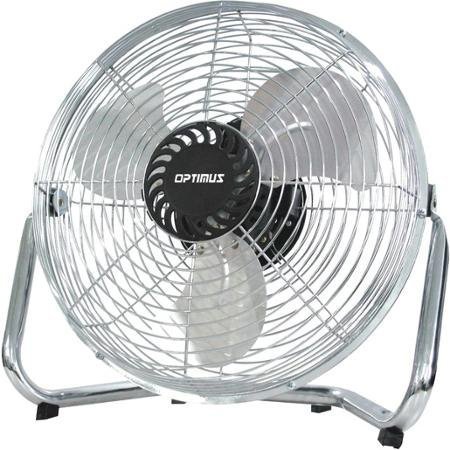
Image: Optimus 18-inch High Velocity Industrial Floor Fan. This image shows the fan with its silver metallic finish and sturdy floor stand.
Lafin-javatra fototra:
- 18-inch diameter for wide air distribution.
- Industrial-grade high velocity airflow.
- Durable metallic finish.
- Floor standing design for stable placement.
- Multiple power levels for adjustable airflow.
Torolàlana fametrahana
- Esory ny fan Carefully remove the fan and all components from the packaging. Retain packaging for future storage or transport.
- Assemble the Floor Stand:
- Attach the fan head to the floor stand using the provided screws and tools. Ensure all connections are secure.
- Verify the fan head can pivot smoothly on the stand.
- Fametrahana: Place the fan on a firm, level surface. Ensure there is adequate space around the fan for proper air circulation and to prevent obstruction of the air intake/output. Keep the fan at least 3 feet away from walls or furniture.
- Fampifandraisana herinaratra: Ensure the fan is in the "OFF" position before plugging it into a standard 120V AC electrical outlet.
Torolàlana miasa
This fan features push-button controls for easy operation. A remote control may also be included for convenience.
- Herim-batana / maty: Locate the power button on the control panel. Press the button once to turn the fan ON. Press it again to turn the fan OFF.
- Fanitsiana ny hafainganan'ny mpankafy: The fan has 4 power levels. After turning the fan ON, repeatedly press the speed control button to cycle through the available speed settings (Low, Medium, High, Max). The fan will operate at the selected speed.
- Fanitsiana ny fitarihan-drivotra: The fan head can be tilted manually to direct airflow upwards or downwards. Gently tilt the fan head to the desired angle. Do not force the fan head beyond its intended range of motion.
fikarakarana
Regular cleaning and maintenance will ensure optimal performance and extend the life of your fan.
- Fanadiovana ny fan
- Esory foana ny fantsona amin'ny loharanon-jiro alohan'ny hanadiovana azy.
- Ampiasao malefaka, damp cloth to wipe the exterior surfaces of the fan. Do not use abrasive cleaners or harsh chemicals, as these may damage the finish.
- To clean the fan blades, carefully remove the front grille (if detachable, refer to assembly instructions for details). Wipe the blades with a soft cloth. Ensure the grille is securely reattached before operating the fan.
- Hamarino tsara fa maina tsara ny faritra rehetra alohan'ny hamerenana ny fantson-drivotra.
- fitahirizana: When not in use for extended periods, store the fan in a cool, dry place. It is recommended to store it in its original packaging to protect it from dust and damage.
Fanamboarana
| OLANA | Antony mety hitranga | vahaolana |
|---|---|---|
| Tsy mandeha ny fan. | Not plugged in; power outlet not working; fan switch is off. | Ensure fan is securely plugged into a working outlet. Check household fuse/circuit breaker. Press the power button to turn the fan on. |
| Ny fikorianan'ny rivotra ambany. | Fan speed set too low; obstructed intake/output; dirty blades. | Increase fan speed. Clear any obstructions. Clean fan blades and grilles as per maintenance instructions. |
| Tabataba na fikororohana tsy mahazatra. | Loose parts; fan not on a level surface; foreign object in blades. | Unplug the fan and check for any loose screws or components. Place the fan on a stable, level surface. Carefully inspect for and remove any foreign objects. |
fepetra arahana
| endri-javatra | antsipirihany |
|---|---|
| Marika | Optimus |
| Anarana modely | Velocity avo |
| Laharana modely | 306c1b92-f36b-4ccc-ac62-2ad33d5c9efb |
| savaivony | 18 santimetatra |
| loko | Silver |
| Style | AN'NY TAOZAVA-BAVENTY |
| Loharanon-kery | Corded Electric |
| Isan'ny haavon'ny hery | 4 |
| Fomba fanaraha-maso | Fanaraha-maso bokotra |
| Fampiasana anatiny / ivelany | an-trano |
| Anisan'ny singa | Floor Stand, Remote Control |
| Met | OSHA |
Warranty sy fanohanana
Optimus products are manufactured to high-quality standards. This product is covered by a limited warranty against defects in materials and workmanship from the date of purchase. Please refer to the warranty card included with your product for specific terms and conditions.
For technical support, troubleshooting assistance, or warranty claims, please contact Optimus customer service. Contact information can typically be found on the product packaging or the official Optimus website.
Azafady, tehirizo ny porofon'ny fividiananao ho an'ny fiantohana.


