Sava lalana
The Yamaha DGX660B is an 88-key weighted digital piano designed to provide an authentic piano experience with extensive features for musical expression and learning. It combines Yamaha's renowned piano touch and tone with versatile functionalities, including vocal effects, a score display for learning, and various acoustic settings.
Inona no ao anaty boaty
- Yamaha DGX660B Digital Piano Unit
- Furniture Stand
- Fitsaharana mozika
- footswitch
- PA150 Power Adapter
Hametraka
Follow these steps to set up your Yamaha DGX660B digital piano:
- Assemble the Furniture Stand: Carefully attach the digital piano unit to the included furniture stand. Ensure all screws are tightened securely to provide a stable playing surface.
- Mampifandray ny Power Adapter: Plug the PA150 Power Adapter into the DC IN jack on the rear of the piano and then into a standard electrical outlet.
- Connect the Footswitch: Insert the included footswitch cable into the SUSTAIN PEDAL jack on the rear of the piano.
- Attach the Music Rest: Slide the music rest into the designated slots on the top panel of the piano.
- Écouteur (tsy voatery): For private practice, connect 3.5mm headphones to the HEADPHONES jack.
- USB Connectivity (Optional): For connecting to a computer or iOS device, use the appropriate USB cables with the USB TO HOST or USB TO DEVICE ports.
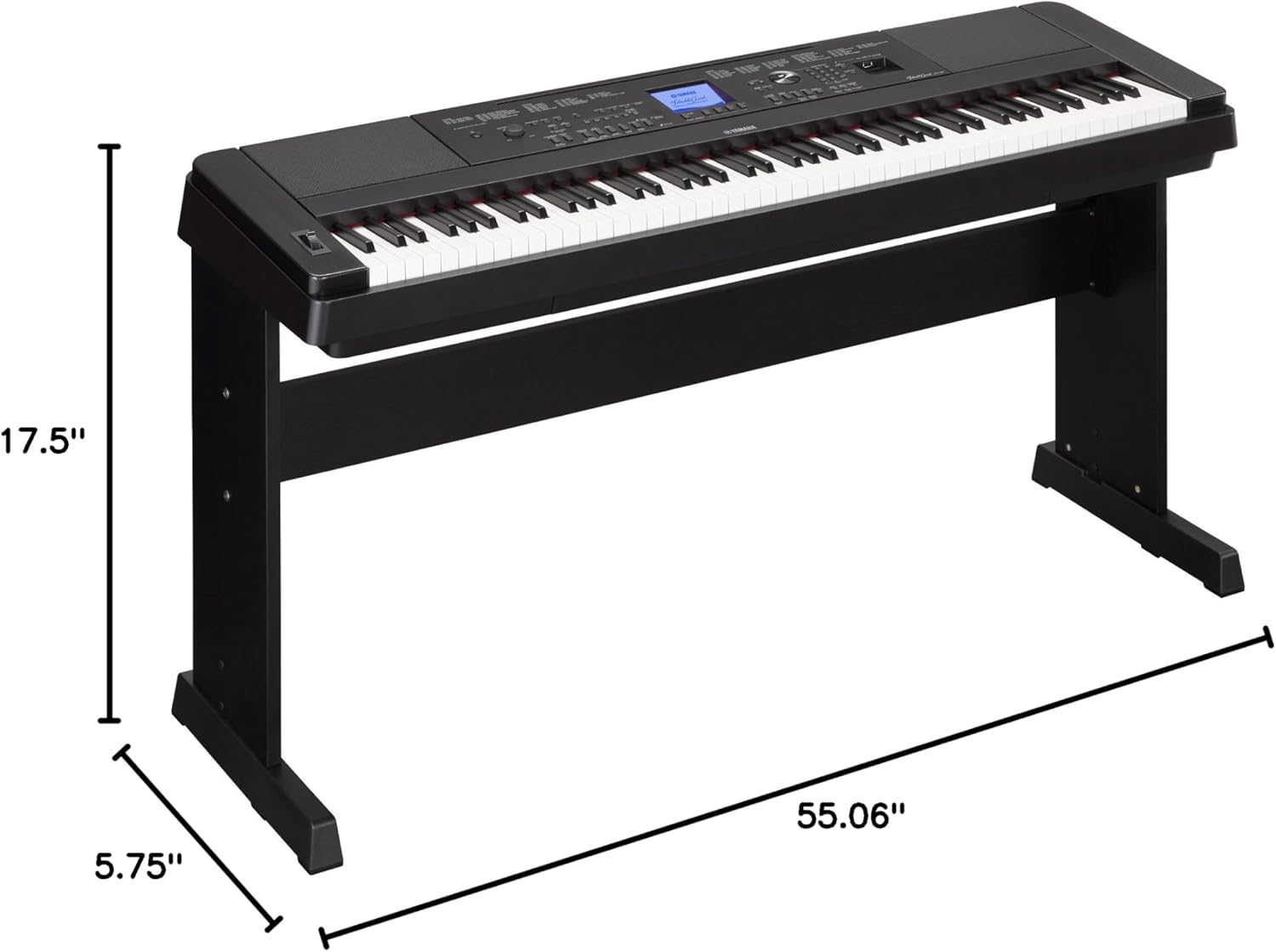
Image: Yamaha DGX660B Digital Piano with its furniture stand, showing dimensions of 55.06 inches width, 17.5 inches depth, and 5.75 inches height for the piano unit itself.
Torolàlana miasa
This section details the primary functions and features of your DGX660B digital piano.
1. Fampandehanana fototra
- Herim-batana / maty: Press the [POWER] button to turn the instrument on or off.
- Fanaraha-maso ny feo: Use the [MASTER VOLUME] knob to adjust the overall sound level.
2. Keyboard Action
The DGX660B features a Tantanana voasokajy (GHS) weighted action. This replicates the feel of an acoustic piano, with a heavier touch in the low keys and a lighter touch in the high keys, providing a realistic playing experience.
3. Pure CF Sound Engine
The piano's core sound is generated by the Pure CF Sound Engine, which faithfully reproduces the tone of a meticulously sampled Yamaha CFIIIS concert grand piano. This ensures rich, expressive, and authentic piano sounds.
4. Piano Room
The Piano Room feature allows you to customize your piano playing environment. You can select different piano types (e.g., Grand Piano, Pop Grand, Warm Grand, Honky Tonk) and acoustic settings (e.g., Concert Hall, Recital Hall, Stage, Room). You can also adjust the piano's lid position (Full, Half, Closed) and the keyboard's touch sensitivity to match your preference.
5. Instrument Voices
Beyond the grand piano, the DGX660B offers 554 realistic instrument voices, including electric pianos, organs, strings, choirs, saxophones, trumpets, guitars, basses, flutes, synth leads, synth pads, percussion, and drum kits. These can be selected and layered to create diverse musical textures.
6. Backing Styles
Explore over 200 built-in backing styles across various genres like R&B, Waltz, Children, Country, Latin, Disco, Swing & Jazz, and Traditional. The Style Recommender feature can suggest appropriate accompaniments based on your playing. These styles provide a virtual band to play along with.
7. Fampidirana mikrô
The instrument includes a microphone input with high-quality vocal effects, allowing you to sing along with your performance or practice vocals with accompaniment.
8. Recording Features
- Six-Track Recorder: Capture your performances and song ideas by recording up to six tracks. This allows for multi-layered musical arrangements.
- Mpanara-peo: Record your entire performance, including vocals, directly to a USB memory device in high-quality audio format. This is ideal for sharing your music or transferring it to a computer for further editing.
- USB fitahirizana: Utilize the USB TO DEVICE port to store recorded MIDI or audio files amin'ny kapila tselatra.
9. Safidy fifandraisana
- USB HOST: Connect the piano to a computer for MIDI data transfer, allowing use with DAWs and music software.
- iOS Device Compatibility: Connect to iOS devices to use a range of exciting apps, including Note Star (digital sheet music with backing tracks) and Chord Tracker (identifies chords in audio files). An optional UD-WL01 Wireless Adaptor is available for wireless connection.
10. Monitor Speakers
The DGX660B features built-in monitor speakers for clear sound reproduction. It can also be connected to an external sound system for larger venues or enhanced audio output. The internal speakers can be set to 'Always On' even when an external output is connected, which is useful for monitoring.
Video: Yamaha DGX660 Overview. This video provides a comprehensive look at the features and capabilities of the Yamaha DGX660 digital piano, including its Graded Hammer Standard keyboard action, Pure CF Sound Engine, Piano Room, various instrument voices, backing styles, microphone input, recording functions, and connectivity options. It demonstrates the instrument's versatility for both beginners and accomplished pianists.
fikarakarana
Ny fikojakojana tsara dia miantoka ny faharetana sy ny fampisehoana tsara indrindra amin'ny piano nomerika anao.
- Fanadiovana: Ampiasao lamba malefaka sy maina mba hamafa ny velaran'ny fitaovana. Ho an'ny loto mafy loha, dia kosehina kelyampen the cloth with water and a mild detergent, then wipe dry immediately. Avoid abrasive cleaners, solvents, or polishes.
- Key Care: Keep the keys clean. Wipe them gently with a soft cloth. Do not use chemical cleaners on the keys.
- fitahirizana: Store the instrument in a location free from extreme temperatures, direct sunlight, excessive dust, or high humidity.
- Mamono hery: Always turn off the power when the instrument is not in use to prevent unnecessary wear and tear.
Fanamboarana
If you encounter any issues with your DGX660B, refer to the following common troubleshooting tips:
- Tsy misy hery: Ensure the power adapter is securely connected to both the instrument and the electrical outlet. Verify the outlet is functioning.
- Tsy misy feo: Check the [MASTER VOLUME] knob and ensure it is not set to minimum. If headphones are connected, disconnect them to check speaker output. Verify that the correct voice is selected and not set to a silent option.
- Feo diso: Reduce the volume. Check for loose connections in cables.
- Fanalahidy tsy mamaly: Ensure the instrument is powered on. If specific keys are unresponsive, contact customer support.
- USB Device Not Recognized: Ensure the USB device is properly inserted and formatted correctly (FAT32 is commonly supported).
For persistent issues, consult the full owner's manual or contact Yamaha customer support.
fepetra arahana
| Anarana modely | DGX660B |
| Isan'ny fanalahidy | 88 |
| Hetsika fototra | GHS Weighted Action |
| Sound Engine | Pure CF Sound Engine |
| Polyphony | 192 naoty |
| FEON'IREO | 554 |
| Styles | 205 |
| mpitam-boky | 6-track MIDI, Audio Recorder (WAV) |
| fifandraisana | USB Type A, USB Type B, 3.5mm Jack (Headphones), Microphone Input |
| mpandahateny | 2 x6w Amplifiers, Built-in Monitor Speakers |
| Dimensions (tsy misy fijoroana) | 55.06" W x 5.75" H x 17.5" D |
| Lanja entana | 82.9 kilao (miaraka amin'ny stand) |
| loko | Mainty |
| UPC | 889025101707, 889025101714 |
Warranty & Support
Raha mila fampahalalana momba ny fiantohana amin'ny antsipiriany, azafady jereo ny karatra fiantohana miaraka amin'ny vokatrao na tsidiho ny Yamaha ofisialy website. For technical support, product registration, or service inquiries, please contact Yamaha customer service through their official channels.