1. Fampidirana
This manual provides essential information for the safe and effective operation, maintenance, and troubleshooting of your Makita DTW1001Z 18V LXT Brushless 3/4in Impact Wrench. Please read and understand all instructions before use to ensure proper handling and to prevent injury or damage.
The Makita DTW1001Z is a cordless impact wrench designed for heavy-duty fastening applications. It features an 18V LXT slide-type battery system (battery and charger not included), a brushless motor for extended tool life and efficiency, and electronic 3-stage impact power selection. It delivers high tightening and nut busting torque for demanding tasks.
2. Torolàlana momba ny fiarovana ankapobeny
Always wear appropriate personal protective equipment (PPE) including safety glasses, hearing protection, and gloves when operating the impact wrench. Ensure your work area is clean, well-lit, and free from obstructions. Keep bystanders, especially children, away from the work area. Do not operate power tools in explosive atmospheres, such as in the presence of flammable liquids, gases, or dust.
Before making any adjustments, changing accessories, or storing the tool, always remove the battery pack. Avoid accidental starting. Ensure the switch is in the off-position before inserting the battery pack. Do not force the tool; use the correct tool for your application. Maintain tools with care; keep cutting tools sharp and clean for better and safer performance. Check for misalignment or binding of moving parts, breakage of parts, and any other condition that may affect the tool's operation. If damaged, have the tool repaired before use.
3. Vokatra singa
Familiarize yourself with the main components of your Makita DTW1001Z impact wrench:
- 3/4" Square Drive Shank: Ho an'ny fametahana sokitra fiantraikany.
- Fifandonana trigger: Controls the tool's speed.
- Mandrosoa / Mivadika: Manova ny lalan'ny fihodinana.
- Impact Power Selection Button: Adjusts the impact force (Hard/Medium/Soft).
- Jiro asa LED: Mamirapiratra ny faritry ny asa.
- Port bateria: For inserting the 18V LXT battery pack.
- Fehin-kibo: For convenient carrying (may be included or optional).

Sary 1: Tapitraview of the Makita DTW1001Z Impact Wrench, showing the main body, handle, and square drive.

Sary 2: lafiny view of the impact wrench, highlighting the trigger, forward/reverse switch, and impact power selection button.
4. Fametrahana
4.1 Fametrahana sy fanesorana ny bateria
The Makita DTW1001Z requires an 18V LXT slide-type battery pack (not included). Ensure the battery is fully charged before use.
- To install: Align the battery pack with the grooves in the tool's housing and slide it in until it locks into place with a slight click.
- To remove: Press the release button on the battery pack and slide it out of the tool.
4.2 Attaching Impact Sockets
This impact wrench features a 3/4" square drive shank. Use only impact-rated sockets designed for use with impact wrenches.
- Ataovy azo antoka fa esorina amin'ny fitaovana ny fonosana batterie.
- Push the desired 3/4" impact socket onto the square drive shank until it clicks securely into place.
- To remove, pull the socket firmly off the drive shank.

Figure 3: The impact wrench with an optional belt clip installed, demonstrating a common accessory attachment point.
5. Torolàlana miasa
5.1 Famoahana/famonoana sy fanaraha-maso ny hafainganam-pandeha
The tool is activated by pressing the trigger switch. The speed is variable and controlled by the amount of pressure applied to the trigger. Releasing mamono ny fitaovana ny mpitroka.
5.2 Fihodinana mandroso/mihodina
The forward/reverse switch is located above the trigger. Push the switch to the left for forward rotation (tightening) and to the right for reverse rotation (loosening). Ensure the switch is fully engaged in the desired position before operating the tool.
5.3 Electronic 3-Stage Impact Power Selection
The DTW1001Z features three impact power settings (Hard, Medium, Soft) to match the application. Use the impact power selection button, typically located near the base of the handle, to cycle through the settings. An indicator light will show the selected mode.
- Hard Mode: For maximum tightening torque (up to 1,050 Nm) and nut busting torque (up to 1,700 Nm) on large or stubborn fasteners.
- Mody antonony: For general fastening applications requiring significant torque but less than maximum.
- Fomba malefaka: For delicate applications or when precise control is needed to prevent overtightening or damage to smaller fasteners.
5.4 Fastening and Loosening
Position the impact socket squarely onto the fastener. Apply firm, steady pressure to the tool and press the trigger. Allow the tool to impact until the fastener is tightened or loosened to the desired degree. Avoid prolonged impacting after the fastener is fully seated to prevent damage to the fastener or workpiece.
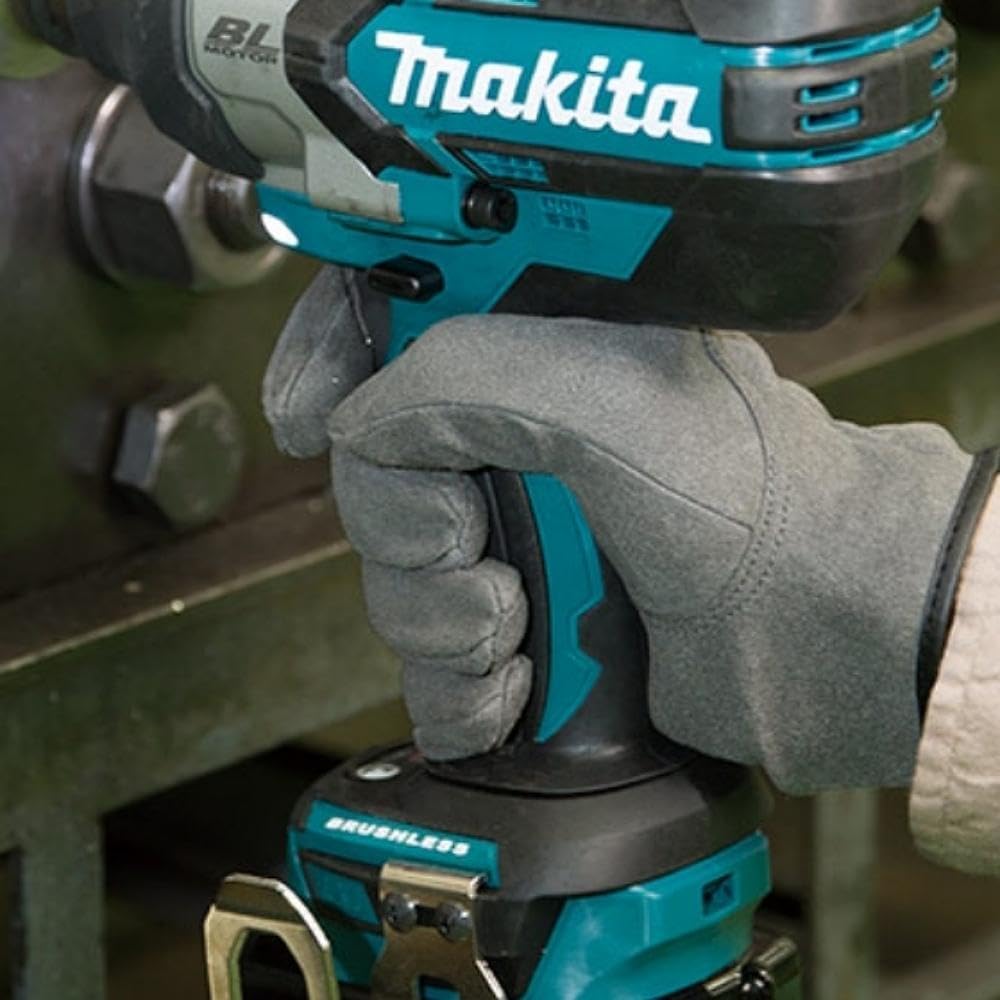
Figure 4: The impact wrench being used to tighten a large bolt, demonstrating proper hand placement and tool engagement.

Figure 5: The impact wrench in action on a heavy-duty fastening task, illustrating its capability for demanding applications.
6. Fikojakojana
Regular maintenance ensures optimal performance and extends the life of your tool. Always disconnect the battery pack before performing any maintenance.
6.1 Fanadiovana
Fafao amin'ny rano madio ny ivelan'ny fitaovana, damp cloth. Do not use harsh chemicals or abrasive cleaners. Keep the ventilation openings clear of dust and debris to prevent overheating. Periodically clean the square drive shank and ensure it is free of rust or buildup.
6.2 Fitehirizana
Store the tool in a dry, secure location out of reach of children. Remove the battery pack before storage. Avoid storing the tool in direct sunlight or in areas with extreme temperatures.
6.3 Serivisy
This tool features a brushless motor, which generally requires less maintenance than brushed motors. However, if the tool requires service or repair, contact an authorized Makita service center. Use of non-genuine or non-recommended parts or accessories may void your warranty and compromise tool safety.
7. Famahana olana
If you experience issues with your Makita DTW1001Z, refer to the following common troubleshooting steps:
- Tsy manomboka ny fitaovana: Ensure the battery pack is fully charged and properly inserted. Check that the forward/reverse switch is fully engaged in either the forward or reverse position, not in the neutral lock position.
- Herinaratra mihena na fiasana miato: The battery pack may be low on charge. Recharge the battery. Ensure the battery terminals and tool contacts are clean.
- Excessive vibration or unusual noise: Stop operation immediately. Check for loose fasteners on the tool or damaged accessories. If the issue persists, discontinue use and contact an authorized service center.
- Fastener not tightening/loosening: Ensure the correct impact socket is used and is fully seated. Verify the impact power selection is appropriate for the task.
For problems not covered here, contact an authorized Makita service representative.
8. Famaritana
| endri-javatra | famaritana |
|---|---|
| Laharana modely | DTW1001Z |
| Loharanon-kery | Battery Powered (18V LXT Lithium-Ion) |
| BOKYtage | 18 Volts |
| Drive Shank | 3/4 inch Square |
| Torque manenjana ambony indrindra | 1,050 Nm (775 ft. lbs.) |
| Torque fanafoanana ny voanjo | 1,700 Nm (1,250 ft. lbs.) |
| Fiantraika isan-minitra (IPM) | Up to 2,200 IPM |
| Tsy misy hafainganam-pandeha (RPM) | Hatramin'ny 1,800 RPM |
| Electronic Impact Power Selection | 3 Stages (Hard/Medium/Soft) |
| Standard Bolt Capacity | M12 - M30 |
| High Tensile Bolt Capacity | M10 - M24 |
| Lanja entana | 3.4 kg (7.48 lbs) |
| Ny refin'ny vokatra | 10.39 x 4.02 x 10.24 santimetatra |
| KEVITRA | Metal, plastika |
Note: Specifications are subject to change without notice. Battery and charger are sold separately.
9. Warranty sy fanohanana
Makita offers a 1-year manufacturer warranty on this product. An additional 2 years of warranty coverage may be available upon product registration within 30 days of purchase. Please refer to the official Makita website or your product documentation for detailed warranty terms and conditions.
Zava-dehibe: Tsy mihatra ity antoka ity raha misy piesy na kojakoja tsy tena izy na tsy atolotra apetraka amin'ny fitaovana. Ny fampiasana bateria sy charger tsy tena izy na mifanaraka amin'ny fitaovana Makita dia hanafoana ny antoka Makita ho an'ny fitaovanay.
For technical support, service, or warranty claims, please contact your local authorized Makita service center or visit the official Makita webtranokala momba ny fifandraisana.


