Sava lalana
Misaotra anao nividyasing the SENTRY HPXBT150 Bluetooth Flat Cord Earbuds. This manual provides detailed instructions on how to set up, operate, and maintain your new wireless earbuds. Please read this manual thoroughly before use to ensure optimal performance and longevity of your device.
Fonosana fonosana
- SENTRY HPXBT150 Bluetooth Flat Cord Earbuds
- Raharaha fiarovana
- Cable USB Charging (Micro-USB)
- Removable Ear Hooks
- User Manual
Vita ny vokatraview
The SENTRY HPXBT150 earbuds feature Bluetooth wireless technology, allowing for a cord-free listening experience. They include an in-line microphone for hands-free calls and media control buttons for easy operation. Removable ear hooks provide a secure fit, especially during physical activity.
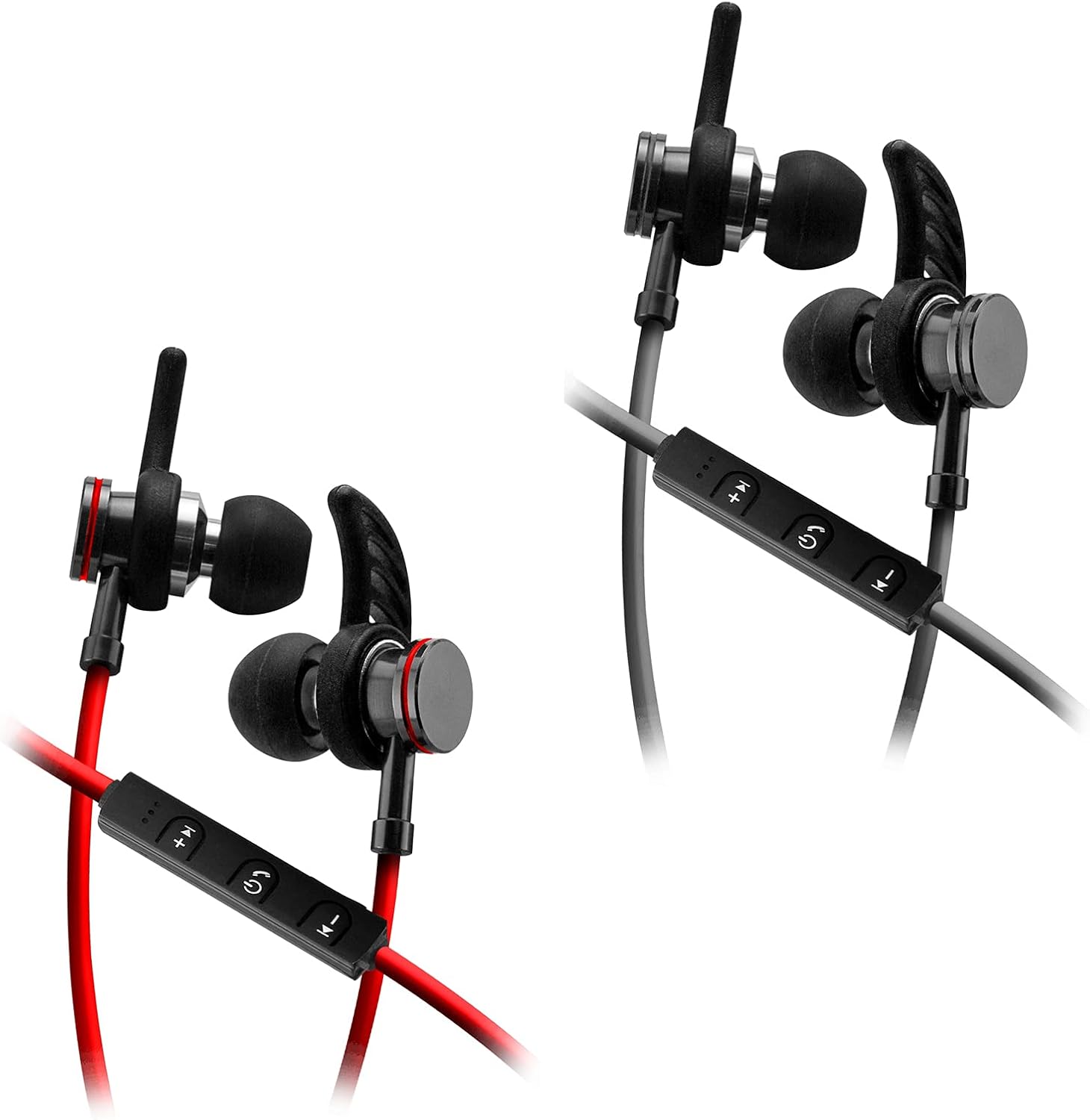
Image: SENTRY HPXBT150 Bluetooth Earbuds showing the in-line control panel and ear hooks. The control panel features volume up/next track, power/multifunction, and volume down/previous track buttons.
Hametraka
1. Fametrahana ny Earbuds
- Locate the Micro-USB charging port on the in-line control unit.
- Ampifandraiso amin'ny seranana famandrihana an'ny écouteur ny tariby famandrihana USB nomena.
- Ampidiro amin'ny loharanon-kery USB mifanaraka aminy ny ilany amin'ny tariby USB (ohatra, seranana USB ho an'ny solosaina, adaptatera USB eo amin'ny rindrina).
- The LED indicator light will illuminate during charging. It will change color or turn off once charging is complete. A full charge typically takes approximately 1-2 hours.
2. Pairing Bluetooth
- Hamarino tsara fa voafahana tanteraka ny écouteur alohan'ny hampiarahana azy voalohany.
- Press and hold the multi-function button (usually the center button on the in-line control) for approximately 5-7 seconds until the LED indicator light flashes red and blue alternately. This indicates the earbuds are in pairing mode.
- On your Bluetooth-enabled device (smartphone, tablet, computer), go to the Bluetooth settings menu.
- Alefaso ny Bluetooth ary tadiavo ireo fitaovana misy.
- Select "HPXBT150" or a similar name from the list of found devices.
- Once successfully paired, the LED indicator on the earbuds will typically flash blue slowly or turn off, and you will hear an audible confirmation.
- Raha asaina tenimiafina dia midira "0000".
Torolàlana miasa
Power On/off
- Herim-batana: Press and hold the multi-function button for approximately 3 seconds until the LED indicator flashes blue and you hear a power-on tone.
- Mamono hery: Press and hold the multi-function button for approximately 3-5 seconds until the LED indicator flashes red and you hear a power-off tone.
Famerenana mozika
- Play/Pause: Tsindrio indray mandeha ny bokotra multifunction.
- Fiakaram-peo: Tsindrio ny bokotra '+'.
- Mihena ny feo: Tsindrio ny bokotra '-'.
- Track manaraka: Tsindrio ary hazòny ny bokotra '+'.
- Làlana teo aloha: Tsindrio ary hazòny ny bokotra '-'.
Call Management
- Valio/Atsaharo ny antso: Tsindrio indray mandeha ny bokotra multifunction.
- Mandà ny antso: Tsindrio ary hazòny ny bokotra multifunction mandritra ny 2 segondra eo ho eo.
- Avereno antsoy ny isa farany: Tsindrio indroa ny bokotra multifunction.
fikarakarana
- Fanadiovana: Use a soft, dry cloth to clean the earbuds. Do not use harsh chemicals or abrasive materials.
- fitahirizana: When not in use, store the earbuds in the provided protective case to prevent damage.
- Fikarakarana bateria: To preserve battery life, avoid fully discharging the earbuds frequently. Charge them regularly, even if not used for extended periods.
- Aza hamandoana (Avoid Moisture): Keep the earbuds away from water and excessive moisture.
Fanamboarana
| OLANA | Vahaolana mety |
|---|---|
| Tsy mandeha ny écouteur. | Ensure the earbuds are fully charged. Connect to a power source and allow time to charge. |
| Tsy afaka mifandray amin'ny fitaovana. | Ensure earbuds are in pairing mode (flashing red/blue). Turn off and on Bluetooth on your device. Move earbuds closer to your device. Forget previous pairings on your device and try again. |
| Tsy misy feo na feo ambany. | Check volume levels on both the earbuds and your connected device. Ensure earbuds are properly paired. Try re-pairing the earbuds. |
| Fifandraisana miato. | Ensure there are no obstructions between the earbuds and your device. Move closer to your device. Avoid environments with strong Wi-Fi or other wireless interference. |
fepetra arahana
- Modely: HPXBT150
- Teknolojia fifandraisana: Wireless (Bluetooth)
- Sampana mpamily: 10mm
- Impedance: 32+/-3 Ohms
- Fahatsapana: 103dB+/-3dB
- Valiny matetika: 20Hz - 20kHz
- Fitaovana mifanentana: Phones, Tablets, MP3 Players, Computers, Gaming Consoles
- Karazana fanaraha-maso: Fanaraha-maso ny haino aman-jery
- Endri-javatra manokana: Microphone Included, USB Connectivity, Removable Ear Hooks
- Lanja entana: 2.08 oz
Information momba ny fiarovana
- Do not expose the earbuds to extreme temperatures, direct sunlight, or fire.
- Do not disassemble or modify the earbuds. This may void the warranty and cause damage.
- Fadio ny fihainoana amin'ny haavo avo be mandritra ny fotoana maharitra mba hisorohana ny fahasimban'ny sofina.
- Arovy amin'ny ankizy sy ny biby fiompy.
- Ario am-pahamendrehana ny vokatra araka ny lalàna eo an-toerana.
Warranty sy fanohanana
For warranty information and technical support, please refer to the documentation included with your purchase or contact SENTRY customer service directly. Keep your proof of purchase for warranty claims.


