1. Fampidirana
The Alpine IVA-W520E is a full-featured 2DIN DVD player solution designed for in-car entertainment and media. It integrates advanced video and audio technologies, including a 7-inch LED touchscreen and a Burr-Brown 24-bit DAC, to deliver high-quality sound and clear images. This manual provides essential information for the proper installation, operation, and maintenance of your IVA-W520E unit.
2. Information momba ny fiarovana
Please read all safety instructions carefully before installing or operating the unit. Failure to follow these instructions may result in injury or damage to the unit or vehicle.
- Fametrahana matihanina naroso: Due to the complexity of car audio-visual systems, professional installation is highly recommended to ensure proper wiring and functionality.
- Loharano herinaratra: Connect the unit only to a 12V DC negative ground power supply.
- Ialao ny fanelingelenana: Do not operate the unit's controls or view video content while driving, as this can lead to accidents. Always pull over to a safe location before making adjustments.
- rivotra: Hamarino tsara ny rivotra manodidina ny fitaovana mba hisorohana ny hafanana be loatra. Aza sakanana ny fisokafan'ny rivotra.
- Hamandoana sy ranoka: Keep the unit away from moisture and liquids. Do not expose it to rain or water.
- Fanadiovana: Mampiasà lamba malefaka sy maina hanadiovana. Halaviro ny mpanadio na solvents.
3. Ny votoatin'ny fonosana
Hamarino fa misy ny entana rehetra ao anaty fonosana alohan'ny hanohizana ny fametrahana:
- Alpine IVA-W520E Head Unit
- Hery/Speaker Harness
- Fitaovana fametrahana (visy, fononteny)
- Karakarao
- User Manual (ity antontan-taratasy ity)
- Warranty Information
4. Fametrahana sy fametrahana
4.1. Torolàlana fametrahana
Tena ilaina ny fametrahana araka ny tokony ho izy mba hahazoana fahombiazana sy fiarovana tsara indrindra. Tena ilaina ny fametrahana azy amin'ny alalan'ny matihanina mahafeno fepetra.
- Atsaharo ny bateria: Before starting any electrical work, disconnect the vehicle's negative battery terminal to prevent short circuits.
- Mametraka: Securely mount the unit in the vehicle's double-DIN opening using the provided mounting brackets and screws. Ensure it is stable and does not obstruct any vehicle controls.
- Wiring: Connect the power harness, speaker wires, and other input/output cables according to the wiring diagram provided in the separate installation guide. Pay close attention to ground connections.
- Antenna and External Devices: Connect the radio antenna and any external devices such as a reverse camera or external ampmpamonjy aina.
4.2. Fametrahana voalohany
After installation, reconnect the battery and power on the unit for the first time.
- Fifantenana fiteny: Araho ny bitsika eo amin'ny efijery hisafidianana ny fiteny tianao.
- Ora sy Daty: Set the correct time and date for accurate display.
- Fikirana feo: Adjust basic audio settings such as volume, balance, and fader.
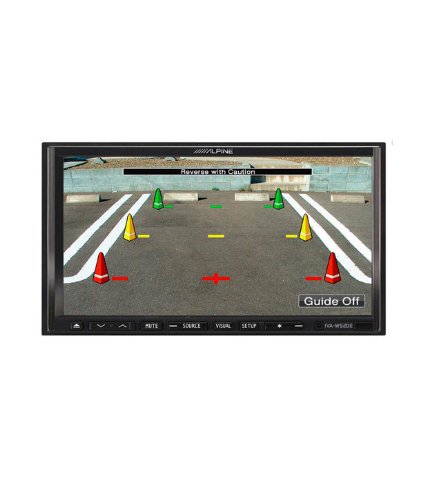
Sary 4.1: Eksample of the IVA-W520E displaying a reverse camera feed, showing parking guidelines. This feature aids in safe vehicle maneuvering.
5. Fampandehanana ny Unit
5.1. Touchscreen and Button Controls
The IVA-W520E features a responsive 7-inch LED touchscreen for primary control, supplemented by physical buttons for quick access to common functions.
- Efijery kasihina: Navigate menus, select sources, and control playback by touching the screen.
- Fanaraha-maso ny feo: Use the dedicated volume buttons or on-screen controls to adjust audio levels.
- Bokotra loharano: Press to cycle through available audio/video sources (Radio, DVD, USB, iPod, AUX, Bluetooth).
- Bika matoanteny Temporarily mutes the audio output.
- bokotra fanamboarana: Midira ao amin'ny menio firafitry ny rafitra.
5.2. Playback Audio
The unit supports various audio formats and sources, enhanced by its Burr-Brown 24-bit DAC for superior sound quality.
- USB Audio: Connect a USB device containing audio files. The unit will display track information and allow navigation through folders.
- iPod/iPhone Connectivity: Connect your iPod or iPhone for direct audio playback and control.
- Famerenana DVD/CD: Insert a DVD or CD into the disc slot for audio or video playback.
- Radio Tuner: Access AM/FM radio stations.
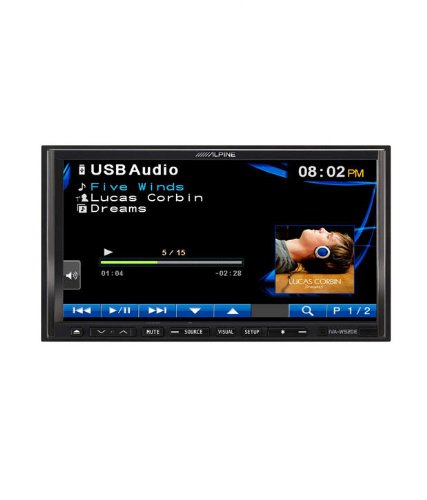
Figure 5.1: The IVA-W520E displaying the USB Audio interface, showing current track, artist, and playback controls. This allows for easy navigation of digital music files.
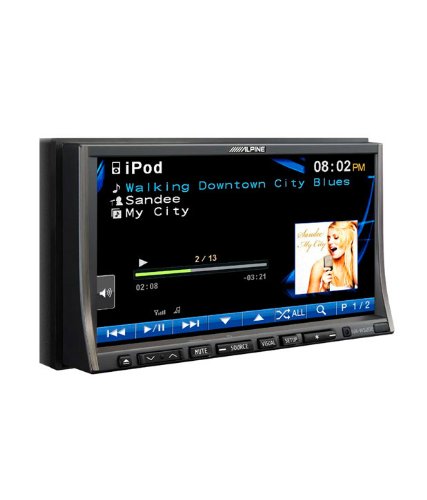
Figure 5.2: The IVA-W520E displaying the iPod interface, showing a list of songs and album art. This demonstrates seamless integration with Apple devices for music playback.
5.3. Famerenana horonan-tsary
The 7-inch LED screen provides enhanced image quality with higher resolution, better contrast, and improved color reproduction compared to standard LCD screens.
- DVD Video: Insert a video DVD for playback. Ensure the parking brake safety wire is correctly connected for video to display while the vehicle is stationary.
- Fidirana Lahatsary ivelany: The unit supports external video sources, such as a reverse camera or other video devices.
5.4. Bluetooth Connectivity
The IVA-W520E is upgradable for Bluetooth hands-free system functionality, allowing for safe and convenient communication while driving.
- mampiaraka: Refer to the separate Bluetooth module manual (if applicable) for pairing instructions with your mobile phone.
- Antso tsy misy tanana: Make and receive calls directly through the unit.
- Audio Streaming: Alefaso amin'ny findainao misy Bluetooth ny feo.
5.5. Navigation System (Upgradable)
The unit is designed to be upgradable with a navigation system. Consult your Alpine dealer for compatible navigation modules and installation.
6. Fikojakojana
Regular maintenance helps ensure the longevity and optimal performance of your Alpine IVA-W520E.
- Fanadiovana efijery: Gently wipe the touchscreen with a soft, lint-free cloth. For stubborn smudges, slightly dampen the cloth with water or a screen-specific cleaner. Do not spray cleaner directly onto the screen.
- Slot kapila: Keep the disc slot free of dust and debris. Avoid inserting bent, scratched, or irregular discs.
- Fanadiovana ankapobeny: Use a soft, dry cloth to wipe the unit's exterior. Avoid harsh chemicals or abrasive materials.
7. Famahana olana
If you encounter issues with your IVA-W520E, refer to the following common problems and solutions:
| OLANA | Antony mety hitranga | vahaolana |
|---|---|---|
| Tsisy Hery | Blown fuse, incorrect wiring, loose connection. | Check vehicle fuses and unit's fuse. Verify power and ground wiring connections. Ensure battery is connected. |
| Tsy misy feo | Ambany loatra ny feo, tsy mandeha ny feo, olana amin'ny tariby fanamafisam-peo, loharano tsy mety nofidiana. | Increase volume. Deactivate mute. Check speaker connections. Select correct audio source. |
| Diso kapila | Kapila maloto, voakiky, na tsy mifanaraka. | Clean the disc. Try a different, known-good disc. Ensure disc format is supported. |
| Video Not Displaying (while driving) | Parking brake safety wire not connected or incorrectly connected. | This is a safety feature. Video playback is disabled while the vehicle is in motion. Ensure the parking brake wire is correctly connected to the vehicle's parking brake circuit. |
| Olana fampiarahana Bluetooth | Bluetooth module not connected, phone not in pairing mode, interference. | Ensure optional Bluetooth module is correctly installed. Put phone in pairing mode. Move closer to the unit. |
If the problem persists after trying these solutions, please contact your authorized Alpine dealer or customer support.
8. Famaritana
Key technical specifications for the Alpine IVA-W520E:
- Modely: IVA-W520E
- Haben'ny fampisehoana: 7 santimetatra (18 sm)
- Karazana fampisehoana: LED LCD Touchscreen
- fanapahan-kevitra: 480 x 272 teboka
- Audio DAC: Burr-Brown 24-bit
- Fitaovana mifanentana: Smartphone (via USB/iPod, Bluetooth upgradable)
- Endri-javatra manokana: Touchscreen, Bluetooth (upgradable)
- Fomba famoahana feo: gazety
- Mpanamboatra: Alpine
- Misy voalohany: 20 Aogositra 2015
9. Warranty sy fanohanana
For detailed warranty information, please refer to the warranty card included with your product package or visit the official Alpine website. Tehirizo ny tapakila fividiananao ho porofon'ny fividianana.
For technical support, service, or inquiries about compatible accessories and upgrades (such as navigation modules or Bluetooth kits), please contact your authorized Alpine dealer or visit the Alpine customer support portal online.
Alpine Official Webtranokala: www.alpine.com


