1. Fampidirana
This manual provides essential instructions for the safe and efficient operation of your Philips AJ3232B/37 Big Display Clock Radio. Please read this manual thoroughly before using the device and retain it for future reference. This clock radio features a large digital display, AM/FM radio tuning, and dual alarm functionality.
2. Fampahalalana manan-danja momba ny fiarovana
- Loharano herinaratra: Operate the device only from the power source indicated on the product label. Ensure the voltage dia mifanaraka amin'ny famatsiana herinaratra eo an-toerana misy anao.
- Rano sy hamandoana: Do not expose the device to dripping or splashing water. Do not place objects filled with liquids, such as vases, on the device.
- rivotra: Ataovy azo antoka fa ampy ny rivotra. Aza sakanana izay fisokafan'ny rivotra.
- hafanana: Aza apetraka eo akaikin'ny loharanon'ny hafanana toy ny radiatera, rejistra hafanana, fatana, na fitaovana hafa (anisan'izany ny fitaovana). amplifiers) izay mamokatra hafanana.
- Fanadiovana: Unplug the device from the wall outlet before cleaning. Use a dry cloth only.
- Serivisy: Aza manandrana manompo an'ity vokatra ity ny tenanao. Ampidiro amin'ireo mpiasan'ny serivisy mahay ny fanompoana rehetra.
- Batterie: Follow polarity markings when inserting batteries. Do not mix old and new batteries, or different types of batteries. Remove batteries if the device is not used for extended periods.
3. Ny votoatin'ny fonosana
Please check that your package contains the following items:
- Philips AJ3232B/37 Clock Radio Unit
- AC Power Adapter
- User Manual (ity antontan-taratasy ity)
4. Controls and Features Overview

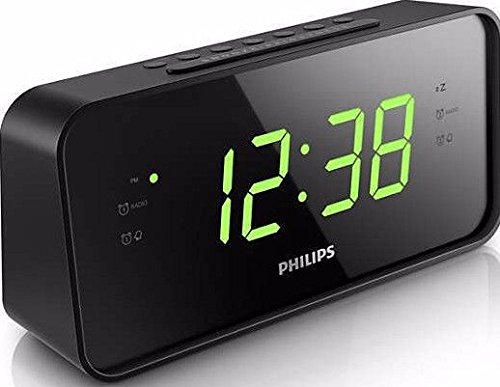
Sary 1: anoloana view of the Philips AJ3232B/37 Clock Radio, highlighting the large green digital time display and indicator lights for radio and alarms.
Sary 2: zorony view of the Philips AJ3232B/37 Clock Radio, illustrating the top panel with control buttons and the overall compact design.
Fanaraha-maso ambony tontonana:
- SNOOZE/SLEEP/DIMMER: Press to temporarily silence the alarm, activate sleep timer, or adjust display brightness.
- ALARM 1 SET: Press to set Alarm 1 time.
- ALARM 2 SET: Press to set Alarm 2 time.
- FOTOANA FOTOANA: Tsindrio raha hametraka ny fotoana ankehitriny.
- TUNE +/-: Press to tune radio frequency or adjust time/alarm settings.
- VOL +/-: Press to adjust radio volume.
- RADIO ON/OFF/BAND: Press to turn the radio on/off or switch between AM/FM bands.
Front Display Indicators:
- Fampisehoana fotoana: Large green LED digits show the current time.
- AM/PM Indicator: Lights up for PM hours (if 12-hour format is selected).
- Alarm 1 Indicator: Mirehitra rehefa mandeha ny fanairana 1.
- Alarm 2 Indicator: Mirehitra rehefa mandeha ny fanairana 2.
- Radio Indicator: Lights up when the radio is on.
5. Fametrahana
5.1 Fampifandraisana herinaratra
- Connect the AC power adapter to the DC IN socket on the back of the clock radio.
- Plug the AC power adapter into a wall outlet. The clock radio will power on, and the display will flash.
5.2 Fametrahana Backup Battery
The clock radio uses 2 AAA batteries (not included) for backup power. This feature ensures that time and alarm settings are retained during a power outage.
- Sokafy ny fonon'ny efitrefitra bateria hita eo amin'ny farany ambany amin'ilay fitaovana.
- Insert 2 AAA batteries, observing the correct polarity (+ and -) as marked inside the compartment.
- Akatona tsara ny saron'ny efitrefitra bateria.
Fanamarihana: Battery backup only maintains settings; the display will not illuminate, and the alarm will not sound during a power outage.
5.3 Setting the Clock Time
- Tsindrio ary hazòny ny FOMBA FIASA bokotra mandra-pahatongan'ny isa ora manomboka mamiratra.
- Tsindrio ny TUNE +/- bokotra hanitsy ny ora. mpanao gazety FOMBA FIASA indray hanamafy ny ora.
- The minute digits will now flash. Press the TUNE +/- buttons to adjust the minutes. Press FOMBA FIASA indray hanamafy ny minitra.
- Efa voapetraka izao ny fotoana.
Fanamarihana: You can switch between 12-hour and 24-hour format by pressing the FOMBA FIASA button repeatedly during the time setting process until the desired format appears.
6. Fampandehanana
6.1 Listening to the Radio
- Tsindrio ny RADIO ON/OFF/BAND button to turn on the radio. The radio indicator will light up.
- Tsindrio ny RADIO ON/OFF/BAND button again to switch between FM and AM bands.
- Tsindrio ny TUNE +/- buttons to tune to your desired radio station. Press and hold for automatic scanning.
- Ahitsio ny feo amin'ny fampiasana ny VOL +/- bokotra.
- Mba hamonoana ny onjampeo dia tsindrio ary tazomy ilay RADIO ON/OFF/BAND bokotra.
Soso-kevitra: Extend the FM wire antenna for better FM reception. For AM reception, rotate the unit for optimal signal.
6.2 Setting the Alarms (Alarm 1 and Alarm 2)
The clock radio features two independent alarms.
- Tsindrio ary hazòny ny Fanairana 1 SET (na Fanairana 2 SET) button until the alarm hour digits flash.
- Tsindrio ny TUNE +/- buttons to adjust the alarm hour. Press the Fanairana 1 SET (na Fanairana 2 SET) button again to confirm.
- The alarm minute digits will flash. Press the TUNE +/- buttons to adjust the alarm minutes. Press the Fanairana 1 SET (na Fanairana 2 SET) button again to confirm.
- The alarm source will now flash (e.g., "bU" for buzzer, "rAd" for radio). Press the TUNE +/- buttons to select your desired alarm source. Press the Fanairana 1 SET (na Fanairana 2 SET) button one last time to activate the alarm. The corresponding alarm indicator will light up.
Mba hanesorana fanairana: Tsindrio imbetsaka ny Fanairana 1 SET (na Fanairana 2 SET) button until the alarm indicator turns off.
6.3 Fampiasana snooze
Rehefa maneno ny fanairana dia tsindrio ny lehibe SNOOZE/RERY/DIMMER button on the top of the unit. The alarm will temporarily stop and sound again after approximately 9 minutes.
6.4 Stopping the Alarm
To stop the alarm completely after it sounds, press the corresponding SET ALARM button (e.g., Fanairana 1 SET for Alarm 1). The alarm will reset for the next day.
6.5 Display Dimmer
Tsindrio ny SNOOZE/RERY/DIMMER button (when the alarm is not sounding) to cycle through different display brightness levels.
7. Fikojakojana
- Fanadiovana: Disconnect the power before cleaning. Use a soft, dry cloth to clean the exterior of the unit. Do not use abrasive cleaners, waxes, or solvents.
- vovoka: Regularly dust the unit to prevent accumulation that could affect performance.
- Fanoloana bateria: Replace backup batteries annually or when the battery low indicator appears (if applicable) to ensure continuous memory retention.
8. Famahana olana
| OLANA | Antony mety hitranga | vahaolana |
|---|---|---|
| No power / Display off. | cord de power tsy connecté na power outage. | Ensure AC power adapter is securely plugged into the unit and a working wall outlet. Check household circuit breaker. |
| Ratsy ny fandraisana radio. | Weak signal or antenna not positioned correctly. | Extend the FM wire antenna fully. For AM, rotate the unit to find the best reception. Avoid placing near other electronic devices that may cause interference. |
| Tsy maneno ny fanairana. | Alarm not activated, alarm time incorrect, or volume too low (for radio alarm). | Verify the alarm indicator is lit. Recheck alarm time settings. Increase radio volume if radio alarm is selected. |
| Fotoana/fanairana very taorian'ny herinaratra outage. | Maty na tsy napetraka ny bateria fanampiny. | Install 2 new AAA batteries or replace existing ones in the battery compartment. |
| Cannot turn off the radio easily. | Incorrect button press for turning off the radio. | To turn off the radio, press and MANOHANA ny RADIO ON/OFF/BAND button for a few seconds. A short press cycles between AM/FM bands. |
9. Famaritana
- marika: Philips
- Modely: AJ3232B/37
- Karazana fampisehoana: LED nomerika (maitso)
- Tuner: AM/FM Digital
- Fanairana: Fanairana roa (Buzzer na Radio)
- Loharano herinaratra: AC Power (100-240V, 50/60Hz, via adapter)
- Backup bateria: 2 x AAA batteries (for time/alarm memory)
- Fanjifana herinaratra: 1.2 Watts (Fiasa)
- refy (LxWxH): Manodidina ny 6.2 x 19 x 9.35 cm (2.4 x 7.5 x 3.7 santimetatra)
- Lanja: Manodidina ny 549 g (1.21 lbs)
- Fitaovana: plastika
10. Warranty sy fanohanana
Raha mila fampahalalana amin'ny antsipiriany momba ny fiantohana, azafady jereo ny karatra fiantohana miaraka amin'ny vokatrao na tsidiho ny Philips ofisialy website. For technical support, product registration, or to download the latest version of this manual, please visit www.jaspa.com/support.
Please have your model number (AJ3232B/37) and serial number ready when contacting support.


