Sava lalana
This manual provides essential instructions for the setup, operation, and maintenance of your Gigaset Handset and Charging Station. This product is compatible with various Gigaset phone systems, including models S2, S44, S200, S440, S445, S645, SX440, and SX445. Please read this manual carefully to ensure proper use and to maximize the lifespan of your device.
1. Fametrahana
1.1 Famoahana sy fisafoana voalohany
Carefully unpack all components. Ensure that the handset, charging station, and power adapter are present and undamaged. If any items are missing or damaged, contact your retailer.
1.2 Connecting the Charging Station
- Connect the power adapter cable to the charging station.
- Ampidiro amin'ny fivoahana herinaratra mahazatra ny adaptatera herinaratra.
- Place the charging station on a flat, stable surface, away from heat sources and direct sunlight.

Sary 1.1: Ambony view of the Gigaset charging station. This image shows the compact design of the charging station, ready to receive the handset.
1.3 Inserting the Battery and Charging the Handset
- Sokafy ny fonon'ny efitrefitra bateria ao ambadiky ny finday.
- Ampidiro ny bateria rechargeable, hiantohana ny polarity marina.
- Akatona ny fonon'ny efitrefitra bateria.
- Place the handset into the charging station. Ensure it is seated correctly and the charging indicator (if present) illuminates.
- Avelao ny handset mba handoa mandritra ny 6-8 ora farafahakeliny alohan'ny fampiasana voalohany mba hahazoana antoka ny fahafahan'ny bateria feno.
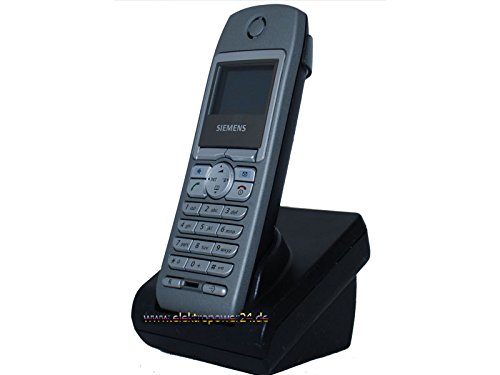
Sary 1.2: Eo anoloana view of the Gigaset handset securely placed in its charging station. The display shows "Wahlvorbereitung" (dialing preparation) and a phone number, indicating it's powered on and ready.
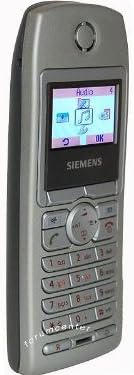
Sary 1.3: lafiny view of the Gigaset handset, highlighting its ergonomic design and button layout. The display shows menu options like "Audio" and "OK".

Sary 1.4: Miverina view of the Gigaset handset, showing the smooth casing and the location of the battery compartment cover.
1.4 Manoratra ny Handset amin'ny toby toby
This handset is designed to be compatible with various Gigaset base stations. The registration process may vary slightly depending on your specific base station model. Refer to your base station's manual for detailed instructions. Generally, the steps involve:
- Activate registration mode on your Gigaset base station (usually by pressing and holding a registration button).
- On the handset, navigate to the "Settings" or "Registration" menu.
- Select "Register Handset" and follow the on-screen prompts. You may need to enter a PIN (default is usually 0000).
- Once registered, the handset display will confirm successful connection to the base station.
2. Torolàlana miasa
2.1 Asa fototra
- Fiantsoana: Enter the phone number and press the green call key.
- Mamaly antso: Press the green call key when the phone rings.
- Famaranana antso: Press the red end call key.
- Antso tsy misy tanana: During a call, press the dedicated hands-free key (often backlit) to activate the speakerphone.
2.2 Phonebook (Directory)
The handset features a directory capable of storing up to 200 phone numbers and names.
- Manampy fidirana: Navigate to the "Directory" or "Phonebook" menu, select "New Entry," and enter the name and number.
- Miantso avy amin'ny lahatahiry: Open the directory, scroll to the desired entry, and press the green call key.
2.3 Display and Indicators
The handset features a 5-line illuminated graphic display. Key indicators include:
- Date/Time Display: Always visible on the idle screen.
- CLIP Function (Call Display): Shows the caller's number or name (if stored in the directory) for incoming calls.
- Tondro bateria: Mampiseho ny haavon'ny fiampangana bateria amin'izao fotoana izao.
- Famantarana ny herin'ny famantarana: Displays the connection quality to the base station.
3. Fikojakojana
3.1 Fanadiovana
- Wipe the handset and charging station with a soft, damp lamba.
- Aza mampiasa mpanadio abrasive na solvents.
- Ensure no liquid enters the device openings.
3.2 Fikarakarana bateria
- Always use the original or approved replacement rechargeable batteries.
- Fadio ny mametraka ny bateria amin'ny hafanana tafahoatra.
- If the handset will not be used for an extended period, remove the battery.
4. Famahana olana
| OLANA | Antony mety hitranga | vahaolana |
|---|---|---|
| Handset does not turn on. | Tsy nampidirina tsara na nesorina ny bateria. | Check battery insertion. Place handset in charging station for several hours. |
| Tsy misy feo dial. | Handset tsy voasoratra ao amin'ny toby fiantsonana na ivelan'ny faritra. | Ensure handset is registered. Move closer to the base station. Check base station power. |
| Kalitao ratsy amin'ny antso. | Interference or handset too far from base station. | Move away from other electronic devices. Move closer to the base station. |
| Tsy afaka manao na mandray antso. | Line issue or base station problem. | Check your telephone line connection. Restart the base station by unplugging and replugging its power. |
5. Famaritana
- marika: Gigaset
- Modely mifanentana: Gigaset S2, S44, S200, S440, S445, S645, SX440, SX445
- Capacity boky finday: Up to 200 entries (names and numbers)
- Aseho: 5-line illuminated graphic display
- Toetoetra: Backlit hands-free key, Date/Time display, CLIP function (Call Display)
- Mpanamboatra: Gigaset
- ASIN: B0102FULTW
Note: Information regarding spare parts availability and guaranteed software updates is not provided. This product is currently not listed as discontinued by the manufacturer.
6. Warranty sy fanohanana
Specific warranty details for this Gigaset Handset and Charging Station are not provided within the available product information. For warranty claims, technical support, or service inquiries, please refer to the documentation included with your original purchase or visit the official Gigaset webtranokala ho an'ny faritra misy anao.
You may also contact your retailer for assistance.