Sava lalana
This manual provides instructions for the setup, operation, and maintenance of the Samsung SMT-i3105 IP Phone. The SMT-i3105 is designed for use in common areas, lobbies, and waiting rooms, offering essential telephony functions for low to moderate usage environments.
Hametraka
Follow these steps to properly set up your Samsung SMT-i3105 IP Phone.
1. Famoahana sy fisafoana
Carefully remove all components from the packaging. Verify that all parts are present and undamaged. If any items are missing or damaged, contact your vendor immediately.
2. Fampifandraisana ny finday
The SMT-i3105 IP Phone supports Power over Ethernet (PoE). If your network infrastructure provides PoE, connect a standard Ethernet cable from your network switch to the LAN port on the back of the phone. The phone will power on automatically.
If PoE is not available, an external power adapter (Samsung SMT-A53PA/XAR, sold separately) is required. Connect the power adapter to the phone's power input and then plug it into a standard electrical outlet. Then, connect an Ethernet cable from your network switch to the LAN port.
Connect the handset cord to the handset port and the handset.
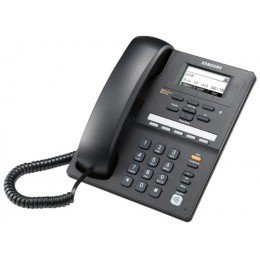
Sary 1: Eo anoloana view of the Samsung SMT-i3105 IP Phone, showing the keypad and display.
3. Safidy fametrahana
The SMT-i3105 IP Phone can be placed on a desk or mounted on a wall. Use the integrated stand for desk placement. For wall mounting, refer to the included wall-mount bracket instructions (if applicable) and ensure secure installation.
Torolàlana miasa
This section details the basic and advanced functions of your IP phone.
1. Fanaovana sy fandraisana antso
- Hanao antso: Lift the handset, dial the desired number using the keypad, and wait for the connection.
- Hamaly antso: Rehefa maneno ny telefaona dia atsangano ny telefaona.
- Hamarana ny antso: Avereno eo amin'ny fandriany ny finday.
2. Endri-javatra Antso fototra
- Tazony: Mandritra ny antso mavitrika, tsindrio ny MANOHANA button to place the caller on hold. Press it again to resume the call.
- Mangina: Mandritra ny antso mavitrika, tsindrio ny Mangina button to mute your microphone. The caller will not hear you. Press it again to unmute.
- hamindra: Mandritra ny antso mavitrika, tsindrio ny famindrana button, dial the number to which you want to transfer the call, and then press famindrana hamita indray.
3. Multiline Operation
The SMT-i3105 supports multi-line operation, allowing you to manage multiple calls simultaneously. Use the line keys on the phone to switch between active lines or initiate new calls while another is on hold.
4. Digital Answering System
The phone features a digital answering system with a recording capacity of up to 17 minutes. Refer to your system administrator or service provider for specific instructions on accessing and managing voicemail messages.
fikarakarana
Ny fikojakojana araka ny tokony ho izy dia miantoka ny faharetan'ny fampiasana sy ny fahombiazan'ny findainao IP.
- Fanadiovana: Ampiasao malefaka, maina, na kely damp cloth to clean the phone's exterior. Do not use abrasive cleaners, solvents, or strong chemicals, as these can damage the plastic material.
- Tontolo iainana: Keep the phone away from excessive heat, direct sunlight, and moisture. Ensure adequate ventilation if placed in an enclosed space.
- Telegrama: Periodically check all connected cables for damage or loose connections.
Fanamboarana
If you encounter issues with your SMT-i3105 IP Phone, refer to the following common problems and solutions.
| OLANA | Antony mety hitranga | vahaolana |
|---|---|---|
| No Power / Phone Does Not Turn On | No PoE connection; external power adapter not connected or faulty. | Ensure Ethernet cable is securely connected to a PoE-enabled port, or verify external power adapter is correctly plugged in and functional. |
| Tsy misy Tone Dial | Network connection issue; phone not registered with IP PBX. | Check Ethernet cable connection. Contact your network administrator to verify network connectivity and phone registration status. |
| Poor Call Quality (e.g., static, echo) | Network congestion; faulty cable; environmental interference. | Check Ethernet cable. Try restarting the phone. If issues persist, contact your network administrator to investigate network conditions. |
For more complex issues, contact your IT department or Samsung support.
fepetra arahana
Key technical specifications for the Samsung SMT-i3105 IP Phone:
- marika: Samsung
- Modely: SMT-i3105
- Karazan-telefaona: Tariby
- Fitaovana: plastika
- Loharano herinaratra: Corded Electric (via PoE or optional SMT-A53PA/XAR adapter)
- Karazana antso: Keypad tokana
- Karazana rafitra famaliana: Hafanàm-po
- Fahaizana antso amin'ny fihaonambe: fototra
- Multiline Operation: ENY
- Fahaizana mirakitra: 17 Minutes (for answering system)
- Mametraka: Birao na rindrina azo apetraka
Warranty sy fanohanana
For information regarding the product warranty, please refer to the warranty card included with your purchase or visit the official Samsung website. Ny fepetra sy fepetra momba ny fiantohana dia mety miovaova arakaraka ny faritra sy ny mpivarotra.
Raha mila fanohanana ara-teknika, serivisy, na loharano fanampiny, tsidiho azafady ny Samsung Support webtoerana or contact your authorized Samsung dealer.


