Sava lalana
The Logitech UE Boom is a 360-degree wireless Bluetooth speaker designed for portable audio. It features a durable, go-anywhere shape and is equipped with a water and stain resistant acoustic skin. This speaker allows for wireless music playback, phone calls, and can be paired with another UE Boom for stereo sound.

Sary: Front view of the Logitech UE Boom Wireless Bluetooth Speaker in Northern Light color.
Endri-javatra fototra
- Feo 360 degre: Delivers immersive audio in all directions.
- Famolavolana portable: Versatile, cylindrical shape for easy transport.
- Water and Stain Resistant: Features a colorful acoustic skin with plasma coating for durability against water and stains.
- Fifandraisana tsy misy tariby: Connects via Bluetooth from up to 50 feet away. Easy pairing via NFC for compatible devices.
- Double Up Feature: Wirelessly connect two UE BOOM speakers in stereo using the UE BOOM app for enhanced sound.
- Fiainana maharitra bateria: Rechargeable battery provides up to 15 hours of playback.
- telefaonina fanamafisam-peo: Integrated crystal-clear speakerphone for calls.
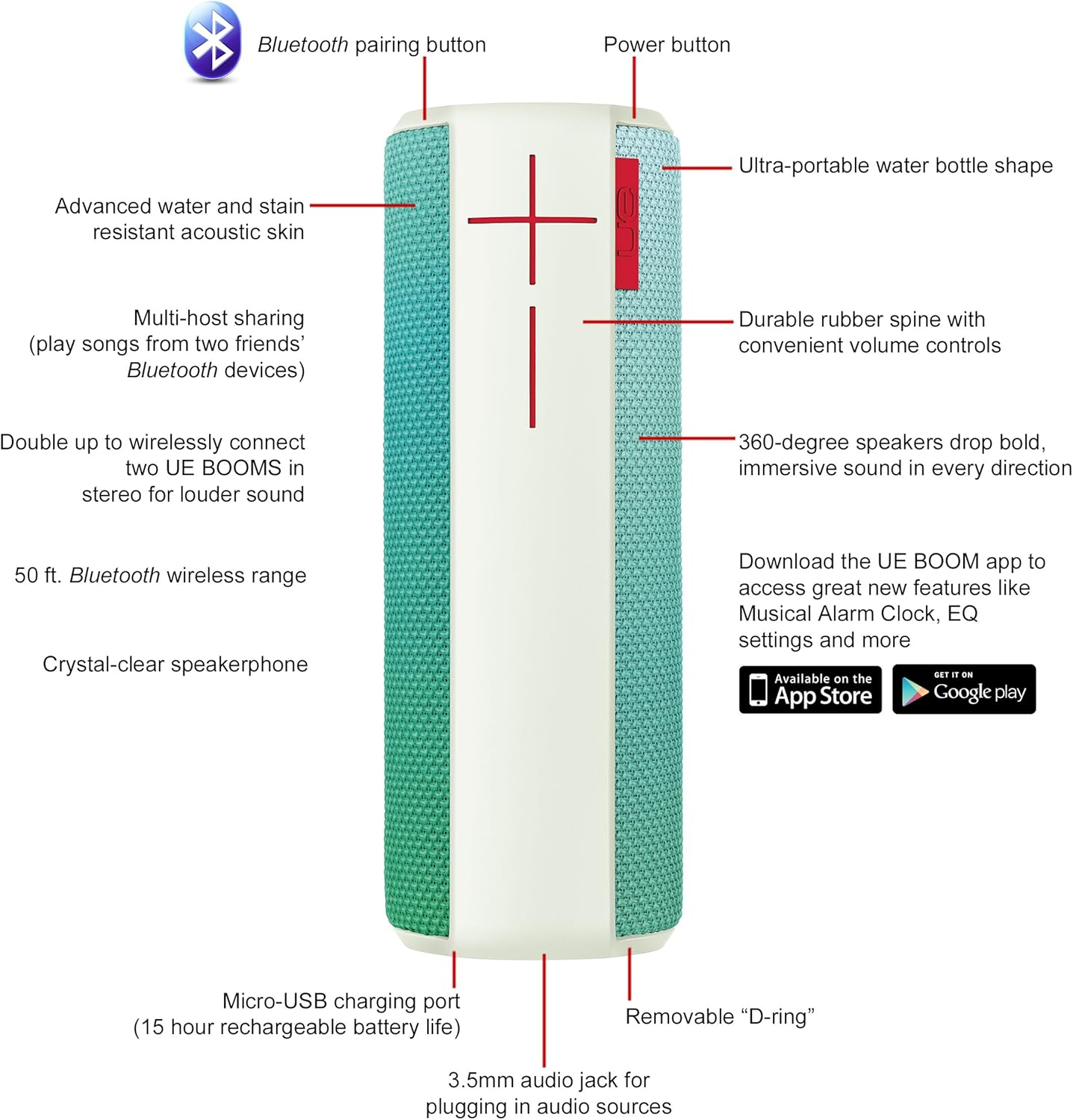
Image: Diagram highlighting key features and controls of the UE Boom speaker, including Bluetooth pairing button, power button, volume controls, micro-USB charging port, and 3.5mm audio jack.
Hametraka
Fametrahana ny Mpandahateny
Before initial use, fully charge your UE Boom speaker. Connect the provided micro-USB cable to the charging port located at the bottom of the speaker and plug the other end into a USB power source. The speaker's battery provides approximately 15 hours of playback on a full charge.
Pairing Bluetooth
- Power on your UE Boom speaker by pressing the power button.
- Press and hold the Bluetooth pairing button (usually indicated by a Bluetooth icon) until you hear an audible tone and the LED indicator flashes rapidly.
- On your mobile device (smartphone or tablet), navigate to the Bluetooth settings.
- Select "UE Boom" from the list of available devices to pair.
- Once paired, you will hear a confirmation tone from the speaker.
For NFC-enabled devices, simply tap your device to the NFC area on the speaker for quick pairing.
Torolàlana miasa
Fanaraha-maso fototra
- Bokotra hery: Located on the top of the speaker to turn it on or off.
- Fanaraha-maso ny volume: Large '+' and '-' buttons on the side of the speaker adjust the volume.
- Bokotra Bluetooth: Manomboka ny fomba fampiarahana Bluetooth.
Using the UE BOOM App
Download the official UE BOOM app from your device's app store (available on App Store and Google Play) to unlock additional features:
- Musical Alarm Clock: Wake up to your favorite music.
- Fampahavitrihana lavitra: Turn your speaker on/off from your device.
- Fikirana EQ: Amboary ny feo profile amin'ny safidinao.
- Double Up: Connect two UE BOOM speakers for a stereo sound experience.
Fampiasana ny Speakerphone
When connected to a smartphone, the UE Boom can be used as a speakerphone. Incoming calls will be routed through the speaker, allowing for hands-free communication.
fikarakarana
The UE Boom speaker features a water and stain resistant acoustic skin. To clean, gently wipe the speaker with a damp cloth. Avoid using harsh chemicals or abrasive cleaners. Ensure all ports are dry before charging or connecting other devices.
Fanamboarana
- Tsy misy hery: Ensure the speaker is charged. Connect it to a power source using the micro-USB cable.
- Tsy afaka mifandray amin'ny alàlan'ny Bluetooth:
- Hamarino tsara fa ao amin'ny "pair mode" (LED mirehitra) ny fanamafisam-peo.
- Hamarino fa mandeha ny Bluetooth amin'ny fitaovanao.
- Move your device closer to the speaker (within 50 feet).
- Andramo ny manasaraka sy mampiaraka indray ilay fitaovana.
- Vola kely na feo diso:
- Ampifanaraho ny feo amin'ny fanamafisam-peo sy ny fitaovanao mifandray.
- Ataovy azo antoka fa feno ny fanamafisam-peo.
- Check for any obstructions around the speaker.
- App tsy mifandray: Ensure the speaker is powered on and connected via Bluetooth to your device. Update the app to the latest version.
Product Specifications
| Anarana modely | Logitech UE Boom Wireless Bluetooth Speaker |
| Laharana modely | 980-001023 |
| Marika | Logitech |
| loko | Northern Light |
| Karazana mpandahateny | ivelan'ny trano |
| Teknolojia fifandraisana | Bluetooth, Wireless |
| Wireless Range | Hatramin'ny 50 feet (15.24 metatra) |
| Loharanon-kery | Battery Powered (1 Lithium Ion bateria misy) |
| Salanisan'ny fiainana bateria | 15 ora |
| Ny haavon'ny fanoherana ny rano | Tsy tantera-drano |
| Lanja entana | 2.2 kilao |
| Haben'ny vokatra (LxWxH) | 2.6 x 2.6 x 7.1 santimetatra |
| KEVITRA | plastika |
| UPC | 097855112125 |
Lahatsary vokatra ofisialy
Video: Efa tapitraview of the Logitech UE Boom speaker's features, including 360-degree sound, water resistance, wireless connectivity, and the ability to pair two speakers for louder sound. This video demonstrates the speaker's durability and portability in various environments.
Warranty sy fanohanana
The Logitech UE Boom Wireless Bluetooth Speaker comes with a Limited Warranty. For specific warranty details, please refer to the documentation included with your product or visit the official Logitech website.
For technical support or customer service, you may contact Logitech at: 646-454-3200.


