1. Fampidirana
This manual provides detailed instructions for the VIZIO SB2920-C6 29-inch 2.0 Channel Sound Bar. This sound bar is designed to enhance your audio experience for television, music, and home theater content. It features two full-range stereo speakers and DTS audio technologies for improved sound quality. The compact and streamlined design allows for versatile placement options.
2. Inona no ao anaty boaty
Hamarino tsara fa eo daholo ireo singa rehetra alohan'ny hanohizana ny fametrahana.
- VIZIO SB2920-C6 29-mirefy 2.0 Channel Sound Bar
- Fanaraha-maso lavitra
- Batterie AAA 2 x (ho an'ny fanaraha-maso lavitra)
- Tariby Audio Optical
- Digital Coaxial Cable
- Stereo RCA Cable
- Cable herinaratra
3. Vokatra mihoatraview
3.1 Eo aloha View

Sary 1: Eo anoloana view of the VIZIO SB2920-C6 Sound Bar, showcasing its sleek, black design.
3.2 Fanaraha-maso ny tontonana ambony

Figure 2: Close-up of the top panel, showing buttons for Power, Input, Bluetooth Pairing, Volume Down, and Volume Up.
3.3 Fifandraisana amin'ny tontonana aoriana

Figure 3: Full rear view of the sound bar, illustrating all available input and output ports.

Figure 4: Close-up of the rear panel showing AUX (1) and AUX (2) input ports.
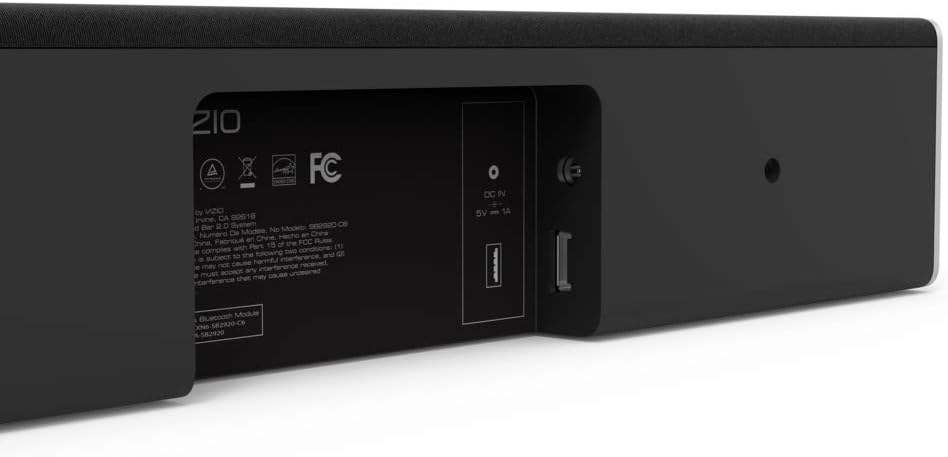
Figure 5: Close-up of the rear panel showing DIGITAL (Coaxial), OPTICAL, and SUB OUT ports.
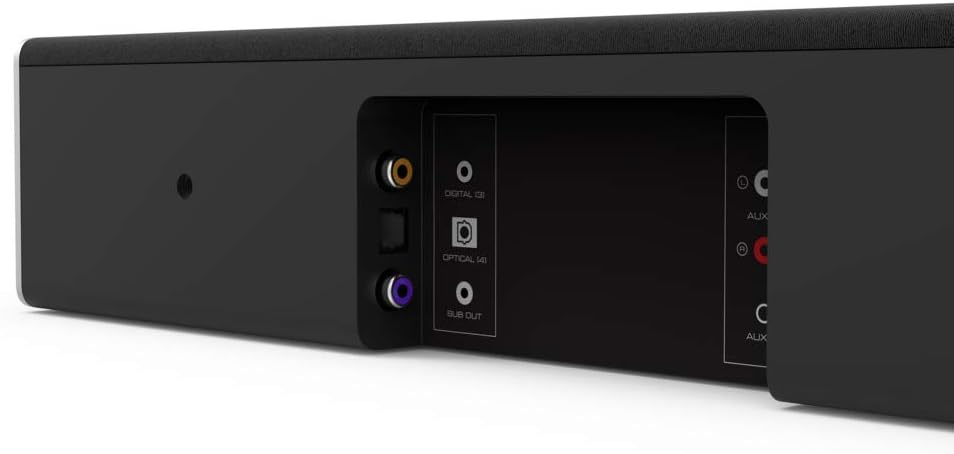
Figure 6: Close-up of the rear panel showing DC IN (power) and USB (Service Only) ports.
3.4 refy

Figure 7: Diagram illustrating the dimensions of the VIZIO SB2920-C6 Sound Bar: 3 inches Depth x 29 inches Width x 3 inches Height.
4. Fametrahana
Follow these steps to set up your VIZIO SB2920-C6 Sound Bar.
4.1 Fametrahana
- Place the sound bar on a flat surface below your TV or mount it on a wall. Ensure it is centered with your TV for optimal sound distribution.
- Keep the sound bar clear of obstructions that could block the sound.
4.2 Mampifandray amin'ny fahitalavitrao
Mifidiana iray amin'ireto fomba fifandraisana manaraka ireto:
- Optical Cable (Recommended for best audio quality):
Connect one end of the optical cable to the OPTICAL port on the sound bar (Figure 5) and the other end to the Optical Digital Audio Out port on your TV. - Digital Coaxial Cable:
Connect one end of the digital coaxial cable to the DIGITAL port on the sound bar (Figure 5) and the other end to the Coaxial Digital Audio Out port on your TV. - RCA Stereo Cables:
Connect the red and white RCA cables to the AUX (1) ports on the sound bar (Figure 4) and the corresponding red and white Audio Out ports on your TV.
4.3 Fampifandraisana herinaratra
Connect the power cable to the DC IN port on the sound bar (Figure 6) and then plug the other end into a wall outlet.
4.4 Fametrahana Video Guide
Video 1: Official VIZIO guide on how to set up your VIZIO Sound Bar, demonstrating connection and initial configuration.
5. Torolàlana miasa
5.1 Power On/off
- Tsindrio ny fahefana button on the sound bar (Figure 2) or the remote control to turn the unit on or off.
5.2 Fanitsiana ny Boky
- Ampiasao ny Vola ambony (+) SY Vola midina (-) buttons on the sound bar (Figure 2) or the remote control to adjust the sound level.
5.3 Fifantenana ny Loharano Fidirana
- Tsindrio ny fahan'ny button on the sound bar (Figure 2) or the remote control to cycle through available input sources (Optical, Digital, AUX 1, AUX 2, Bluetooth).
5.4 Fanambadiana Bluetooth
- Tsindrio ary hazòny ny Bluetooth button on the sound bar (Figure 2) or the remote control for 3 seconds to enter pairing mode. The LED indicators on the sound bar will flash.
- On your mobile device, search for the VIZIO sound bar in the Bluetooth settings and select it to pair.
5.5 Audio Enhancements
- The remote control includes buttons for basse, EQ, ary Treble to customize your audio experience.
- DTS technologies such as DTS Studio Sound, DTS TruVolume, and DTS TruSurround are integrated to optimize sound quality. Refer to the full user manual for detailed adjustments.
6. Fikojakojana
To ensure the longevity and optimal performance of your VIZIO SB2920-C6 Sound Bar, follow these maintenance guidelines:
- Fanadiovana: Use a soft, dry cloth to clean the surface of the sound bar. Avoid using liquid cleaners or abrasive materials, as they may damage the finish.
- rivotra: Ensure that the sound bar's vents are not blocked to prevent overheating.
- fitahirizana: If storing the sound bar for an extended period, disconnect it from power and store it in a cool, dry place.
7. Famahana olana
Raha sendra olana amin'ny sound bar-nao ianao dia jereo ireto vahaolana mahazatra ireto:
| OLANA | Vahaolana mety |
|---|---|
| No sound from the sound bar |
|
| Tapaka tampoka ny feo |
|
| Tsy afaka mampiaraka ny fitaovana Bluetooth |
|
| Ratsy ny kalitaon'ny feo |
|
8. Famaritana
| endri-javatra | antsipirihany |
|---|---|
| Anarana modely | SB2920-C6 |
| Karazana mpandahateny | Soundbar |
| Fanamboarana fantsona manodidina ny feo | 2.0 |
| Teknolojia fifandraisana | Bluetooth |
| Wireless Communication Technology | Bluetooth |
| Audio Output Mode | Stereo, Manodidina |
| Endri-javatra manokana | Bass Boost, Wireless |
| Fitaovana mifanentana | Personal Computer, Phones, Smartphone, Tablet, Television |
| Fomba fanaraha-maso | mitokana |
| loko | Mainty |
| Haben'ny vokatra (D x W x H) | 3" x 29" x 3" |
| Lanja entana | 4.5 kilao |
| Karazana fametrahana | Wall Mount |
| Ilaina ny bateria | 2 AAA (tafiditra) |
9. Warranty sy fanohanana
The VIZIO SB2920-C6 Sound Bar typically comes with a 12-month limited warranty. For specific warranty details, registration, and technical support, please refer to the official VIZIO website or contact VIZIO customer service directly. Keep your purchase receipt for warranty claims.
Fanohanana an-tserasera: FITSIDIHANA www.vizio.com/support
Serivisy ho an'ny mpanjifa: Refer to your product packaging or the VIZIO support webtranokala ho an'ny fampahalalana mifandraika amin'izao fotoana izao.


