1. Fampidirana
This manual provides detailed instructions for the proper use, setup, and maintenance of your Genius HS-920BT Bluetooth Headset. Please read this manual thoroughly before using the device to ensure optimal performance and longevity.
The Genius HS-920BT is a versatile Bluetooth headset designed for wireless audio streaming and hands-free communication with compatible devices such as smartphones, tablets, and PCs.
2. Ny votoatin'ny fonosana
Hamarino fa ao anatin'ny fonosanao ny entana rehetra:
- Genius HS-920BT Bluetooth Headset
- USB Charging Cable
- Multi-language User Manual (this document)
3. Vokatra mihoatraview
The HS-920BT headset features an adjustable headband and comfortable earcups, integrating controls for audio playback and call management.
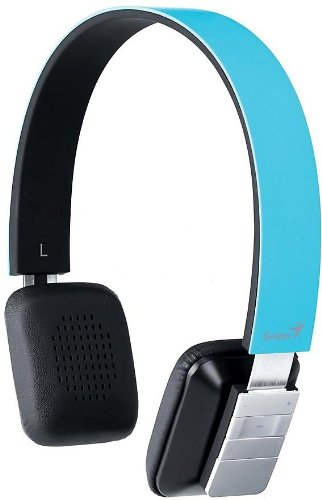
Figure 1: Genius HS-920BT Bluetooth Headset (Blue)
This image displays the Genius HS-920BT Bluetooth Headset in blue, viewed from an angle, highlighting its adjustable headband and earcup design.
Lafin-javatra fototra:
- Wireless Bluetooth connectivity for audio and calls (A2DP support)
- Integrated rechargeable Lithium-Ion battery
- Mikrofon-trano anatiny ho an'ny fifandraisana tsy misy tanana
- On-ear controls for volume adjustment, track skipping (AVRCP support)
- Fehin-doha azo amboarina mba hamehezana
- 40 mm driver units for clear sound
4. Fametrahana
4.1 Fametrahana ny headset
Before initial use, fully charge the headset. Use the provided USB charging cable.
- Connect the small end of the USB charging cable to the charging port on the headset.
- Ampifandraiso amin'ny seranana USB mandeha amin'ny herinaratra ny tendrony lehibe kokoa amin'ny tariby USB (oh: solosaina, adaptatera rindrina USB).
- The LED indicator on the headset will illuminate during charging and change color or turn off when fully charged. Refer to the headset's LED behavior for specific indications.
Maharitra 2-3 ora eo ho eo ny fiampangana feno.
4.2 Fampiarahana amin'ny fitaovana Bluetooth
To use the HS-920BT wirelessly, you must pair it with your Bluetooth-enabled device.
- Herim-batana: Press and hold the Power button on the headset until the LED indicator flashes, usually alternating blue and red, indicating pairing mode.
- Ampidiro ny Bluetooth: On your smartphone, tablet, or PC, enable Bluetooth functionality.
- Hitady ny Fitaovana: In your device's Bluetooth settings, search for available devices. The headset should appear as "HS-920BT".
- Select and Pair: Select "HS-920BT" from the list. If prompted for a passcode, enter "0000" (four zeros).
- fanamafisana: Once paired, the headset's LED indicator will typically flash blue slowly, and your device will confirm the connection.
The headset will automatically attempt to reconnect to the last paired device when powered on, if that device's Bluetooth is active and within range.
5. Torolàlana miasa
The HS-920BT features intuitive controls located on the earcup.

Figure 2: Earcup Controls of HS-920BT
This image shows a close-up of the right earcup of the Genius HS-920BT Bluetooth Headset, detailing the control buttons for power, volume, and track navigation.
5.1 Power On/off
- Herim-batana: Tsindrio ary hazòny mandritra ny 3 segondra eo ho eo ny bokotra Hery mandra-pirehitra manga ny jiro famantarana LED.
- Mamono hery: Tsindrio ary hazòny mandritra ny 3 segondra eo ho eo ny bokotra Hery mandra-pahafatin'ny jiro LED.
5.2 Famerenana mozika
- Play/Pause: Tsindrio indray mandeha ny bokotra Play/Pause.
- Track manaraka: Press the "Next Track" button (usually marked with a forward arrow).
- Làlana teo aloha: Press the "Previous Track" button (usually marked with a backward arrow).
5.3 Fitantanana ny antso
- Valio/Atsaharo ny antso: Press the Multi-function button (often the same as Play/Pause) once during an incoming call to answer, or once during a call to end it.
- Mandà ny antso: Press and hold the Multi-function button for approximately 2 seconds during an incoming call.
- Avereno antsoy ny isa farany: Tsindrio indroa ny bokotra Multi-function rehefa tsy miantso.
5.4 Fanaraha-maso ny volume
- Ampitomboy ny volanao: Tsindrio ny bokotra Fampiakarana ny feo (+).
- Ahena ny volume: Tsindrio ny bokotra "Fampidinana ny feo" (-).
6. Fikojakojana
Proper care ensures the longevity of your headset.
- Fanadiovana: Mampiasà lamba malefaka sy maina hanadiovana ny headset. Aza mampiasa mpanadio abrasive na solvents.
- fitahirizana: Tehirizo ao amin'ny toerana mangatsiatsiaka sy maina lavitry ny tara-masoandro mivantana sy ny hafanana tafahoatra ny headset.
- Fikarakarana bateria: To preserve battery life, avoid fully discharging the battery frequently. Charge the headset regularly, even if not in use for extended periods.
- Fipoahana rano: The headset is not waterproof. Avoid exposure to water or excessive moisture.
7. Famahana olana
If you encounter issues with your HS-920BT headset, refer to the following common solutions:
| OLANA | Vahaolana mety |
|---|---|
| Tsy mandeha ny headset. | Ensure the battery is charged. Connect the headset to a power source using the USB cable. |
| Tsy afaka mampifandray ny headset amin'ny fitaovana hafa. |
|
| Tsy misy feo na feo ambany. |
|
| Ratsy ny kalitaon'ny antso. |
|
8. Famaritana
| Anaran'ny modely: | HS-920BT |
| Teknolojia Wireless: | Bluetooth |
| Fiara mpamily: | 40 mm |
| Batterie: | Lithium-Ion azo averina ampiasaina ao anatiny |
| Karazana fanaraha-maso: | Volume Control, Track Navigation, Call Management |
| Microphone: | Naorina-in |
| Pro manohanafiles: | A2DP, AVRCP |
| Fitaovana fitaovana: | PC, Smartphone, Tablety |
| Lanja entana: | 110g ny |
| refy (LxWxH): | 13.6 x 17.3 x 2.9 cm |
9. Warranty sy fanohanana
For warranty information and technical support, please refer to the warranty card included with your product or visit the official Genius website. Tehirizo ny tapakila fividiananao ho porofon'ny fividianana.
For further assistance, you may contact Genius customer service through their official channels.