1. Fampidirana
The Mastech MS6612 is a digital luxmeter designed for measuring illuminance. It features a large LCD display with backlight and a bar graph for easy reading. This device offers automatic and manual range switching, data hold, peak value measurement, relative value measurement, and zero calibration functions. It is capable of measuring up to 200,000 Lux or 20,000 Foot-Candles (Fc).
2. Information momba ny fiarovana
Please read and understand all safety instructions before operating the device. Failure to follow these instructions may result in injury or damage to the meter.
- Do not operate the meter in environments with explosive gas, vapor, or dust.
- Avoid exposing the meter to extreme temperatures or high humidity.
- Remove batteries if the meter is not used for an extended period to prevent leakage.
- Do not attempt to repair or modify the meter. Refer all servicing to qualified personnel.
- Ataovy madio sy maina ny metatra.
3. Vokatra mihoatraview
The Mastech MS6612 Digital Luxmeter consists of a main unit with an LCD display and control buttons, and a silicon photoelectric diode sensor for light detection.
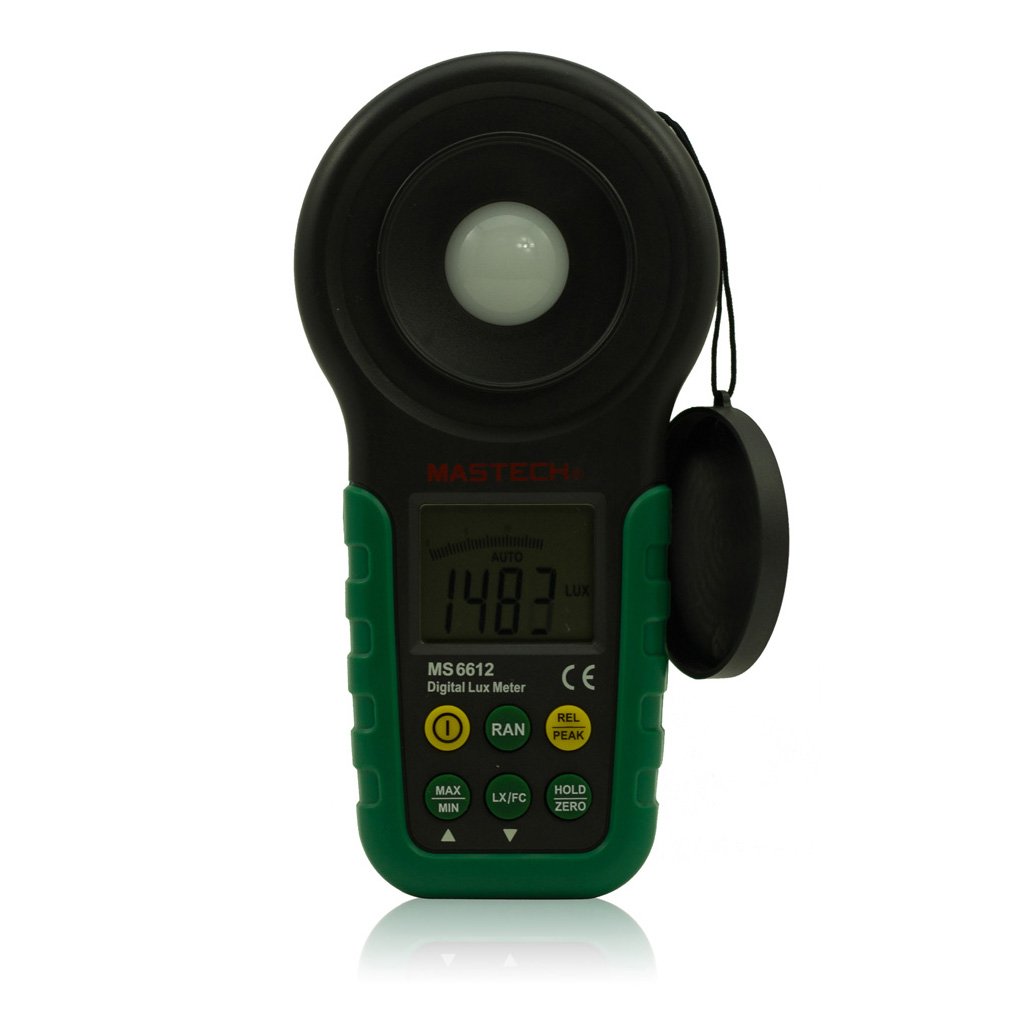
Sary 1: anoloana view of the Mastech MS6612 Digital Luxmeter. This image shows the main body of the device, including the large LCD screen, control buttons, and the light sensor located at the top.
singa fototra:
- LCD Display: 3½ digits with analog bar display for clear readings.
- Bokotra fanaraha-maso: For various functions such as power, range, hold, peak, relative, zero, unit conversion, and mute.
- Fahazavana sensor: Silicon photoelectric diode for accurate light measurement.
- Efitra bateria: Located at the rear for a 9V battery.
4. Fametrahana
4.1 Fametrahana bateria
- Tadiavo ao ambadiky ny metatra ny fonon'ny fitoeran'ny bateria.
- Use a screwdriver (if necessary) to open the battery compartment.
- Insert one 9V (IEC 6LR61) battery, observing the correct polarity (+/-).
- Soloy ny fonon'ny efitry ny bateria ary arovy izany.
Note: A low battery indicator will appear on the display when the battery needs replacement.
5. Torolàlana miasa
5.1 Power On/off
- Tsindrio ny fahefana bokotra hampandeha ny metatra.
- Tsindrio ny fahefana button again to turn the meter off.
- The meter features an automatic power-off function, which will turn off the device if no keys are operated for more than 10 minutes.
5.2 Fandrefesana fototra
- Alefaso ny metatra.
- Point the light sensor towards the light source to be measured.
- The illuminance value will be displayed on the LCD. The meter automatically selects the appropriate range.
5.3 Range Switching (Auto/Manual)
The MS6612 supports both automatic and manual range switching.
- In auto-ranging mode, the meter automatically selects the best measurement range.
- Tsindrio ny Range button to switch between auto and manual ranging modes. In manual mode, you can cycle through available ranges.
- If the measured value exceeds the current range in manual mode, the LCD will display "OL" (Overload).
5.4 Fihazonana angon-drakitra
Mba hampijanonana ny famakiana ankehitriny eo amin'ny efijery:
- Tsindrio ny MANOHANA button. The "HOLD" indicator will appear on the display.
- Tsindrio ny MANOHANA button again to release the data hold and resume live measurement.
5.5 Maximum/Minimum Value Measurement
ny view the maximum or minimum illuminance recorded during a measurement session:
- Tsindrio ny MAX/MIN button. The display will show the maximum recorded value.
- mpanao gazety MAX/MIN again to cycle to the minimum recorded value.
- mpanao gazety MAX/MIN a third time to exit this mode and return to live measurement.
5.6 Peak Value Measurement
This function captures the highest instantaneous illuminance value.
- Tsindrio ny TAMPON'ISAN'NY button to activate peak measurement. The "PEAK" indicator will appear.
- The display will show the highest illuminance detected since activating the function.
- mpanao gazety TAMPON'ISAN'NY hivoaka indray ity fomba ity.
5.7 Relative Value Measurement
This function allows you to set a reference point and measure the difference from that point.
- In a stable light environment, press the REL button. The current reading becomes the reference, and the display will show "0".
- Subsequent measurements will show the difference (positive or negative) from this reference value.
- mpanao gazety REL again to exit relative measurement mode.
5.8 Zero Calibration Function
To ensure accuracy, especially in low light conditions, perform a zero calibration.
- Place the light sensor in a completely dark environment (e.g., cover it with an opaque cap).
- Tsindrio ny ZERO button. The display should read "0.00".
- This calibrates the meter to account for any residual sensor output in darkness.
5.9 Unit Conversion (Fc/Lux)
The meter can display measurements in Lux or Foot-Candles (Fc).
- Tsindrio ny UNIT button to toggle between Lux and Fc units.
- The selected unit will be indicated on the LCD.
- Fiovam-po: 1 Fc = 10.764 Lux; 1 Lux = 0.09290 Fc.
5.10 Touch Tone and Mute Function
The meter may emit a touch tone when buttons are pressed. This can be muted.
- Refer to the specific button on your device for muting the touch tone.
6. Fikojakojana
6.1 Fanadiovana
- Fafao ny c an'ny metatraasing miaraka amin'ny malefaka, damp lamba. Aza mampiasa mpanadio abrasive na solvents.
- Keep the light sensor clean and free from dust or smudges to ensure accurate readings. Use a soft, lint-free cloth.
6.2 Fanoloana bateria
Replace the 9V battery when the low battery indicator appears on the display. Follow the steps in Section 4.1 for battery installation.
6.3 Fitehirizana
- If storing the meter for an extended period, remove the battery to prevent leakage and potential damage.
- Tehirizo ao amin'ny toerana mangatsiaka sy maina ny metatra, lavitry ny tara-masoandro mivantana sy ny mari-pana tafahoatra.
7. Famahana olana
| OLANA | Antony mety hitranga | vahaolana |
|---|---|---|
| Tsy mandeha ny metatra. | Batterie maty na tsy napetraka tsara. | Check battery polarity, replace battery. |
| Aseho eo amin'ny efijery ny "OL". | Measurement value exceeds current range (manual mode). | Switch to a higher range or enable auto-ranging. |
| Vakiteny tsy marina. | Dirty sensor, uncalibrated zero, or incorrect range. | Clean sensor, perform zero calibration, ensure correct range. |
| Tondro bateria ambany. | Kety ny herin'ny bateria. | Soloy ny bateria 9V. |
8. Famaritana
| fikirana | sarobidy |
|---|---|
| Fandrefesana Ranges | 20, 200, 2000, 20000, 200000 Lux 20, 200, 2000, 20000 Fc |
| miseho | 3½ digits, max reading of 1999, with analog bar display |
| Sensor | Silicon photoelectric diode |
| Measured Spectral Range | 320~730nm |
| Sampling Rate | ≥2 times/s |
| Temperature miasa | -10~50 °C, max 80% RH (Non-Condensed) |
| Temperature fitehirizana | -10~50 °C, max 80% RH (Non-Condensed, removing batteries) |
| Tontolo iainana miasa | Fampiasana anatiny |
| hahavony | 2000m highest |
| Herin'aratra | 1 x 9V, IEC 6LR61 battery |
| Fiainana bateria | Approx. 200 ora |
| refy (HxWxD) | 190 mm x 89 mm x 42.5 mm (7.48 x 3.50 x 1.67 santimetatra) |
| Lanja (tsy misy bateria) | Manodidina ny 360 g (12.7 oz) |
| Lanja (miaraka amin'ny bateria) | Manodidina ny 420 g (14.8 oz) |
Illuminance Unit Conversion:
- 1 Foot-Candle (Fc) = 10.764 Lux
- 1 Lux = 0.09290 Foot-Candle (Fc)
9. Warranty sy fanohanana
Mastech products are designed for reliability and performance. For specific warranty information, please refer to the warranty card included with your purchase or visit the official Mastech website. For technical support or service inquiries, please contact Mastech customer service through their official channels.
Azafady, tehirizo ny tapakila fividiananao ho porofon'ny fividianana ho an'ny fitakiana fiantohana.


