1. Fampidirana
This manual provides instructions for the installation, programming, and operation of the Galcon 7101D 1-Station Battery Operated Irrigation Controller with a 3/4-inch waterproof valve. The 7101D controller is designed for automated operation of drip and sprinkler systems. It is completely waterproof and can be installed above or below ground, including in valve boxes or areas where it may be submerged up to 3 feet. The controller operates on a single 9V alkaline battery.
2. Information momba ny fiarovana
- Vakio tsara ny toromarika rehetra alohan'ny fametrahana sy ny fandidiana.
- Use only a 9V alkaline battery. Do not use rechargeable batteries.
- Ensure proper sealing of the battery compartment to maintain waterproofing.
- This product is designed for use only in the USA and Canada.
- Aza manandrana manongotra na manamboatra ilay fitaovana. Mifandraisa amin'ny fanohanan'ny mpanjifa hahazoana fanampiana.
3. Ny votoatin'ny fonosana
Hamarino fa misy ny singa rehetra ao anaty fonosana:
- Galcon 7101D 1-Station Battery Operated Controller
- 3/4-inch Inline Irrigation Valve
- User Manual (ity antontan-taratasy ity)
4. Toetran'ny vokatra
- Controller, solenoid, and 3/4" valve integrated into one unit.
- Easy programming with 6 large buttons.
- Manual operation and rain delay functions.
- Weekly or Cyclic programming options.
- Completely waterproof and UV resistant construction.
- Designed for use in the USA and Canada.
5. Fametrahana sy fametrahana
5.1 Fametrahana bateria
- Locate the battery compartment on the controller.
- Sokafy ny fonon'ny batterie.
- Insert one new 9V alkaline battery, ensuring correct polarity.
- Securely close the battery compartment cover to maintain the waterproof seal.
5.2 Controller and Valve Installation
The Galcon 7101D integrates the controller and valve into a single unit.
- Identify the water flow direction. The valve has an arrow indicating the correct flow.
- Connect the inlet side of the valve to your main water supply line.
- Connect the outlet side of the valve to your irrigation system (drip or sprinkler lines).
- Ataovy azo antoka fa mafy ny fifandraisana rehetra mba hisorohana ny fivoahana.
- The unit can be installed above ground or submerged in a valve box up to 3 feet deep.

Sary 1: Galcon 7101D Controller and Valve Assembly. This image shows the integrated controller and valve unit, highlighting its compact design.
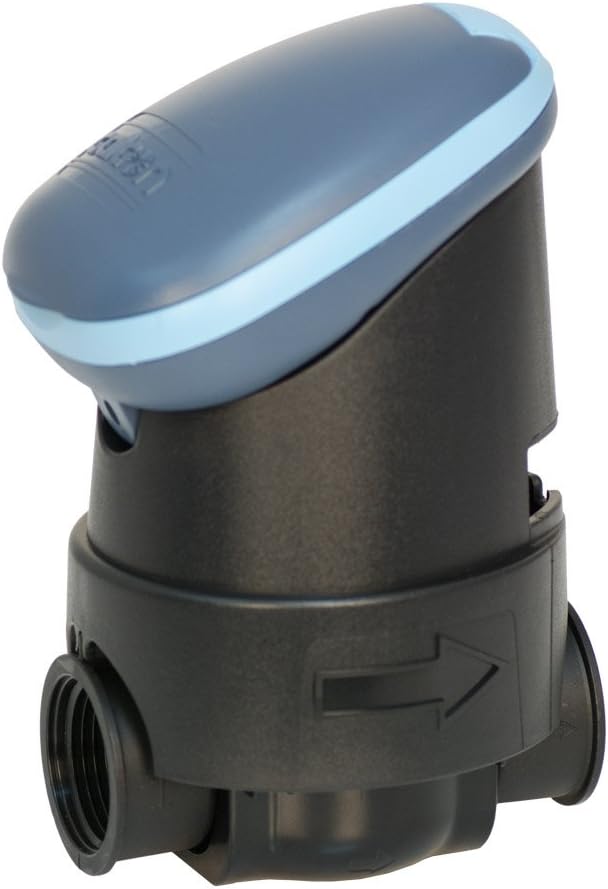
Sary 2: Galcon 7101D Valve with Flow Direction Arrow. This image illustrates the valve component, showing the arrow indicating the correct water flow direction for installation.
6. Torolàlana miasa
The Galcon 7101D features 6 large buttons for programming and operation. Refer to the on-screen prompts for specific settings.
6.1 Fametrahana ny Ora sy ny Andro Ankehitriny
Follow the on-screen instructions to set the current time and day of the week. This is crucial for accurate scheduling.
6.2 Programming Irrigation Schedules
The controller supports two main programming modes:
- Fandaharana isan-kerinandro: Set specific days of the week for irrigation.
- Cyclic Programming: Set an irrigation cycle (e.g., every 2 days) regardless of the day of the week.
Use the programming buttons to navigate through the menu and set:
- Start Time(s)
- Duration of watering (in minutes)
- Frequency (specific days or cycle interval)
6.3 Fampandehanana tanana
To manually turn the water on or off, use the dedicated manual operation button. This allows for immediate watering outside of the programmed schedule.
6.4 Rain Delay Function
Activate the rain delay function to temporarily suspend irrigation for a set period (e.g., 24, 48, 72 hours) after rainfall. This conserves water and prevents overwatering.
7. Fikojakojana
- Fanoloana bateria: Replace the 9V alkaline battery annually, or when the low battery indicator appears on the display.
- Fanadiovana: Clean the exterior of the controller with a damp lamba. Aza mampiasa mpanadio abrasive na solvents.
- ririnina: In freezing climates, remove the controller and valve from the irrigation system and store indoors to prevent freeze damage.
8. Famahana olana
| OLANA | Antony mety hitranga | vahaolana |
|---|---|---|
| Banga ny fampisehoana ny mpanara-maso. | Batterie maty na tsy voapetraka tsara. | Replace the 9V alkaline battery, ensuring correct polarity. |
| Valve does not open/close. | Low battery, incorrect programming, or debris in valve. | Check battery, verify programming, or inspect valve for obstructions. |
| Ny rano mitete avy amin'ny fifandraisana. | Ny fifandraisana malalaka na ny tombo-kase simba. | Tighten connections. If leaks persist, check for damaged O-rings or seals. |
| Irrigation does not start at scheduled time. | Incorrect time/day setting, rain delay active, or programming error. | Verify current time and day, check if rain delay is active, review irrigation program. |
9. Famaritana
- Modely: 7101D
- Laharan'ny ampahany: GAR6S2312P0
- Valve Valv: 3/4 inch
- Loharano herinaratra: 1 x 9V Alkaline Battery (required)
- Naoty tsy tantera-drano: IP-68 (submersible up to 3 feet)
- Safidy fandaharana: Weekly or Cyclic
- refy: 4.4 x 3.9 x 7.4 santimetatra (Product)
- Lanja: 3.2 oz
- Mpanamboatra: Galcon USA, LTD
- Operating Region: Etazonia sy Kanada
10. Warranty sy fanohanana
For warranty information or technical support, please contact Galcon customer service. Refer to the product packaging or the official Galcon webtranonkala hahazoana ny antsipirian'ny fifandraisana amin'izao fotoana izao.
Fanamarihana: Unauthorized disassembly or modification of the product may void the warranty.


