1. Fampidirana
This manual provides detailed instructions for the setup, operation, and maintenance of your Vibe Axcess 5-in-1 Universal Remote. Please read this manual thoroughly before using the remote control to ensure proper functionality and to maximize your user experience. This remote is designed to control up to five different audio/video devices.
2. Vokatra mihoatraview
The Vibe Axcess 5-in-1 Universal Remote is designed to consolidate control of multiple home entertainment devices into a single unit. It features dedicated buttons for various functions and device types.
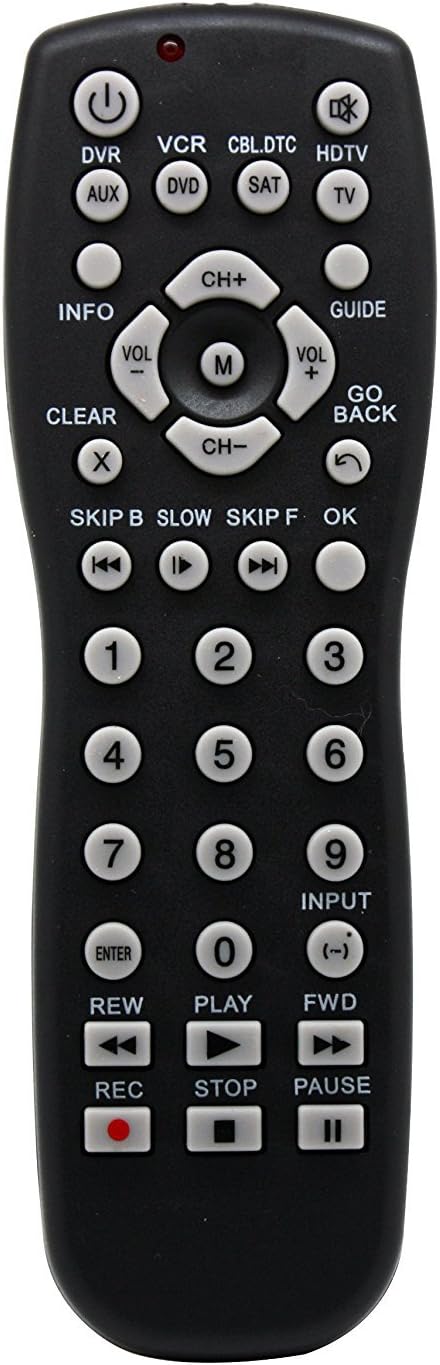
Sary 1: anoloana view of the Vibe Axcess 5-in-1 Universal Remote. This image displays the remote's layout, including device selection buttons (DVR, VCR, CBL.DTC, HDTV, AUX, DVD, SAT, TV), navigation pad, number keys, and media control buttons (REW, PLAY, FWD, REC, STOP, PAUSE).

Sary 2: Packaging of the Vibe Axcess 5-in-1 Universal Remote. The packaging highlights the remote's 5-in-1 capability and compatibility with various device types such as DVD/VCR, HDTV, DVD, AUX, and CBL/SAT/CABLE.
3. Fametrahana
3.1 Fametrahana bateria
- Tadiavo eo an-damosin'ny fanaraha-maso lavitra ny fonon'ny efitrefitra bateria.
- Atsofohy midina ny fonony na tsindrio ny famohana ary atsangano mba hisokatra.
- Insert two (2) AAA batteries, ensuring the positive (+) and negative (-) terminals match the diagrams inside the compartment.
- Avereno apetraka ny fonon'ny fitoeran-bateria, ary avereno amin'ny toerany mandra-pikitsoka tsara.
Fanamarihana: Always use fresh batteries and replace both batteries at the same time. Do not mix old and new batteries or different types of batteries.
3.2 Fandaharana ny fanaraha-maso lavitra
To control your devices, the universal remote must be programmed with the correct codes for each device. There are typically two methods for programming:
3.2.1 Fidirana kaody mivantana
This method involves entering a specific code from a code list (usually provided with the remote or available online) for your device's brand.
- Alefaso ny fitaovana tianao fehezina (oh: fahitalavitra, mpilalao DVD).
- Press and hold the desired device button on the remote (e.g., TV, DVD) for approximately 3 seconds until the indicator light (usually red) illuminates and stays on.
- While the indicator light is on, enter the 3-digit or 4-digit code for your device's brand using the number keys.
- If the code is valid, the indicator light will turn off. If the light flashes and remains on, the code was invalid; re-enter the code.
- Andramo ny lavitra amin'ny fanindriana ny fahefana button. If the device turns off, the code is correct. If not, try the next code listed for your brand.
3.2.2 Fikarohana kaody mandeha ho azy
If you cannot find a code or direct code entry fails, use the auto code search method.
- Alefaso ilay fitaovana tianao hifehezana.
- Press and hold the desired device button (e.g., TV) for approximately 3 seconds until the indicator light illuminates and stays on.
- While holding the device button, press the fahefana button once. The indicator light will start flashing, indicating it is searching for a code.
- Point the remote at the device and wait for the device to turn off. This may take several minutes as the remote cycles through codes.
- Raha vao maty ny fitaovana dia tsindrio avy hatrany ny Ampidiro bokotra hitahiry ny kaody. Ho faty ny jiro famantarana.
- Test the remote's functions. If some functions do not work, repeat the auto search process to find a more compatible code.
4. Torolàlana miasa
Once programmed, operating your Vibe Axcess 5-in-1 Universal Remote is straightforward.
- Mifidiana fitaovana: Press the corresponding device button (e.g., TV, DVD, CBL.DTC) for the device you wish to control. The indicator light will briefly illuminate to confirm selection.
- Herim-batana / maty: Tsindrio ny fahefana bokotra hampandehanana na hamonoana ny fitaovana voafantina.
- Fanaraha-maso ny feo: Ampiasao ny VOL+ SY VOL- bokotra hanitsy ny feo.
- Fanaraha-maso ny fantsona: Ampiasao ny CH+ SY CH- bokotra hanovana fantsona.
- Laharana laharana: Use the number keys (0-9) to directly enter channel numbers or other numerical inputs.
- Fikarohana: Use the directional pad (up, down, left, right) and OK bokotra ho an'ny fitetezana ny menio.
- Fanaraha-maso media: Ampiasao MILAY, MIato, MIJANÒNA, REW, Re, ary REC for controlling media playback on compatible devices.
5. Fikojakojana
5.1 Fanadiovana
To clean your remote, gently wipe it with a soft, dry cloth. Do not use abrasive cleaners, solvents, or harsh chemicals, as these can damage the remote's finish or internal components.
5.2 Fanoloana bateria
When the remote's performance degrades or the indicator light fails to illuminate, it is time to replace the batteries. Follow the battery installation steps in Section 3.1. Dispose of used batteries responsibly according to local regulations.
6. Famahana olana
- Remote tsy mandeha:
- Hamarino raha tafiditra tsara ny bateria ary tsy lany. Soloy raha ilaina.
- Hamarino tsara fa nifidy ny bokotra fitaovana marina ianao (oh: TV ho an'ny fahitalavitrao).
- Verify that the remote is programmed with the correct code for your device. Re-program if unsure.
- Ataovy azo antoka fa tsy misy sakana eo anelanelan'ny lavitr'ezaka sy ny sensor infrarouge an'ny fitaovana.
- Misy asa sasany tsy mandeha:
- Some universal remote codes may not support all original remote functions. Try another code for your device brand using the programming steps.
- Ensure the device you are trying to control supports the specific function (e.g., not all TVs have a dedicated 'INFO' button function).
- Tsy mirehitra ny jiro famantarana:
- Jereo sy soloy ny bateria.
- If the issue persists after battery replacement, the remote may be faulty.
7. Famaritana
- Modely: OT795-KO
- marika: Vibe
- Haben'ny vokatra: 10.7 x 4 x 0.8 santimetatra
- Lanja entana: 4 oz
- Batterie: 2 AAA bateria ilaina (tsy tafiditra)
- Max isan'ny fitaovana tohanana: 5
- Teknolojia fifandraisana: Infrared
- Endri-javatra manokana: rehetra izao
8. Warranty sy fanohanana
For information regarding warranty coverage or technical support, please refer to the documentation included with your purchase or contact the retailer where the product was acquired. Specific warranty terms may vary.


