1. Fampidirana
This manual provides detailed instructions for the installation, operation, and maintenance of your Gewiss GW10701 Programmable Thermostat. This device is designed to control heating and air conditioning systems, allowing you to manage room temperature efficiently and comfortably. Please read this manual thoroughly before installation and use to ensure proper functionality and safety.
2. Information momba ny fiarovana
Araho hatrany ireto fepetra fiarovana manaraka ireto mba hisorohana ny ratra na ny fahasimban'ny fitaovana:
- Ny fametrahana dia tsy tokony hataon'ny mpiasa mahafeno fepetra mifanaraka amin'ny fehezan-dalàna sy fitsipika elektrika eo an-toerana.
- Disconnect power to the heating/cooling system at the main circuit breaker before installing or servicing the thermostat.
- Aza asiana rano na hamandoana be loatra ny thermostat.
- Ampiasao ny karazana bateria voafaritra ihany ary ataovy izay hahazoana antoka fa marina ny polarity mandritra ny fametrahana azy.
- Keep batteries out of reach of children. Do not dispose of batteries in fire.
- Do not attempt to open or repair the thermostat yourself. Contact qualified service personnel.
3. Vokatra mihoatraview
The Gewiss GW10701 is a wall-mounted programmable thermostat featuring an LCD display and intuitive controls for temperature management.
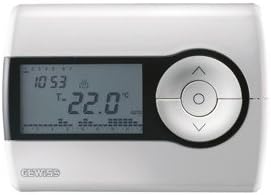
Sary 1: anoloana view of the Gewiss GW10701 Thermostat. It features a clear LCD screen displaying time and temperature, alongside a circular control panel with directional buttons and a central confirmation button for easy navigation and setting adjustments.
3.1. Ireo singa
- LCD Display: Shows current time, temperature, operating mode, and programming settings.
- Bokotra fanaraha-maso: Typically include UP/DOWN arrows for temperature adjustment, MODE button for selecting operating modes (e.g., Heat, Cool, Auto, Off), and a SET/PROG button for accessing programming menus. (Note: Specific button functions may vary slightly; refer to on-screen prompts.)
- Efitra bateria: Located on the rear or side, houses the power supply batteries.
- Tendrombohitra miakatra: For secure wall installation.
4. Fametrahana
4.1. Mifidy toerana iray
Select a central location on an interior wall, approximately 1.5 meters (5 feet) above the floor. Avoid locations near heat sources (lamps, direct sunlight, fireplaces), drafts (windows, doors), or areas with poor air circulation.
4.2. Fametrahana ny Thermostat
- Tapaka ny hery: Turn off the power to your heating/cooling system at the main circuit breaker.
- Separate Base Plate: Carefully detach the front cover of the thermostat from its base plate.
- Marika sy fandavahana: Hold the base plate against the wall at your chosen location. Mark the drilling points. Drill holes and insert wall anchors if necessary.
- Secure Base Plate: Fasten the base plate to the wall using the provided screws.
- Tariby (raha ilaina): Connect the system wires to the appropriate terminals on the base plate. Refer to the wiring diagram provided with your heating/cooling system or consult a qualified electrician. Note: While the thermostat is battery-powered, it controls a 230V system. Ensure correct wiring.
- Mametraka bateria: Insert the required batteries into the battery compartment, observing correct polarity (+/-).
- Ampifandraiso amin'ny Thermostat: Carefully reattach the thermostat front cover to the base plate, ensuring it clicks securely into place.
- Ampodio hery: Turn on the power to your heating/cooling system at the main circuit breaker.
5. Fampandehanana
5.1. Fametrahana voalohany
Upon first power-up or after battery replacement, you may need to set the current time and date. Follow the on-screen prompts or refer to the programming section.
5.2. Fametrahana ny maripana
Ampiasao ny UP SY MIDINY arrow buttons to adjust the desired temperature. The display will show the set temperature temporarily, then revert to the current room temperature.
5.3. Fomba fiasa
Tsindrio ny MODE button (or similar) to cycle through available operating modes:
- HAFANA: The thermostat will activate the heating system when the room temperature falls below the set temperature.
- COOL: The thermostat will activate the air conditioning system when the room temperature rises above the set temperature.
- CAR: The thermostat automatically switches between heating and cooling to maintain the set temperature range.
- eny; Maty ny rafitra fanafanana sy fampangatsiahana.
6. Fandaharana
The Gewiss GW10701 allows you to create custom heating/cooling schedules for different times of the day and days of the week. This feature helps optimize energy consumption and comfort.
6.1. Fametrahana Ora sy Daty
- Tsindrio ny SET or PROG bokotra hidirana ao amin'ny menio fikandrana.
- Navigate using the arrow buttons to find "Time" or "Date" settings.
- Use the arrow buttons to adjust the values (hour, minute, day, month, year).
- Confirm each setting with the SET or central button.
6.2. Creating a Program Schedule
The thermostat typically offers daily or weekly programming options. You can set different temperatures for various periods (e.g., Wake, Day, Evening, Sleep).
- Tsindrio ny PROG bokotra hiditra amin'ny fomba fandaharana.
- Fidio ny andro na vondron'andro tianao handaminana (oh: Alatsinainy-Zoma, Sabotsy-Alahady, na andro tsirairay).
- For each period (e.g., "Wake"), set the desired start time and temperature using the arrow buttons.
- Advance to the next period and repeat the process.
- Save your program and exit programming mode.
Consult the on-screen menu and specific button labels on your device for precise programming steps, as interfaces can vary.
7. Fikojakojana
7.1. Fanoloana bateria
The thermostat is powered by batteries. When the battery indicator appears on the display, replace the batteries promptly to ensure continuous operation. Typically, 2x AA or AAA alkaline batteries are required.
- Esory tsara ny fonon'ny thermostat eo anoloana.
- Esory ny bateria taloha ary ario amin'ny andraikitra.
- Ampidiro ny bateria vaovao, hiantohana ny polarity marina.
- Ampidiro ny fonony eo aloha.
7.2. Fanadiovana
Clean the thermostat's exterior with a soft, dry cloth. Do not use abrasive cleaners, solvents, or spray cleaners directly onto the device, as this can damage the display or internal components.
8. Famahana olana
| OLANA | Antony mety hitranga | vahaolana |
|---|---|---|
| Foana na manjavozavo ny fampisehoana. | Bateria kely na maty. | Soloy vaovao ny bateria. |
| Tsy mamaly ny rafitra fanafanana/mangatsiaka. |
|
|
| Toa tsy marina ny famakiana mari-pana. | Thermostat location affected by drafts or heat sources. | Ensure thermostat is not exposed to direct sunlight, drafts, or heat-emitting appliances. |
9. Famaritana
- Mpanamboatra: Gewiss
- Laharana modely: GW10701 (Chorus)
- refy (L x W x H): 13 x 2.3 x 9.2 cm
- Lanja: 9.07 g
- loko: White
- Fitaovana: plastika
- Herin'aratra: bateria-Powered
- Switching Voltage: 230 Volt (for controlled system)
- Karazana fampisehoana: LCD na LED
- Karazana fametrahana: Mipetaka amin'ny rindrina
- Endri-javatra mifehy: Programmable, Button control
- Fampiasana: Heating systems, Air conditioning systems
10. Warranty sy fanohanana
For warranty information, technical support, or service inquiries regarding your Gewiss GW10701 Thermostat, please refer to the warranty card included with your product or visit the official Gewiss website. You may also contact your local Gewiss distributor or retailer for assistance.
Gewiss Official Webtranokala: www.gewiss.com


