1. Mihoatraview
The Roku 2 XS is a streaming player designed to deliver high-definition entertainment to your television. It supports 1080p HD streaming and includes features for motion-based gaming. This device provides access to a wide array of streaming channels, including popular services like Netflix, Hulu Plus, and Amazon Instant Video. It also offers a free mobile application for iOS and Android devices, enhancing control and content browsing. Connectivity options include Ethernet for wired connections and a USB port for playing local media.
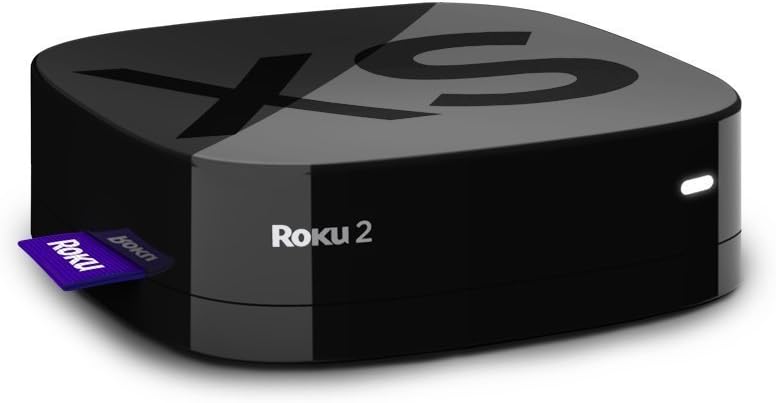
Image: The Roku 2 XS 1080p Streaming Player, a compact black device with the Roku logo, shown with a purple Roku tag eo anilany.
2. Inona no tafiditra
- Enhanced remote with motion control for games
- Angry Birds game (pre-installed or included as a code)
- Batterie AA roa
- A/V cable (red/white/yellow)
- Power adapter
- Get Started guide
3. Inona no ilainao
- Televiziona iray
- High-speed Internet service (minimum 1.2 Mbps; 5 Mbps recommended for HD video)
- A wireless router (for Wi-Fi connectivity)
4. Fametrahana
Follow these steps to set up your Roku 2 XS streaming player:
- Mifandray amin'ny fahitalavitra: Connect the Roku 2 XS to your television using the provided A/V cable or an HDMI cable (not included). For optimal 1080p HD quality, an HDMI connection is recommended.
- Hery mampifandray: Plug the power adapter into the Roku 2 XS and then into a wall outlet.
- Herim-batana: Turn on your television and select the correct input source (HDMI or A/V) where the Roku 2 XS is connected.
- Fametrahana voalohany: Follow the on-screen instructions to connect to your Wi-Fi network and link your Roku account. If you do not have a Roku account, you will be prompted to create one.
- Fanambadiana lavitra: The enhanced remote should automatically pair with your device. If not, refer to the 'Remote Control' section for manual pairing instructions.
Vita ny fametrahanaview Video
Video: Fotoana fohyview demonstrating the setup process and features of the Roku 2 XS streaming player.
5. Torolàlana miasa
Fanaraha-maso lavitra
The Roku 2 XS comes with an enhanced remote featuring motion control for gaming and dedicated buttons for popular streaming services. It also includes a voice search function for easier content discovery.
- Fikarohana: Use the directional pad (up, down, left, right) and the 'OK' button to navigate menus and select items.
- Fikarohana feo: Press and hold the microphone button on the remote and speak your search query. This allows for quick searching of movies, TV shows, and channels.
- Bokotra natokana: Utilize the dedicated buttons for direct access to services like Netflix, Hulu Plus, and Amazon Instant Video.
- Fanaraha-maso ny fihetsehana: The remote's motion sensors enable interactive gameplay for compatible games.
Accessing Channels and Content
From the Roku home screen, you can browse and launch installed channels. To add new channels, navigate to the Roku Channel Store. Many channels offer free content, while others require a subscription.
6. endri-javatra
- 1080p HD Streaming: Enjoy high-definition video quality for a clear viewamin'ny traikefa.
- Motion-Based Gaming: Engage in interactive games using the remote's motion control capabilities.
- Extensive Channel Selection: Access over 600 streaming channels, including movies, TV shows, live sports, music, and news.
- One-Stop Search: Easily find movies and TV shows across multiple top channels.
- Fampiharana finday maimaim-poana: Control your Roku player, browse channels, and stream media from your iOS or Android device.
- Safidy fifandraisana maro: Includes Ethernet for a stable wired connection and a USB port for playing local media files (MP4 video, AAC/MP3 audio, JPEG/PNG images).
- Design Compact: Small footprint, silent operation, and low power consumption.
7. Famaritana
| Marika | Roku |
| Anarana modely | 3100R |
| Lanja entana | 0.3 oz |
| Ny refin'ny vokatra | 3.3 x 3.3 x 0.9 santimetatra |
| loko | Mainty |
| vahaolana | 1080p |
| Teknolojia fifandraisana | HDMI |
| Karazana mpampitohy | USB |
| Tohanana Aterineto | Amazon Instant Video, Hulu Plus, Netflix, Pandora, YouTube |
8. Fikojakojana
The Roku 2 XS is designed for low maintenance. To ensure optimal performance and longevity:
- Tehirizo ao amin'ny faritra misy rivotra tsara ilay fitaovana mba hisorohana ny hafanana be loatra.
- Clean the device and remote periodically with a soft, dry cloth.
- Fadio ny mampibaribary ny fitaovana amin'ny hafanana tafahoatra na ny hamandoana.
9. Famahana olana
If you encounter issues with your Roku 2 XS, consider the following basic troubleshooting steps:
- Tsy misy hery: Ataovy azo antoka fa mifandray tsara amin'ny fitaovana sy ny fivoahana herinaratra miasa ny adaptatera herinaratra.
- Tsy misy sary/feo: Verify that the Roku 2 XS is correctly connected to your TV and that your TV is set to the correct input source. Check all cable connections.
- Lavitra tsy mamaly: Replace the batteries in the remote. If the issue persists, try re-pairing the remote according to the 'Get Started guide'.
- Buffering/Connectivity Issues: Check your internet connection and Wi-Fi signal strength. Try restarting your wireless router and the Roku device.
- Olana amin'ny fampiharana: Try removing and re-adding the problematic channel from your Roku device.
Raha mila fanazavana fanampiny momba ny famahana olana na olana maharitra, dia jereo ny fanohanana ofisialin'ny Roku. website or the comprehensive 'Get Started guide' included with your product.
10. Warranty & Fanohanana
The Roku 2 XS 1080p Streaming Player typically comes with a Garantie mpanamboatra 90 andro. Azafady, tehirizo ny porofon'ny fividiananao ho an'ny fitakiana fiantohana.
For product support, including additional guides, FAQs, and contact information, please visit the official Roku support website. You can also find helpful resources and community forums online.
Disclaimer ara-dalàna: This product is provided in excellent condition and functions perfectly. It comes in its original box with the manual and all contents.


