1. Fampidirana
The Intermatic EI400C Electronic Countdown In-Wall Timer is designed to provide automatic shut-off functionality for various electrical loads, including indoor and outdoor lighting, bathroom fans, whole house fans, and other appliances. This timer offers precise control from 1 second to 24 hours, enhancing convenience and energy efficiency in your home or office. Its silent operation and simple push-button interface make it user-friendly, while its no-neutral wire requirement simplifies installation in most standard wall boxes.
2. Fampahalalana manan-danja momba ny fiarovana
WARNING: Risk of Electric Shock. Improper installation can lead to serious injury or death.
- Always turn off power at the circuit breaker or fuse box before installing or servicing the timer.
- Installation should be performed by a qualified electrician or in accordance with all local and national electrical codes.
- Do not use this timer with sunlamps, saunas, or any loads that could cause personal injury if timed incorrectly or if the timer malfunctions.
- Ataovy azo antoka fa voaaro tsara ny fifandraisana amin'ny tariby rehetra.
- Ity fitaovana ity dia natao ho an'ny fampiasana anatiny ihany.
3. Vokatra mihoatraview
The Intermatic EI400C is an electronic countdown timer designed for in-wall installation. It features a digital display and intuitive controls for setting countdown durations.
3.1 singa
- Fampisehoana nomerika: Shows current time and countdown status.
- bokotra on/off: Activates or deactivates the timer.
- Bokotra Miampy (+) / Miiba (-): Adjust countdown duration.
- bokotra fiatoana: Temporarily stops the countdown.
- Efitra bateria: Houses the CR2 lithium battery.
3.2 Sary vokatra


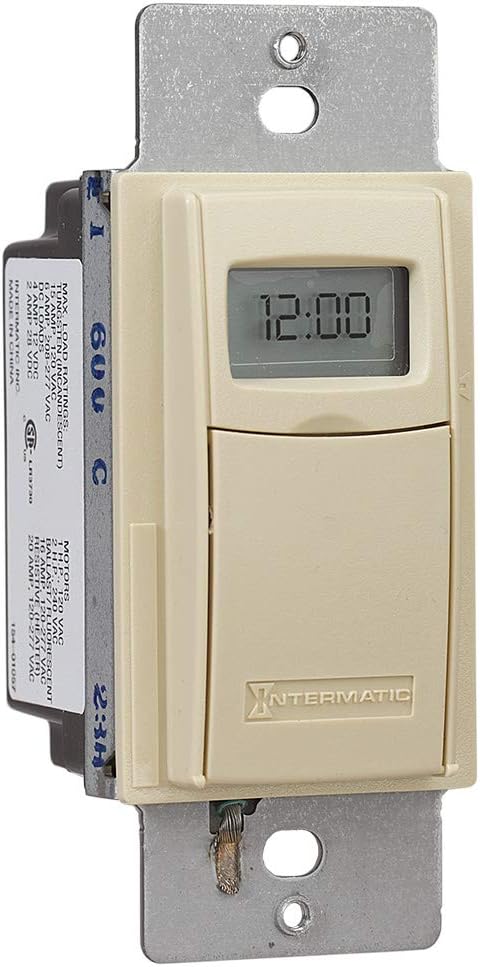

4. Fametrahana sy fametrahana
The Intermatic EI400C timer is designed for easy installation, compatible with single-pole or 3-way switch configurations and does not require a neutral wire connection.
4.1 Dingana mialoha ny fametrahana
- Vonoy ny hery: Locate the circuit breaker or fuse that controls the switch you are replacing and turn off the power. Verify power is off using a voltage tester.
- Esory ny Switch efa misy: Esory tsara ny takelaka rindrina ary esory amin'ny boaty rindrina ny switch efa misy. Esory amin'ny switch taloha ny tariby.
4.2 Torolàlana tariby
The EI400C timer is compatible with both single-pole and 3-way switch setups. Refer to the diagram provided with your product for specific wiring configurations. Generally, the timer will have two load wires and a ground wire. For 3-way applications, one of the traveler wires from the existing 3-way switch will be connected to the timer.
- Connect the timer's wires to the corresponding house wires using wire nuts.
- Ataovy azo antoka fa mafy sy azo antoka ny fifandraisana rehetra.
- The EI400C does not require a neutral wire, simplifying installation in older homes.
4.3 Mounting and Finalizing Installation
- Carefully push the wired timer into the wall box.
- Secure the timer to the wall box with the provided screws.
- Attach the decorative wall plate.
- Ampodio hery: Avereno ny herinaratra amin'ny fiatoana.
4.4 Fametrahana bateria
The timer comes with a replaceable CR2 lithium battery, which powers the internal clock and settings memory. The battery is typically pre-installed or needs to be inserted upon initial setup.
- Open the small front cover of the timer to access the battery compartment.
- Insert the CR2 lithium battery, observing the correct polarity.
- Akatona tsara ny saron'ny efitrefitra bateria.
5. Torolàlana miasa
The EI400C timer offers simple, push-button operation for setting countdown durations from 1 second to 24 hours.
5.1 Setting a Countdown Time
- Fanaraha-maso fidirana: Gently open the front cover of the timer to reveal the control buttons.
- Ahitsio ny fotoana: Ampiasao ny + SY - buttons to set the desired countdown duration. The display will show the selected time.
- Fameram-potoana fanombohana: Tsindrio ny On/off button to activate the timer. The connected load will turn on, and the timer will begin counting down.
5.2 Turning Off Before Countdown Ends
If you wish to turn off the connected load before the set countdown time expires, simply press the On/off button again. This will immediately turn off the load and reset the timer.
5.3 Fiatoana fiatoana
Tsindrio ny Miato button to temporarily halt the countdown. The connected load will remain on. Press Miato hamerina indray ny fanisana.
5.4 Lockable Settings
The timer features lockable settings to prevent unintended changes to the program. Refer to the detailed instructions included in the product packaging for how to activate and deactivate this feature.
5.5 Visual/Audible Warnings
The EI400C can be configured to provide a visual or audible warning before the timer turns off. Consult the full product manual for steps on enabling and customizing these warning options.
5.6 Instructional Video
Clip 1: An official Intermatic video providing an overview of their in-wall timers, including the EI400 series. This video demonstrates general features and benefits of Intermatic in-wall timers, which are applicable to the EI400C model.
6. Fikojakojana
The Intermatic EI400C timer requires minimal maintenance, primarily focusing on battery replacement.
6.1 Fanoloana bateria
The internal CR2 lithium battery provides power for the timer's memory and display, typically lasting up to three years. When the battery is low, a 'LoBatt' indicator may appear on the display.
- Open the front cover of the timer.
- Carefully remove the old CR2 battery from its compartment.
- Insert a new CR2 lithium battery, ensuring correct polarity.
- Akatona tsara ny fonony.
Fanamarihana: Some users have reported that the battery compartment cover can be difficult to open or may not stay securely closed after multiple battery changes. Exercise care when opening and closing the compartment. If the cover does not stay closed, ensure the battery makes proper contact.
7. Famahana olana
This section addresses common issues you might encounter with your Intermatic EI400C timer.
| OLANA | Antony mety hitranga | vahaolana |
|---|---|---|
| Timer display is blank or shows 'LoBatt' | Low or dead CR2 battery, or poor battery contact. | Replace the CR2 lithium battery. Ensure the battery is inserted correctly and the compartment cover is securely closed to maintain contact. |
| Timer shows 'NoOP' error | Indicates a problem with battery contact or internal operation. | Check and re-seat the CR2 battery. If the issue persists, the unit may require replacement. |
| Connected load does not turn on/off | No power to the timer, incorrect wiring, or faulty load. | Verify power at the circuit breaker. Double-check wiring connections according to the installation instructions. Test the connected load (e.g., light bulb) with a different switch or power source. |
| Difficulty opening battery compartment cover | Tight fit or worn plastic tabs. | Use a small, flat-head screwdriver to gently pry open the cover. Be careful not to damage the plastic tabs. |
| Timer does not hold settings after power outage | Dead or missing CR2 battery. | The CR2 battery maintains settings during power outages. Ensure it is installed and functional. |
8. Famaritana
| endri-javatra | antsipirihany |
|---|---|
| Laharana modely | EI400C |
| Marika | Intermatic |
| loko | Ivory |
| KEVITRA | plastika |
| BOKYtage | 120-277 VAC |
| Enta-mavesatra ambony indrindra | 20 Amps |
| Fameram-potoana | 1 Second to 24 Hours |
| Karazana Switch | Andry tokana na lalana 3 |
| Karazana fametrahana | Standard Wall Box, Rectangular Decorator Wall Plate |
| Ilaina ny bateria | 1 CR2 Lithium (included) |
| Fiainana bateria | Hatramin'ny 3 taona |
| lafiny | 4.13 x 1.75 x 1.2 santimetatra |
| Lanja entana | 6 ounces (0.38 kilao) |
| Certification | CSA Certified |
| UPC | 078275101371 |
9. Warranty & Fanohanana
9.1 Fampahalalana momba ny fiantohana
The Intermatic EI400C Electronic Countdown In-Wall Timer comes with a Garantie voafetra 5 taona. Ity fiantohana ity dia manarona ny lesoka amin'ny fitaovana sy ny asa amin'ny fampiasana mahazatra. Azafady, tehirizo ny porofon'ny fividiananao ho an'ny fitakiana fiantohana.
9.2 Fanohanana ny mpanjifa
For technical assistance, troubleshooting beyond this manual, or warranty inquiries, please contact Intermatic customer support. Refer to the official Intermatic webtranonkala na ny fonosan'ny vokatra raha mila ny fampahalalana farany indrindra momba ny fifandraisana.
Loharano an-tserasera: Tsidiho ny Intermatic Store on Amazon ho fampahalalana fanampiny momba ny vokatra sy loharano.


