Sava lalana
Misaotra anao nividyasing the KLH AUDIO KL-300i Nostalgia 5-n-1 System. This integrated audio system combines classic and modern audio playback capabilities, including a turntable, CD player, cassette player, AM/FM radio, and an iPod dock. This manual provides essential information for setting up, operating, and maintaining your system to ensure optimal performance and longevity.
Information momba ny fiarovana
Please read all safety instructions carefully before operating this product. Keep this manual for future reference.
- Loharano herinaratra: Ampifandraiso amin'ny fantson-jiro AC manana ny volta voafaritra ihany ny fitaovana.tage.
- rivotra: Ataovy azo antoka fa ampy ny rivotra. Aza sakanana ny fisokafan'ny rivotra.
- Rano sy hamandoana: Aza atao amin'ny orana na ny hamandoana ilay fitaovana. Aza asiana zavatra feno ranon-javatra, toy ny vazy, eo amin'ilay fitaovana.
- hafanana: Aza apetraka eo akaikin'ny loharanon'ny hafanana toy ny radiatera, rejistra hafanana, fatana, na fitaovana hafa ny fitaovana (anisan'izany amplifiers) izay mamokatra hafanana.
- Fanadiovana: Esory amin'ny fivoahan'ny rindrina ny fitaovana alohan'ny hanadiovana azy. Mampiasà lamba maina ihany.
- Serivisy: Aza manandrana manompo an'ity vokatra ity ny tenanao. Ampidiro amin'ireo mpiasan'ny serivisy mahay ny fanompoana rehetra.
Fonosana fonosana
Hamarino fa ny entana rehetra voatanisa etsy ambany dia tafiditra ao anaty fonosana:
- KLH AUDIO KL-300i Main Unit
- Fanaraha-maso lavitra
- Cable Input Auxiliary
- AM/FM Antenna Wire
- Boky torolàlana (torolàlana ity)
Vita ny vokatraview
Familiarize yourself with the various components and controls of your KLH AUDIO KL-300i system.
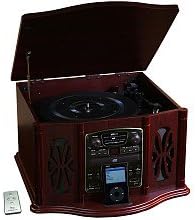
This image displays the KLH AUDIO KL-300i Nostalgia 5-n-1 System. The unit features a dark wood finish. The top lid is open, revealing a turntable. Below the turntable, the front panel includes controls for the CD player, AM/FM radio tuner, and an iPod dock. A small remote control is visible to the left of the main unit.
Fanaraha-maso ny tontonana anoloana:
- Bokotra hery: Mamelona na mamono ny fitaovana.
- Mpifidy asa: Switches between Phono, CD, Radio, iPod, and Aux modes.
- Knob feo: Manitsy ny haavon'ny horonam-peo master.
- CD Player Controls: Play/Pause, Stop, Skip forward/backward.
- Radio Tuner: AM/FM band selector, Tuning knob.
- Dock iPod: Connector for iPod devices.
- Aux-In Jack: Fidirana 3.5mm ho an'ny fitaovana audio ivelany.
- Jack finday: Output 3.5mm ho an'ny fihainoana manokana.
Top Panel:
- Fihodinana: For playing vinyl records.
- Sarony: Protects the turntable when not in use.
sisiny tontonana:
- Deck kasety: For playing audio cassette tapes.
Hametraka
Follow these steps for initial setup of your audio system.
- Fametrahana: Place the unit on a stable, flat surface away from direct sunlight, heat sources, and excessive dust or moisture. Ensure there is adequate space around the unit for ventilation.
- Mampifandray ny Antenne: For optimal AM/FM radio reception, connect the supplied antenna wire to the antenna terminal on the rear of the unit. Extend the wire fully for better reception.
- Fampifandraisana herinaratra: Ampidiro amin'ny fivoahana rindrina mahazatra ny tadin-jiro AC.
- Herin'ny voalohany: Press the Power button on the front panel to turn on the unit.
Torolàlana miasa
Hetsika ankapobeny:
- Herim-batana / maty: Tsindrio ny bokotra Hery hamelomana na hamono ilay fitaovana.
- Fifidianana asa: Use the Function Selector knob or buttons to choose your desired audio source (Phono, CD, Radio, iPod, Aux).
- Fanitsiana volume: Rotate the Volume knob to increase or decrease the sound level.
Fihetseham-pihodinana:
- Lift the lid of the unit.
- Asio firaketana vinyl eo amin'ny vilia turntable.
- Select the appropriate speed (33 1/3, 45, or 78 RPM) using the speed selector switch. For 45 RPM records, place the included adapter on the spindle if needed.
- Gently lift the tonearm and position the stylus over the desired starting groove of the record.
- Lower the tonearm slowly onto the record. Playback will begin automatically.
- To stop playback, gently lift the tonearm and return it to its rest.
Fampiasana CD Player:
- Press the Function Selector to CD mode.
- Press the Eject button to open the CD tray.
- Apetraho ao anaty lovia ny CD iray miaraka amin'ny lafiny etikety izay miatrika miakatra.
- Press the Eject button again to close the tray. The CD will begin playing automatically or display the track count.
- Use the Play/Pause, Stop, and Skip buttons to control playback.
Cassette Player Operation:
- Insert a cassette tape into the cassette slot on the side of the unit.
- Tsindrio ny bokotra Play raha hanomboka playback.
- Use the Fast Forward (FF) button to advance the tape quickly.
- To stop playback, press the Stop/Eject button. Pressing it halfway will eject the tape.
Radio AM/FM:
- Press the Function Selector to Radio mode.
- Select either AM or FM band using the band selector switch.
- Rotate the Tuning knob to search for radio stations.
- Adjust the antenna wire for best reception.
iPod Dock Operation:
- Press the Function Selector to iPod mode.
- Carefully place your compatible iPod device onto the iPod dock connector.
- Use your iPod's controls to select and play music. Audio will be routed through the KLH AUDIO system's speakers.
Aux-In Operation:
- Press the Function Selector to Aux mode.
- Connect an external audio device (e.g., MP3 player, smartphone) to the Aux-In jack on the front panel using the supplied 3.5mm auxiliary cable.
- Play audio from your external device. The sound will be played through the KLH AUDIO system's speakers.
Fampiasana fanaraha-maso lavitra:
The remote control primarily operates the CD player functions (Play, Pause, Stop, Skip). Note that the remote cannot turn the unit on or off.
fikarakarana
Proper care will ensure the longevity of your system.
- Fanadiovana ny Unit: Fafao amin'ny lamba malefaka sy maina ny ivelany amin'ilay fitaovana. Aza mampiasa mpanadio mikikisana, savoka, na solvent.
- Stylus Care: Handle the turntable stylus with extreme care. Clean the stylus periodically with a soft brush, brushing from back to front.
- Fikarakarana CD/Kasety: Keep CDs and cassette tapes clean and free of dust. Store them in their cases when not in use.
Fanamboarana
If you experience issues with your system, refer to the following common problems and solutions.
| OLANA | Antony mety hitranga | vahaolana |
|---|---|---|
| Tsisy Hery | Tsy voasakana tsara ny tady herinaratra. | Check power cord connection to unit and wall outlet. |
| Tsy misy feo | Ambany loatra ny volume; Asa tsy mety nofantenana; Headphone mifandray. | Increase volume; Select correct function; Disconnect headphones. |
| Turntable tsy mihodina | Unit not powered on; Belt dislodged. | Ensure unit is on; Contact service if belt issue suspected. |
| Ratsy fandraisana Radio | Tsy mivelatra na tsy napetraka tsara ny antenne. | Extend and adjust the antenna wire for better signal. |
| CD tsy mandeha | CD inserted incorrectly; CD is scratched or dirty. | Ensure CD is label-side up; Clean or replace CD. |
fepetra arahana
| endri-javatra | famaritana |
|---|---|
| Loharanon-kery | AC 120V ~ 60Hz |
| refy (W x D x H) | Approx. 17" x 17" x 10.5" (43.2 cm x 43.2 cm x 26.7 cm) |
| Hafainganam-pandeha mihodinkodina | 33 1/3, 45, 78 RPM |
| Haavo matetika amin'ny radio | AM: 530-1710 kHz, FM: 88-108 MHz |
| CD Compatibility | CD, CD-R / RW |
| iPod Dock | Compatible with older generation iPods (30-pin connector) |
Warranty sy fanohanana
This product is covered by a limited manufacturer's warranty. For specific warranty terms and conditions, please refer to the warranty card included with your purchase or contact KLH customer support. If you require technical assistance or have questions not covered in this manual, please contact KLH customer service through their official webtranonkala na ny fampahalalana momba ny fifandraisana nomena miaraka amin'ny vokatrao.


