1. Fampidirana
This manual provides instructions for the safe and efficient use of your Oster Classic Series 16-Speed Blender, Model 006812-001-000. This appliance is designed for various kitchen tasks, including blending, chopping, and pureeing. Please read all instructions carefully before initial use and retain this manual for future reference.
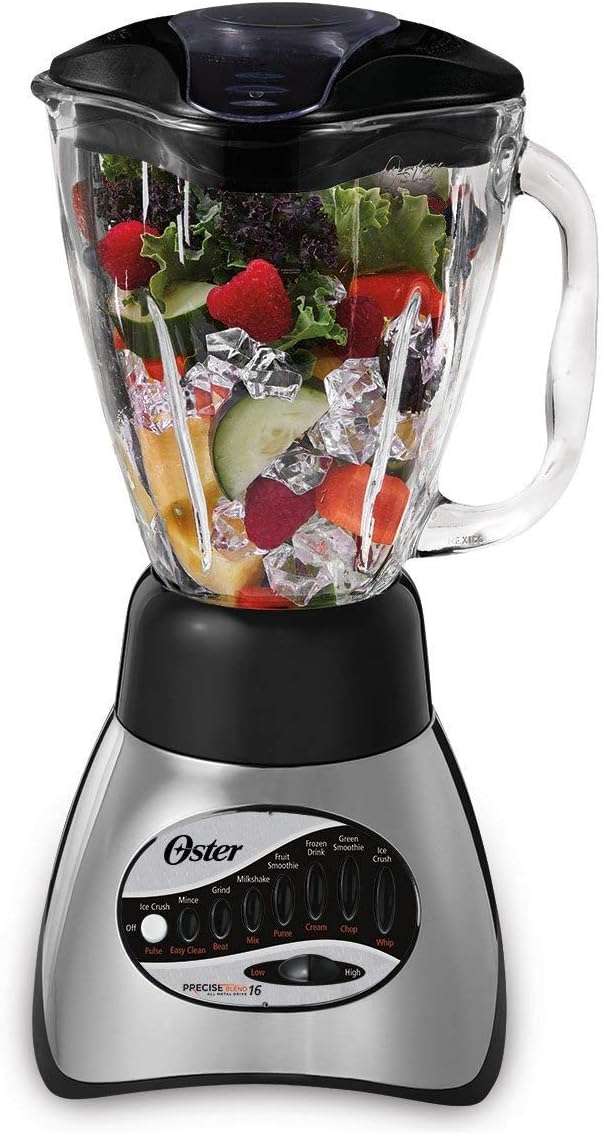
Figure 1: Oster Classic Series 16-Speed Blender with a 5-cup glass jar filled with fruits and vegetables, ready for blending.
2. Torolàlana manan-danja momba ny fiarovana
Rehefa mampiasa fitaovana elektrika dia tokony harahina hatrany ny fepetra fiarovana fototra mba hampihenana ny mety hisian'ny afo, fahatafintohinana herinaratra ary/na ratra amin'ny olona, anisan'izany ireto manaraka ireto:
- Vakio ny toromarika rehetra alohan'ny hampiasana ny blender.
- Mba hiarovana amin'ny fahatafintohinana elektrika, aza atsoboka ao anaty rano na rano hafa ny tady, ny plugs na ny fitaovana.
- Ilaina ny fanaraha-maso akaiky rehefa misy fitaovana ampiasain'ny ankizy na eo akaikiny.
- Esory amin'ny fivoahana rehefa tsy ampiasaina, alohan'ny hametrahana na hanala ny kojakoja, ary alohan'ny hanadiovana.
- Aza mifandray amin'ny kojakoja mihetsika.
- Aza mampiasa fitaovana amin'ny tady na plug simba na taorian'ny tsy fahombiazan'ny fitaovana na nilatsaka na simba tamin'ny fomba rehetra.
- Mety hiteraka afo, fahatafintohinana elektrika, na ratra ny fampiasana fitaovana fametahana tsy aroso na amidin'ny mpanamboatra.
- Aza mampiasa any ivelany.
- Aza avela hihantona eo amin'ny sisin'ny latabatra na ny kaontera ny tady na hikasika ireo faritra mafana.
- Arovy ao anaty fitoeran-javatra ny tanana sy ny fitaovana rehefa mifangaro mba hisorohana ny mety hisian'ny ratra mafy amin'ny olona na ny fahasimban'ny blender. Azo ampiasaina ny scraper fa rehefa tsy mandeha ny blender.
- Maranitra ny lelany. Tandremo amim-pitandremana.
- Ampiasao foana ny blender miaraka amin'ny sarony.
- When blending hot liquids, use caution; do not fill the jar to its maximum capacity.
- Ity fitaovana ity dia natao ho an'ny fampiasana an-trano ihany.
3. Fametrahana sy Fivoriambe
Before first use, wash the blending jar, lid, and blade assembly in warm, soapy water. Rinse thoroughly and dry.
- Place the Sealing Gasket: Position the sealing gasket onto the blade assembly. Ensure it is seated correctly to prevent leaks.
- Attach Blade Assembly to Jar: Insert the blade assembly through the opening at the bottom of the glass jar.
- Secure the Bottom Cap: Screw the bottom cap onto the jar, twisting clockwise until it is securely tightened.
- Place Jar on Motor Base: Invert the assembled jar and place it onto the motor base. Ensure the jar is seated firmly and correctly aligned with the base.
- Ampio akora: Place your desired ingredients into the glass jar. Do not overfill.
- Arovy ny sarony: Place the lid firmly onto the glass jar. Ensure the filler cap is also in place.
- Hery mampifandray: Plug the blender into a standard 120-volt electrical outlet.

Figure 2: The Oster blender highlighting its Crush Pro 4" blade and ice crushing capabilities, essential for effective blending.
4. Torolàlana miasa
Your Oster Classic Series Blender features 16 speeds for versatile blending tasks.
4.1 Fifantenana hafainganam-pandeha
The control panel offers various speed settings and functions. Select the appropriate speed based on the ingredients and desired consistency.
- eny; Mamono ny "blender".
- PULSE: Provides short bursts of power for controlled chopping or mixing. Release the button to stop.
- AMBANY/AVO: Continuous blending at low or high speeds.
- Asa manokana: Buttons such as Ice Crush, Mince, Grind, Milkshake, Fruit Smoothie, Frozen Drink, Green Smoothie, Mix, Puree, Cream, Chop, Whip are pre-programmed settings for common tasks.
4.2 Torohevitra fampifangaroana
- Always add liquids first when blending.
- Cut solid ingredients into small pieces (approximately 1-inch cubes) for optimal blending.
- Do not overload the blender. If the motor strains, reduce the amount of ingredients or add more liquid.
- For thick mixtures, use the PULSE function to help move ingredients around.
- When blending hot liquids, remove the filler cap from the lid to allow steam to escape and start with a low speed. Hold the lid firmly.
- The 700-watt motor and stainless steel blade are designed to crush ice cubes efficiently for smooth results.
5. Fikarakarana sy fikojakojana
Proper care ensures the longevity and performance of your blender. Always unplug the blender before cleaning.
5.1 Cleaning the Blending Jar and Lid
- The 5-cup Boroclass glass blending jar is dishwasher safe. It can also be washed by hand with warm, soapy water.
- The lid and filler cap are also dishwasher safe (top rack) or can be hand-washed.
- For quick cleaning, add 2 cups of warm water and a drop of dish soap to the jar, secure the lid, and run on a low speed for 30 seconds. Rinse thoroughly.
- Handle the stainless steel blade assembly with care as the blades are sharp.
5.2 Cleaning the Motor Base
- Fafao amin'ny doka ny fototry ny moteraamp lamba. Aza atsoboka ao anaty rano na ranon-javatra hafa ny fototry ny maotera.
- Aza mampiasa mpanadio abrasive na pads scoring, fa mety hanosihosy ny tany.
6. Famahana olana
If your blender experiences issues, refer to the following common problems and solutions.
| OLANA | Antony mety hitranga | vahaolana |
|---|---|---|
| Tsy manomboka ny blender. | Not plugged in; power outlet not active; jar not correctly seated. | Ensure the blender is securely plugged into a working outlet. Check that the jar is properly assembled and seated on the motor base. |
| Motor stalls or struggles. | Overloaded with ingredients; ingredients are too large or too solid; insufficient liquid. | Reduce the amount of ingredients. Cut solid items into smaller pieces. Add more liquid. Use the PULSE function to break up contents. |
| Mitete avy any amin'ny faran'ny siny. | Blade assembly not tightened; gasket not properly seated or damaged. | Ensure the bottom cap is securely tightened. Check the sealing gasket for proper placement and any signs of damage. Replace if necessary. |
| Ny akora tsy mifangaro tsara. | Not enough liquid; ingredients stuck; incorrect speed setting. | Add more liquid. Use the PULSE function or stop the blender and stir ingredients with a non-metallic utensil. Select a higher speed setting. |
7. Product Specifications
- marika: Oster
- Modely: 006812-001-000
- loko: Black (Brushed Nickel finish on base)
- Hery: 700 Watts
- Isan'ny hafainganam-pandeha: 16
- Fahavitan'ny siny: 5-Cup (1.2 Liters)
- Fitaovana siny: Boroclass Glass (Dishwasher Safe, Shatterproof)
- Blade fitaovana: Inôksa
- Rafitra fiara: All-Metal Drive
- Haben'ny vokatra: 9" D x 8" W x 14.25" H
- Lanja entana: 6.2 kg
- BOKYtage: 120 Volts
- Karazana fitaovana maimaim-poana: BPA maimaim-poana
- Anisan'ny singa: One Blender Base, One Blender Jar, One Blender Lid
- UPC: 034264415652

Figure 3: Illustration of the Duralast All Metal Drive system, emphasizing its durability and 10-year warranty on the metal drive components.
8. Warranty sy fanohanana
Your Oster Classic Series 16-Speed Blender comes with a limited warranty.
- All-Metal Drive Warranty: The All-Metal Drive system is backed by a 10-year limited warranty, ensuring long-lasting durability.
- Garantie ankapobeny: Refer to the official user guide for complete warranty details and terms.
Raha mila fanampiana fanampiny, fisoratana anarana vokatra, na ny view the full user guide, please visit the official Oster webtranokala na jereo ny antontan-taratasy nomena.


