1. Fampidirana
This manual provides comprehensive instructions for the setup, operation, maintenance, and troubleshooting of your COBY CR-A78 AM/FM Digital Alarm Clock with Time Projector. Please read this manual thoroughly before using the device to ensure proper function and to maximize your user experience. Keep this manual for future reference.
2. Vokatra mihoatraview
The COBY CR-A78 is a versatile digital alarm clock featuring an AM/FM radio tuner and a unique time projection function. It is designed to provide reliable timekeeping, alarm functions, and radio entertainment, with the added convenience of projecting the current time onto a wall or ceiling.
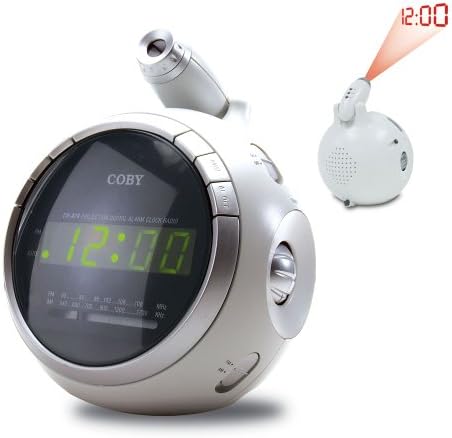
Sary 2.1: anoloana view of the COBY CR-A78 digital alarm clock, showing the green LED display and the adjustable time projector. An inset image illustrates the time '12:00' being projected onto a surface.
3. endri-javatra
- AM/FM Digital Tuner: Mba hihainoana ireo onjam-peo tianao indrindra.
- Large Green LED Display: Provides clear visibility of the time.
- Integrated Time Projector: Projects the current time onto a wall or ceiling for easy viewing.
- Fampiasa fanairana roa: Set two independent alarms for different wake-up times.
- Fampiasana Snooze: Allows for a temporary pause of the alarm.
- Timer matory: Fall asleep to music with an automatic shut-off feature.
- Backup bateria: Mitazona ny fikirana ora sy fanairana mandritra ny famonoana herinaratratages (requires 9V battery, not included).
4. Ny votoatin'ny fonosana
- COBY CR-A78 AM/FM Digital Alarm Clock
- AC Power Adapter
- User Manual (ity antontan-taratasy ity)
5. Fametrahana
5.1. Fampifandraisana herinaratra
- Insert the small end of the AC power adapter into the DC IN jack located on the back of the unit.
- Plug the other end of the AC power adapter into a standard wall outlet (AC 120V, 60Hz).
- The unit will power on, and the display will flash, indicating it is ready for time setting.
5.2. Fametrahana Backup Battery
A 9-volt battery (not included) can be installed to provide backup power for the clock and alarm settings during a power interruption.
- Tadiavo ny fonon'ny fitoeran-bateria eo amin'ny farany ambanin'ny fitaovana.
- Remove the cover by sliding it off.
- Connect a 9-volt battery to the battery connector inside the compartment, observing polarity (+ and -).
- Place the battery into the compartment and replace the cover securely.
6. Torolàlana miasa
6.1. Fametrahana ny fotoana
- Tsindrio ary hazòny ny FOMBA FIASA bokotra mandra-pahatongan'ny isa ora manomboka mamiratra.
- Tsindrio ny HOUR button repeatedly to adjust the hour. Observe the PM indicator for correct AM/PM setting.
- Tsindrio ny MINUTE button repeatedly to adjust the minute.
- Tsindrio ny FOMBA FIASA bokotra indray hanamafisana sy hialana amin'ny fomba fametrahan'ny fotoana.
6.2. Fametrahana ny fanairana
The CR-A78 features two independent alarms, Alarm 1 and Alarm 2.
- Tsindrio ary hazòny ny Fanairana 1 SET (na Fanairana 2 SET) mandra-pirehitra ny isa famantarana ny ora fanairana.
- Tsindrio ny HOUR bokotra hametrahana ny ora fanairana tianao.
- Tsindrio ny MINUTE bokotra hametrahana ny minitra fanairana tiana.
- Tsindrio ny Fanairana 1 SET (na Fanairana 2 SET) button again to confirm the alarm time.
- Mba hampavitrika ny fanairana, dia sòsiho ny ALARM 1 ON/OFF (na ALARM 2 ON/OFF) switch to the 'ON' position. Select 'BUZZER' for a beeping alarm or 'RADIO' to wake to the radio.
6.3. Using the Snooze Function
Rehefa maneno ny fanairana, tsindrio ny SNOOZE button. The alarm will temporarily stop and sound again after approximately 9 minutes. To turn off the alarm completely, press the ALARM ON / OFF switch to 'OFF'.
6.4. Radio Operation (AM/FM)
- Tsindrio ny RADIO ON/OFF bokotra hampandeha ny radio.
- Alefaso ny AM/FM switch to select the desired band.
- Rotate ny Tuning knob to find your desired station.
- Ahitsio ny feo amin'ny fampiasana ny BOKY FAHA- bokotra.
- Raha hamono ny radio dia tsindrio ny RADIO ON/OFF bokotra indray.
6.5. Using the Time Projector
- Locate the projector lens on top of the unit.
- Tsindrio ny PROJECTOR ON/OFF button to activate the time projection.
- Ahodino ny family ny projecteur mba hanitsiana ny fifantohan'ny fotoana aseho.
- Adjust the angle of the projector arm to direct the time onto your desired surface (wall or ceiling).
- Tsindrio ny PROJECTOR ON/OFF button again to turn off the projection.
7. Fikojakojana
- Fanadiovana: Mampiasà lamba malefaka sy maina hanadiovana ny ivelany amin'ilay fitaovana. Aza mampiasa mpanadio na solvents mikikisana.
- Fikarakarana Lens: Gently wipe the projector lens with a soft, lint-free cloth if it becomes dusty.
- Fametrahana: Apetraho eo amin'ny toerana milamina sy fisaka ny fitaovana, lavitry ny tara-masoandro mivantana, ny hafanana ary ny hamandoana be loatra.
- Fanoloana bateria: Replace the 9-volt backup battery annually or if the unit experiences frequent power outages to ensure continuous backup functionality.
8. Famahana olana
| OLANA | Antony mety hitranga | vahaolana |
|---|---|---|
| Tsy mandeha ny unit. | Tsy mifandray tsara ny adaptatera AC. | Ensure the AC adapter is securely plugged into the unit and a working wall outlet. |
| Tsy maneno ny fanairana. | Tsy mandeha na tsy mety ny fametrahana ny fanairana. | Verify the alarm time is set correctly and the ALARM ON/OFF switch is in the 'ON' position (BUZZER or RADIO). |
| Ratsy ny fandraisana radio. | Antenna not extended or unit too close to interference. | Extend the FM wire antenna fully. For AM, rotate the unit for best reception. Move away from other electronic devices. |
| Projected time is blurry. | Projector focus not adjusted. | Rotate the projector lens to adjust the focus until the time is clear. |
| Very ny fotoana/setrana taorian'ny hery outage. | Maty na tsy napetraka ny bateria fanampiny. | Install a fresh 9-volt battery or replace the existing one. |
9. Famaritana
| endri-javatra | famaritana |
|---|---|
| Marika | Coby |
| MODELY | CR-A78 |
| Karazana fampisehoana | LED nomerika (maitso) |
| Radio Tuner | AM/FM Analog |
| Loharanon-kery | AC 120V, 60Hz |
| Battery Backup | 1 x 9V bateria (tsy tafiditra) |
| Haben'ny vokatra (L x W x H) | 12.7 x 10.16 x 15.24 sm (5 x 4 x 6 santimetatra) |
| Lanja vokatra | 567 g (1.25 lbs) |
| loko | Silver |
10. Warranty sy fanohanana
For warranty information or technical support, please refer to the documentation provided at the time of purchase or contact Coby customer service. Keep your purchase receipt as proof of purchase for any warranty claims.


