Sava lalana
This manual provides comprehensive instructions for the setup, operation, and maintenance of your Coby CT-P9040 5.8 GHz Analog Cordless Phone. Please read this manual thoroughly before using your phone to ensure proper functionality and to prevent damage.
Ny votoatin'ny fonosana sy ny singa
Alohan'ny hanombohanao dia ataovy izay hahazoana antoka fa misy ny singa rehetra ao anaty fonosana:
- Handset tsy misy tariby
- Sampana fototra
- AC Power Adapter
- Tady an-telefaonina
- Battery Pack azo averina
- User Manual (ity antontan-taratasy ity)
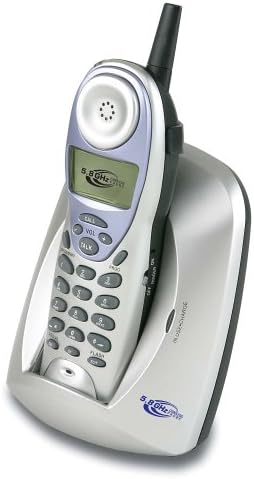
Image: The Coby CT-P9040 cordless phone, showing the handset docked in its silver base unit. The handset features a display screen, numeric keypad, and function buttons. The base unit has a charging cradle for the handset.
Setup Guide
1. Fametrahana bateria
- Tadiavo ny toerana misy ny bateria ao ambadiky ny finday.
- Sokafy ny fonon'ny batterie.
- Ampifandraiso amin'ny jack ao anatin'ny efi-trano ny connecteur batterie azo averina.
- Place the battery pack into the compartment and close the cover securely.
2. Fifandraisana vondrona fototra
- Connect one end of the telephone line cord to the "LINE" jack on the back of the base unit.
- Ampifandraiso amin'ny jack telefaonina mahazatra eo amin'ny rindrina ny ilany ilany amin'ny tariby telefaonina.
- Connect the AC power adapter to the "DC IN" jack on the back of the base unit.
- Ampidiro amin'ny fivoahana herinaratra mahazatra ny adaptatera herinaratra AC.
3. Fametrahana voalohany
Place the handset in the base unit's charging cradle. Ensure the "IN CHARGE" indicator light on the base unit illuminates, indicating proper charging. For optimal battery performance, charge the handset for at least 12-14 hours before initial use.
Torolàlana miasa
Fiantsoana
- Pick up the handset from the base unit or press the LAHATENY bokotra.
- Henoy ny feon'ny antso.
- Antsoy ny laharan-telefaona tianao.
- Mba hamarana ny antso dia tsindrio ny LAHATENY button again or place the handset back in the base unit.
Mamaly Antso
Rehefa maneno ny telefaonina dia raiso ny finday na tsindrio ny LAHATENY bokotra hamaly ny antso.
Famerenana antso
Raha hiantso indray ny laharana farany nantsoina, tsindrio ny REDIAL bokotra eo amin'ny handset.
Fanitsiana ny volume
Mandritra ny antso dia ampiasao ny VOL+ SY BOKY - buttons on the handset to adjust the earpiece volume.
Flash Function
Tsindrio ny Flash button to use call waiting or transfer calls if supported by your telephone service provider.
Storing Phone Numbers (Speed Dial)
Your phone can store up to 10 numbers for frequently called contacts. Refer to the detailed instructions in the full manual for programming speed dial entries.
Fikojakojana sy fikarakarana
- Arovy ny telefaona amin'ny loharano mafana, ny tara-masoandro mivantana ary ny hamandoana.
- Clean the phone's surfaces with a soft, damp lamba. Aza mampiasa mpanadio abrasive na solvents.
- Ensure the charging contacts on the handset and base unit are clean to maintain proper charging.
- If the phone will not be used for an extended period, remove the battery from the handset.
Fanamboarana
| OLANA | Antony mety hitranga | vahaolana |
|---|---|---|
| Tsy misy feo dial | Tapaka ny tadin-telefaonina. | Ataovy azo antoka fa mifandray tsara amin'ny fitaovana fototra sy ny jack rindrina ny tariby telefaonina. |
| Handset tsy mi-charge | Handset not properly seated in cradle or dirty charging contacts. | Reseat the handset in the base unit. Clean the charging contacts on both the handset and base unit with a dry cloth. |
| Kalitao feo ratsy / Statika | Interference from other electronic devices or out of range. | Move the base unit away from other electronic devices (e.g., microwaves, Wi-Fi routers). Move closer to the base unit. |
| Tsy afaka manao/mandray antso | Power adapter disconnected or battery low. | Check if the AC power adapter is securely plugged in. Ensure the handset battery is fully charged. |
fepetra arahana
- Modely: CT-P9040 SVR
- Frequency: 5.8 GHz Analog
- fantsona: 40 Channel Auto Scan
- fahatsiarovana: 10-number speed dial storage
- Asa: Flash, Redial, Pause, Tone/Pulse Switch
- Headset Jack: Built-in 2.5mm
- Mametraka: Desk and Wall Mountable
- refy (L x W x H): 5 x 8 x 4 santimetatra
- Lanja: 1.8 kg
- loko: Silver
- ID mpiantso: Tsy tohanana
- Multiline Operation: Hetsika tokana andalana
Warranty sy fanohanana
For warranty information and technical support, please refer to the warranty card included with your product or visit the official Coby website. Tehirizo ny tapakila fividiananao ho porofon'ny fividianana ho an'ny fitakiana fiantohana.
For further assistance, you may contact Coby customer service. Contact details are typically available on the manufacturer's webtoerana na ao amin'ny fonosana vokatra.


