Sava lalana
This manual provides detailed instructions for the setup, operation, and maintenance of your Audiovox CE-122 Personal CD Player with Car Kit. Please read this manual thoroughly before using your device to ensure proper functionality and to maximize your listening experience.
The Audiovox CE-122 is a portable CD player designed for versatile use, featuring a Digital Anti-Shock System (DASS) for uninterrupted playback during movement, a 22-track programmable memory, and a bass boost function. It includes a complete car kit for in-vehicle use.
Fonosana fonosana
Hamarino fa ny entana rehetra voatanisa etsy ambany dia tafiditra ao anatin'ny fonosanao:
- Audiovox CE-122 Portable CD Player
- écouteur
- AC Adapter
- Adapter fiara
- Adapter kasety
- Torolàlana ho an'ny mpampiasa (ity antontan-taratasy ity)
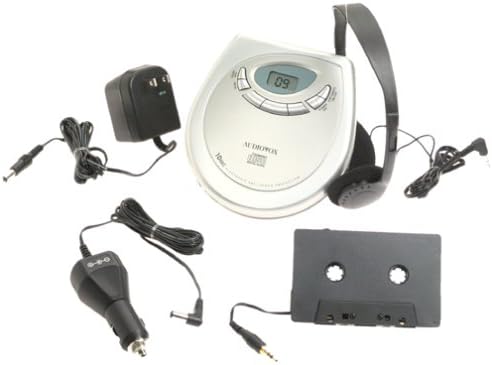
Sary: The Audiovox CE-122 portable CD player shown with all its accessories, including headphones, AC adapter, car adapter, and cassette adapter.
Endriky ny vokatra
- Plays audio CD and CD-R/RW discs.
- AC/DC operation for home and portable use.
- Complete car kit included for in-vehicle audio.
- Digital Anti-Shock System (DASS) provides up to 20 seconds of skip protection.
- 22-track programmable memory for custom playback sequences.
- Bass boost feature for enhanced audio.
- Forward and reverse search functions.
- Repeat and pause functions.
- Key hold switch to prevent accidental button presses.
- Line out jack for connecting to external audio systems.
- Auto power off function to conserve battery life.
- Dual stereo headphone jack for shared listening.
- Built-in charger for rechargeable batteries (rechargeable batteries not included).
Hametraka
1. Fampidirana Batterie
The CD player operates on 4 AA batteries (included). For rechargeable batteries (not included), ensure they are inserted correctly for charging.
- Sokafy ny fonon'ny efitrefitra bateria hita eo amin'ny farany ambany amin'ilay fitaovana.
- Insert 4 AA batteries, observing the correct polarity (+/-) as indicated inside the compartment.
- Akatona tsara ny saron'ny efitrefitra bateria.
2. Connecting Power (AC Adapter)
For home use or to charge rechargeable batteries:
- Plug the small end of the AC adapter into the DC IN 4.5V jack on the CD player.
- Ampidiro amin'ny fivoahan'ny rindrina mahazatra ny tendrony hafa amin'ny adaptatera AC.
- If using rechargeable batteries, select the 'charge' function (if available on your model) to begin charging.
3. Mampifandray écouteur
Plug the headphones into one of the two headphone jacks on the side of the CD player.

Sary: A close-up view of the headphones included with the Audiovox CE-122 CD player.
4. Car Kit Setup
To use the CD player in your vehicle:
- Plug the car adapter into your vehicle's cigarette lighter or 12V power outlet.
- Connect the small end of the car adapter to the DC IN 4.5V jack on the CD player.
- Insert the cassette adapter into your vehicle's cassette player.
- Connect the audio cable from the cassette adapter to the LINE OUT jack on the CD player.
- Ensure your car stereo is set to the cassette function to hear the CD player's audio.
Torolàlana miasa
1. Inserting a CD
- Press the OPEN button to open the CD compartment lid.
- Place a CD (audio CD or CD-R/RW) onto the center spindle with the label side facing up.
- Gently press the CD down until it clicks into place.
- Akombony mafy ny sarom-bilany CD mandra-pikatonany.

Sary: The Audiovox CE-122 portable CD player with its lid open, revealing the disc compartment where a CD is placed.
2. Famerenana fototra
- Lalao: Tsindrio ny MILEO/ MIato button to start playback. The track number will appear on the display.
- fiatoana: Tsindrio ny MILEO/ MIato button during playback to pause. Press again to resume.
- Mijanòna: Tsindrio ny MIJANÒNA bokotra hampiatoana ny playback.
3. Track Navigation
- Skip Track: Tsindrio ny MITADIAVA (►►) na MIVERINA (◄◄) buttons to move to the next or previous track.
- Fikarohana: Tsindrio ary hazòny ny MITADIAVA (►►) na MIVERINA (◄◄) buttons during playback to fast forward or rewind within a track.
4. Avereno asa
Tsindrio ny AVERINA button to cycle through repeat modes:
- Avereno 1: Mamerina ny lalana ankehitriny.
- Avereno daholo: Repeats all tracks on the disc.
- Avereno miala: Disables repeat function.
5. Programmable Memory
You can program up to 22 tracks to play in a specific order:
- With the CD stopped, press the FANDAHARAM-POTOANA bokotra.
- Ampiasao ny MITADIAVA (►►) na MIVERINA (◄◄) bokotra hisafidianana ny lalana tiana.
- mpanao gazety FANDAHARAM-POTOANA again to add the track to the memory.
- Repeat steps 2 and 3 for up to 22 tracks.
- mpanao gazety MILEO/ MIato to start playback of the programmed sequence.
6. Bass Boost
Tsindrio ny BASS BOOST bokotra hampandeha na hanafoana ny endri-javatra fanamafisana ny bass.
7. Key Hold Switch
Alefaso ny MANOHANA switch to the ON position to disable all buttons, preventing accidental operation during transport.
8. Digital Anti-Shock System (DASS)
The DASS provides up to 20 seconds of skip protection. This feature is automatically active during playback to ensure smooth audio even during movement.
9. Auto Power maty
The unit will automatically power off after a period of inactivity or when a CD finishes playing to conserve battery life.

Sary: The Audiovox CE-122 portable CD player, a silver-colored device with a digital display and control buttons, shown alongside its black over-ear headphones.
fikarakarana
1. Cleaning the CD Player
- Fafao amin'ny lamba malefaka sy maina ny ivelan'ny fitaovana. Aza mampiasa mpanadio abrasive na solvents.
- To clean the lens, use a specialized CD lens cleaner disc. Do not touch the lens directly.
2. Fikarakarana bateria
- Esory ny batterie raha tsy ampiasaina mandritra ny fotoana maharitra ilay fitaovana mba hisorohana ny fivoahana.
- Replace all batteries at the same time; do not mix old and new batteries or different types of batteries.
3. fitahirizana
Tehirizo ao amin'ny toerana mangatsiaka sy maina ny mpilalao CD, lavitry ny tara-masoandro mivantana sy ny mari-pana tafahoatra.
Fanamboarana
If you encounter issues with your Audiovox CE-122, please refer to the following common problems and solutions:
- Tsy misy hery:
• Check if batteries are inserted correctly and are not depleted. Replace if necessary.
• Ensure the AC adapter or car adapter is securely connected and the power source is active. - CD Not Playing / Disc Error:
• Ensure the CD is inserted correctly with the label side up.
• Check if the CD is scratched or dirty. Clean the CD with a soft, lint-free cloth.
• Make sure the CD compartment lid is fully closed.
• The disc format may not be supported (e.g., data CD instead of audio CD or CD-R/RW). - Skipping During Playback:
• While the DASS provides protection, severe shocks or vibrations can still cause skipping. Try to keep the player stable.
• Ensure the CD is clean and free of scratches.
• Low battery power can sometimes affect anti-shock performance. Replace or recharge batteries. - Tsy misy feo:
• Check headphone connection and ensure they are fully plugged in.
• Ahitsio ny haavon'ny feo.
• If using the car kit, ensure the car stereo is set to the correct input (cassette function) and volume is up. - Bokotra tsy mamaly:
• Jereo raha ny MANOHANA switch is in the ON position. Slide it to OFF to enable buttons.
fepetra arahana
| Laharana modely | AK-122 |
| Format kapila tohanana | Audio CD, CD-R/RW (MP3 compatible) |
| Anti-Shock Protection | 20 seconds (Digital Anti-Shock System) |
| Fahatsiarovana azo zahana | 22 lalana |
| Loharanon-kery | 4 x AA batteries, AC adapter (4.5V DC), Car adapter (12V DC) |
| fifandraisana | Auxiliary (Line Out), Dual Headphone Jacks |
| Dimensions (eo ho eo) | 11.1 x 7.8 x 3.2 santimetatra (fonosana) |
| Lanja (eo ho eo) | 1.5 kg |
Warranty sy fanohanana
For warranty information and customer support, please refer to the documentation provided at the time of purchase or contact Audiovox customer service. Keep your proof of purchase for warranty claims.


