1. Fampidirana
This manual provides essential information for the installation, operation, and maintenance of your new generic replacement keyboard. This keyboard is designed for specific iiyama laptop models, including NP50RZ, STYLE-15FH127-i5-UH7X, and IStNEi-15FH127-i5-UH7XB. It features a Japanese layout and does not include a backlight function.
Fanamarihana manan-danja: To ensure you have purchased the correct product, please carefully verify your laptop's model number or the original product's part number before proceeding with installation. Compatibility is crucial for proper function.
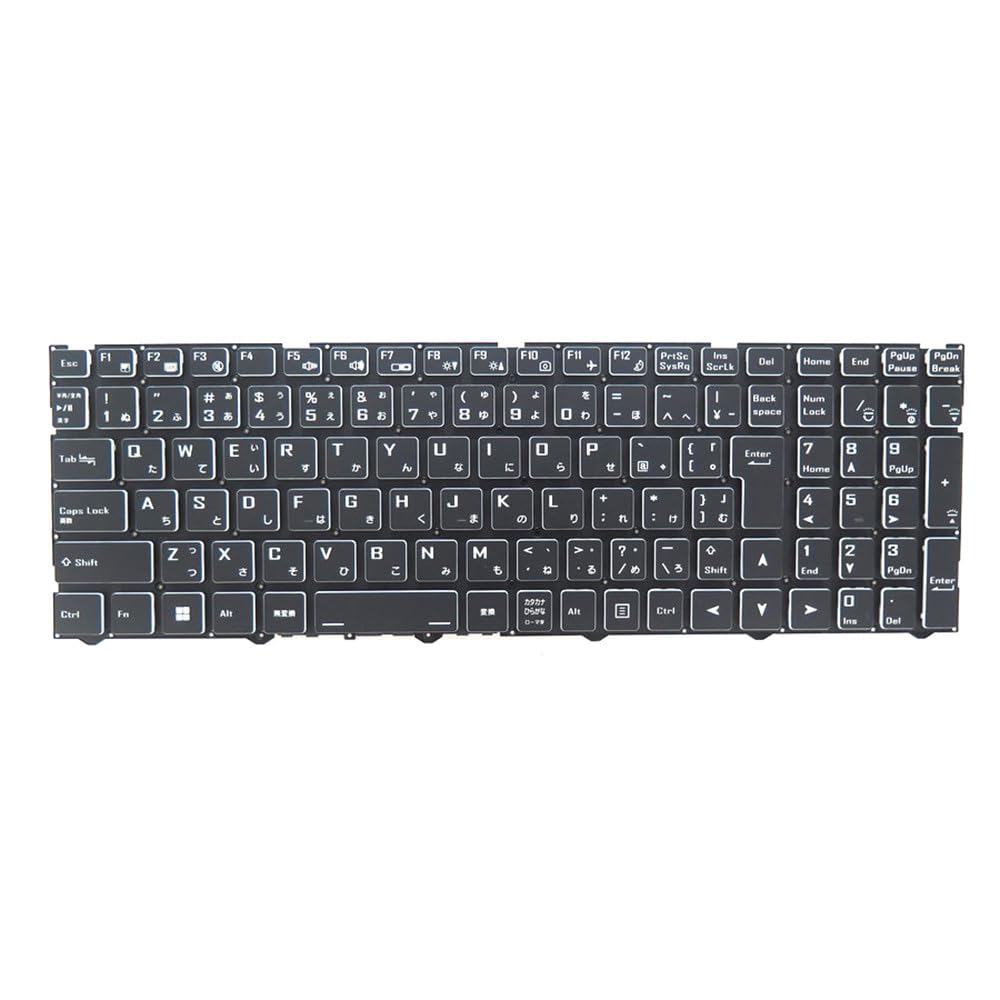
This image displays the replacement keyboard, showing its Japanese layout and overall design.
2. Fametrahana sy fametrahana
Replacing a laptop keyboard requires careful handling and some technical proficiency. If you are unsure about any step, it is recommended to seek assistance from a qualified technician.
Fiarovana fiarovana:
- Always power off your laptop and disconnect it from the power adapter before beginning any installation.
- Remove the laptop battery if it is user-removable.
- Use appropriate tools to avoid damaging your laptop's casing na singa anatiny.
- Work in a clean, well-lit environment.
Dingana fametrahana ankapobeny:
- Omano ny solosaina finday: Ensure the laptop is powered off and disconnected from all power sources.
- Remove Old Keyboard: Carefully identify and release the clips or screws holding the old keyboard in place. Gently lift the old keyboard.
- Disconnect Ribbon Cable: Locate the ribbon cable connecting the old keyboard to the motherboard. Carefully unlatch the connector and detach the cable.
- Connect New Keyboard: Align the ribbon cable of the new keyboard with the connector on the motherboard. Gently insert the cable and secure the latch. Ensure the connection is firm and properly seated.
- Position New Keyboard: Carefully place the new keyboard into its designated slot, ensuring all clips or screw holes align.
- Secure Keyboard: Fasten any screws or engage clips to secure the new keyboard in place.
- Reassemble Laptop: Reinstall the battery (if removed) and close the laptop casing.
- Fampiasana fitsapana: Power on the laptop and test all keys to ensure proper operation.
If you have taken photos during the disassembly process, these can be helpful for reassembly or for troubleshooting if issues arise.
3. Torolàlana miasa
This replacement keyboard functions identically to the original Japanese layout keyboard it replaces. No special drivers are typically required, as the operating system will recognize it as a standard input device.
Asa fototra:
- Standard Keys: All alphanumeric, symbol, and function keys operate as expected for a Japanese keyboard layout.
- Function (Fn) Keys: The 'Fn' key, usually located near the left Ctrl key, can be pressed in combination with other keys (e.g., F1-F12) to activate special laptop functions such as volume control, screen brightness adjustment, or external display switching. Refer to your laptop's specific user manual for detailed Fn key combinations.
- Tsy misy jiro aoriana: This specific keyboard model does not feature a backlight. Therefore, there are no controls for backlight illumination.
4. Fikojakojana
Proper maintenance can extend the lifespan of your keyboard and ensure consistent performance.
Fanadiovana:
- vovoka sy potipoti-javatra: Use a can of compressed air to blow away dust and crumbs from between the keys. Hold the can upright to prevent propellant discharge.
- Fanadiovana ambonin'ny tany: Gently wipe the keycaps and keyboard surface with a soft, lint-free cloth lightly dampvoahodina amin'ny rano na vahaolana fanadiovana malefaka tsy misy abrasive. Fadio ny hamandoana be loatra.
- Mafy loha (Stubborn Stains): For more stubborn stains, a cotton swab lightly dampened with isopropyl alcohol can be used, but avoid direct application to the keyboard.
Fikarakarana ankapobeny:
- Fadio ny mandraraka ranon-javatra eo amin'ny fitendry.
- Do not expose the keyboard to extreme temperatures or direct sunlight for prolonged periods.
- Avoid applying excessive force to the keys.
5. Famahana olana
If you encounter issues with your replacement keyboard, try the following troubleshooting steps:
- Tsy mamaly ny fitendry:
- Ensure the laptop is fully powered on and the operating system has loaded.
- Avereno indray ny solosainao.
- Check the ribbon cable connection. Power off the laptop, disconnect the power, and carefully re-seat the keyboard's ribbon cable to ensure it is properly connected and latched.
- Tsy miasa ireo fanalahidy manokana:
- Check for any physical obstructions (e.g., crumbs, debris) under the non-functional keys. Use compressed air to clear them.
- If multiple keys are affected, re-check the ribbon cable connection as described above.
- Incorrect Character Input:
- Verify that your operating system's keyboard layout settings are configured for a Japanese (JP) keyboard.
- Keyboard Detected as Different Device:
- In Device Manager (Windows) or System Information (macOS/Linux), check the keyboard entry. If there are errors or an incorrect device is listed, try uninstalling the device driver and restarting the laptop to allow the system to reinstall it.
If these steps do not resolve the issue, consider contacting the seller for further assistance or consulting a professional repair service.
6. Famaritana
The following are the technical specifications for this replacement keyboard:
| Marika | levitra |
| mpanamboatra | levitra |
| Laharana modely | KB 15FH127-i5-UH7X |
| Modely solosaina finday mifanaraka | iiyama NP50RZ, STYLE-15FH127-i5-UH7X, IStNEi-15FH127-i5-UH7XB |
| Ny refin'ny vokatra | 43 x 18 x 7 cm |
| Lanja entana | 300 g |
| Fametrahana kitendry | Japoney (JP) |
| Jiro lamosina | tsy misy |
| ASIN | B0G5HCNCMJ |
| Daty azo alaina voalohany | 2025/12/7 |
7. Warranty sy fanohanana
As this is a generic replacement part, warranty terms and support services are typically provided by the seller from whom the product was purchased. Please refer to your purchase documentation or contact the seller directly for information regarding:
- Warranty period and coverage.
- Return and exchange policies.
- Technical support for installation or operational issues.
Always retain your proof of purchase for warranty claims or support inquiries.