
1. Fampidirana
Misaotra anao nividyasing the ELEPHAS BL128MINI Mini Projector. This manual provides essential information for setting up, operating, and maintaining your projector. Please read it thoroughly before use to ensure optimal performance and longevity of the device.
2. Ny votoatin'ny fonosana
Hamarino fa ny entana rehetra voatanisa etsy ambany dia tafiditra ao anatin'ny fonosanao:
- 1 x ELEPHAS BL128MINI Projector
- 1 x Fanaraha-maso lavitra
- 1 x User Manual (ity antontan-taratasy ity)
- 1 x HDMI Cable
- 1 x Detachable Tripod
3. Vokatra mihoatraview
3.1 Lafin-javatra fototra
- 1080P Full HD Resolution: Supports 1920 x 1080 resolution for clear images.
- 24-bit True Color: Manolotra loko marevaka sy marina.
- Fampisehoana efijery lehibe: Capable of projecting up to a 200-inch screen.
- Detachable Tripod: Provides stable placement and flexible positioning.
- Built-in HIFI Speaker: Offers integrated audio output.
- Safidy fifandraisana maro: Includes USB, HDMI, AV, and Audio ports.

Image 3.1: The ELEPHAS BL128MINI Projector offers 1080P Full HD resolution with 24-bit true color, an 8000:1 contrast ratio, and enhanced brightness for a vivid viewamin'ny traikefa.
3.2 Projector Ports and Controls
Familiarize yourself with the various ports and controls on your projector for proper connection and operation.

Image 3.2: Rear panel of the ELEPHAS BL128MINI Projector, highlighting DC power input, USB ports, HDMI port, AV port, and audio output. Compatible devices include Xbox, TV Stick, PC, Smartphone, USB drives, speakers, and headphones.
4. Fametrahana
4.1 Fampifandraisana herinaratra
- Ampifandraiso amin'ny seranan-tsambo DC IN amin'ny projecteur ny adaptatera herinaratra.
- Ampidiro amin'ny fivoahan'ny rindrina ny adaptatera herinaratra.
4.2 Fametrahana Tripod
The included detachable tripod allows for stable placement on various surfaces.
- Locate the tripod mounting screw hole on the bottom of the projector.
- Screw the tripod securely into the mounting hole.
- Adjust the tripod legs to achieve the desired height and angle for projection.

Image 4.2: The detachable tripod provides stability for the projector, whether placed on a desktop or uneven outdoor surfaces.
4.3 Placement and Projection Distance
Position the projector on a flat, stable surface. The optimal projection distance ranges from 3.3 to 9.8 feet for screen sizes between 50 and 200 inches.

Image 4.3: Recommended projection distances for achieving various screen sizes, from 50 to 200 inches.
5. Torolàlana miasa
5.1 Power On/off
- Herim-batana: Tsindrio ny bokotra herinaratra eo amin'ny projector na ny fanaraha-maso lavitra.
- Mamono hery: Press the power button again. The projector will enter standby mode.
5.2 Fanitsiana fifantohana
Ahodino ny peratra fifantohana amin'ny family projecteur mandra-pahazava sy maranitra ilay sary naseho.
5.3 Fantenana Loharano fampidirana
Use the 'Source' button on the remote control or the projector to select the desired input source (HDMI, USB, AV).
5.4 Fampifandraisana ireo fitaovana ivelany
Ny projector dia manohana fitaovana ivelany isan-karazany:
- HDMI: Connect laptops, PCs, TV boxes, TV sticks, gaming consoles (e.g., Xbox), or other HDMI-enabled devices using the provided HDMI cable.
- USB: Ampidiro ao amin'ny seranana USB ny kapila flash USB mba handefasana rakitra media files mivantana.
- NY: Ampiasao ny seranana AV ho an'ireo fitaovana tranainy misy famoahana horonan-tsary mitambatra.
- Smartphone/Tablet: For iOS and Android devices, an additional HDMI adapter (not included) is required for connection.
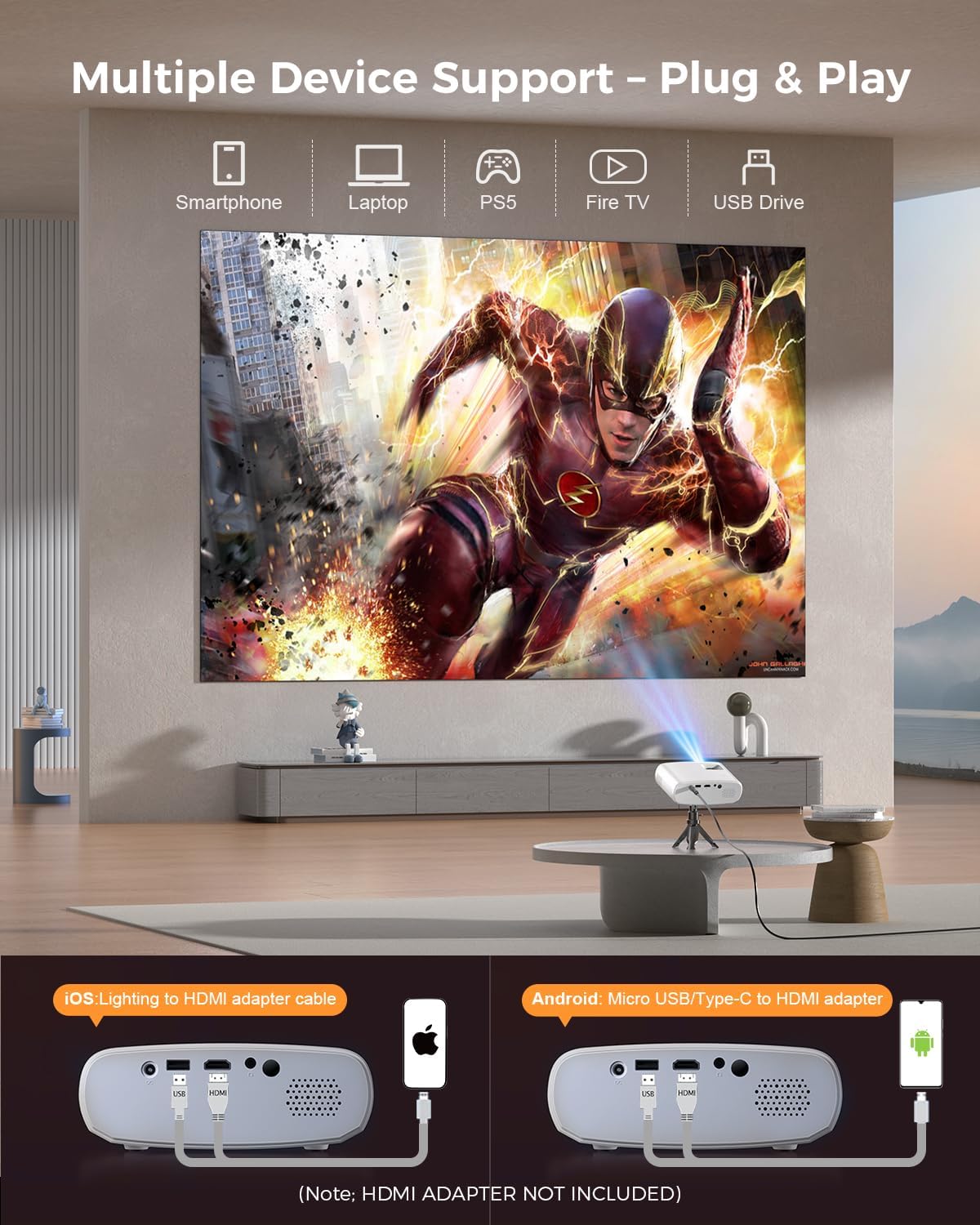
Image 5.4: The projector supports multiple devices via HDMI and USB. Note that an HDMI adapter is required for direct smartphone connection (not included).
5.5 Output Audio
The projector has a built-in HIFI speaker. For external audio, connect headphones or external speakers to the Audio Out port.
6. Fikojakojana
6.1 Fanadiovana
- Lens: Use a soft, lint-free cloth or lens cleaning paper. Avoid abrasive materials.
- Casing: Fafao ny projecteur casing with a soft, dry cloth. Do not use liquid cleaners or solvents.
- rivotra: Ataovy azo antoka fa tsy misy vovoka sy sakana ny varavaran'ny fidiran'ny rivotra mba hisorohana ny hafanana be loatra.
6.2 Fitehirizana
When not in use, store the projector in a cool, dry place, away from direct sunlight and extreme temperatures. Use the original packaging or a protective bag to prevent dust accumulation.
7. Famahana olana
| OLANA | Antony mety hitranga | vahaolana |
|---|---|---|
| Tsy misy sary navoaka | Power cable loose; Incorrect input source; Device not connected properly. | Check power connection; Select correct input source; Reconnect HDMI/USB cable. |
| Manjavozavo ny sary | Tsy voahitsy ny fifantohana; Akaiky/lavitra loatra ny efijery ny projecteur. | Amboary ny peratra fifantohana; Amboary ny halaviran'ny fandefasana. |
| Tsy misy feo | Ambany loatra ny feo; Mangina; Tsy mifandray ny fitaovana audio ivelany. | Ampitomboy ny volume; Atsaharo; Jereo ny fifandraisana audio ivelany. |
| Tsy mandeha ny fanaraha-maso lavitra | Lany/maty ny bateria; Misy sakana eo amin'ny fanaraha-maso lavitra sy ny projecteur. | Soloy ny bateria; Ataovy azo antoka fa mazava tsara ny fahitana ny mpandray IR. |
| Cannot play Netflix/Hulu/Prime Video | HDCP copyright protection. | Use an external streaming device like Amazon Fire Stick or Roku Stick (not included). |
8. Famaritana
| endri-javatra | antsipirihany |
|---|---|
| MODELY | BL128MINI |
| Marika | ELEFA |
| Asehoy ny fanapahan-kevitra | 1920 x 1080 (1080P Full HD) |
| Teknolojia fifandraisana | HDMI, USB, AV, Audio Out |
| Endri-javatra manokana | HDMI Connectivity, Portable, Built-in Speakers, Detachable Tripod |
| Fampiasana soso-kevitra | An-trano/Ivelany |
| Lanja entana | 1.96 kilao (eo ho eo. 0.89 kg) |
| Ny refin'ny vokatra | 6 x 4.4 x 2.4 santimetatra (tokony ho 15.2 x 11.2 x 6.1 cm) |
9. Warranty sy fanohanana
ELEPHAS projectors are certified with CE, FCC, and RoHS standards.
- Factory Support: We provide 3-years factory support for this product.
- Tohana ara-teknika: Misy ny fanohanana ara-teknika mandritra ny androm-piainana.
- Serivisy ho an'ny mpanjifa: 24/7 professional service is provided.
- Miverina: A 30-day return or exchange policy is in place.
For further assistance, please refer to the contact information provided on the product packaging or the official ELEPHAS website.

Image 9.1: ELEPHAS offers comprehensive customer support, including 24/7 professional service, a 30-day return policy, and lifetime technical support.