
Sava lalana
Thank you for choosing the MLOVE E90 Bluetooth Speaker. This manual provides detailed instructions for setting up, operating, and maintaining your speaker to ensure optimal performance and longevity. Please read this manual thoroughly before using the product and retain it for future reference.
Vita ny vokatraview
Inona no ao anaty boaty
- MLOVE E90 Bluetooth Speaker
- USB-C Charging Cable
- Fehin-tsoroka
- Torolalana fanombohana haingana
Endri-javatra fototra
- 80W Powerful Stereo Sound: Delivers robust audio output for an immersive listening experience.
- Jiro RGB Dynamic: Features customizable RGB lights that sync with music, enhancing the ambiance.
- IP65 vovoka sy rano: Designed for outdoor use, resistant to dust and water splashes.
- Fampiasa True Wireless Stereo (TWS): Allows pairing two E90 speakers for enhanced stereo sound.
- Fomba filalaovana maro: Supports Bluetooth, AUX-in, USB drive, and MicroSD card playback.
- Fiainana maharitra bateria: Equipped with a large capacity battery for extended playtime.
- Famolavolana portable: Includes a shoulder strap for easy transport.
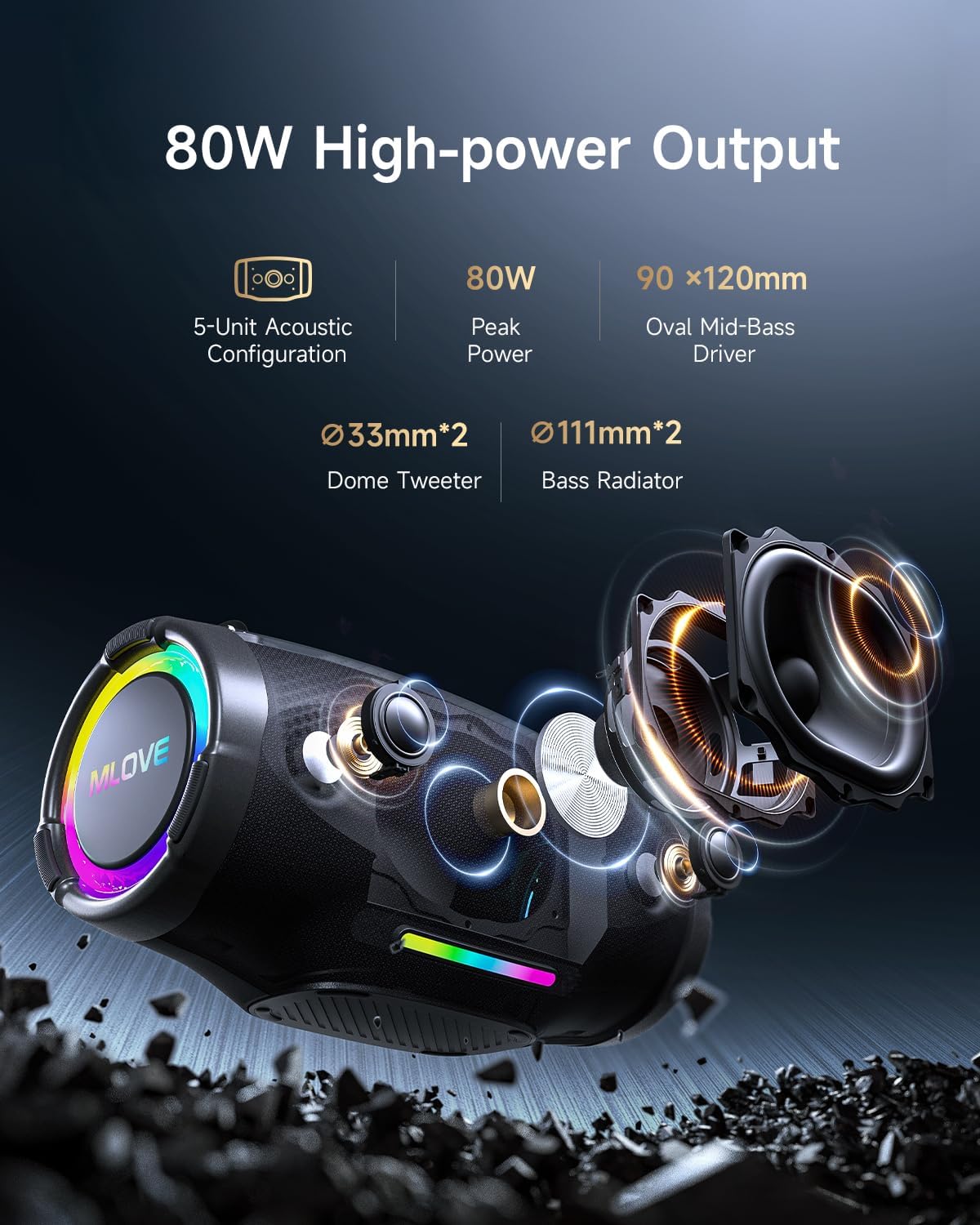
Image: Internal components of the MLOVE E90 speaker, highlighting its 80W peak power output, 5-unit acoustic configuration, including two 33mm dome tweeters, two 111mm bass radiators, and a 90x120mm oval mid-bass driver.

Image: The MLOVE E90 speaker illustrating its powerful battery life, emphasizing its large capacity and Type-C quick charge capability for uninterrupted listening.
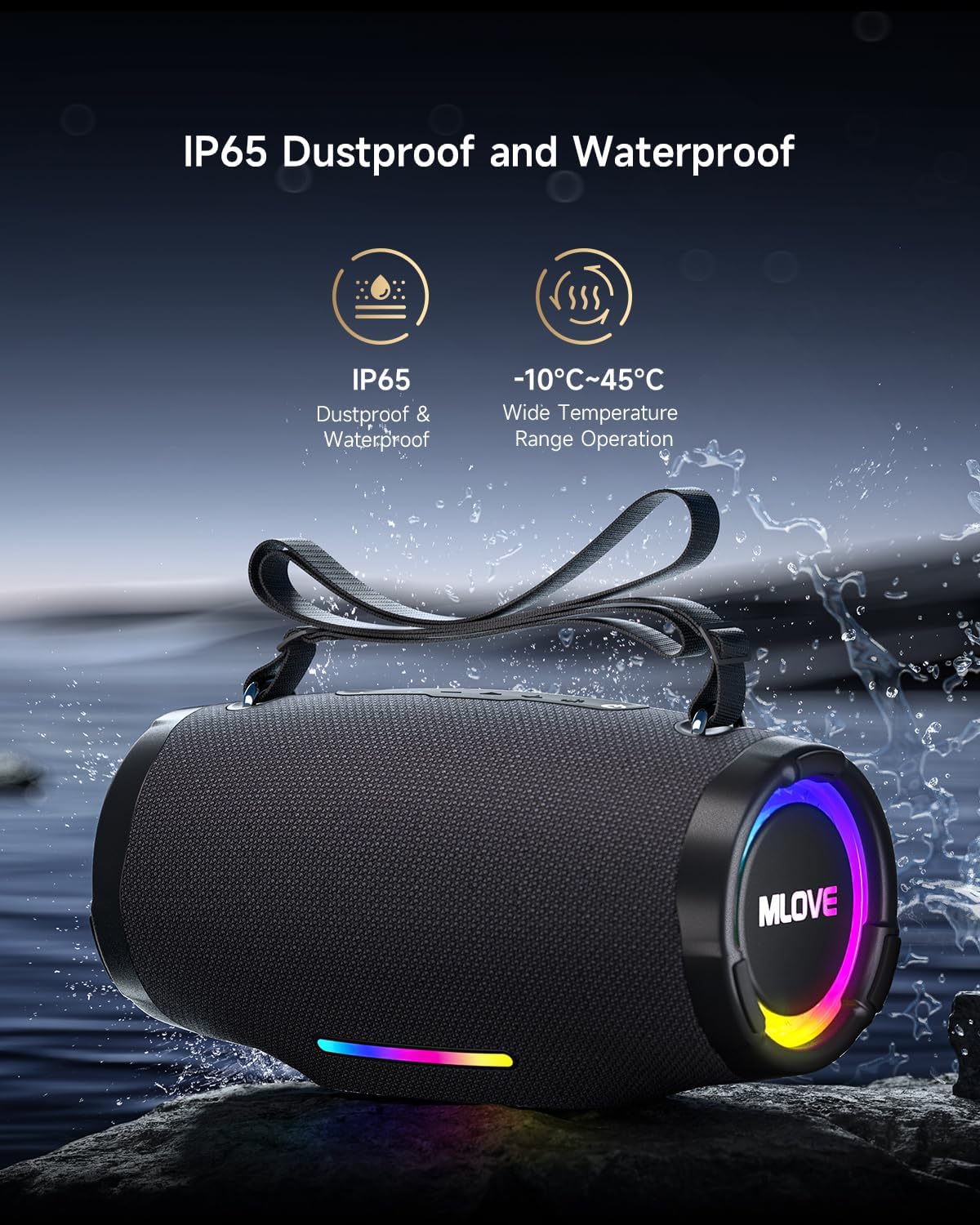
Image: The MLOVE E90 speaker shown with water splashing around it, highlighting its IP65 dustproof and waterproof rating, making it suitable for various outdoor environments and temperatures from -10°C to 45°C.
Setup Guide
1. Fiampangana ny mpiteny
- Locate the USB-C charging port, usually protected by a rubber flap on the back or side of the speaker.
- Ampifandraiso amin'ny seranana famandrihana ny fanamafisam-peo ny tariby USB-C nomena.
- Connect the other end of the USB-C cable to a compatible USB power adapter (not included) or a computer's USB port.
- The charging indicator lights will illuminate, typically showing charging progress. A full charge may take approximately 4.5 hours with a 3A charger.
- Once fully charged, disconnect the charging cable and ensure the rubber flap is securely closed to maintain water resistance.
2. Mamelona/Mamono
- Hamelona: Press and hold the Power button for a few seconds until you hear an audible prompt or see the indicator lights activate.
- Mamono: Press and hold the Power button again for a few seconds until you hear an audible prompt or the indicator lights turn off.
3. Pairing Bluetooth
- Ensure the speaker is powered on and in Bluetooth pairing mode. The Bluetooth indicator light will typically flash.
- Amin'ny fitaovanao (smartphone, tablette, solosaina), avelao ny Bluetooth ary tadiavo ireo fitaovana misy.
- Select "MLOVE E90" from the list of found devices.
- Once paired, the speaker will emit an audible confirmation, and the Bluetooth indicator light will become solid.
- The speaker supports Bluetooth 5.4 for stable and efficient connection.

Image: The MLOVE E90 speaker demonstrating its ability to connect to two devices simultaneously (e.g., a smartphone and a tablet) with seamless switching, utilizing Bluetooth 5.4 for stable playback.
4. Fampiarahana Stereo Tsy Misy Tambajotra (TWS) Marina
To achieve a true stereo sound experience, you can pair two MLOVE E90 speakers together.
- Ensure both MLOVE E90 speakers are powered on and not connected to any Bluetooth device.
- On one speaker (this will be the primary speaker), press the TWS button (refer to your Quick Start Guide for button location). The TWS indicator light will flash.
- Ny mpandahateny voalohany dia hikaroka ho azy ny mpandahateny faharoa.
- Once connected, both speakers will emit an audible confirmation, and the TWS indicator lights will become solid.
- Now, connect your device to the primary speaker via Bluetooth as described in step 3. Audio will play in stereo through both speakers.

Image: Two MLOVE E90 speakers shown wirelessly connected, demonstrating the True Wireless Stereo (TWS) function which allows them to play audio in synchronized stereo for an enhanced listening experience.
Torolàlana miasa
Fanaraha-maso fototra
- Bokotra hery: Tsindrio ary hajanony mba hamelona/famonoana.
- bokotra Play/Pause: Tsindrio indray mandeha raha hilalao na hampiato ny mozika.
- Vola ambony (+): Press once to increase volume. Press and hold to skip to the next track.
- Vola midina (-): Press once to decrease volume. Press and hold to skip to the previous track.
- Button Mode (M): Press to switch between playback modes (Bluetooth, AUX, USB, MicroSD).
- bokotra maivana: Press to cycle through RGB light modes. Press and hold to turn lights off/on.
- Bokotra fanamafisam-peo: Press to activate/deactivate enhanced bass.
RGB Light Modes
The MLOVE E90 features dynamic RGB lighting with 16.8 million colors. Use the Light button to cycle through various modes, including beat-sync and dynamic flowing light effects. Press and hold the Light button to turn the lights off or on.
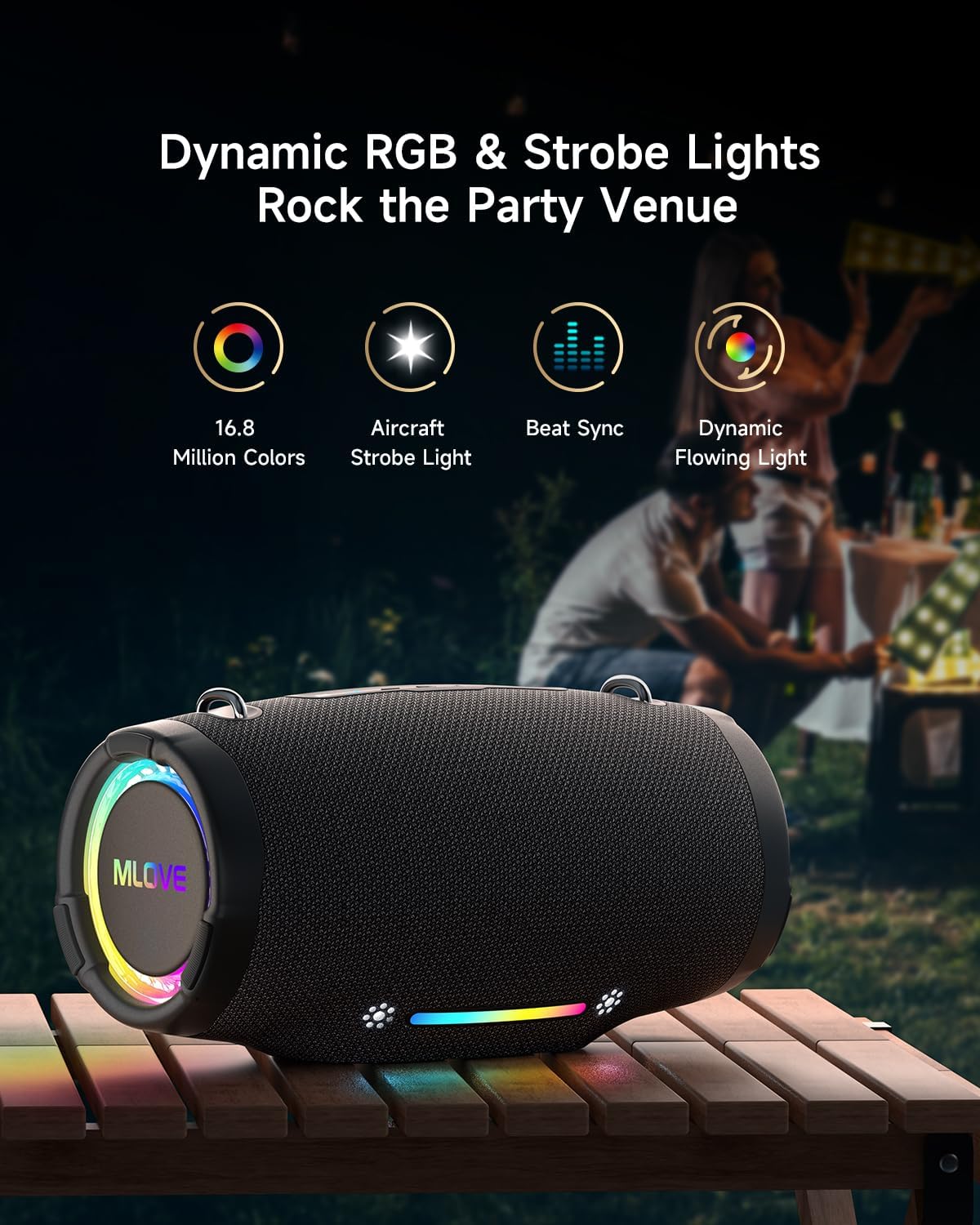
Image: The MLOVE E90 speaker displaying its dynamic RGB and strobe lights in an outdoor party setting, illustrating features like 16.8 million colors, aircraft strobe light effects, beat synchronization, and dynamic flowing light patterns.
Fomba Playback maro
Manohana fomba fampidirana feo isan-karazany ny fanamafisam-peo:
- Bluetooth 5.4: Fifandraisana tsy misy tariby amin'ny fitaovana mifanaraka aminy.
- AUX-in: Ampifandraiso amin'ny tariby audio 3.5mm (tsy tafiditra).
- USB Playing: Ampidiro USB flash drive misy feo files (WAV, WMA, MP3 formats supported).
- MicroSD Card Playing: Insert a MicroSD card with audio files (WAV, WMA, MP3 formats supported).
Use the Mode button to switch between these input sources. The speaker will automatically detect and switch to an inserted USB drive or MicroSD card.
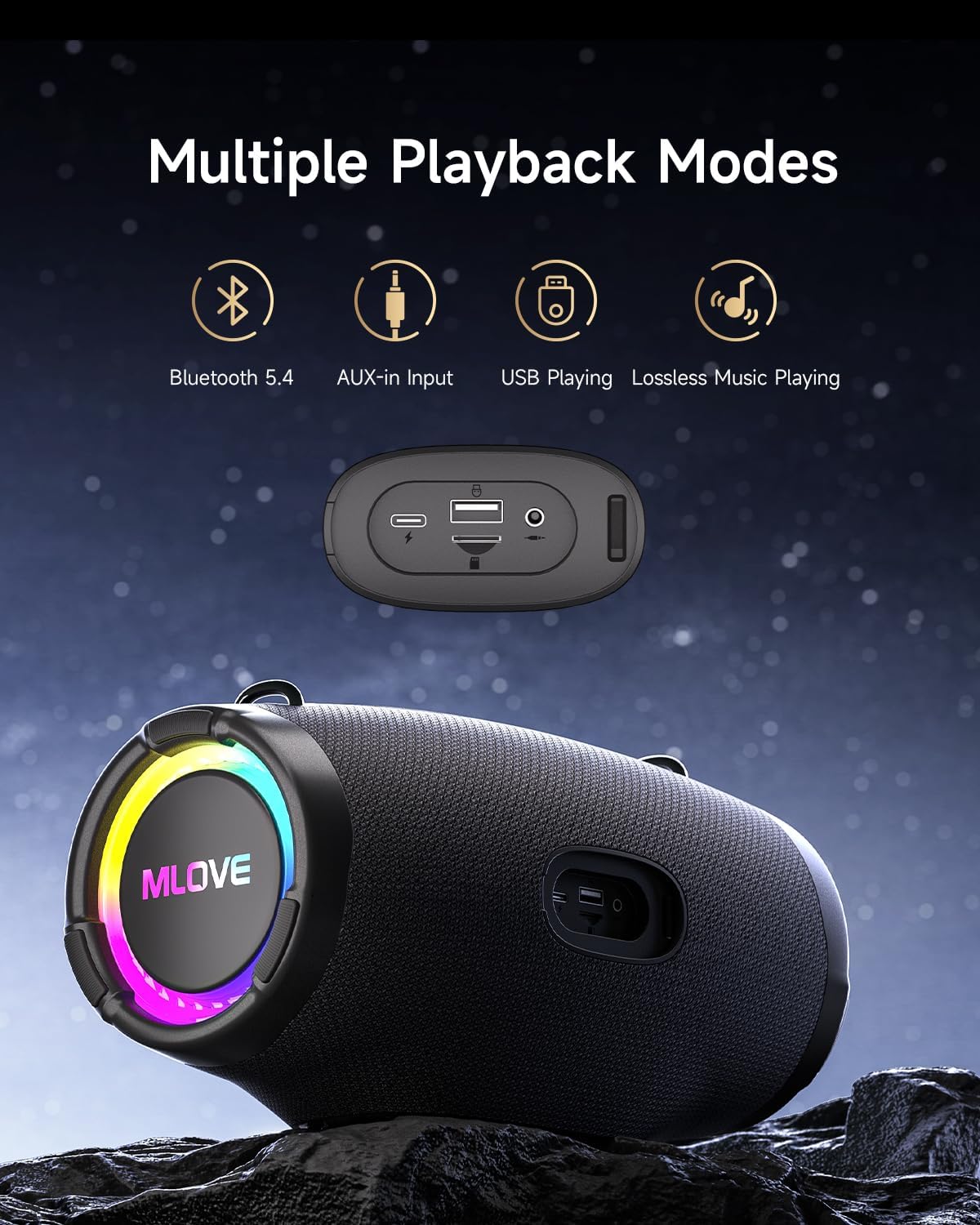
Image: The MLOVE E90 speaker displaying its connectivity panel with ports for USB-C charging, USB-A for playing music from a USB drive and power bank functionality, and a 3.5mm AUX-in port, alongside icons for Bluetooth 5.4, AUX-in, USB Playing, and Lossless Music Playing.
fikarakarana
FANADIOVANA
- Fafao ny mpandahateny amin'ny malefaka, damp lamba.
- Aza mampiasa mpanadio mikikisana, alikaola, na ranoka simika, satria mety hanimba ny ety ivelany ireo.
- Ensure all port covers are securely closed before cleaning with a damp lamba.
Ny fanoherana ny rano (IP65)
- The MLOVE E90 is rated IP65, meaning it is protected against dust ingress and low-pressure water jets from any direction.
- This speaker is suitable for use in light rain or near water, but it should not be submerged in water.
- Always ensure the rubber flap covering the charging and input ports is securely closed to maintain water resistance.
- Do not expose the speaker to saltwater or other corrosive liquids. If exposed, rinse with fresh water and dry thoroughly.
fitahirizana
- Tehirizo ao amin'ny toerana mangatsiatsiaka sy maina ny mpandahateny lavitry ny tara-masoandro mivantana sy ny hafanana tafahoatra.
- If storing for an extended period, charge the battery to approximately 50% every few months to preserve battery health.
Fanamboarana
| OLANA | Antony mety hitranga | vahaolana |
|---|---|---|
| Tsy mandeha ny fanamafisam-peo. | bateria kely. | Ampifandraiso amin'ny tariby USB-C nomena ny mpandahateny. |
| Tsy afaka mampiaraka amin'ny alalan'ny Bluetooth. | Tsy amin'ny fomba fampiarahana; fitaovana Bluetooth maty; lavitra loatra ny mpandahateny. | Ensure speaker is in pairing mode (flashing Bluetooth light). Turn Bluetooth on your device. Move device closer to speaker (within 10 meters). Forget "MLOVE E90" on your device and try pairing again. |
| Tsy misy feo na feo ambany. | Ambany loatra ny feo amin'ny fanamafisam-peo na fitaovana; diso ny fomba fampidirana. | Increase volume on both the speaker and your connected device. Press the Mode button to ensure the correct input source is selected. |
| Tsy nahomby ny fampiarahana TWS. | Efa mifandray amin'ny fitaovana hafa ny fanamafisam-peo; lavitra loatra ny elanelan'ny fanamafisam-peo. | Ensure both speakers are disconnected from any Bluetooth devices. Place speakers close to each other. Follow TWS pairing instructions carefully. |
| Tsy mandeha ny jiro RGB. | Maty ny jiro; tsy mandeha tsara ny fanamafisam-peo. | Press the Light button to cycle through modes or press and hold to turn them on. If issue persists, contact support. |
| Feo mivadika amin'ny feo avo. | Avo loatra ny feo; kalitaon'ny loharanon-peo. | Reduce the volume. Ensure the audio source is of good quality. |
fepetra arahana
| Marika | MLOVE |
| Anarana modely | E90 |
| Karazana mpandahateny | Portable Bluetooth Speaker |
| Hery avoakan'ny mpandahateny ambony indrindra | 80 Watts |
| Audio Output Mode | Stereo |
| Wireless Communication Technology | Bluetooth 5.4 |
| Famaliana matetika | 20000 Hz (Note: Typically a range, e.g., 20Hz-20kHz) |
| Loharanon-kery | Battery Powered |
| Rating tsy tantera-drano | IP65 |
| Haben'ny vokatra (D x W x H) | 15.4 x 30.5 x 15.8 cm |
| Lanja entana | 2000g ny |
| Fitaovana mifanentana | Solosaina manokana, finday avo lenta, takelaka, fahitalavitra |
| Fampiasana soso-kevitra | For smartphone or tablet, For ambient sound system |
| Fomba fanaraha-maso | Application (Physical buttons also available) |
| Anisan'ny singa | Quick Start Guide, USB-C Charging Cable, Shoulder Strap |
Warranty sy fanohanana
The MLOVE E90 Bluetooth Speaker comes with a Garantie voafetra 2 taona avy amin'ny mpanamboatra manomboka amin'ny datin'ny fividianana. Ity fiantohana ity dia mirakitra ny lesoka amin'ny famokarana sy ny asa amin'ny fampiasana mahazatra.
Tsy voarakotry ny antoka ny fahasimbana vokatry ny fampiasana diso, ny lozam-pifamoivoizana, ny fanovana tsy nahazoana alalana, na ny fikikisana mahazatra. Tazomy azafady ny porofon'ny fividiananao mba hahazoana antoka.
Fanohanana ny mpanjifa
For technical assistance, warranty claims, or any questions regarding your MLOVE E90 speaker, please contact our customer support team. Refer to the contact information provided in your Quick Start Guide or on the official MLOVE website.
Note: Specific contact details may vary by region.