1. Vokatra mihoatraview
The Generic X500 V2 ARF Kit is a 500mm wheelbase carbon fiber frame kit designed for FPV drones. This Almost Ready to Fly (ARF) kit includes essential components such as motors, Electronic Speed Controllers (ESCs), and propellers, providing a robust foundation for building a high-performance multirotor drone.
Ny endri-javatra fototra dia ahitana:
- Mampifanaraka: Suitable for multirotor drone configurations.
- Famaritana: 500mm wheelbase, 144x144mm frame body with 2mm thickness.
- Fanorenana maivana: Made from durable carbon fiber composite material for optimal strength-to-weight ratio.
- Flight Stability: Engineered for improved flight stability and reduced vibration.
- mifanentana: Designed for straightforward installation and integration with various flight control systems (not included).
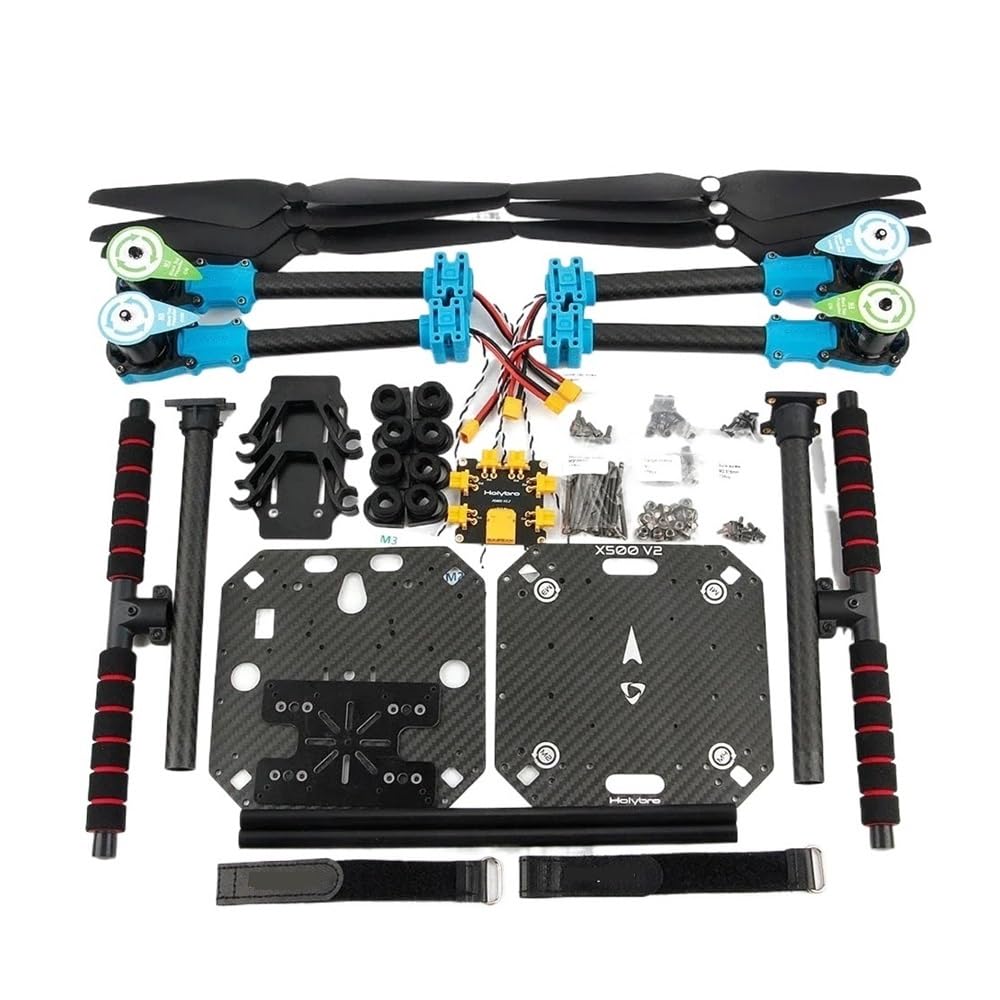
Image 1.1: Fully assembled X500 V2 ARF Kit, showcasing the carbon fiber frame, motors, and propellers.
2. Information momba ny fiarovana
Operating drones requires adherence to safety guidelines to prevent injury or damage. Please read and understand the following before assembly and operation:
- Vakio ny boky: Familiarize yourself with all components and assembly steps.
- Propeller Safety: Propellers can cause severe injury. Always disconnect the battery before handling the drone or performing maintenance. Keep hands clear of rotating propellers.
- Fikarakarana bateria: Use appropriate batteries for your drone. Ensure correct polarity when connecting. Do not overcharge or puncture batteries.
- Fanairana momba ny tontolo iainana: Operate in open areas, away from people, animals, buildings, and power lines. Avoid flying in strong winds or adverse weather conditions.
- Fanarahana lalàna: Be aware of and comply with all local regulations regarding drone operation, including registration requirements and no-fly zones.
- Fanamarinana mialoha ny sidina: Always perform a thorough pre-flight inspection to ensure all components are securely attached and functioning correctly.
3. Ny votoatin'ny fonosana
The X500 V2 ARF Kit includes the following components:
- X500 V2 Frame Kit (carbon fiber top and bottom plates, arms, landing gear)
- 4 x 2216 KV920 Brushless Motors
- 4 x S 20A Electronic Speed Controllers (ESCs)
- 6 x 1045 Propellers (typically 2 sets of 3, or 3 sets of 2 for spares)
- Power Distribution Board (PDB) with XT60 battery connector and XT30 ESC peripheral connectors
- Mounting hardware (screws, nuts, standoffs)
- Battery bracket with two battery straps
- Dual 10mm diameter rod x 250mm long rail system
4. Fametrahana sy Fivoriambe
The X500 V2 ARF Kit requires assembly of the frame, motors, ESCs, and propellers. Follow these general steps:
4.1 Frame Assembly
- Ampifandraiso amin'ny sandry: Secure the ultra-light 16mm carbon fiber arms to the main frame plates using the provided fiber nylon connectors and hardware. Ensure all connections are tight.
- Mametraha fitaovana fipetrahana: Assemble the 16mm/10mm diameter carbon fiber landing gear tubes with the three-way connectors and attach them to the main frame.
- Mount Top and Bottom Plates: Secure the 144x144mm top and bottom plates, ensuring the 28mm spacing is maintained.

Sary 4.1: Misy antsipiriany view of the frame's central structure and arm attachment points.
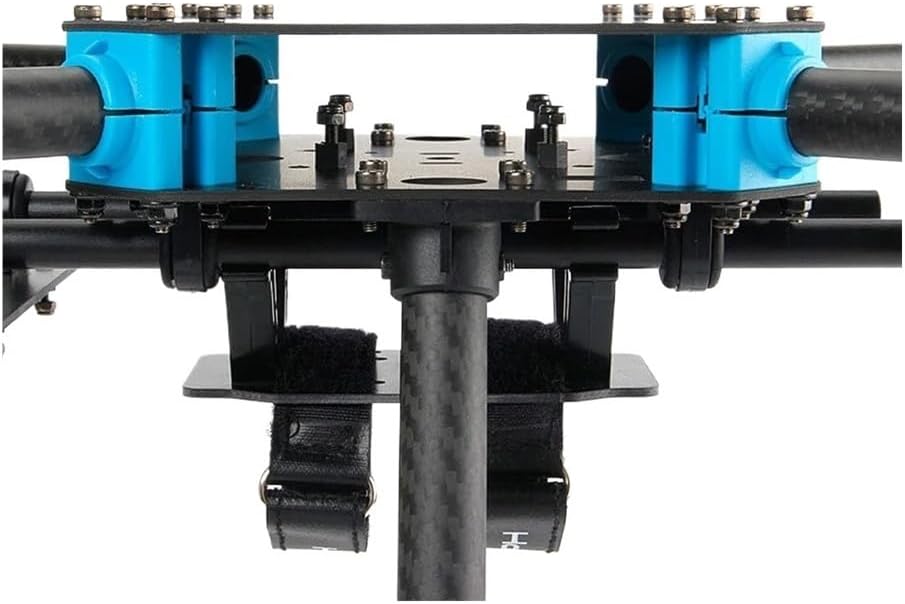
Sary 4.2: Side profile showing the landing gear and the battery bracket with straps.
4.2 Motor and ESC Installation
- Mount Motors: Attach the 2216 KV920 brushless motors to the motor mounting holes (16x16mm) at the end of each arm. Ensure they are securely fastened.
- Connect ESCs: Connect the S 20A ESCs to the motors. The ESCs should be mounted on the arms or within the frame structure, ensuring good airflow for cooling.
- Power Distribution Board (PDB): Mount the PDB centrally. Connect the ESC power leads to the XT30 peripheral connectors on the PDB. The main battery connector (XT60) will connect to your flight battery.
4.3 Propeller Attachment
Attach the 1045 propellers to the motors. Ensure correct rotation direction for each motor. Typically, two propellers rotate clockwise (CW) and two counter-clockwise (CCW). Consult your flight controller's documentation for specific motor/propeller direction configuration.
Warning: Always ensure propellers are correctly balanced and securely fastened. Loose or unbalanced propellers can cause severe vibration and flight instability.
4.4 Flight Controller and Receiver (Not Included)
This ARF kit does not include a flight controller or radio receiver. You will need to integrate your preferred flight controller (e.g., compatible with Pi 4, Jetson Nano) and receiver into the frame. Use the platform plate with mounting holes for companion computers and the dual 10mm diameter rod rail system for additional equipment.
5. Torolàlana miasa
Once assembled and integrated with a flight controller and radio system, follow these general operating principles:
- Fijerena mialoha ny sidina: Before each flight, inspect all components for damage, loose connections, or obstructions. Ensure propellers are secure and correctly oriented. Verify battery charge levels.
- Fametrahana ny Drone: Follow your flight controller's specific arming procedure. This typically involves a stick command on your remote controller.
- Esory: Gently increase throttle. The drone should lift off smoothly. If it drifts or is unstable, land immediately and re-check calibration and balance.
- Fanaraha-maso ny sidina: Use your remote controller to maneuver the drone. Practice in a safe, open area until you are comfortable with its response.
- Fipetrahana: Reduce throttle slowly and gently bring the drone down. Disarm the motors immediately after landing.
- Aorian'ny sidina: Disconnect the battery. Inspect the drone for any signs of stress or damage.
Note: This manual covers the hardware kit. Refer to your flight controller and radio system manuals for detailed setup, calibration, and flight procedures.
6. Fikojakojana
Regular maintenance ensures the longevity and safe operation of your X500 V2 ARF Kit:
- Fanaraha-maso Frame: Regularly check carbon fiber arms and plates for cracks, delamination, or stress marks. Replace damaged components immediately.
- Fanamarinana fitaovana: Ensure all screws, nuts, and connectors are tight. Vibrations during flight can loosen hardware.
- Fanaraha-maso maotera: Check motors for smooth rotation, excessive play in bearings, or signs of overheating. Keep them free of dirt and debris.
- ESC Inspection: Ensure ESCs are securely mounted and have adequate cooling. Check for any burnt components or damaged wiring.
- Fikojakojana ny propeller: Inspect propellers for nicks, bends, or cracks. Replace damaged propellers as they can cause severe vibrations and reduce flight efficiency. Ensure they are balanced.
- Wiring: Check all wiring for fraying, cuts, or loose connections. Secure any loose wires to prevent interference with propellers or other components.
7. Famahana olana
This section addresses common issues related to the X500 V2 ARF Kit hardware. For flight controller or software-related issues, consult your flight controller's documentation.
| OLANA | Antony mety hitranga | vahaolana |
|---|---|---|
| Vibration tafahoatra | Unbalanced or damaged propellers, loose motor mounts, bent motor shafts, loose frame components. | Inspect and replace damaged propellers. Ensure all motor screws and frame bolts are tight. Check motor shafts for bends. |
| Motor not spinning / inconsistent speed | Loose ESC-to-motor connection, faulty ESC, damaged motor winding, incorrect ESC calibration. | Check all motor wire connections. Test with a known good ESC/motor. Recalibrate ESCs (refer to ESC manual). |
| Frame components feel loose | Screws or bolts have vibrated loose. | Inspect all frame connections and tighten any loose hardware. Consider using thread-locking compound on critical screws. |
| Power distribution issues | Loose PDB connections, faulty PDB, damaged XT60/XT30 connectors. | Check all solder joints and connections on the PDB. Ensure XT60/XT30 connectors are not damaged or corroded. |
8. Famaritana
| endri-javatra | antsipirihany |
|---|---|
| Anarana modely | X500 V2 ARF Kit |
| Fitohizan'ny kodiarana | 500mm |
| Frame Body Dimensions | 144x144mm |
| Frame Body Thickness | 2mm |
| Top/Bottom Plate Spacing | 28mm |
| Haavon'ny fitaovana fipetrahana | 215mm |
| Lanja (kita) | 610g (approximate, without battery/flight controller) |
| Motor Mounting Hole | 16x16mm |
| Tafiditra ao anatin'izany ny motera | 4 x 2216 KV920 Brushless Motors |
| ESCs Included | 4 x S 20A ESCs |
| Propellers Included | 6 x 1045 Propellers |
| Birao fitsinjarana herinaratra | XT60 battery and XT30 ESC peripheral connectors |
| Fitaovana sandry | Ultra-light 16mm carbon fiber tube with fiber nylon connectors |
| Landing Gear Material | 16mm/10mm diameter carbon fiber tube with three-way connectors |
| Companion Computer Platform | Mounting holes for mainstream companion computers (e.g., Raspberry Pi 4, Jetson Nano) |
| Rail System | Dual 10mm diameter rod x 250mm long |
| Modely azo ampiharina | Multirotor / FPV Drones |

Image 8.1: Dimensional diagram of the X500 V2 ARF Kit.
9. Warranty sy fanohanana
This product is provided by Generic. For warranty information or technical support, please contact the seller or manufacturer directly through your purchase platform. Keep your proof of purchase for any warranty claims.