
Sava lalana
This manual provides comprehensive instructions for the installation, operation, and maintenance of your Dormakaba Rose Biometric Digital Door Lock. Designed for modern access control, this lock offers advanced security features including fingerprint and PIN code access. Please read this manual thoroughly before installation and use to ensure proper function and longevity of your device.
Information momba ny fiarovana
- Ensure all components are present and undamaged before installation.
- Aza atao amin'ny rano mivantana na amin'ny mari-pana tafahoatra ny hidin-trano.
- Use only specified AAA alkaline batteries. Do not mix old and new batteries.
- Keep fingerprints and PIN codes confidential.
- For emergency power, use a Type C USB cable with a compatible power source.
- This lock is designed for internal doors with a thickness of 32-50mm.
Vita ny vokatraview ary Components
The Dormakaba Rose Biometric Door Lock integrates a fingerprint scanner, a backlit keypad, and a lever handle for secure and convenient access. It is designed for easy installation and reversible for left or right-handed doors.
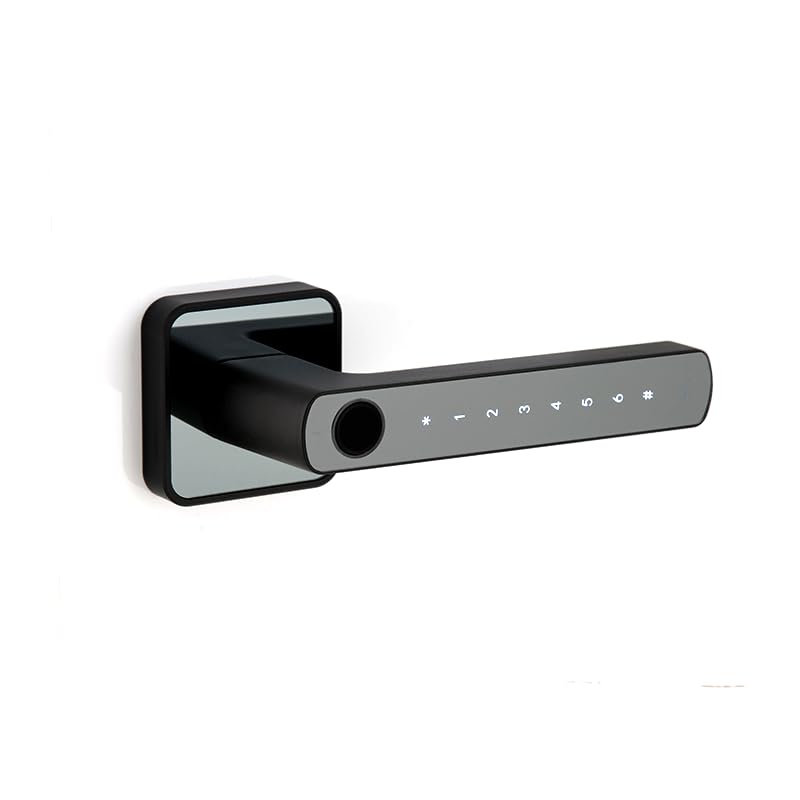
Sary 1: Eo anoloana view of the Dormakaba Rose Biometric Door Lock, highlighting the fingerprint sensor and keypad.
singa fototra:
- Fingerprint Sensor: For biometric access.
- Kitendry backlit: For PIN code entry (6-10 digits).
- Lever Handle: For manual operation.
- Efitra bateria: Holds 3 AAA alkaline batteries.
- Seranan-tsambo USB-C: For emergency power.
- Dormakaba 60mm Tubular Deadlatch: Internal locking mechanism.
fepetra arahana
| endri-javatra | antsipirihany |
|---|---|
| Marika | dormakaba |
| Anarana modely | Rose Biometric Silver |
| Karazana hidin-trano | Biometric Digital Lever Lock |
| Access Modes | Fingerprint, PIN Code (6-10 digits) |
| Fahaizan'ny mpampiasa | Up to 200 Fingerprints & PIN Codes |
| Haben'ny varavarana | 32-50mm (Internal Doors) |
| Loharanon-kery | 3 x AAA Alkaline Batterie |
| Hery vonjy maika | Type C USB |
| refy (LxWxH) | 14.2 x 2.5 x 5 santimetatra |
| lanja | 1.15 kg |
| KEVITRA | Metal |
| Endri-javatra manokana | Voice Navigation, High Resolution Backlit Keypad, Reversible Handing |
Fametrahana sy fametrahana
The Dormakaba Rose lock is designed for straightforward installation. It can be installed on both left and right-handed doors. Ensure your door thickness is between 32mm and 50mm.
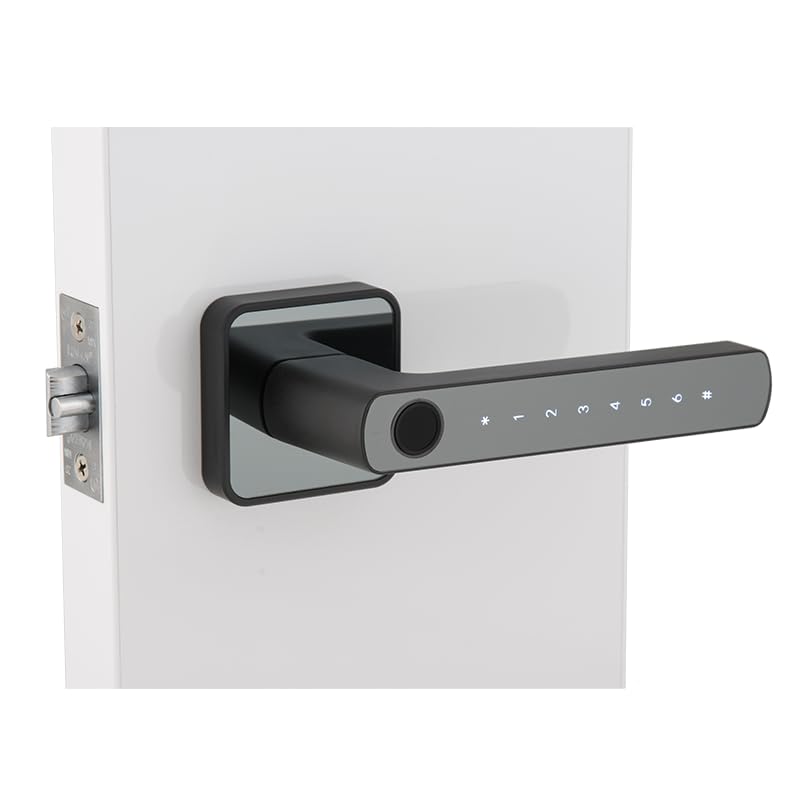
Figure 2: Dormakaba Rose Biometric Door Lock installed on a door.
Dingana fametrahana:
- Omano ny varavarana (Prepare the Door): Ensure the door is clean and the existing boreholes are compatible with the lock's dimensions. If necessary, drill new holes according to the provided template (not included in this manual, refer to packaging).
- Mametraka ny Latch: Insert the dormakaba 60mm tubular deadlatch into the door edge. Secure it with screws.
- Famaritana ny fanomezana: The lock is reversible. Adjust the lever handle direction if needed before final assembly.
- Mount Exterior Assembly: Feed the spindle and connecting cables through the latch and door. Position the exterior lock assembly.
- Mount Interior Assembly: Connect the cables from the exterior unit to the interior unit. Align the interior unit with the spindle and secure it to the exterior unit using the provided screws.
- Mametraka bateria: Open the battery cover on the interior unit and insert 3 AAA alkaline batteries, observing polarity.
- Fitsapana asa: After installation, test the lock's mechanical and electronic functions before closing the door.
Torolàlana miasa
The Dormakaba Rose lock offers multiple access methods and operating modes for enhanced security and convenience.
Initial Setup (First Use):
- Upon first power-up, the lock will prompt for initial administrator setup. Follow the voice navigation prompts.
- Register the first administrator fingerprint and/or PIN code. This administrator will have full control over user management.
Fomba fidirana:
- Fomba mahazatra: Requires a single valid fingerprint or PIN code to unlock.
- Fomba andalovana: Allows the door to remain unlocked for continuous access during specific periods. This mode is typically set by an administrator.
- Dual User Mode: Requires two different valid fingerprints or PIN codes to unlock, providing an extra layer of security.
mamoha ny varavarana (Unlocking the Door):
- Mampiasa fanondro: Place a registered finger on the fingerprint sensor. The lock will verify and unlock if successful.
- Using PIN Code: Enter your registered 6-10 digit PIN code on the backlit keypad, then press the '#' key. The lock will verify and unlock if successful.
Emergency Power Option:
If the batteries are completely drained, the lock can be temporarily powered using a Type C USB cable connected to an external power bank or adapter. Connect the USB-C cable to the port on the exterior unit, then use your fingerprint or PIN code to unlock.
fikarakarana
Regular maintenance ensures the optimal performance and longevity of your Dormakaba Rose lock.
- Fanadiovana: Wipe the lock surface with a soft, dry cloth. Do not use abrasive cleaners, solvents, or harsh chemicals, as these can damage the finish and electronic components.
- Fanoloana bateria: Replace all 3 AAA alkaline batteries when the low battery indicator appears or when voice prompts indicate low power. Do not mix old and new batteries.
- Fingerprint Sensor: Keep the fingerprint sensor clean and free of dirt or moisture for accurate readings.
- Fanamarinana mekanika: Periodically check that the lever handle operates smoothly and the latch retracts fully.
Fanamboarana
This section addresses common issues you might encounter with your Dormakaba Rose Biometric Door Lock.
| OLANA | Antony mety hitranga | vahaolana |
|---|---|---|
| Tsy mamaly ny Lock. | Batterie maty. | Replace batteries or use emergency Type C USB power. |
| Tsy fantatra ny dian-tanana. | Finger is dirty/wet, sensor is dirty, or fingerprint not properly registered. | Clean finger and sensor. Re-register fingerprint if issue persists. |
| Tsy mandeha ny kaody PIN. | Incorrect PIN entered, or PIN not properly registered. | Ensure correct PIN is entered. Re-register PIN if necessary. |
| Voice navigation is too loud/quiet or off. | Volume settings adjusted. | Refer to the lock's menu for voice volume adjustment. |
| Lock is difficult to install. | Door thickness incompatibility or incorrect drilling. | Verify door thickness (32-50mm). Ensure proper alignment and drilling as per template. |
Warranty sy fanohanana
Your Dormakaba Rose Biometric Door Lock comes with a Garantie 1 taona manomboka amin'ny datin'ny fividianana. Ity fiantohana ity dia mandrakotra ny lesoka amin'ny famokarana sy ny tsy fahombiazan'ny fampiasana mahazatra.
Fanilihana antoka:
- Damage caused by improper installation or unauthorized repairs.
- Damage due to misuse, abuse, neglect, or accidents.
- Ara-dalàna sy rovitra.
- Damage from natural disasters or power surges.
Fanohanana ny mpanjifa:
For technical assistance, warranty claims, or further inquiries, please contact Dormakaba customer support. Refer to your product packaging or the official Dormakaba webtranokala ho an'ny fampahalalana mifandraika amin'izao fotoana izao.
Azafady, tehirizo ny porofon'ny fividiananao mba hanamarina ny fiantohana.