
1. Fampidirana
This instruction manual provides essential information for the safe and efficient use of your ApoloSign 32-inch UHD 4K Smart Portable TV Gen2. Please read this manual thoroughly before operating the device and retain it for future reference. This portable smart TV combines a high-resolution display with smart features, offering versatile entertainment and productivity options throughout your home.

Image: The ApoloSign 32-inch Portable TV Gen2 positioned in a modern living room, showcasing ny endriny kanto sy ny fahafahany entina mora foana.
2. Information momba ny fiarovana
Fiarovana ankapobeny
- Aza atao amin'ny orana na ny hamandoana ny fitaovana mba hisorohana ny afo na ny fahatafintohinana herinaratra.
- Ataovy azo antoka tsara ny rivotra. Aza sakanana ny fisokafan'ny rivotra.
- Ampiasao ihany ny adaptatera herinaratra omena miaraka amin'ilay fitaovana.
- Avoid placing the device on unstable surfaces.
- Aza manandrana manongotra na manamboatra ilay fitaovana. Alefaso amin'ny mpiasa mahay ny serivisy rehetra.
Fiarovana ny bateria
- The device contains a built-in 15000mAh lithium-ion battery. Do not expose it to excessive heat, direct sunlight, or fire.
- Fenoy ny bateria alohan'ny fampiasana voalohany.
- If the battery shows signs of swelling, leakage, or damage, discontinue use immediately and contact support.
- Ario ny bateria araka ny fitsipika eo an-toerana.
3. Ny votoatin'ny fonosana
Hamarino fa misy ny entana rehetra ao anaty fonosana:
- ApoloSign 32-inch UHD 4K Smart Portable TV Gen2 Display
- Rolling Stand Base
- Stand Pole (multiple sections)
- Power Adapter
- Feo Remote Control
- 8MP Camera Module
- Assembly Screws and Tools
- User Manual (ity antontan-taratasy ity)

Image: The voice remote control, a key accessory for navigating the ApoloSign TV.

Image: The detachable 8MP camera module, designed for video calls and other interactive features.
4. Vokatra mihoatraview
The ApoloSign 32-inch UHD 4K Smart Portable TV Gen2 is a versatile device designed for flexible use across various environments. Its main components include:
- 32-inch UHD 4K Touchscreen: A large, high-resolution display with touch functionality for intuitive interaction.
- Rolling Stand: A sturdy base with smooth wheels for easy movement between rooms.
- Adjustable Screen Mount: Allows for height adjustment, left/right swivel, and tilt for optimal viewing angles in both portrait and landscape orientations.
- Integrated 8MP Camera: For video conferencing and other camera-enabled applications.
- Voice Remote Control: Enables hands-free operation and navigation.
- Batterie 15000mAh ao anatiny: Provides up to 8 hours of portable use.
- Ports connectivity: Includes HDMI, USB 2.0, USB 3.0, Bluetooth 5.3, and Wi-Fi for various connections.
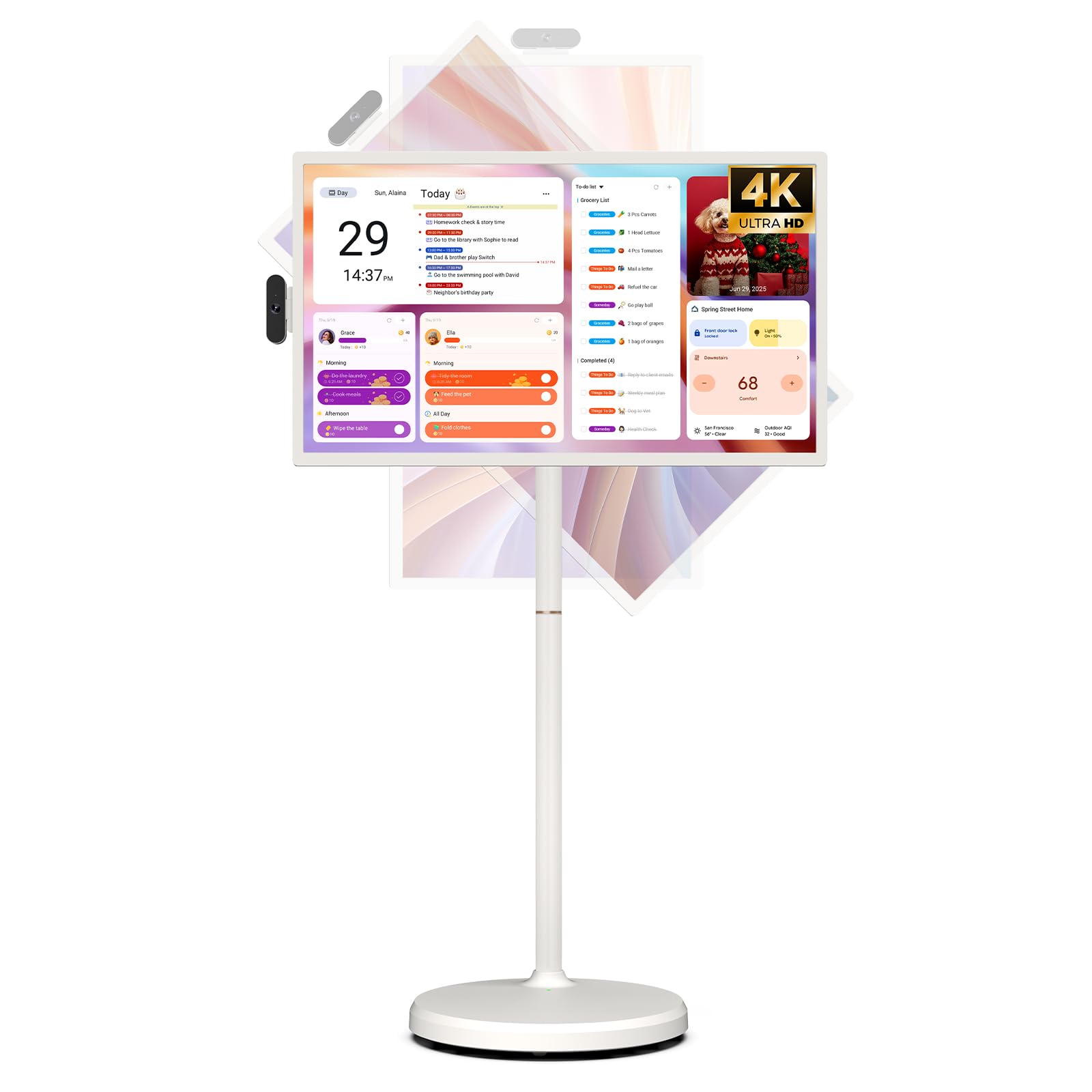
Image: The ApoloSign 32-inch UHD 4K Smart Portable TV Gen2, highlighting its large screen and mobile stand.
5. Fametrahana
FIVORIAMBE
- Esory ny singa rehetra ao anaty boaty.
- Attach the stand pole sections to the rolling base using the provided screws.
- Carefully mount the TV display onto the top of the assembled stand pole, ensuring it clicks securely into place.
- Connect the internal power cable from the stand to the display.
- Attach the 8MP camera module to the designated slot on top of the display.
Power-On voalohany sy fifandraisana amin'ny tambajotra
- Connect the power adapter to the TV and a power outlet. The device will begin charging.
- Press the power button located on the back of the display to turn on the TV.
- Araho ny bitsika eo amin'ny efijery hisafidianana ny fiteninao sy ny faritra misy anao.
- Mifandraisa amin'ny tambajotra Wi-Fi anao amin'ny alàlan'ny fisafidianana azy amin'ny lisitra ary ampidiro ny tenimiafina.
- Sign in with your Google account to access the Google Play Store and other services.
Fanaraha-maso lavitra
- Insert batteries into the voice remote control.
- On the TV screen, navigate to Settings > Remotes & Accessories > Add Accessory.
- Press and hold the specified pairing buttons on the remote (refer to remote's mini-guide) until the indicator light blinks.
- Select the remote control from the list on the TV screen to complete pairing.
6. Torolàlana miasa
Fikarohana fototra
- Efijery kasihina: Tap, swipe, and pinch to navigate menus, open apps, and interact with content.
- Feo lavitra: Use the directional pad and selection buttons for menu navigation. Press the voice button to activate voice commands for searching or launching apps.
Screen Rotation and Adjustment
The screen can be rotated 90 degrees between landscape and portrait modes. It also allows for height adjustment, left/right swivel, and tilting to achieve the desired viewing zoro.

Image: Illustrations demonstrating the various ways the ApoloSign TV screen can be adjusted: height, tilt, and rotation.
Apps and Google Play Store
Running on a customized Android 15 OS and Google certified, you can download and install any app available on the Google Play Store. Access streaming services, social media, productivity tools, and games.

Image: The ApoloSign TV screen showing the Android 15 interface with icons for popular apps like Netflix, YouTube, Spotify, and TikTok.
Wireless and Wired Casting
Share content from your mobile phone, tablet, or laptop to the TV screen.
- Famoahana tsy misy tariby: Use the built-in MixCast feature or other compatible casting protocols. Ensure your device and the TV are on the same Wi-Fi network.
- Wired Casting: Connect external devices like gaming consoles or laptops via the HDMI port. The TV supports 4K HDMI output.
Video: A demonstration of how to screen mirror a mobile phone, tablet, or laptop to the ApoloSign Smart Portable TV.
Calendar Widget and Screensavers
The interactive desktop calendar widget syncs with Google Calendar, Outlook, and Google Tasks to help manage your schedule. Utilize dynamic screensavers to transform the TV into a digital clock, photo frame, or market billboard.

Image: The ApoloSign TV screen showcasing its digital calendar feature, displaying daily schedules and events.

Image: The ApoloSign TV screen demonstrating different digital screensaver options, including a photo display and a music player interface.
Fampiasana fakan-tsary
The integrated 8MP camera is ideal for video calls and conferences. Ensure the camera is correctly installed and facing the desired direction.
7. Fikojakojana
FANADIOVANA
- Esory foana ilay fitaovana alohan'ny hanadiovana.
- Mampiasà lamba malefaka sady tsy misy loko kely dampened with water or a screen cleaner to wipe the display. Avoid harsh chemicals.
- Wipe the body of the TV and stand with a dry, soft cloth.
Fikarakarana bateria
- Mba hahazoana androm-piainana tsara indrindra amin'ny bateria, aza atao ritra tanteraka matetika izany.
- Tehirizo ao amin'ny toerana mangatsiatsiaka sy maina ilay fitaovana rehefa tsy ampiasaina mandritra ny fotoana maharitra.
- Charge the battery periodically if stored for a long time to prevent deep discharge.
Software Updates
Regularly check for and install software updates to ensure optimal performance and access to the latest features. Updates can usually be found in the device's settings menu.
8. Famahana olana
- Device not powering on or shutting off abruptly:
Ensure the power adapter is securely connected and the battery is charged. If the issue persists, perform a soft reset by holding the power button for 10-15 seconds. If problems continue, contact customer support. - Remote control not responding or selective functionality:
Check the remote's batteries and replace if necessary. Ensure the remote is paired correctly (refer to Section 5). If the remote is still unresponsive, try re-pairing it. - Olana amin'ny fifandraisana Wi-Fi:
Verify that your Wi-Fi router is working correctly. Restart the TV and your router. Ensure the TV is within range of your Wi-Fi signal. - Screen mirroring not working:
Confirm that both the TV and the source device (phone, tablet, laptop) are connected to the same Wi-Fi network. Ensure the casting feature is activated on both devices. - Poor picture or sound quality:
For streaming content, check your internet connection speed. For wired connections (HDMI), ensure cables are securely connected and undamaged. Adjust display settings (resolution, brightness) as needed.
9. Famaritana
| endri-javatra | antsipirihany |
|---|---|
| Anarana modely | SW3299T-4K |
| Haben'ny efijery | 32 santimetatra |
| vahaolana | 4K UHD 2160p (3840x2160 Pixels) |
| Display Technology | LCD |
| Ny tahan'ny fanavaozana | 60 Hz |
| Rafitra fikirakirana | Android 15 |
| ram | 16GB (8+8GB) |
| Fitehirizana anatiny | 256GB |
| Fahaizana bateria | 15000mAh (up to 8 hours runtime) |
| Camera | 8MP |
| fifandraisana | Bluetooth 5.3, Wi-Fi |
| seranana | 1x HDMI, 1x USB 2.0, 1x USB 3.0 |
| Famariparitana ny mpandahateny | 2.1 fantsona mpandahateny |
| Fomba fanaraha-maso | Touch, Voice Remote |
| Ny refin'ny vokatra | 16.14" D x 28.87" W x 60.26" H |
10. Warranty sy fanohanana
Warranty avy amin'ny mpanamboatra
This ApoloSign product is covered by a Garantie mpanamboatra 1 taona manomboka amin'ny datin'ny fividianana. Ity fiantohana ity dia manarona ny lesoka amin'ny fitaovana sy ny asa amin'ny fampiasana mahazatra. Azafady, tehirizo ny porofon'ny fividiananao ho an'ny fitakiana fiantohana.
Fanohanana ny mpanjifa
For technical assistance, troubleshooting, or warranty inquiries, please contact ApoloSign Official customer support. They offer 24/7 fast support to address any issues you may encounter.
Raha mila fanazavana fanampiny dia tsidiho ny ApoloSign Store on Amazon.