
1. Fampidirana
The IHSENO Zigbee Vibration Sensor is a smart home device designed to detect vibrations, motion, and falls. It integrates with the Tuya Smart or Smart Life application via a Zigbee gateway, providing real-time alerts and enabling smart automation scenarios to enhance home safety and monitoring.
2. Information momba ny fiarovana
- Ity fitaovana ity dia natao ho an'ny fampiasana anatiny ihany.
- Aza apetraka amin'ny hafanana tafahoatra, ny hamandoana, na ny tara-masoandro mivantana ny fitaovana.
- Arovy amin'ny ankizy.
- Use only the specified battery type (not included).
- Aza manandrana manongotra na manamboatra ilay fitaovana.
3. Ny votoatin'ny fonosana

Sary 3.1: This image shows the complete packing list for the IHSENO Zigbee Vibration Sensor. It includes the product box, the Smart Vibration Sensor itself, a 3M adhesive sticker for mounting, an inserting pin (likely for reset or battery access), and the user manual.
Hamarino azafady fa ao anatin'ny fonosanao ny entana rehetra:
- IHSENO Zigbee Vibration Sensor
- User Manual
- 3M Adhesive Sticker
- Inserting Pin
Fanamarihana: Tsy tafiditra ny bateria ary tsy maintsy vidiana misaraka.
4. Vokatra mihoatraview
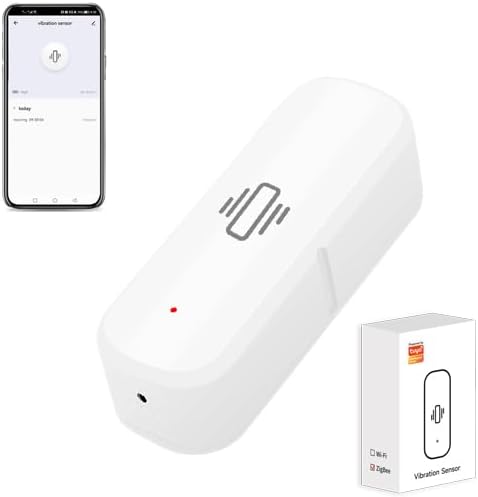
Sary 4.1: The IHSENO Zigbee Vibration Sensor, a compact white device, is shown alongside a smartphone displaying its corresponding application interface. The app shows a 'vibration sensor' screen with a large icon and a history log.
The IHSENO Zigbee Vibration Sensor is a compact device designed for various monitoring applications. Its primary functions include:
- Fitihana hovitrovitra: Detects physical vibrations, shocks, or movements.
- Fanaraha-maso tena fotoana: Sends instant notifications to your smartphone via the Tuya Smart/Smart Life app.
- Smart Linkage: Can be integrated with other Tuya-compatible smart devices for automated actions.
- Tantara firaketana: Stores a log of detected events for review.
- Fahatsapana azo ahitsy: Allows customization of detection sensitivity.
- Fampitandremana herinaratra ambany: Mampahafantatra anao rehefa ambany ny herin'ny bateria.
5. Fametrahana
5.1 Fametrahana bateria
The sensor requires batteries (not included) for operation. To install the battery:
- Sokafy moramora ny sensor casing. Refer to the device's casing for instructions on how to open it, as designs may vary. An inserting pin might be used to pry open a specific seam or cover.
- Insert the required battery type (e.g., CR2032, check device markings) into the battery compartment, ensuring correct polarity (+/-).
- Akatony ny sensor casing azo antoka.
5.2 Fametrahana app
The IHSENO Zigbee Vibration Sensor operates with the Tuya Smart or Smart Life application.
- Download ny Tuya Smart or Smart Life app from your smartphone's app store (Google Play Store for Android or Apple App Store for iOS).
- Misoratra anarana na miditra amin'ny kaontinao.
5.3 Device Pairing (Zigbee Hub Required)

Sary 5.1: This diagram illustrates the network setup for the Smart Vibration Sensor. The sensor connects wirelessly to a Tuya Zigbee Gateway (Hub), which then connects to a WiFi Router. The router provides internet access, enabling APP Control from a smartphone.
This Zigbee version of the sensor requires a Tuya Zigbee Gateway (Hub) to function. Ensure your Zigbee gateway is already set up and connected to your home Wi-Fi network.
- Sokafy ny fampiharana Tuya Smart na Smart Life.
- Navigate to your Zigbee Gateway in the app.
- Select 'Add sub-device' or 'Hitady ny devices'.
- Follow the in-app instructions to put the vibration sensor into pairing mode (usually by pressing and holding a reset button on the sensor until an indicator light flashes).
- Once detected, add the sensor to your gateway.
- Rename the sensor for easy identification (e.g., "Living Room Vibration Sensor").
5.4 Fametrahana ara-batana
Select an appropriate location for the sensor where vibration detection is desired. This could be on a window, door, cabinet, or appliance.
- Clean the surface where you intend to mount the sensor.
- Peel off the protective film from the 3M adhesive sticker.
- Attach the sticker to the back of the sensor.
- Press the sensor firmly onto the desired surface for a few seconds to ensure secure adhesion.
6. Torolàlana miasa
6.1 Vibration Detection and Remote Alarm

Sary 6.1: An IHSENO Zigbee Vibration Sensor is mounted on a wall in a bedroom setting, indicating detection with a red alarm icon. A hand holds a smartphone displaying the sensor's app interface, showing an active alarm notification, demonstrating remote monitoring capabilities.
Once installed and paired, the sensor will detect vibrations. When a vibration, motion, or fall is detected, the sensor will send an alarm notification to your smartphone through the Tuya Smart/Smart Life app. This allows for immediate awareness of events in your home.
6.2 Real-time Monitoring and History Records

Sary 6.2: The IHSENO Zigbee Vibration Sensor is placed on a coffee table in a living room. A smartphone displays the sensor's application, showing a 'vibration sensor' screen with a current status and a detailed history log of detected events, highlighting its real-time monitoring feature.
The app provides real-time status updates from the sensor. You can also view a comprehensive history of all detected events, including timestamps, directly within the Tuya Smart/Smart Life app.
6.3 Smart Linkage
The sensor can be linked with other Tuya-compatible smart devices to create automated scenarios. For example:
- If the sensor detects vibration on a window, a smart light could turn on.
- If the sensor detects movement on a washing machine, you could receive a notification that the laundry cycle is complete.
To set up smart linkages, navigate to the 'Smart' or 'Automation' section within the Tuya Smart/Smart Life app and follow the instructions to create new scenes or automations.
6.4 Customize Sensitivity Settings

Sary 6.3: A smartphone displays the 'Sensitivity Set' screen within the sensor's application. A slider allows users to adjust the sensitivity level from 'L' (Low) to 'H' (High), with instructions to shake the device to trigger an alarm and save the setting.
You can adjust the sensitivity of the vibration detection to suit your specific needs. This is done through the sensor's settings in the Tuya Smart/Smart Life app.
- Open the Tuya Smart or Smart Life app and select your vibration sensor.
- Look for 'Sensitivity Settings' or a similar option.
- Use the slider or options provided to adjust the sensitivity level (e.g., Low, Medium, High).
- Test the new setting by gently vibrating the sensor to ensure it triggers at the desired level.
6.5 Low Power Warning

Sary 6.4: An IHSENO Zigbee Vibration Sensor is attached to a window frame, suggesting a security application. A smartphone screen shows a 'Low Power Warning' notification, indicating that the device's battery needs to be changed soon.
The sensor will send a low battery notification to your smartphone when its power level is critically low. This ensures you have ample time to replace the battery and maintain continuous monitoring.
7. Fikojakojana
7.1 Fanoloana bateria
When you receive a low power warning, replace the battery promptly to ensure uninterrupted operation.
- Sokafy ny sensor casing araka ny voalaza ao amin'ny fizarana 5.1.
- Esory ny bateria taloha.
- Insert a new battery of the same type, observing correct polarity.
- Akatona ny casing azo antoka.
7.2 Fanadiovana
To clean the sensor, use a soft, dry cloth. Do not use liquid cleaners or abrasive materials, as these can damage the device.
8. Famahana olana
- Device not connecting to the hub:
- Ensure the Zigbee gateway is powered on and connected to your Wi-Fi network.
- Verify the sensor has a fresh battery installed.
- Make sure the sensor is within range of the Zigbee gateway.
- Try resetting the sensor (refer to the device for a small reset button, often requiring the inserting pin) and re-attempt pairing.
- Check the Tuya Smart/Smart Life app for any error messages or specific pairing instructions.
- No alarm notifications:
- Check the app's notification settings for the sensor and your phone's general notification settings.
- Ensure the sensor is properly paired and online in the app.
- Verify the sensitivity settings are appropriate for the desired detection level.
- Check the battery level of the sensor.
- Difficulty adjusting sensitivity:
- Ensure you are using the latest version of the Tuya Smart/Smart Life app.
- Follow the in-app instructions carefully when adjusting the sensitivity slider. Some apps require a test vibration to save the setting.
9. Famaritana
| Marika | IHSENO |
| Laharana modely | Zigbee Vibration Sensor |
| Teknolojia | Vibration Sensor |
| fifandraisana | Zigbee (Requires Tuya Zigbee Gateway) |
| Loharanon-kery | Mampiasa bateria (Tsy tafiditra ny bateria) |
| Fitaovana mifanentana | Smartphone (via Tuya Smart/Smart Life App) |
| Fomba fanaraha-maso | App |
| loko | White |
| Lanja entana | 0.96 oz |
| Ny refin'ny vokatra | 2.75 x 0.94 x 0.79 santimetatra |
10. Fampahalalana momba ny fiantohana
This product comes with a standard manufacturer's warranty. Please refer to the product packaging or contact the seller for specific warranty terms and conditions.
11. Fanohanana ny mpanjifa
For technical assistance, troubleshooting, or product inquiries, please contact your retailer or the manufacturer's customer support channels. Contact information can typically be found on the product packaging or the seller's website.