
1. Vokatra mihoatraview
The eLinkSmart Keyless Waterproof Bicycle Chain Lock provides advanced security for your bicycle, scooter, motorcycle, or other valuables. This heavy-duty chain lock features multiple unlocking methods, including fingerprint recognition and a smartphone application, ensuring convenient and robust protection. Its durable, waterproof design is built to withstand various outdoor conditions.
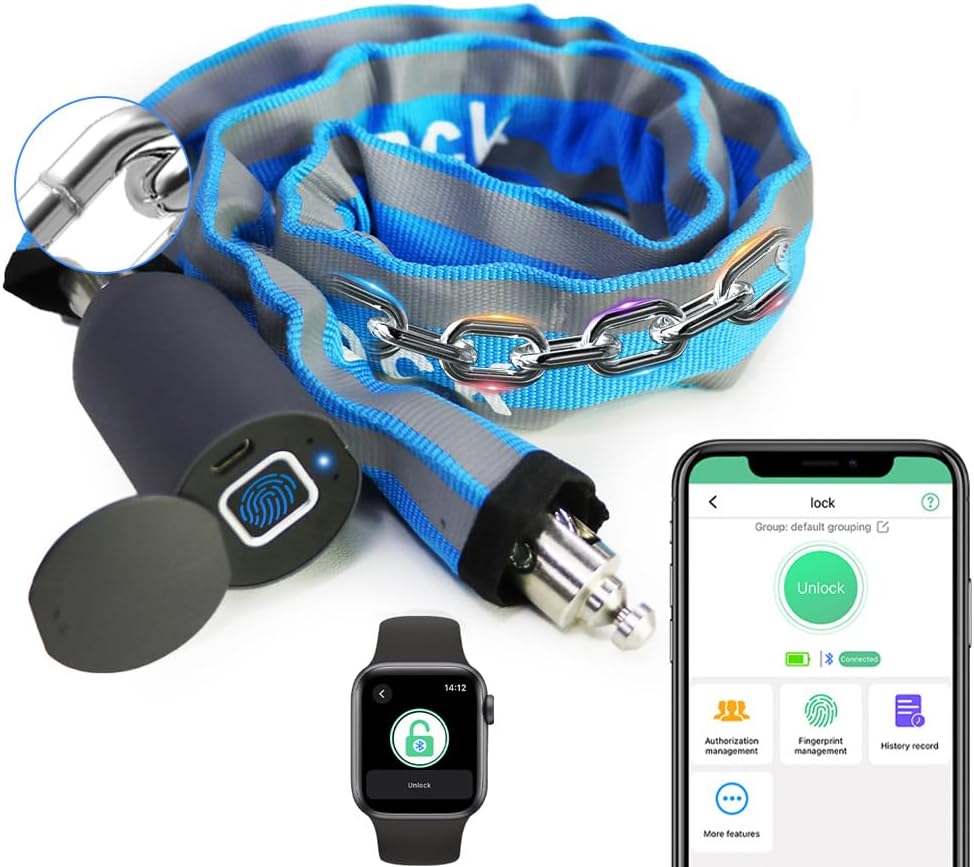
Image: The eLinkSmart Keyless Waterproof Bicycle Chain Lock, showcasing ny endriny matanjaka.
2. Endri-javatra fototra
- Biometric Fingerprint Unlocking: Supports up to 20 unique fingerprint users for quick and secure access.
- Fanaraha-maso fampiharana smartphone: Manage up to 1000+ users, authorize remote unlocking for family or friends, and view unlock records via the dedicated app.
- Durable 100CM Chain: Features a Φ 5MM diameter chain, 100CM (3.28 FT) in length, made from robust material with a durable nylon cover.
- Tsy tantera-drano sy vovoka (IP67): Designed to withstand outdoor elements, preventing rust and ensuring reliable operation in rain. The sliding cover protects the fingerprint area and charging port.
- Heavy-Duty Security: Engineered to resist cutting, prying, sawing, and hammering, with a pulling force resistance of over 2600 pounds.
- Long Battery Life & Low Battery Alarm: Equipped with a rechargeable 110MAH lithium battery, providing up to 6 months of standby time or over 2000 unlocks. The app and lock provide voice prompts and a red light indicator for low battery.
- Reflective Nylon Cover: The chain's cover includes reflective strips for enhanced visibility in low-light conditions.
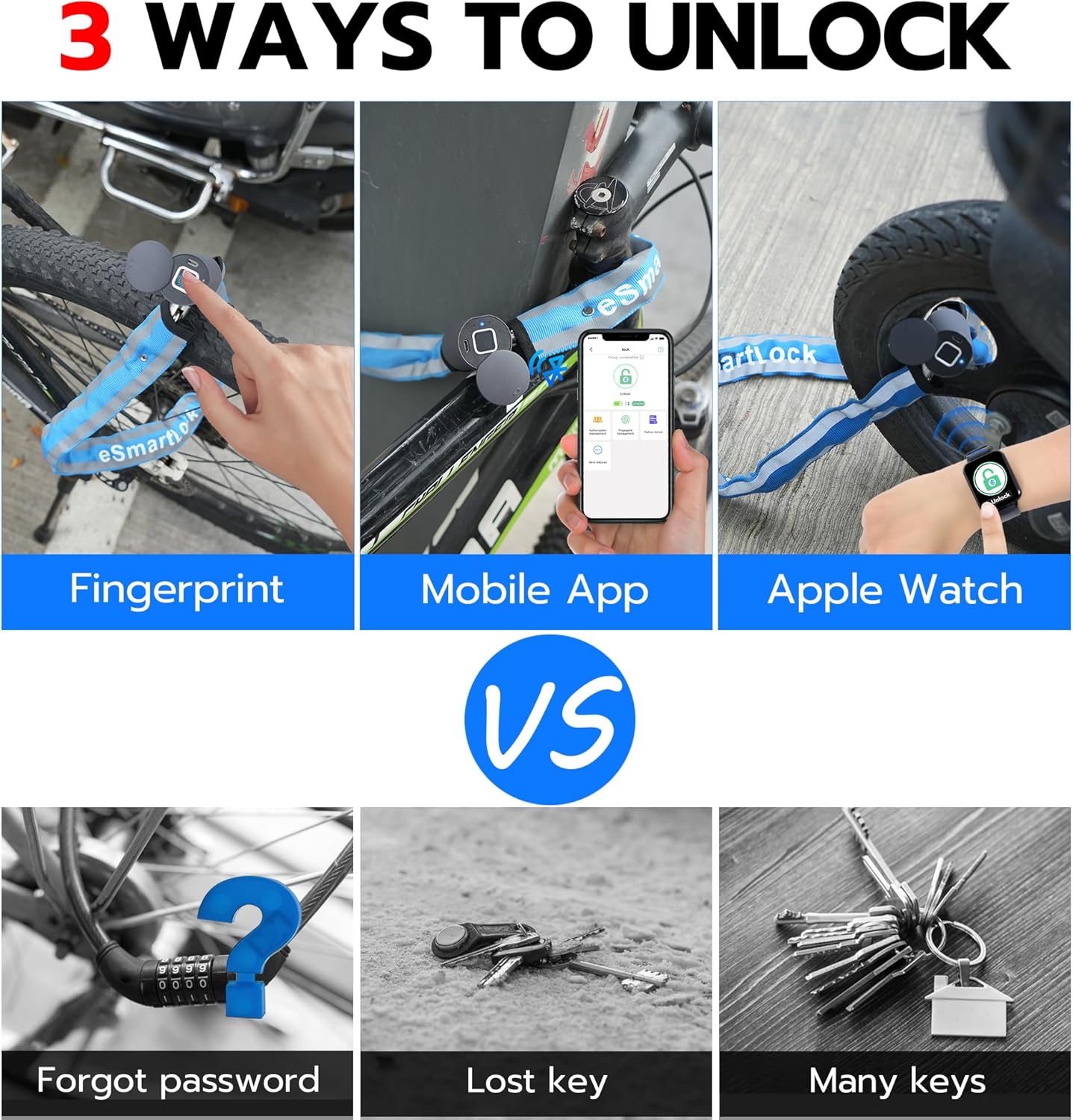
Image: Illustration of the three primary unlocking methods: fingerprint, mobile app, and Apple Watch.
3. Inona no ao anaty boaty
- Smart Bike Chain Lock
- USB Cable (Micro USB)
- User Manual

Image: The eLinkSmart Smart Cable Lock, showing the lock unit, USB charging cable, and user manual.
4. Torolàlana fananganana
4.1 Fametrahana voalohany
Before first use, fully charge the lock. Slide open the protective cover to reveal the Micro USB charging port. Connect the provided USB cable to the lock and a power source. The indicator light will flash while charging and turn solid when fully charged.
Video: Demonstrates the charging process of the eLinkSmart chain lock, showing the Micro USB port and indicator light.
4.2 Fampidinana sy fampiarahana ny fampiharana
- Download the "eSmartLock" app from your smartphone's app store (iOS/Android).
- Open the app and follow the on-screen instructions to create an account and pair your lock via Bluetooth. Ensure Bluetooth is enabled on your device.

Image: The eLinkSmart app interface, illustrating features like unlock records and authorization management.
4.3 Fingerprint Registration
- After pairing with the app, navigate to the fingerprint management section.
- Follow the app's instructions to register your fingerprints. You will typically need to place your finger on the sensor multiple times from different angles to ensure accurate recognition. The lock supports up to 20 fingerprint users.
5. Torolàlana miasa
5.1 Locking the Device
To lock the device, simply insert the metal pin of the chain into the lock body. The lock will automatically engage, and you will hear an audible click, indicating it is secured.

Image: The eLinkSmart chain lock securing a bicycle to a fixed object.
5.2 Mamoha amin'ny Fingerprint
Slide open the protective cover on the lock body to expose the fingerprint sensor. Place your registered finger firmly on the sensor. Upon successful recognition, the lock will disengage, and you can remove the chain pin.
5.3 Unlocking with the App
Open the "eSmartLock" app on your paired smartphone. Ensure Bluetooth is active and the lock is within range. Tap the "Unlock" button within the app. The lock will disengage, allowing you to open it.

Image: Demonstrates remote unlocking functionality using the eLinkSmart smartphone application.
5.4 Remote Authorization
Through the eSmartLock app, you can grant temporary or permanent unlocking access to other users. This feature is useful for sharing access with family, friends, or colleagues. Access permissions can be managed and revoked at any time within the app.
6. Fikojakojana
6.1 Famandrihana ny bateria
When the battery is low, the app will provide voice prompts, and the lock will display a red light. Recharge the lock using the provided Micro USB cable. A power bank can also be used for charging. Ensure the protective cover is closed after charging to maintain waterproof integrity.
6.2 Fikarakarana tsy tantera-drano
The lock is IP67 rated for water and dust resistance. Always ensure the sliding protective cover over the fingerprint sensor and charging port is securely closed when not in use, especially in wet or dusty environments, to prevent damage.
Video: Short demonstration of the eLinkSmart chain lock's waterproof capabilities.
6.3 Fikarakarana ankapobeny
Clean the lock body and chain periodically with a soft, damp cloth. Avoid using harsh chemicals or abrasive materials that could damage the finish or electronic components. Store the lock in a dry place when not in use for extended periods.
7. Famahana olana
- Hihidy tsy mamaly: Ensure the battery is charged. If the battery is completely depleted, connect it to a power source for a few minutes before attempting to unlock.
- Fingerprint tsy fantatra: Ensure your finger is clean and dry. Try different angles or re-register your fingerprint if issues persist. The sensor may require firm contact.
- Olana mifandray amin'ny fampiharana: Ensure Bluetooth is enabled on your phone and the lock is within range. Restart the app or your phone if necessary.
- Returning the item: If you intend to return the item, it is essential to first remove the device from the eSmartLock app and perform a factory reset. This action ensures that the lock is no longer linked to your personal account, as there is no other method to open the lock once it has been unpaired without the registered credentials.
8. Famaritana
| Marika | eLinkSmart |
| Anarana modely | New-C6BF |
| Karazana hidin-trano | Biometrika |
| Halavan'ny rojo | 100CM (3.28 FT) |
| Savaivony rojo | Φ 5MM |
| KEVITRA | Metal (with durable nylon cover) |
| Rating tsy tantera-drano | IP67 |
| Batterie | Rechargeable 110MAH Lithium Battery |
| fifandraisana | Bluetooth |
| Fingerprint Users | Hatramin'ny 20 |
| Mpampiasa App | 1000+ |
| Lanja entana | 0.85 kilao (1.87 kilao) |
| Ny refin'ny vokatra | 7.09 x 2.36 x 8.66 santimetatra |
Video: Demonstrates the 100CM chain length and its application for securing bikes and scooters.
9. Warranty sy fanohanana
For any questions or support needs, please contact eLinkSmart customer service. We are committed to providing 24-hour service. If you encounter any issues or require assistance, please reach out to us directly.
Important Note for Returns: If you intend to return the item, it is essential to first remove the device from the eSmartLock app and perform a factory reset. This action ensures that the lock is no longer linked to your personal account, as there is no other method to open the lock once it has been unpaired without the registered credentials.