1. Fampidirana
Thank you for choosing the Smart Tech 24HN01V3CA 24-inch HD LED Smart TV. This compact television is designed to provide high-definition entertainment with integrated smart features, making it ideal for various living spaces. Its practical design and advanced connectivity options ensure a versatile viewamin'ny traikefa.
This manual provides essential information for setting up, operating, and maintaining your new television. Please read it thoroughly before use and keep it for future reference.
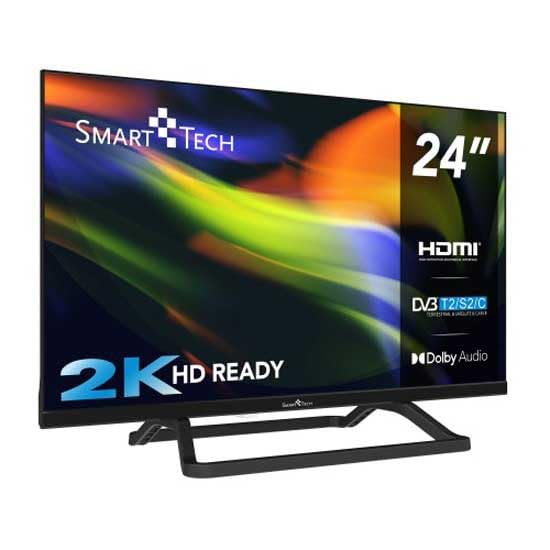
Sary 1.1: Eo anoloana view of the Smart Tech 24-inch HD LED Smart TV with its stand. This image shows the television's display and the included base.
2. Ny votoatin'ny fonosana
Azafady, jereo fa tafiditra ao anatin'ny fonosanao ireto entana manaraka ireto:
- Smart Tech 24-inch HD LED Smart TV (Model: 24HN01V3CA)
- TV TV
- Fanaraha-maso lavitra
- User Manual (ity antontan-taratasy ity)
- Cable herinaratra
If any items are missing or damaged, please contact your retailer or Smart Tech customer support.
3. Fampahalalana manan-danja momba ny fiarovana
Mba hiantohana ny fampandehanana azo antoka sy hisorohana ny fahasimbana dia tandremo ireto fepetra fiarovana manaraka ireto:
- Loharano herinaratra: Ampifandraiso amin'ny fivoahana herinaratra AC amin'ny voltage.
- rivotra: Ataovy azo antoka tsara ny rivotra manodidina ny fahitalavitra. Aza sakanana ny fisokafan'ny rivotra.
- Rano sy hamandoana: Do not expose the TV to rain, moisture, or excessive humidity.
- Loharanon'ny hafanana: Keep the TV away from heat sources such as radiators, heat registers, stoves, or other appliances that produce heat.
- Fanadiovana: Esory ny herinaratra amin'ny fahitalavitra alohan'ny hanadiovana azy. Mampiasà lamba malefaka sy maina. Aza mampiasa ranoka fanadiovana na aerosol.
- Fametrahana: Place the TV on a stable, level surface. Avoid placing it in direct sunlight or near strong magnetic fields.
- Ankizy: Supervise children to ensure they do not climb on the TV or stand.
- Serivisy: Aza manandrana manompo an'ity vokatra ity ny tenanao. Ampidiro amin'ireo mpiasan'ny serivisy mahay ny fanompoana rehetra.
4. Fametrahana
4.1 Fametrahana ny Stand
If you are not wall-mounting your TV, you will need to attach the included stand.
- Apetraho amin'ny toerana malefaka sy madio ny fahitalavitra mba hisorohana ny fahasimban'ny efijery.
- Ampifanaraho amin'ny lavaka fametrahana eo amin'ny faran'ny fahitalavitra ny fitoeran-jiro.
- Arovy ny fijoroana amin'ny fampiasana ny visy nomena. Ataovy azo antoka fa miraikitra tsara ny fijoroana.
4.2 Fametrahana rindrina (tsy voatery)
This TV supports VESA standard wall mounts. The VESA mounting pattern for this model is 75 x 75 mm. Please use a compatible wall mount kit (sold separately) and follow the instructions provided with the wall mount.
fampitandremana: Wall mounting should be performed by qualified personnel to prevent injury or damage.
4.3 Fampifandraisana ireo fitaovana ivelany
Your Smart Tech TV offers various ports for connecting external devices such as Blu-ray players, game consoles, sound systems, and USB storage devices.
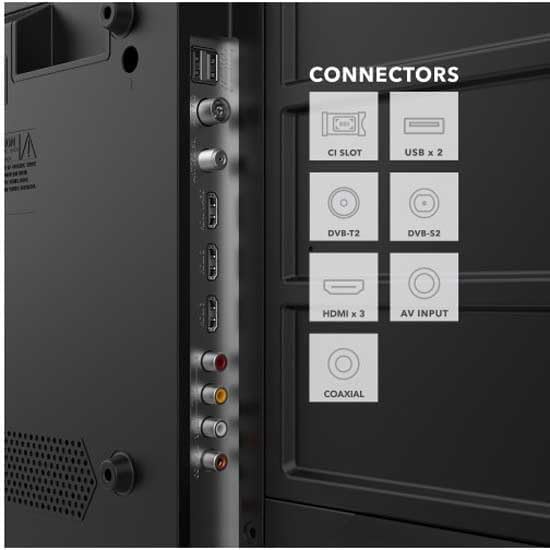
Sary 4.1: Misy antsipiriany view of the Smart Tech TV's rear panel connectors. This image highlights the HDMI, USB, CI Slot, DVB-T2, DVB-S2, AV Input, and Coaxial ports.
- Seranana HDMI (x3): Ampifandraiso ireo fitaovana avo lenta toy ny mpilalao Blu-ray, consoles lalao video, na boaty set-top.
- Port USB (x1): Ampifandraiso ireo fitaovana fitahirizana USB ho an'ny famerenam-baovao na fanavaozana rindrambaiko.
- DVB-T2/S2/C: Connect an antenna for terrestrial digital TV or a satellite dish for satellite TV.
- AV Input: Ampifandraiso ireo fitaovana tranainy amin'ny alalan'ny tariby mitambatra video sy feo stereo.
- CI Slot: For inserting a Conditional Access Module (CAM) for encrypted channels.
- Coaxial: Ho an'ny fifandraisana amin'ny rafitra audio ivelany.
4.4 Fampifandraisana herinaratra
After all connections are made, plug the power cable into the TV's power input and then into a wall outlet.
4.5 Fametrahana voalohany
Upon first power-on, the TV will guide you through an initial setup wizard. This typically includes:
- Fifidianana fiteny
- Country/Region selection
- Network connection (Wi-Fi setup for Smart TV features)
- Channel scanning (for DVB-T2/S2/C)
- Fikirana faritra amin'ny fotoana
5. Fampandehanana ny fahitalavitrao
5.1 Fanaraha-maso lavitraview
The included remote control allows you to access all TV functions. Insert two AAA batteries (not included) into the remote control, observing the correct polarity.
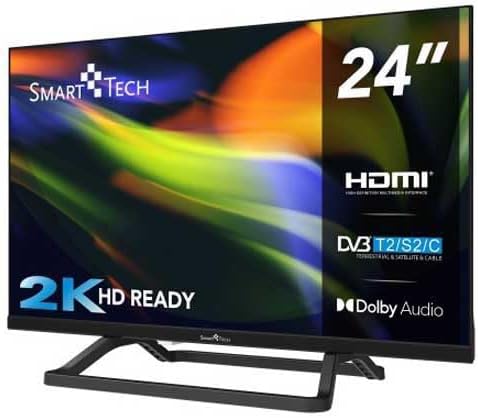
Image 5.1: The Smart Tech TV remote control. This image displays the layout of buttons for power, channel, volume, navigation, and smart TV functions.
- Bokotra hery: Mandeha na mamono ny fahitalavitra.
- Bokotra isa: Misafidiana fantsona mivantana.
- Vola miakatra/midina: Ahitsio ny haavon'ny feo.
- Fantsona ambony/midina: Change channels sequentially.
- Bokotra Fitetezana (Miakatra/Midina/Havia/Ankavanana/OK): Mandehana menus ary hamafiso ny safidy.
- Bokotra loharano: Select input sources (HDMI, AV, DVB).
- Bokotra fahitalavitra marani-tsaina: Quick access to popular apps like Netflix, YouTube, Amazon Prime (if available on your model).
- bokotra Menu: Midira ao amin'ny menio fandrindrana lehibe.
- Bokotra fivoahana: Exit current menu or application.
5.2 Asa fototra
- Mamelona/mamono: Press the Power button on the remote or on the TV.
- Fanovana fantsona: Use the CH+/- buttons or number buttons.
- Fanitsiana ny volume: Ampiasao ny bokotra VOL+/-.
- Misafidiana Loharano fampidirana: Press the Source button and select the desired input (e.g., HDMI 1, USB).
5.3 Endri-javatra TV Smart
Your Smart Tech TV comes with integrated Smart TV capabilities, allowing you to access a world of online content. Ensure your TV is connected to the internet via Wi-Fi during the initial setup.
- Miditra amin'ny Apps: Use the dedicated Smart TV buttons on your remote or navigate to the 'Smart' or 'Apps' section in the main menu.
- Serivisy streaming: Enjoy popular streaming platforms like Netflix, YouTube, and Amazon Prime (subscription may be required).
- Web Browser: Hikaroka mivantana ny Internet avy amin'ny fahitalavitra.
6. Fikojakojana
6.1 Fanadiovana ny fahitalavitra
Esory foana ny televiziona amin'ny fivoahan'ny herinaratra alohan'ny hanadiovana.
- Ecran: Fafao moramora amin'ny lamba malefaka tsy misy loko ny efijery. Ho an'ny marika mafy loha, kely dampen the cloth with water or a specialized screen cleaner (ensure it's suitable for LED screens) and wipe gently. Do not apply pressure.
- Kabinetra: Wipe the TV cabinet with a soft, dry cloth. Do not use abrasive cleaners, waxes, or solvents as they can damage the finish.
6.2 Fanavaozana rindrambaiko
Your TV may receive software updates to improve performance and add new features. Ensure your TV is connected to the internet to receive automatic updates, or check for updates manually through the TV's settings menu.
7. Famahana olana
Alohan'ny hifandraisana amin'ny fanohanan'ny mpanjifa dia jereo ireto olana sy vahaolana mahazatra manaraka ireto:
| OLANA | Antony mety / Vahaolana |
|---|---|
| Tsy misy hery | Check if the power cable is securely plugged into the TV and the wall outlet. Ensure the wall outlet is working. |
| Tsy misy sary, fa misy feo | Ataovy azo antoka fa voafantina ny loharano fampidirana marina. Jereo ny fifandraisana tariby amin'ny fitaovana ivelany. |
| Tsy misy feo fa misy sary | Check the volume level and ensure the TV is not muted. Check audio cable connections if using external speakers. |
| Tsy mandeha ny fanaraha-maso lavitra | Jereo ary soloy ny bateria. Ataovy azo antoka fa tsy misy sakana eo anelanelan'ny fanaraha-maso lavitra sy ny sensor IR an'ny fahitalavitra. |
| Tsy afaka mifandray amin'ny Wi-Fi | Ensure your Wi-Fi router is on and within range. Re-enter the Wi-Fi password. Try restarting the TV and router. |
8. Famaritana
| endri-javatra | antsipirihany |
|---|---|
| Marika | Smart Tech |
| Laharana modely | 24HN01V3CA |
| Haben'ny efijery | 24 santimetatra |
| Display Technology | LED |
| vahaolana | 768p (1366 x 768 teboka) |
| Ny tahan'ny fanavaozana | 120 Hz |
| Endri-javatra manokana | Fahaizana Smart TV |
| Teknolojia fifandraisana | HDMI, USB, Wireless (Wi-Fi) |
| Internet Applications | Netflix, YouTube, Amazon Prime |
| Total seranan-tsambo HDMI | 3 |
| Total seranan-tsambo USB | 1 |
| Standard VESA Mount | 75 x 75 mm |
| Haben'ny vokatra (D x W x H) | 6 x 53.5 x 31.8 cm |
| Lanja entana | 2.45 kg |
| Fantsom-peo | 5.1 Feon'ny manodidina |
9. Warranty sy fanohanana
9.1 Garantie voafetra
This Smart Tech 24HN01V3CA TV comes with a limited warranty. Please refer to the warranty card included in your package or visit the official Smart Tech website for detailed terms and conditions regarding warranty coverage, duration, and limitations.
9.2 Fanohanana ny mpanjifa
If you encounter any issues that cannot be resolved using the troubleshooting guide, or if you require further assistance, please contact Smart Tech customer support. Contact information can typically be found on the official Smart Tech webtranokala na ao amin'ny antontan-taratasy fiantohana anao.
When contacting support, please have your TV model number (24HN01V3CA) and serial number ready.