
Sava lalana
Thank you for choosing the Cuifati Mini Body Camera. This manual provides detailed instructions for the proper use, setup, and maintenance of your device. Please read this manual thoroughly before operating the camera to ensure optimal performance and longevity.
Fonosana fonosana
- 1 x Wearable Camera
- 1 x mitondra kitapo
- 1 x User Manual
- 1 x Lanyard
- 1 x Back Shell Bracket
- 1x Tripod
- 1 x USB Cable
- 1 x Lamba fanadiovana

Figure 1: Cuifati Mini Body Camera and included accessories.

Figure 2: Multi-scenario application examples for the body camera.
Vita ny vokatraview
Familiarize yourself with the components and controls of your Cuifati Mini Body Camera.
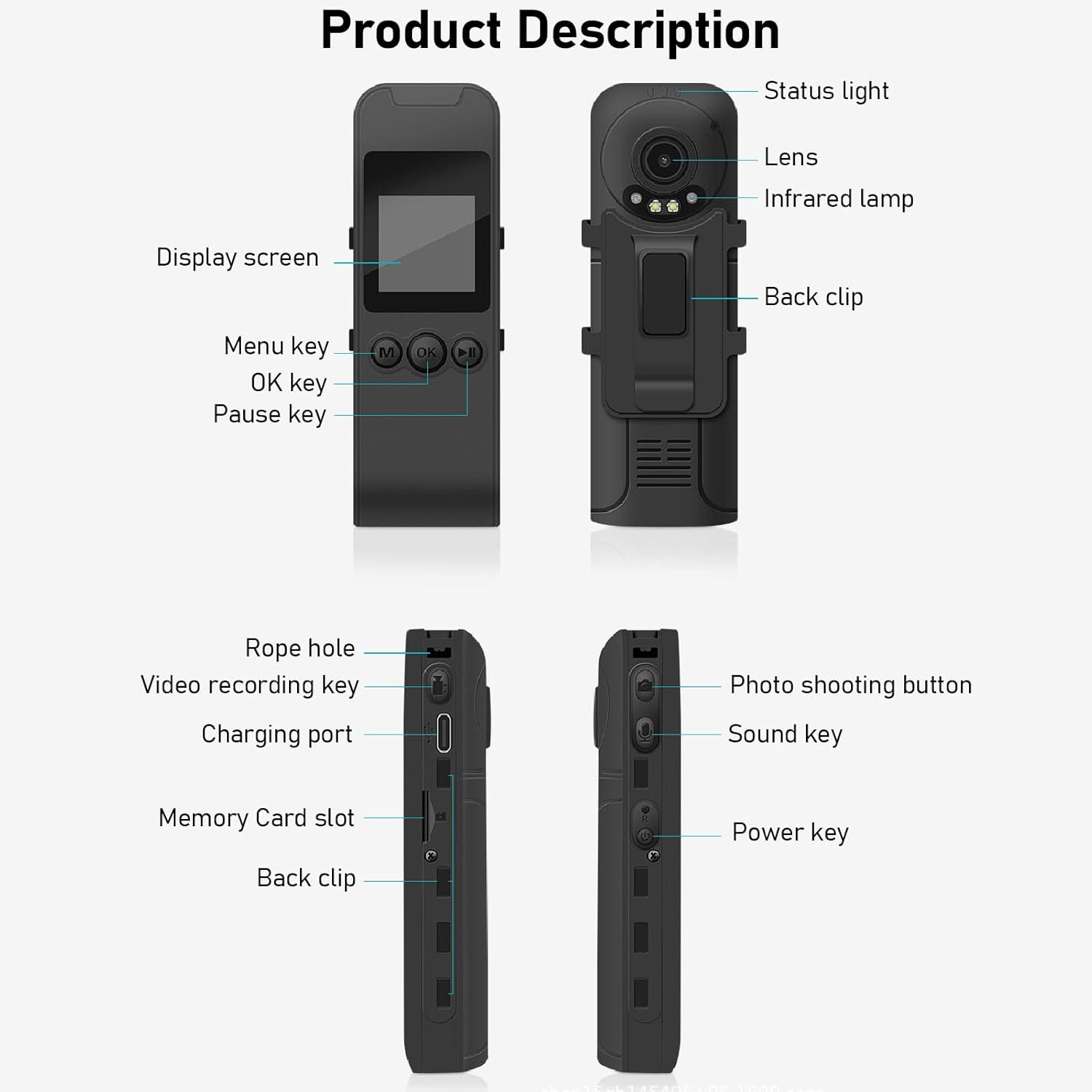
Figure 3: Labeled components of the Cuifati Mini Body Camera.
- Jiro sata: Indicates device status (e.g., recording, charging).
- Lens: Main camera lens for video and photo capture.
- Infrarouge Lamp: Manome fahazavana ho an'ny fahitana amin'ny alina.
- Back Clip: For attaching the camera to clothing or other surfaces.
- Asehoy ny efijery: 1.3-inch LCD for live view, playback, ary fitetezana sakafo.
- Menu Key (M): Miditra amin'ny fikirana fitaovana.
- OK Key: Confirms selections or starts/stops functions.
- lakile fiatoana: Pauses playback or recording.
- Rope Hole: Attachment point for the lanyard.
- Video Recording Key: Initiates and stops video recording.
- Seranan-tsambo famandrihana (Karazana-C): For charging the device and connecting to a computer.
- Slot karatra fitadidiana: Insert microSD card for storage.
- Photo Shooting Button: Maka sary tsy mihetsika.
- Sound Key: Controls audio recording.
- lakile fahefana: Mamelona na mamono ny fitaovana.
Hametraka
1. Fametrahana ny bateria
Before first use, fully charge the camera's built-in lithium-ion battery. Connect the camera to a power source using the provided Type-C USB cable. The status light will indicate charging status. A full charge provides approximately 20 hours of work time and 10 hours of video recording.
Figure 4: Built-in 1200mAh battery for extended use.
2. Mampiditra karatra fitadidiana
The camera supports up to a 256GB memory card (not included). Locate the memory card slot on the side of the camera. Gently insert the microSD card with the gold contacts facing down until it clicks into place. To remove, push the card in slightly until it springs out.

Figure 5: Memory card slot for storage expansion.
Torolàlana miasa
1. Mamelona/Mamono
- Hamelona: Press and hold the Power Key until the display screen illuminates.
- Mamono: Press and hold the Power Key until the device shuts down.
2. Fandraisana an-tsary
The camera records in 1440P HD at 30 frames per second with a 120° wide-angle lens and infrared night vision.
- Hanombohana firaketana: Press the Video Recording Key. The status light will change, and a recording indicator will appear on the screen.
- Atsaharo ny firaketana: Press the Video Recording Key again.
- Loop Recording: The camera supports loop recording, automatically overwriting the oldest files rehefa feno ny karatra fitadidiana.
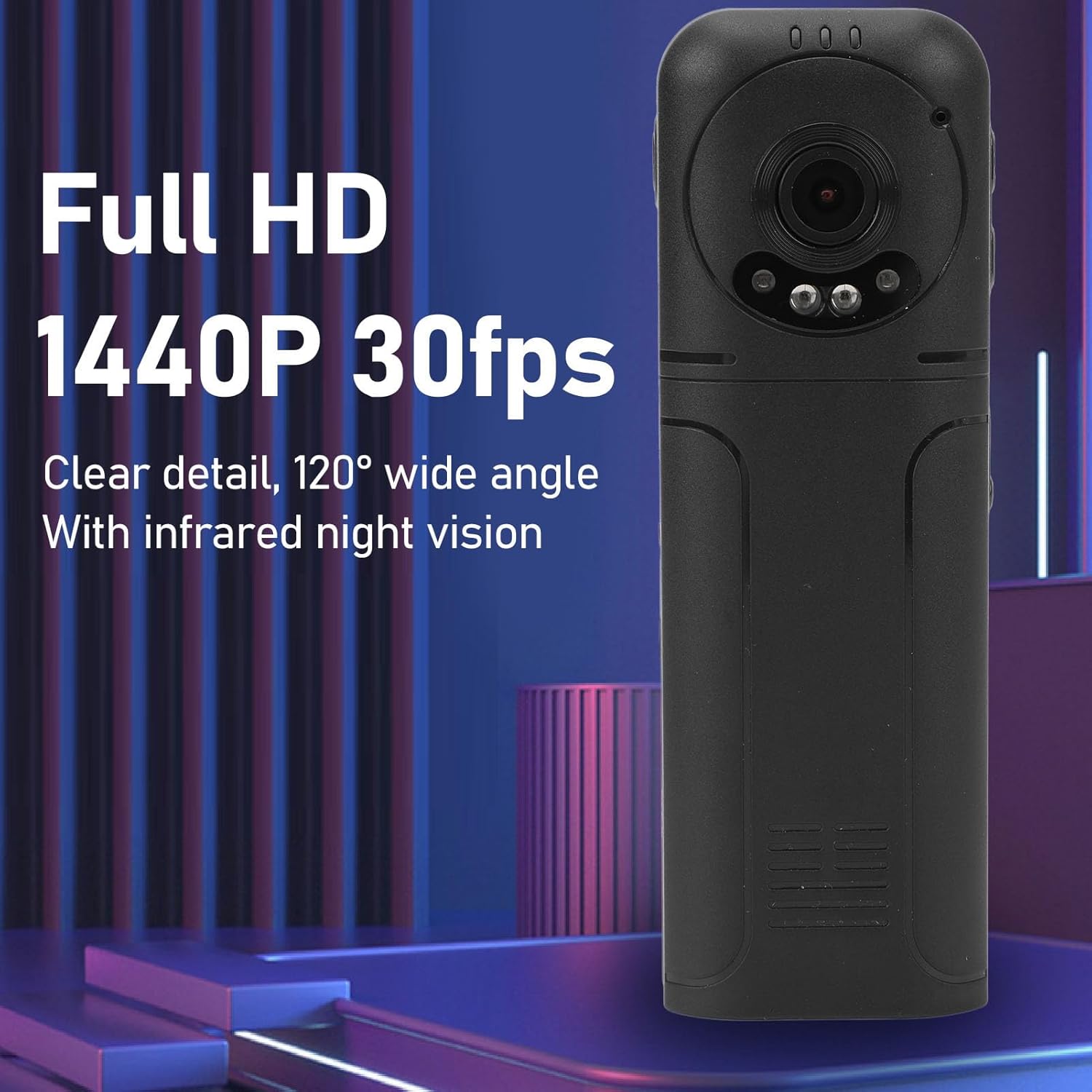
Figure 6: 1440P HD video recording with night vision.
3. Fakan-tsary
- Maka sary: In standby mode, press the Photo Shooting Button.
4. Fandraisana feo
- To Start Audio Recording: Press the Sound Key.
- To Stop Audio Recording: Press the Sound Key again.

Figure 7: Audio recording functionality.
5. Playback sy File MANAGEMENT
The 1.3-inch LCD screen supports live playback, browsing, and pausing of videos, photos, and recordings directly on the device.

Figure 8: 1.3-inch color screen for on-device playback.
- Famerenana amin'ny fitaovana: Use the Menu, OK, and Pause keys to navigate and play files eo amin'ny efijery.
- Mampifandray amin'ny solosaina: Connect the camera to a computer via the Type-C USB cable to transfer, view, or delete files.
- Asa OTG: If your mobile phone supports OTG, you can connect the camera directly to your phone for playback and file fitantanana.
fikarakarana
1. Fanadiovana
- Use the provided cleaning cloth or a soft, dry cloth to wipe the camera body and lens.
- Do not use liquid cleaners or solvents, as they may damage the device.
2. fitahirizana
- Tehirizo ao amin'ny toerana mangatsiaka sy maina ny fakantsary, lavitry ny tara-masoandro mivantana sy ny mari-pana tafahoatra.
- Remove the memory card if storing for extended periods.
Fanamboarana
Raha sendra olana amin'ny fakantsarinao ianao dia jereo ireto olana sy vahaolana mahazatra ireto:
| OLANA | vahaolana |
|---|---|
| Tsy mandeha ny fakan-tsary. | Ataovy azo antoka fa voaloa ny bateria. Mifandraisa amin'ny loharanon-jiro ary andramo indray. |
| Tsy afaka mirakitra lahatsary/sary. | Check if a memory card is inserted correctly and has sufficient free space. Format the memory card if necessary (this will erase all data). |
| Tsy fantatra ny karatra fitadidiana. | Ensure the memory card is inserted correctly. Try a different compatible memory card. Format the card using the camera's menu or a computer. |
| Kalitao lahatsary/feo ratsy. | Ensure the lens is clean. Check lighting conditions. For audio, ensure the microphone is not obstructed. |
| Mijanona na tsy mamaly intsony ny fitaovana. | Press and hold the Power Key for 10-15 seconds to force a restart. |
fepetra arahana
Below are the technical specifications for the Cuifati Mini Body Camera (Model CUIFATI2vg0ri8moa):
- Karazana entana: Wearable Camera
- Fitaovana: ABS
- Fahitana alina: 2pcs Night Vision Light Beads
- Fanapahan-dahatsary: 1440P (Maximum)
- Ny tahan'ny Frame: 30FPS
- Karazana bateria: Lithium Ion Battery
- Fahaizana bateria: 1200mAh (Efa tafiditra)
- Storage Support: Maximum 256GB Memory Card (Not Included)
- seranan-tsambo fiampangana: Type-C
- Anaran'ny fampiharana: For RoadCam (if applicable for advanced features)
- Anaran'ny modely: CUIFATI2vg0ri8moa
- Mpanamboatra: CUIFATI
Warranty sy fanohanana
For warranty information or technical support, please refer to the documentation provided at the time of purchase or contact Cuifati customer service directly. Keep your purchase receipt as proof of purchase.