1. Fampidirana
The PEAKMETER PM2016S is a compact and intelligent digital clamp meter designed for accurate electrical measurements. This instrument features a liquid crystal display with a maximum count value of 5999 and a backlight function for improved visibility in various environments. It offers a range of measurement functions with automatic range selection, making it suitable for both beginners and experienced users. The PM2016S can measure AC and DC voltage, AC current, resistance, frequency, and also includes continuity testing, Non-Contact Voltage (NCV) detection, and V/Ω/A auto-scan capabilities. Its portable design ensures ease of use and convenience.
2. Information momba ny fiarovana
WARNING: To avoid electric shock or personal injury, read and understand all instructions and safety information before using this instrument.
- Always ensure the instrument is in good working condition before use.
- Aza mihatra mihoatra ny naoty voltage, as marked on the instrument, between the terminals or between any terminal and earth ground.
- Mitandrema rehefa miasa amin'ny voltagmihoatra ny 30V AC RMS, 42V peak, na 60V DC. Ireo voltagmiteraka loza mitatao.
- Do not use the instrument if it appears damaged or if the insulation is compromised.
- Ensure the test leads are in good condition, without any cracks or breaks in the insulation.
- Esory amin'ny faritra foana ny taribin'ny fitsapana alohan'ny hanovana ny fiasany.
- Soloy avy hatrany ny bateria rehefa miseho ny famantarana ny bateria ambany mba hahazoana antoka fa marina ny famakiana.
- Araho ny fehezan-dalàna fiarovana eo an-toerana sy nasionaly.
This instrument complies with EN61010-1, EN61010-2-033, EN61326, CAT. III 600V safety ratings.
3. Toetran'ny vokatra
- High Quality Jaw Head: Durable and precise clamp mechanism for current measurement.
- Clear LCD Display and Backlight: Easy-to-read 6000-count display with backlight for visibility in various lighting conditions.
- Fampandehanana mora: Simple, intuitive controls, often requiring just one click for common functions.
- Fiara mandeha ho azy: Automatically selects the appropriate measurement range, simplifying operation.
- Mitazona data: Freezes the displayed reading for convenient recording.
- Tsy mifandray VoltagFitihana e (NCV): Safely detects AC voltage tsy misy fifandraisana mivantana.
- V/Ω/A Auto Scan: Automatically identifies and measures voltage, resistance, or current.
- Fitsapana mitohy: Checks for electrical continuity with an audible buzzer.
- Fandrefesana matetika: Measures frequency via clamp na voltage fidirana.
- Compact sy maivana: Endrika azo entina an-tanana mba ho mora entina sy ampiasaina.
- Auto tapaka: Automatically shuts down after 10 minutes of inactivity to conserve battery life.
4. Ny votoatin'ny fonosana

Ny fonosana matetika dia ahitana ireto zavatra manaraka ireto:
- Color Box (Packaging)
- PEAKMETER PM2016S Digital Clamp metatra
- Fitarihana fitsapana (Mena sy Mainty)
- AAA Batteries (2x 1.5V)
- User Manual
Description: This image displays the complete contents of the PEAKMETER PM2016S Digital Clamp Multimeter package, including the device itself, test leads, batteries, and the user manual, all presented within its retail packaging.
5. Fametrahana
5.1 Fametrahana bateria
The PM2016S requires two 1.5V AAA batteries. To install or replace batteries:
- Ataovy azo antoka fa maty ny metatra.
- Tadiavo ao ambadiky ny metatra ny fonon'ny fitoeran'ny bateria.
- Mampiasà screwdriver hanokafana ny efitranon'ny bateria.
- Insert the two AAA batteries, observing the correct polarity (+ and -).
- Soloy ny fonon'ny batterie ary arotsaho amin'ny visy izany.
5.2 Fampifandraisana ireo mpitarika fitsapana
Ho an'ny voltage, resistance, frequency (voltage), and continuity measurements, connect the test leads:
- Ampidiro ao amin'ny jack "COM" (common input) ny tariby fitsapana mainty.
- Insert the red test lead into the "VΩ" input jack.
6. Torolàlana miasa
The PM2016S features an auto-ranging function, simplifying most measurements. Press the red power button to turn the meter on or off. The meter will typically start in auto-scan mode (V/Ω/A Auto Scan).
6.1 AC/DC Voltage Fandrefesana
- Ampifandraiso ireo tariby fitsapana araka ny voalaza ao amin'ny Fizarana 5.2.
- Turn on the meter. It will automatically detect AC or DC voltage.
- Touch the red and black test probes to the points in the circuit where you want to measure voltage.
- Vakio ny voltage sanda eo amin'ny efijery LCD.
Description: This video demonstrates the unboxing of the PEAKMETER PM2016S and its accessories, followed by a practical demonstration of measuring AC voltage using the test leads. The user connects the leads to a power outlet and the meter displays the voltage mamaky.
6.2 Fandrefesana ny herin'aratra AC (Clamp Function)
- Ensure the meter is on.
- Tsindrio ny clamp trigger to open the jaws.
- Enclose a single conductor (not a bundle of wires) within the jaws. Ensure the jaws are fully closed.
- The meter will display the AC current reading.
Description: This video demonstrates the AC current measurement function of the PEAKMETER PM2016S. The user clamps the meter around a power cable connected to an appliance (kettle), and the meter displays the current draw.
6.3 Fandrefesana matetika
The PM2016S can measure frequency in two ways:
- Via Test Leads (Voltage Frequency): Ao amin'ny voltage measurement mode, the meter can display frequency. Press the "Hz/NCV" button to toggle to frequency display.
- Via Clamp (Current Frequency): When measuring AC current with the clamp, the meter can also display the frequency of the current. Press the "Hz/NCV" button to toggle to frequency display.

Description: This image shows the clear LCD display of the PM2016S, highlighting its backlight feature and the various measurement indicators, including frequency (Hz).
6.4 Non-Contact Voltage (NCV) Detection
- Press the "Hz/NCV" button to activate NCV mode. The display will show "NCV".
- Move the top end of the meter near a live AC voltage loharano.
- The meter will beep and the NCV indicator will light up, with the frequency of beeps and light increasing as it gets closer to the voltage loharano.
Description: This video demonstrates the NCV (Non-Contact Voltage) function of the PEAKMETER PM2016S. The user activates NCV mode and brings the meter near a power outlet, showing the audible and visual alerts when voltage dia hita.
6.5 Fitsapana mitohy
- Ampifandraiso ireo tariby fitsapana araka ny voalaza ao amin'ny Fizarana 5.2.
- The meter will automatically enter continuity mode if resistance is low.
- Tsindrio eo amin'ireo teboka roa tianao hojerena ny fitohizan'ny fifandraisana ireo "probe" fitsapana.
- If there is continuity (resistance less than 30Ω), the buzzer will sound.
6.6 Data Hold and Backlight
- Mitazona data: Press the "HOLD" button (often combined with the backlight button) to freeze the current reading on the display. Press again to release.
- Jiro lamosina: Press and hold the "HOLD" button (or a dedicated backlight button if present) to turn the backlight on or off.

Description: This image highlights the user-friendly design of the PM2016S, showing the main power button and other function buttons, emphasizing its easy operation.
7. Fikojakojana
7.1 Fanadiovana
Fafao amin'ny doka ny raharahaamp lamba sy savony malefaka. Aza mampiasa akora manimba na ranoka solvent. Tazomy tsy ho voaloto sy ho voadona ny terminal fidirana.
7.2 Fanoloana bateria
When the low battery indicator appears on the display, replace the batteries as described in Section 5.1. Remove batteries if the meter is not used for an extended period to prevent leakage.
8. Famahana olana
- Tsy misy fampisehoana/Metrika tsy mirehitra: Jereo ny fametrahana ny bateria ary ho azo antoka fa tsy lany ny bateria. Soloy raha ilaina.
- Famakiana tsy marina: Ensure test leads are properly connected. Check for damaged leads. Verify the correct measurement function is selected (though auto-ranging minimizes this). Ensure the clamp jaws are fully closed for current measurements.
- Famantarana ny "OL" na ny "overload": The measured value exceeds the meter's range. Select a higher range if available, or ensure the input is within the meter's specifications.
- Tsy misy famantarana NCV: Ensure NCV mode is active. The NCV sensor is typically at the top of the clamp head; ensure it is close to the AC source.
9. Famaritana
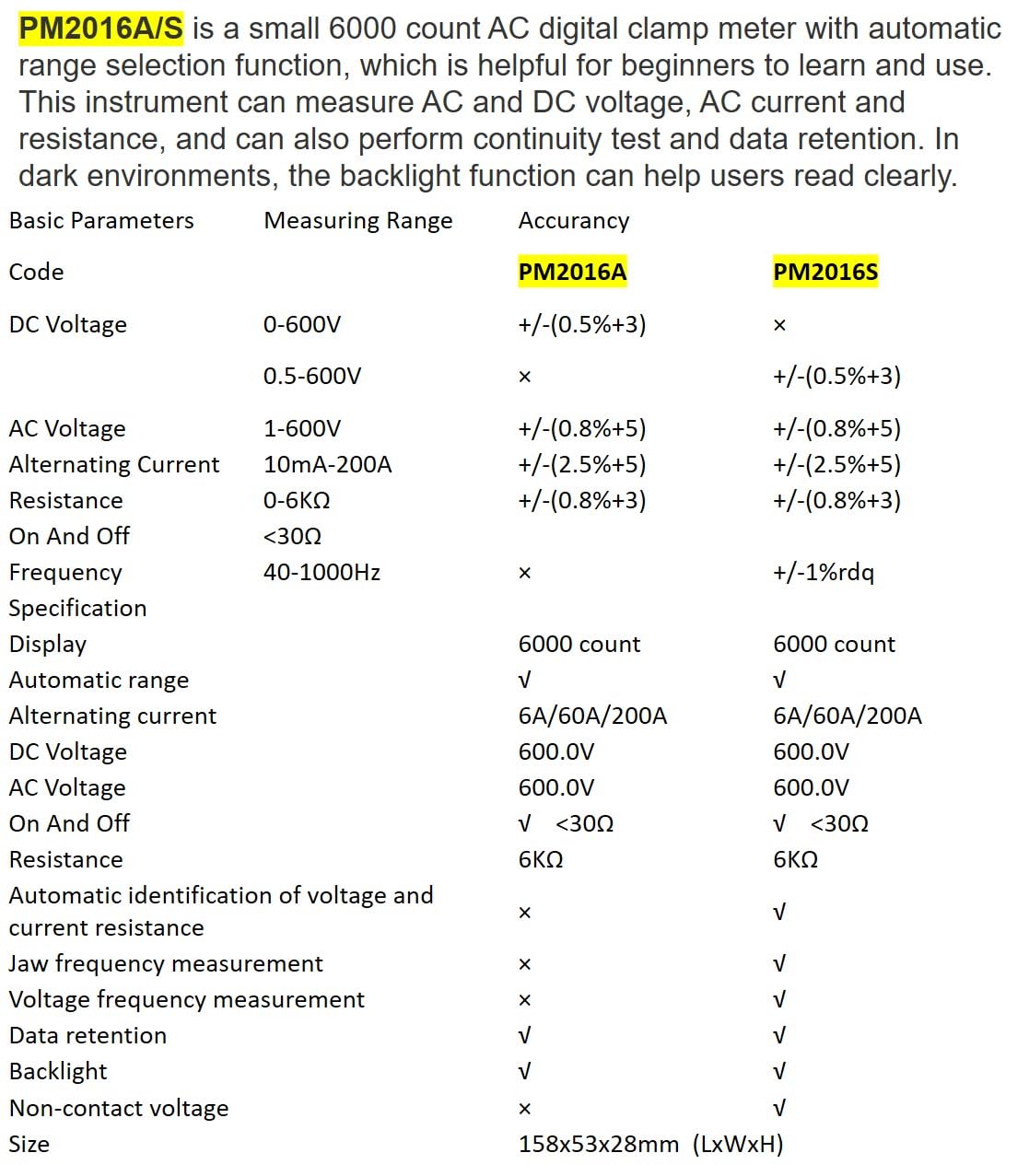
Description: This image presents a comprehensive table detailing the basic parameters, measuring ranges, and accuracy for both the PM2016A and PM2016S models, including features like display count, auto-ranging, and NCV.
| fikirana | Range (PM2016S) | Accuracy (PM2016S) |
|---|---|---|
| DC Voltage | 0.5~600V | ±(0.5%+3) |
| AC Voltage | 1.0~600V | ±(0.8%+5) |
| AC ankehitriny | 6A/60A/200A | ±(2.5%+8) |
| fanoherana | 0~6kΩ | ±(0.8%+3) |
| hatetika | 60Hz~1000Hz | ±(1.0%+5) |
| miseho | 6000 isa | |
| Auto Range | ENY | |
| fanohizana | <30Ω | |
| V/Ω/A Auto Scan | ENY | |
| Frequency (Clamp) | ENY | |
| Frequency (Voltage) | ENY | |
| Mitazona data | ENY | |
| Jiro lamosina | ENY | |
| NCV | ENY | |
| Herin'aratra | 2*1.5V AAA Batteries | |
| Lanja afa-karatsaka | 122.4g (tsy misy batteries) | |
| Size | 158mm * 55mm * 29mm | |
| Valan'ny vava | Ø20mm | |
| Naoty fiarovana | EN61010-1, EN61010-2-033, EN61326, CAT. III 600V | |

Description: This image provides a visual representation of the physical dimensions of the PEAKMETER PM2016S, including its length, width, and jaw opening size, along with its weight.
10. Warranty sy fanohanana
The PEAKMETER PM2016S Digital Clamp Multimeter comes with a Warranty 1 taona manomboka amin'ny datin'ny fividianana. Ity fiantohana ity dia manarona ny lesoka amin'ny fitaovana sy ny asa amin'ny fampiasana mahazatra.
For technical support, warranty claims, or service inquiries, please contact your retailer or the manufacturer directly. Keep your purchase receipt as proof of purchase for warranty purposes.