
Sava lalana
This manual provides detailed instructions for the MILOUZ Smart Watch IDW26. It covers setup, operation, maintenance, and troubleshooting to ensure optimal use of your device. The MILOUZ Smart Watch IDW26 features a 1.83-inch HD touch screen, Alexa Built-in, call answering and making capabilities, and comprehensive health monitoring including heart rate, SpO2, and sleep tracking. It is also IP68 waterproof and supports 100 sports modes.
Inona no ao anaty boaty
- MILOUZ Smart Watch IDW26
- Charging Cable
- User Manual (ity antontan-taratasy ity)
Hametraka
1. Famandrihana ny Smart Watch
Before initial use, fully charge your MILOUZ Smart Watch. Connect the magnetic charging cable to the charging contacts on the back of the watch and plug the USB end into a power adapter (not included) or a computer's USB port. A full charge typically takes approximately 2 hours.

Image: The MILOUZ Smart Watch connected to its magnetic charging cable, displaying battery status.
The watch has a working time of up to 7 days and a standby time of 30 days on a single charge.
2. Misintona ny Companion App
Mba hamahana ny endri-javatra rehetra sy hampifanarahana ny angona, ampidino ny Veryfit app from your smartphone's app store (available for Android and iOS devices). Hitady ny "Veryfit" and install the application.
3. Mampifanaraka amin'ny Smartphone
- Ataovy azo antoka fa alefa amin'ny findainao ny Bluetooth.
- Open the Veryfit app and follow the on-screen instructions to create an account or log in.
- In the app, navigate to the device pairing section (usually indicated by a device icon or "Add Device").
- Select your MILOUZ Smart Watch from the list of available devices. The watch's model number (IDW26) may appear.
- Confirm the pairing request on both your smartphone and the smart watch.
- Rehefa mifandray ny famantaranandro dia hampifanaraka ny fotoana sy ny angona amin'ny findainao.
Fampiasana ny Smart Watch
Fikarohana fototra
The MILOUZ Smart Watch features a 1.83-inch HD touch screen for intuitive navigation. Swipe left, right, up, or down to access different menus and functions. Tap to select an option, and typically swipe right or press the side button to return to the previous screen or watch face.
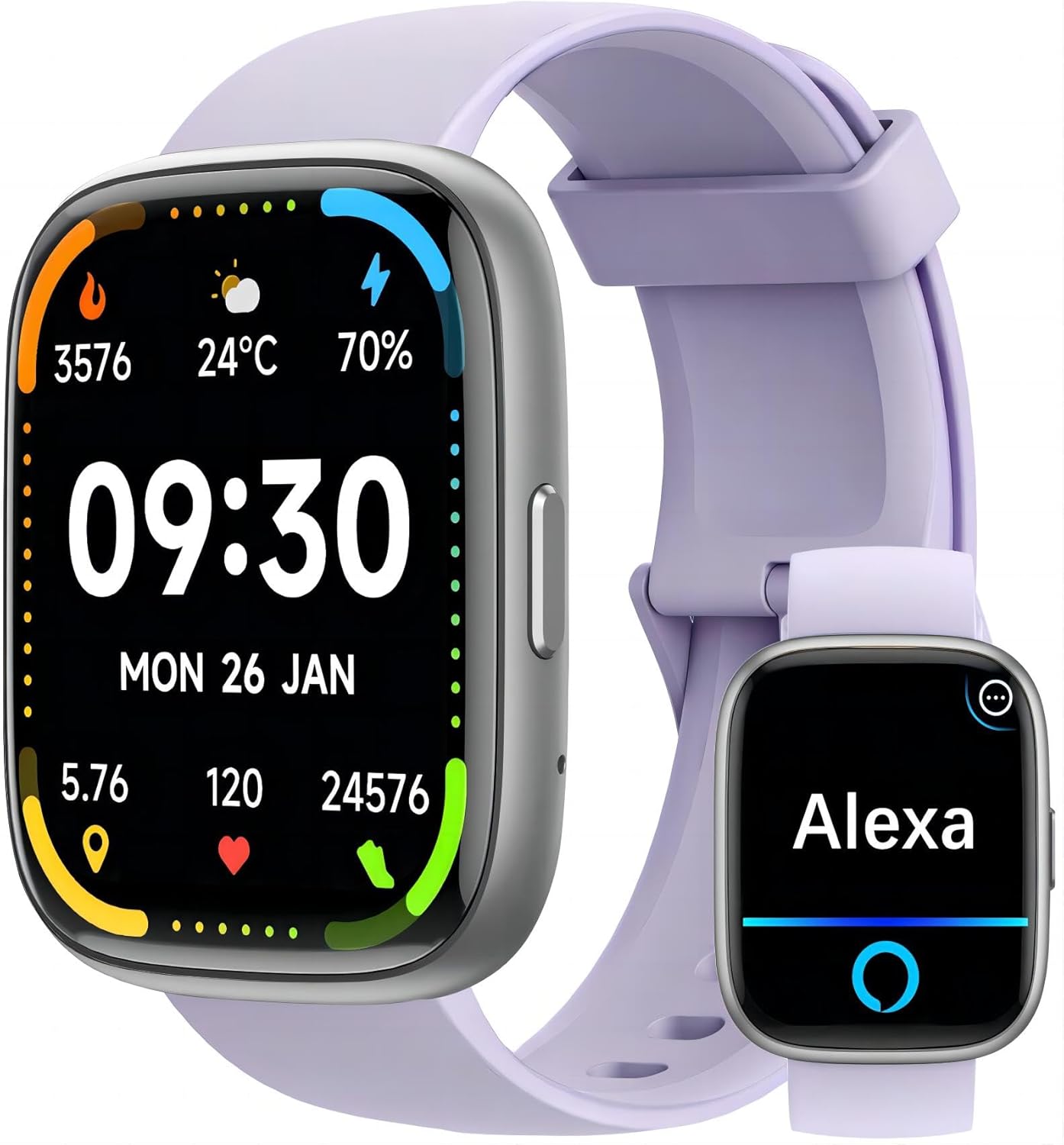
Image: The MILOUZ Smart Watch main display and an Alexa interface screen.
Call Functions (Answer/Make Calls)
After successful Bluetooth pairing, your smart watch can answer and make calls directly. The watch includes a built-in speaker and microphone.
- Mamaly antso: When a call comes in, the watch will display the caller ID. Tap the green phone icon on the screen to answer.
- Fiantsoana: Access the phone function on your watch to view call history, frequent contacts, or use the dial pad to make a call.

Image: The MILOUZ Smart Watch showing an incoming call and various call management options.
Alexa namboarina
The MILOUZ Smart Watch integrates Alexa Voice Assistant. Ensure your watch is connected to your smartphone and the Veryfit app is running in the background for Alexa functionality. Tap the Alexa icon on your watch and speak your commands or questions.

Image: The MILOUZ Smart Watch showing message notifications and the Alexa voice assistant interface.
Message Reminders
Receive notifications for calls, SMS, and various social media apps directly on your watch. Ensure that message notifications are enabled in the Veryfit app and your phone's settings for the watch to display them.
Manamboara endrika famantaranandro
The watch supports over 200 personalized dials and DIY dial options. You can change the watch face through the Veryfit app to match your style or display preferred information.

Image: A collection of diverse watch faces available for the MILOUZ Smart Watch.
Multi-Function Smartwatch Features
The MILOUZ Smart Watch offers a range of functions accessible through its interface:
- Fanaraha-maso hetsika
- Phone (Call functions)
- Hafatra
- Alexa Voice Assistant
- Fomba fanazaran-tena
- Record workout
- Fanaraha-maso ny adin-tsaina
- Fiofanana mifoka rivotra
- Clock (Alarm, Timer, Stopwatch)
- Weather
- Fanaraha-maso mozika
- Fanaraha-maso fakan-tsary
- Mitadiava telefaona
- Female Health Tracking
- Fampahatsiahivana zava-pisotro
- Fanaraha-maso ny torimaso
Endri-javatra fanaraha-maso ara-pahasalamana
The MILOUZ Smart Watch provides 24-hour health monitoring capabilities.

Image: The MILOUZ Smart Watch showing health metrics like heart rate, SpO2, and menstrual cycle tracking, alongside sleep monitoring data.
- Fanaraha-maso ny tahan'ny fo: Manara-maso tsy tapaka ny tahan'ny fitempon'ny fonao mandritra ny andro.
- Fanaraha-maso SpO2: Mandrefy ny haavon'ny saturation oksizenina ao amin'ny ranao.
- Fanaraha-maso torimaso: Mamakafaka ny lamina fatorianao, anisan'izany ny torimaso lalina, ny torimaso maivana ary ny fotoana fifohazana.
- Female Menstruation Monitor: Provides tracking and predictions for menstrual cycles.
100 Fomba Fanatanjahantena
The watch supports over 100 sports modes, allowing you to track various activities such as running, swimming, cycling, yoga, and more. It records workout data including duration, distance, calories burned, and heart rate.

Image: Various sports activities being performed, illustrating the 100 sports modes feature of the MILOUZ Smart Watch.
Ny fanoherana ny rano (IP68)
The MILOUZ Smart Watch is rated IP68 waterproof, meaning it is resistant to dust and can withstand immersion in water up to 1.5 meters for up to 30 minutes. It is suitable for daily use, hand washing, and swimming. However, it is not recommended for hot showers, saunas, or diving, as steam and hot water can affect the seals.
Image: The MILOUZ Smart Watch being used during a swimming activity, demonstrating its IP68 waterproof rating.
fikarakarana
- Fanadiovana: Diovy tsy tapaka ny famantaranandro sy ny fehy amin'ny malefaka, damp lamba. Fadio ny mampiasa akora simika masiaka na akora abrasive.
- Fanamainana: Rehefa avy tratran'ny rano dia ataovy izay hahazoana antoka fa maina tanteraka ny famantaranandro alohan'ny hamenoana azy na hampiasana azy mandritra ny fotoana maharitra.
- fitahirizana: Tehirizo ao amin'ny toerana mangatsiatsiaka sy maina ny famantaranandro rehefa tsy ampiasaina.
- Fadio ny hafanana tafahoatra: Do not expose the watch to extremely high or low temperatures, as this can affect battery life and performance.
Fanamboarana
- Jereo tsy mandeha: Ataovy azo antoka fa feno ny famantaranandro. Ampifandraiso amin'ny charger mandritra ny 10 minitra farafahakeliny.
- Tsy azo ampiarahina amin'ny finday:
- Ataovy azo antoka fa mandeha ny Bluetooth amin'ny findainao.
- Ataovy azo antoka fa ao anatin'ny faritra misy ny Bluetooth an'ny findainao ny famantaranandro.
- Avereno indray ny findainao sy ny famantaranandro marani-tsaina.
- Hamarino raha nohavaozina ho amin'ny dikan-teny farany ny fampiharana Veryfit.
- If previously paired, try unpairing and re-pairing the device through the Veryfit app and your phone's Bluetooth settings.
- Call Function Not Working:
- Confirm the watch is successfully paired for calls (sometimes a separate Bluetooth connection for calls is needed).
- Check microphone and speaker settings on the watch.
- Hamarino tsara fa ao anatin'ny faritra misy ny Bluetooth-n'ny findainao ny famantaranandro.
- Alexa Not Responding:
- Verify the watch is connected to your phone and the Veryfit app is active.
- Ataovy azo antoka fa manana fifandraisana Internet mavitrika ny findainao.
- Check Alexa settings within the Veryfit app.
- If you walk too far from your phone, Alexa functionality may be interrupted and require re-connection.
- Data momba ny fahasalamana tsy marina:
- Ataovy azo antoka fa anaovana tsara eo amin'ny hato-tananao ny famantaranandro, eo amin'ny rantsantanana iray eo ho eo ambonin'ny taolana amin'ny hato-tanana ny sakany.
- Fadio ny fihetsehana tafahoatra mandritra ny fandrefesana.
- Note that smart watch health data is for reference only and not intended for medical diagnosis.
- Fampandrenesana tsy miseho:
- Check notification permissions for the Veryfit app in your phone's settings.
- Ensure notifications are enabled for specific apps within the Veryfit app.
- Hamarino tsara fa mifandray amin'ny findainao ny famantaranandro.
fepetra arahana
| endri-javatra | antsipirihany |
|---|---|
| Laharana modely | IDW26 |
| Haben'ny efijery | Ecran tactile HD 1.83 santimetatra |
| fifandraisana | Bluetooth |
| Rafitra fikirakirana | Android Wear 1.0 (Compatible with Android & iOS) |
| Water Resistance | IP68 |
| Karazana bateria | Lithium polymer |
| Time Charging | Approx. 2 ora |
| Fotoana fiasana | Hatramin'ny 7 andro |
| Fotoana mijoro | Hatramin'ny 30 andro |
| Fanaraha-maso ara-pahasalamana | Heart Rate, SpO2, Sleep, Female Health |
| Sports Modes | 100+ |
| Endri-javatra manokana | Alexa Built-in, Answer/Make Calls, Message Reminders, Music Control, Camera Control |
| Lanja entana | 3.17 oz |
| Ny haben'ny fonosana | 10.71 x 4.17 x 0.75 santimetatra |
Warranty sy fanohanana
For warranty information and customer support, please refer to the documentation included with your purchase or visit the official MILOUZ website. If you encounter any issues not covered in this manual, please contact MILOUZ customer service for assistance.
MILOUZ Official Store: MILOUZ Store on Amazon