
Mediacom Azimut 4
Mediacom SmartPad 4 4G Azimut 4 Tablet User Manual
Model: Azimut 4
1. Fampidirana
This manual provides essential information for the safe and efficient use of your Mediacom SmartPad 4 4G Azimut 4 tablet. Please read this manual thoroughly before operating the device and retain it for future reference.
2. Information momba ny fiarovana
- Fiarovana ny bateria: Do not attempt to replace the internal battery. Do not expose the device to extreme temperatures or direct sunlight.
- fanoherana ny rano: Ity fitaovana ity dia tsy mahatanty rano. Halaviro ny fisian'ny ranon-javatra.
- famandrihana: Ny charger sy tariby tany am-boalohany ihany no ampiasaina miaraka amin'ilay fitaovana.
- Fiarovana ny fihainoana: Ialao ny fihainoana maharitra amin'ny haavo avo be mba hisorohana ny fahasimban'ny sofina.
- fanariana: Dispose of the device and its battery according to local regulations. Do not dispose of with household waste.
3. Ny votoatin'ny fonosana
Ataovy azo antoka fa misy ny entana rehetra ao anaty fonosana:
- Mediacom SmartPad 4 4G Azimut 4 Tablet
- USB-C Charging Cable
- Power Adapter
- Torolàlana fanombohana haingana (raha misy)
- Fitaovana Ejector SIM (raha misy)
4. Fametrahana fitaovana
Fantaro tsara ireo singa ara-batana ao amin'ny takelakao.
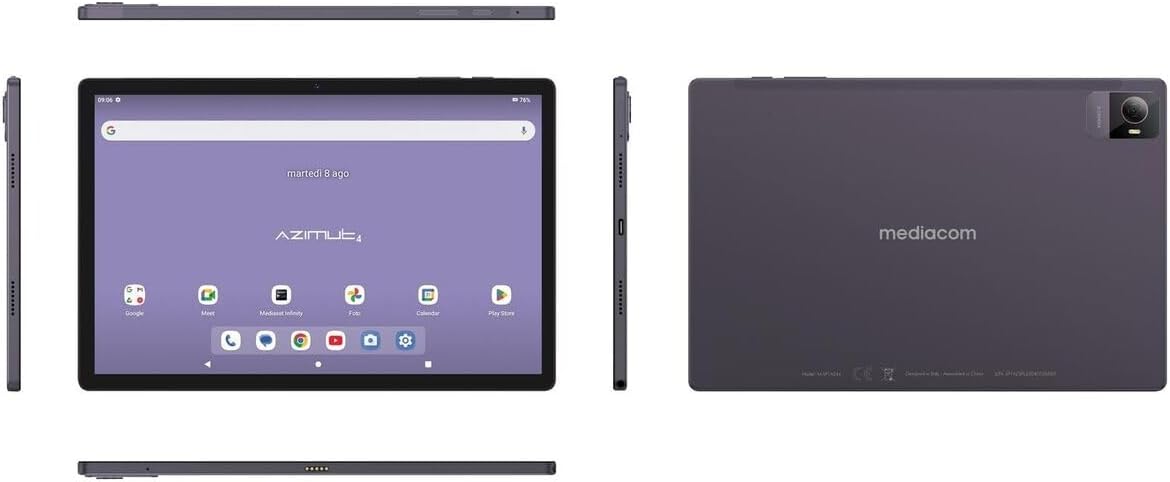
Sary 4.1: maromaro views of the Mediacom SmartPad 4 4G Azimut 4 tablet, illustrating the front display, rear camera, and various side ports and buttons. This includes the power button, volume rocker, USB-C port, headphone jack, and SIM/microSD card slot.
- Fakan-tsary eo anoloana: Located at the top center of the display when held in landscape orientation.
- Aseho: 10.51-inch IPS screen.
- Bokotra hery: Typically located on the side, used to turn the device on/off or wake/sleep the screen.
- Botom-peo: Located near the power button, used to adjust audio volume.
- Seranan-tsambo USB-C: Ho an'ny fiampangana sy famindrana angona.
- Jack finday: Standard 3.5mm audio output.
- Slot karatra SIM/microSD: Combined slot for Nano-SIM and microSD cards.
- Fakantsary aoriana: Located on the back of the tablet, typically with a flash.
- Mpandahateny: Four speakers for immersive audio.
5. Fametrahana
5.1 Famandrihana ny fitaovana
Before first use, fully charge your tablet. Connect the USB-C cable to the tablet's USB-C port and the power adapter. Plug the adapter into a wall outlet. The battery indicator on the screen will show charging status.
5.2 Fampidirana karatra SIM sy MicroSD
- Locate the SIM/microSD card slot on the side of the tablet.
- Ampiasao ny fitaovana fanesorana SIM omena hanokafana ny lovia.
- Carefully place your Nano-SIM card and/or microSD card into the designated slots on the tray. Ensure correct orientation.
- Atsipazo moramora ao anatin'ilay slot ilay lovia mandra-pikitikitika amin'ny toerany.
5.3 Hery voalohany Mampirehitra sy Fametrahana
- Press and hold the Power button until the Mediacom logo appears.
- Follow the on-screen prompts to select your language, connect to a Wi-Fi network, set up your Google account, and configure other initial settings.
6. Torolàlana miasa
6.1 Fikarohana fototra
The Mediacom SmartPad 4 4G Azimut 4 uses a multi-touch capacitive touchscreen. Common gestures include:
- Peho: Raha hisafidy singa na hanokafana fampiharana.
- Tsindrio ary hazòny: Mba hidirana amin'ny menu contextual na hamindra kisary.
- Swipe: Mba hivezivezena amin'ny pejy na lisitra.
- Kitapo: Mba zoom in na out of sary sy web pejy.
6.2 Mampifandray amin'ny Wi-Fi
- Mandehana any Fikirana > Tambajotra & Internet > Wifi.
- Toggle Wi-Fi On.
- Safidio ny tamba-jotra tianao ao amin'ny lisitra ary ampidiro ny tenimiafina raha misy amporisihina.
6.3 Connecting to 4G Cellular Network
If a Nano-SIM card is inserted and activated, your tablet will automatically connect to the 4G network. Ensure mobile data is enabled in Fikirana > Tambajotra & Internet > Tambajotra finday.
6.4 Fampiasana ny fakan-tsary
Open the Camera app from your home screen or app drawer. You can switch between the 8 MP front camera and the 13 MP rear camera. Tap the shutter button to take photos or record videos.
6.5 Fitantanana fitahirizana
Your tablet has 64 GB of internal storage. You can expand this by up to 128 GB using a microSD card. To view fampiasana fitahirizana, mandehana any amin'ny Fikirana > fitahirizana.
6.6 Fifandraisana Bluetooth
Mba hampifandray ny fitaovana Bluetooth:
- Mandehana any Fikirana > Fitaovana mifandray > Bluetooth.
- Toggle Bluetooth On.
- Select your device from the list of available devices and follow pairing instructions.
7. Fikojakojana
7.1 Fanadiovana ny fitaovana
Mampiasà lamba malefaka sady tsy misy loko mba hanadiovana ny efijery sy ny vatan'ilay takelaka. Fadio ny mampiasa akora simika masiaka na akora abrasive.
7.2 Fikarakarana bateria
- Fadio ny fanalana tanteraka ny bateria matetika.
- Aza avela ho fenoina mandritra ny fotoana maharitra ny takelaka rehefa avy fenoina tanteraka.
- Store the tablet in a cool, dry place when not in use for long periods.
7.3 Fanavaozana rindrambaiko
Jereo tsy tapaka ny fanavaozana rindrambaiko mba hahazoana antoka fa mahomby sy azo antoka tsara indrindra. Mandehana any amin'ny Fikirana > RAFITRA > Fanavaozana ny rafitra.
8. Famahana olana
- Tsy mandeha ny fitaovana: Hamarino tsara fa feno ny bateria. Ampifandraiso amin'ny charger ary andramo indray.
- Screen tsy mamaly: Try restarting the device by holding the Power button for about 10-15 seconds.
- Olana amin'ny fifandraisana Wi-Fi: Restart your tablet and your Wi-Fi router. Ensure you are within range and have entered the correct password.
- Apps mianjera: Fafao ny cache-n'ilay fampiharana misy olana (Fikirana > Fampiharana > [Anaran'ny Fampiharana] > Fitehirizana & cache > Fafao ny cache). Raha mbola mitohy ny olana dia andramo apetraka indray ilay fampiharana.
- Fahombiazana miadana: Close unused apps, clear cache, or consider performing a factory reset (backup your data first).
9. Famaritana
| endri-javatra | famaritana |
|---|---|
| Anarana modely | Azimut 4 |
| Rafitra fikirakirana | Android 13 |
| miseho | 10.51" IPS, 1920 x 1200 pixels, Multi-touch 5 points |
| processeur | Spreadtrum Tiger T606 (8-core, 1.6 GHz) |
| ram | 4 GB |
| Fitehirizana anatiny | 64 GB |
| Fitehirizana azo itarina | microSD hatramin'ny 128 GB |
| Fakan-tsary aoriana | 13 Megapixels (with flash) |
| Camera Front | 8 megapixels |
| Teknolojia finday | 4G (GSM, WCDMA, FDD-LTE) |
| Tarika finday | W-CDMA 900/2100, GSM 850/900/1800/1900, LTE B1/B20/B3/B7 |
| Wireless fifandraisana | Wi-Fi (802.11n), Bluetooth 5.0 |
| seranana | 1 x Nano-SIM/microSD combo, 1 x Headphone (3.5mm), 1 x USB-C |
| Batterie | 6000mAh Li-Po |
| Endri-javatra manokana | 4G Cellular Technology, Ergonomic and Contemporary Design |
10. Warranty sy fanohanana
For warranty information and technical support, please refer to the warranty card included in your product packaging or visit the official Mediacom website. Tehirizo ny porofon'ny fividiananao ho an'ny fitakiana fiantohana.
11. Fankatoavana ny Fitsipika
This device complies with relevant regulatory standards. For detailed compliance information, please refer to the product packaging or the official Mediacom website.