
1. Fampidirana
This manual provides essential instructions for the safe and efficient operation of your GROVIEW Mini Projector Bluetooth, Model Groview-B2D-US. Please read this manual thoroughly before using the projector and retain it for future reference.
Ny Groview-B2D-US is a compact and portable projector featuring electric focus, Bluetooth 5.1 connectivity, and a fully sealed optical engine designed for reduced noise and extended lifespan. It supports Full HD 1080P input with a native 720P resolution and offers a digital zoom function.
2. Information momba ny fiarovana
- Aza mijery mivantana amin'ny family projector rehefa mandeha ny lamp mandeha.
- Ataovy izay hahazoana rivotra tsara manodidina ny projecteur mba hisorohana ny hafanana be loatra. Aza sakanana ny fisokafan'ny rivotra.
- Ny adaptatera herinaratra omena miaraka amin'ny projecteur ihany no ampiasao.
- Aza atao amin'ny orana, hamandoana, na mari-pana tafahoatra ny projecteur.
- Fadio ny mametraka ny projector amin'ny toerana tsy milamina.
- Aza manandrana manala na manamboatra ny projecteur samirery. Mifandraisa amin'ny mpiasan'ny serivisy mahafeno fepetra mba hahazoana fanampiana.
- Arovy amin'ny ankizy sy ny biby fiompy ny projector.
3. Inona no ao anaty boaty
Hamarino fa misy ny entana rehetra ao anaty fonosana:
- 1 x Groview Electric Focus Projector
- 1 x HDMI Cable
- 1 x Tady herinaratra
- 1 x Fanaraha-maso lavitra
- 1 x User Manual (ity antontan-taratasy ity)
4. Vokatra mihoatraview
4.1 Singa ao amin'ny Projecteur
The following image illustrates the main components of the Groview Mini Projector.

4.2 Seranana fidirana/famoahana
The rear panel of the projector features various ports for connecting external devices.
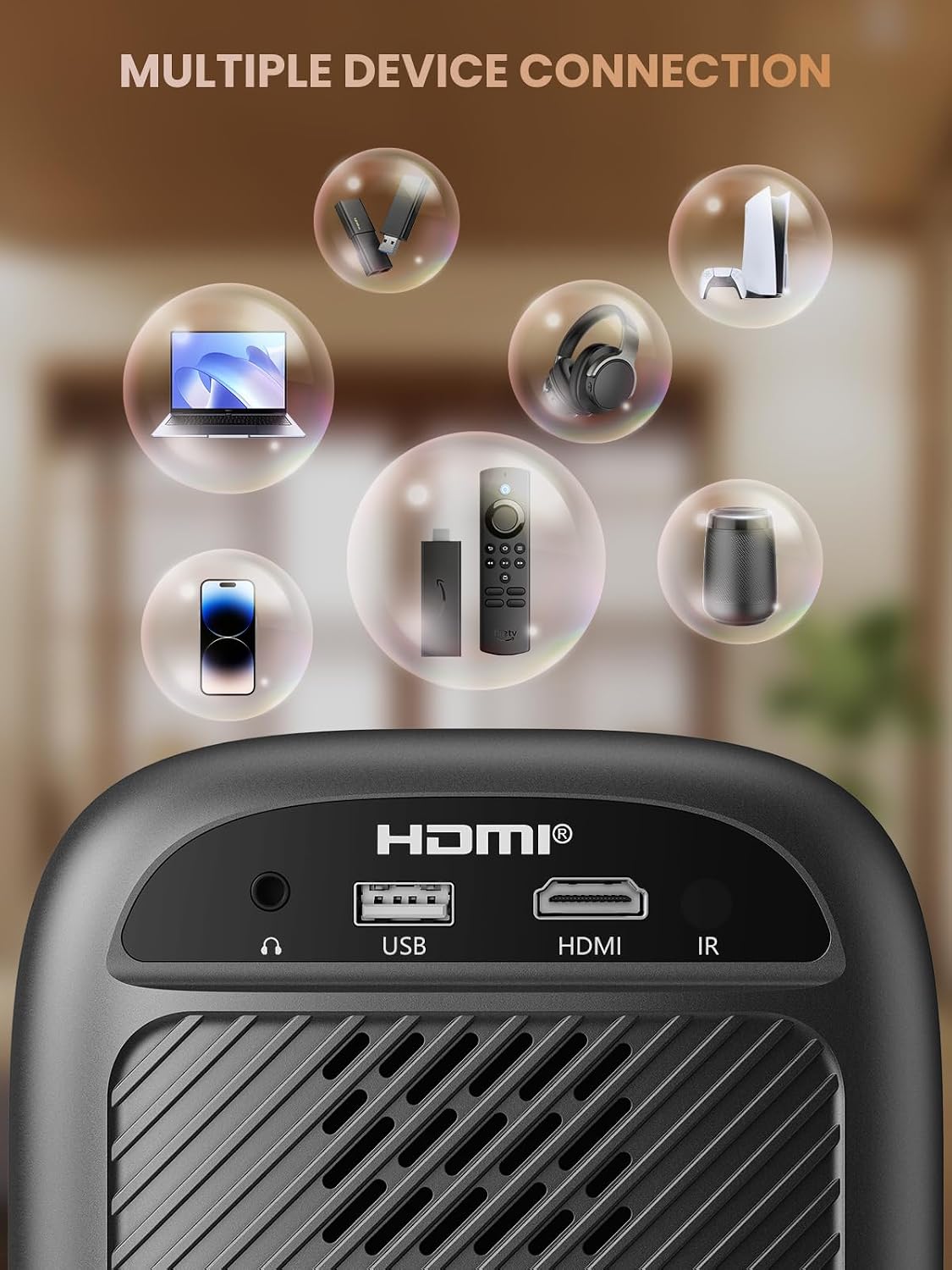
- Seranana HDMI: Connects to devices such as TV sticks, laptops, game consoles, and Blu-ray players.
- Port USB: Connects to USB flash drives for media playback.
- Audio Port (3.5mm Jack): Mifandray amin'ny mpandahateny ivelany na écouteur.
- Mpandray IR: Ho an'ny famantarana lavitra fanaraha-maso.
5. Fametrahana
5.1 Fampifandraisana herinaratra
- Ampifandraiso amin'ny fampidiran'ny herinaratra ny tady herinaratra.
- Ampidiro amin'ny fivoahana ny faran'ny tadin-jiro.
5.2 Fametrahana Projector
Place the projector on a stable, flat surface. For optimal image quality, position the projector perpendicular to the projection surface (wall or screen). The projector can create a large image from a relatively short distance.
5.3 Fanitsiana fifantohana
Ny Groview-B2D-US features electric focus, allowing for precise image clarity adjustment using the remote control.

- Alefaso ny projector.
- Point the remote control at the projector.
- Press the dedicated focus buttons (usually marked with 'F+' and 'F-' or similar icons) on the remote until the projected image is sharp and clear.
5.4 Fanitsiana vato fototra
The projector includes a keystone adjustment slider on the rear panel. This allows you to correct trapezoidal distortion if the projector is not perfectly aligned with the screen. Adjust the slider until the image appears rectangular.
5.5 Herin'ny voalohany
Press the power button on the projector or the remote control to turn on the device. The projector will boot up and display the main interface.
6. Torolàlana miasa
6.1 Fitaovana mampifandray
Ny projector dia manolotra safidy fifandraisana maro:
- HDMI: Connect an HDMI cable from your source device (e.g., TV Stick, laptop, game console) to the projector's HDMI port. Select the HDMI input source from the projector's menu.
- USB: Insert a USB flash drive into the USB port. The projector's media player will typically detect the drive automatically, allowing you to browse and play supported media files.
- Bluetooth 5.1: Connect to external Bluetooth speakers or headphones for enhanced audio.

- Enable Bluetooth on your external audio device and set it to pairing mode.
- Ao amin'ny projecteur, mandehana any amin'ny menio fikirana Bluetooth.
- Fidio ny fitaovanao avy amin'ny lisitry ny fitaovana azo ampiarahina.
Note: Bluetooth does not support smartphone mirroring.
6.2 Smartphone Connection Methods
To connect a smartphone, an adapter is required:

- Fitaovana iOS: Use a Lightning to HDMI adapter cable.
- Fitaovana Android: Use a Micro USB/Type C to HDMI adapter cable or a Google Chromecast.
6.3 Navigation and Menu
Use the arrow buttons on the remote control to navigate through the projector's on-screen menu. The 'OK' or 'Enter' button confirms selections, and the 'Back' or 'Return' button goes back to the previous menu.
6.4 Digital Zoom Function
The projector features a digital zoom function, allowing you to adjust the image size from 75% to 100% without moving the projector.

Access the zoom settings through the projector's menu and use the remote control to adjust the desired size.
6.5 Fampiasana fanaraha-maso lavitra
The included remote control operates the projector's functions. Ensure batteries are correctly installed. Note: A coin may be needed to open the battery compartment.
7. Fikojakojana
7.1 Fanadiovana
- Lens: Gently wipe the lens with a soft, lint-free cloth specifically designed for optical surfaces. Do not use abrasive cleaners.
- ivelany: Fafao amin'ny lamba malefaka sy maina ny ivelan'ny projecteur. Ho an'ny marika mafy loha, d kelyamp azo ampiasaina ny lamba, arahin'ny maina.
7.2 Dust-proof Design
Ny Groview-B2D-US features a fully sealed optical engine, which helps prevent dust and debris from entering the projector and affecting image quality or lifespan.

7.3 Fitehirizana
When not in use, store the projector in a cool, dry place, away from direct sunlight and extreme temperatures. Use the lens cap to protect the lens from dust and scratches.
8. Famahana olana
- Tsy misy sary: Check power connection, input source selection, and ensure the lens cap is removed. Verify the connected device is powered on and outputting a signal.
- Sary manjavozavo: Adjust the electric focus using the remote control. Ensure the projector is placed at an appropriate distance from the screen.
- Tsy misy feo: Check the volume settings on both the projector and the connected source device. If using Bluetooth, ensure the external audio device is properly paired and its volume is up.
- Fanaraha-maso lavitra tsy mandeha: Check the batteries in the remote control and ensure there are no obstructions between the remote and the projector's IR receiver.
- Fampitandremana amin'ny hafanana be loatra: Ensure ventilation openings are not blocked. Turn off the projector and allow it to cool down before restarting.
For further assistance, please contact Groview fanohanana mpanjifa.
9. Famaritana
| endri-javatra | famaritana |
|---|---|
| Marika | Groview |
| Laharana modely | Groview-B2D-US |
| Native Resolution | 1280 x 720 teboka |
| Fanapahan-kevitra tohanana | 1080P Full HD |
| Teknolojia fifandraisana | Jack 3.5mm, Bluetooth 5.1, HDMI, USB |
| Endri-javatra manokana | Electric Focus, Fully Sealed Optical Engine, Mini size & Lightweight, 150" Display, Digital Zoom (75%-100%) |
| Fampiasana soso-kevitra | An-trano/Ivelany |
| Lanja entana | 2.99 kg |
| Ny refin'ny vokatra | 4.8 x 5.7 x 6.9 santimetatra |
| loko | grey |
10. Warranty sy fanohanana
Groview products are designed for reliability and performance. For information regarding warranty coverage and customer support, please refer to the warranty card included with your purchase or visit the official Groview website. Our service team is available to assist with any product-related inquiries.