
FOYCOY D8
FOYCOY D8 Bluetooth Headphones User Manual
Modely: D8
1. Fampidirana
Thank you for choosing the FOYCOY D8 Bluetooth Headphones. These wireless earbuds are designed for an active lifestyle, offering extended playtime, secure fit, and high-fidelity audio. This manual provides detailed instructions on how to set up, operate, maintain, and troubleshoot your headphones to ensure optimal performance.

Image: The FOYCOY D8 Bluetooth Headphones, showing both earbuds and the charging case with its LED display.
2. Ny votoatin'ny fonosana
Ataovy azo antoka fa ao anaty fonosanao ny entana rehetra:
- FOYCOY D8 Wireless Earbuds (Left and Right)
- 2600mAh Wireless Charging Case
- USB-C Charging Cable
- User Manual (ity antontan-taratasy ity)
- Additional Eartips (S, M, L sizes; M size pre-installed)

Image: An illustration showing the FOYCOY D8 earbuds, charging case, USB-C cable, and different sized eartips included in the package.
3. Vokatra mihoatraview
The FOYCOY D8 headphones feature an ergonomic design with over-ear earhooks for a secure and comfortable fit, ideal for sports and active use. The charging case provides extended battery life and doubles as a power bank.
Singa ao amin'ny écouteur:
- Bokotra maro miasa: Ho an'ny fanaraha-maso mozika, antso an-tariby ary mpanampy amin'ny feo.
- Microphone: Built-in for clear calls.
- Mametraka fifandraisana: Ho an'ny famandrihana ao anatin'ny boaty.
- Earhook: Mahatonga azy hifanaraka tsara amin'ny sofina.
- Eartip: Soft silicone for in-ear comfort and sound isolation.
Singa ao amin'ny boaty famandrihana:
- LED Power Display: Mampiseho ny isan-jaton'ny bateria sisatage of the case and charging status of individual earbuds.
- Port USB-C fampidirana: Ho fiampangana ny raharaha.
- Port USB Output: To use the case as a power bank for other devices.
- Faritra famandrihana tsy misy tariby: For wireless charging of the case.

Sary: Famintinana fohyview of the FOYCOY D8 headphones and their charging case, illustrating features such as extended playtime, wireless charging, and power bank capability.
4. Fametrahana
4.1 Initial Charge & Preparation
Alohan'ny hampiasana voalohany, ataovy azo antoka fa feno ny sofina sy ny vata fampangatsiahana.
- Remove Insulating Film: Locate and remove the protective insulating film from the charging contacts on both earbuds. The headphones will not turn on or charge if these films are not removed.
- Ampidiro ny raharaha: Connect the charging case to a power source using the provided USB-C cable or place it on a wireless charging pad. The LED display will show the charging progress.
- Ampidiro ny earbuds: Place both earbuds into the charging case. Ensure they are properly seated; the LED display on the case will show their charging status.
Zava-dehibe: If the charging case is over-discharged (shows "0"), it may take 15-30 minutes for the LED display to update after plugging in the power supply.

Image: The charging case displaying its battery percentage and the charging status of the earbuds.
4.2 Choosing and Wearing Eartips
Selecting the correct eartip size is crucial for comfort, secure fit, and optimal sound quality.
- Choose Eartips: Experiment with the included S, M, and L sized eartips to find the pair that provides the best seal and comfort for your ears. The M size is pre-installed.
- Install Eartips: Gently attach the chosen eartips to the earbuds.
- Wear Earbuds: Place the earbud into your ear canal.
- Amboary ny fihantonan-tsofina: Guide the adjustable earhook over your ear to secure the earbud in place. Ensure a snug and comfortable fit for stability during movement.

Image: Instructions on selecting the correct eartip size and properly wearing the earbuds with the earhooks for a secure fit.
4.3 Mampifandray amin'ny fitaovanao
The FOYCOY D8 headphones feature one-step auto pairing for convenience.
- Herim-batana: Esory amin'ny vata fampangatsiahana ny sofina roa. Mandeha ho azy izy ireo ary miditra amin'ny fomba fampiarahana.
- Ampidiro ny Bluetooth: Amin'ny findainao, tablette, na fitaovana hafa afaka Bluetooth, mandehana any amin'ny kiran'ny Bluetooth.
- mampifandray: Hitady ny "D8" in the list of available devices and select it to connect. Once connected, you will hear a confirmation tone, and the earbuds will be ready for use.
The earbuds are compatible with most Bluetooth-enabled devices, including Android smartphones, iPhone series, iPads, MacBooks, computers, and smart TVs.

Image: A visual guide to the one-step auto pairing process, showing the earbuds in their case and the Bluetooth connection screen on a smartphone.
5. Torolàlana miasa
5.1 Power On/off
- Herim-batana: Take the earbuds out of the charging case. They will automatically power on.
- Mamono hery: Place the earbuds back into the charging case. They will automatically power off and begin charging. Alternatively, long press the multi-function button for 2 seconds to manually power off.
5.2 Fanaraha-maso mozika
- Play/Pause: Click the multi-function button once on either the Left (L) or Right (R) earbud.
- Track manaraka: Quick-click the Right (R) earbud's multi-function button twice.
- Làlana teo aloha: Quick-click the Left (L) earbud's multi-function button twice.
- Fiakaram-peo: Long press the Right (R) earbud's multi-function button.
- Mihena ny feo: Long press the Left (L) earbud's multi-function button.
5.3 Fifehezana antso
- Valio/Atsaharo ny antso: Click the multi-function button once on either L/R earbud.
- Mandà ny antso: Long press the multi-function button for 2 seconds on either L/R earbud.
5.4 Fampandehanana ny Mpanampy amin'ny Feo
- Ampidiro ny Voice Assistant (Siri, Google Assistant, sns.): Quick-click the multi-function button three times on either L/R earbud.

Image: A comprehensive guide to the on-device button controls for music playback, call handling, and activating voice assistants.
5.5 Mono & Binaural Modes
The earbuds support both stereo and mono modes:
- Fomba binaural: Use both earbuds simultaneously for a full stereo sound experience.
- Fomba tokana: Use either the left or right earbud independently. This allows you to keep one earbud charging while using the other, or to remain aware of your surroundings.
5.6 Charging the Earbuds & Case
- Fametrahana sofina: Place the earbuds into the charging case. They will automatically begin charging. The case's LED display will show the charging status of each earbud.
- Case Charging (USB-C): Connect the provided USB-C cable to the charging case's USB-C input port and to a power adapter (not included). The LED display will show the case's battery percentage.
- Case Charging (Wireless): Place the charging case on a compatible wireless charging pad (not included). Ensure the case is centered on the pad for efficient charging.
A full charge provides approximately 9 hours of listening time for the earbuds, and the 2600mAh charging case can provide multiple recharges for a total playtime of up to 120 hours.
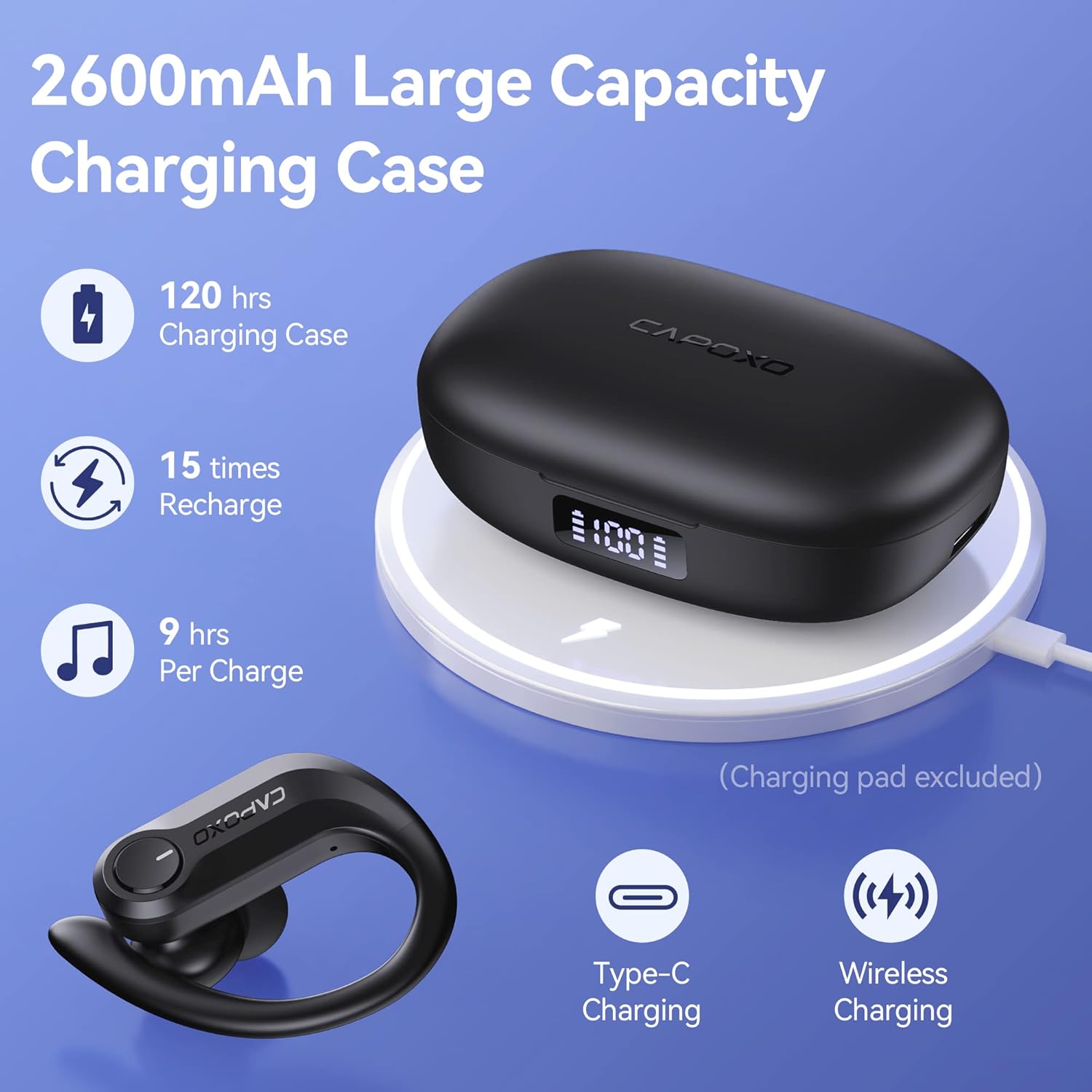
Image: The charging case highlighting its large capacity, extended playtime, and support for both Type-C and wireless charging.
5.7 Using the Charging Case as a Power Bank
The 2600mAh charging case can also function as an emergency power bank for your mobile phone or other small devices.
- Mampifandray fitaovana: Use a USB cable (not included) to connect your device to the USB output port on the right side of the charging case.
- famandrihana: The charging case will begin to charge your connected device. The LED display will show the remaining power of the case.

Image: The charging case being used as an emergency power bank to charge a smartphone.
6. Fikojakojana
6.1 Fanadiovana
- Regularly clean the earbuds, especially the eartips and charging contacts, with a soft, dry, lint-free cloth.
- If the wireless earbuds cannot be charged, try wiping the pins and points with an alcohol cloth to remove any residue.
- Aza mampiasa akora simika masiaka na fitaovana abrasive hanadiovana.
6.2 Fitehirizana
- Tehirizo ao anaty vata fampangatsiahana ny sofina rehefa tsy ampiasaina mba hiarovana azy sy hitazonana azy ho voaloa.
- Tehirizo ao amin'ny toerana mangatsiaka sy maina ny fitaovana, lavitry ny mari-pana tafahoatra sy ny tara-masoandro mivantana.
- Charge the charging case at least once every two weeks to prevent over-discharge, even if not in regular use.
6.3 Fanamafisana ny rano (IPX7)
The FOYCOY D8 earbuds are IPX7 waterproof, meaning they can withstand submersion in up to 1 meter of water for 30 minutes. This makes them suitable for workouts, running, and other activities where they may be exposed to sweat or light rain.
- Do not intentionally submerge the earbuds for extended periods or in depths greater than specified.
- The charging case is not waterproof. Keep it dry.
- Ensure earbuds are dry before placing them back into the charging case to prevent damage to the charging contacts.

Image: The earbuds demonstrating their IPX7 waterproof capability, suitable for active use.
7. Famahana olana
Olana & Vahaolana iraisana:
| OLANA | Antony mety hitranga | vahaolana |
|---|---|---|
| Earbuds do not turn on or charge when taken out of case. | Protective insulating film still on charging contacts. | Remove the insulating film from the charging points on both earbuds. Place them back in the case to activate. |
| No pairing name "D8" shown on phone, but charging case shows 100%. | Earbuds not activated or charging contacts are dirty. | Ensure insulating films are removed. Wipe the charging pins and points on the earbuds and in the case with an alcohol cloth. Place earbuds back in case, then remove to re-enter pairing mode. |
| Tsy azo ampangaina ny Earbuds. | Dirty charging contacts or improper placement. | Wipe the charging pins on the earbuds and the charging points in the case with an alcohol cloth. Ensure earbuds are correctly seated in the case. |
| Charging case LED display shows "0" even when plugged in. | Charging case is over-discharged. | Wait 15-30 minutes after plugging in the power supply; the LED display will update. |
| Connection drops frequently (especially with iPhone). | Interference or software issue. | Try resetting the earbuds to factory settings (see below). Ensure no other devices are interfering with the Bluetooth signal. Update your phone's operating system if available. |
7.1 How to Restore Factory Default Settings
This action will delete all pairing data between the earbuds and your devices. Perform this if you experience persistent connection issues or wish to clear previous pairings.
- Dingana 1: Place both earbuds into the charging case. Ensure they are in the charging status.
- Dingana 2: Hold the multi-function button on ROA earbuds for 8 seconds. The earbuds will flash Red & Blue light alternately for 3 seconds, indicating that both earbuds have been reset completely.
- Dingana 3: Pick up the earbuds to turn them on. Activate the Bluetooth setting on your device, search for "D8", and select it to connect.
If the issue persists, repeat the steps above.
8. Famaritana
| endri-javatra | antsipirihany |
|---|---|
| Anarana modely | D8 |
| Teknolojia fifandraisana | Wireless (Bluetooth) |
| Bluetooth Version | 5.3 (from A+ content) |
| Anisan'ny singa | Charging Case, Cable |
| KEVITRA | Plastic, Rubber, Silicone |
| Fampiasana manokana | Sport, Music, Exercising |
| Fitaovana mifanentana | Bluetooth-enabled devices (Android, iPhone, iPad, Mac Book, PC, Smart TV) |
| Karazana fanaraha-maso | Media Control (On-device Button) |
| Ny haavon'ny fanoherana ny rano | IPX7 tsy tantera-drano |
| Fahaveloman'ny bateria (Earbuds) | Approx. 9 ora isaky ny fiampangana |
| Fotoam-pilalaovana manontolo (miaraka amin'ny tranga) | Hatramin'ny 120 ora |
| Charging Case Battery Capacity | 2600mAh |
| Endri-javatra Charging Case | USB-C Input, USB Output (Power Bank), Wireless Charging, Dual LED Power Display |
| Earpiece endrika | Over-Ear (with earhooks) |
| Fametrahana sofina | Ao amin'ny sofina |
| Fanaraha-maso ny tabataba | Passive Noise Cancellation (In-ear design) |
| Ny refin'ny vokatra | 6.93 x 6.93 x 11.06 santimetatra |
| Lanja entana | 7.4 oz |
9. Warranty & Fanohanana
For warranty information or technical support, please refer to the contact details provided with your purchase or visit the official FOYCOY website. Tehirizo ny porofon'ny fividiananao ho an'ny fitakiana fiantohana.