
Formovie X5
Formovie X5 4K Laser TV Projector User Manual
Model: X5 | Brand: Formovie
Sava lalana
The Formovie X5 4K Laser TV Projector is a portable mini smart projector designed to deliver a cinematic experience in your home. Featuring ALDP Laser Display Technology, 2450 lumens brightness, and built-in Denon speakers, it offers stunning 4K resolution and immersive audio. This manual provides essential information for setting up, operating, and maintaining your projector.
Vita ny vokatraview
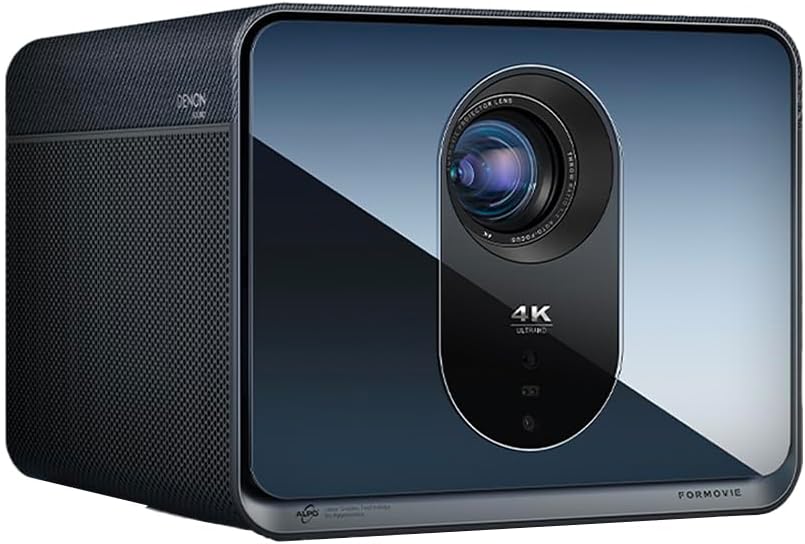
anoloana view of the Formovie X5 projector, showcasing noho ny endriny kanto sy ny family miavaka.
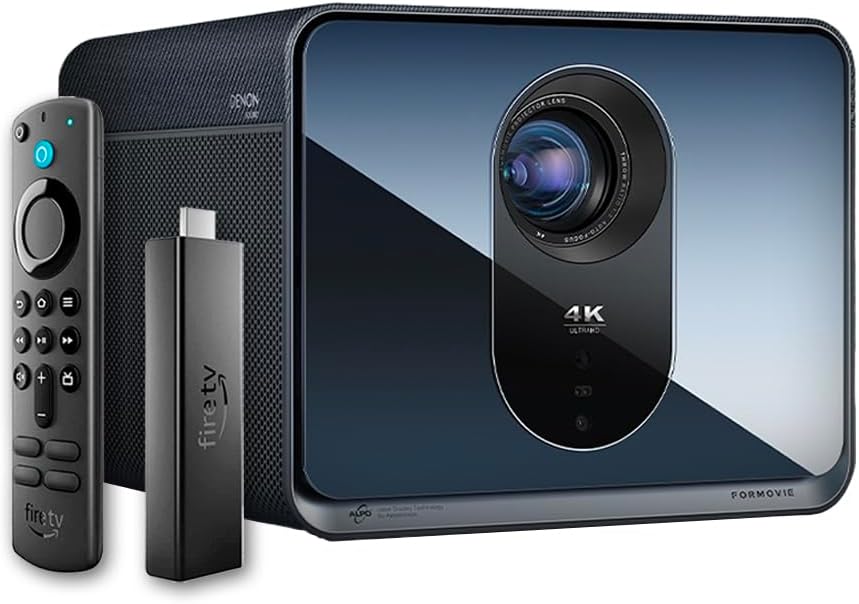
The Formovie X5 projector shown alongside its included Amazon Fire TV Stick 4K Max and remote control.

aoriana view of the Formovie X5 projector, displaying various connectivity ports including LAN, USB, HDMI, and S/PDIF.
Setup Guide
1. Unboxing sy fametrahana
- Esory tsara ny projector sy ny kojakoja rehetra ao anaty fonosana.
- Place the projector on a stable, flat surface. Ensure adequate ventilation around the unit.
- Position the projector directly in front of your desired projection surface (wall or screen) for optimal image geometry. While the projector has auto-correction, a direct alignment is recommended for the best experience.
2. Fampifandraisana herinaratra
- Ampifandraiso amin'ny seranan-tsambo fampidiran-kery an'ny projector ny adaptatera herinaratra.
- Ampidiro amin'ny fivoahana elektrika sahaza ny adaptatera herinaratra.
3. Initial Power On and Auto-Focus
- Tsindrio ny bokotra herinaratra eo amin'ny projector na ny fanaraha-maso lavitra mba hampandeha ny fitaovana.
- The projector will automatically initiate its auto-focus and omnidirectional auto-correction features. Allow a few moments for the image to stabilize and sharpen.
4. Connecting the Fire TV Stick 4K Max
- Insert the Amazon Fire TV Stick 4K Max into an available HDMI port on the projector.
- Connect the Fire TV Stick to its power source.
- Select the corresponding HDMI input on the projector's menu.
Torolàlana miasa
Fifehezana lavitra
The included remote control allows full navigation and control of the projector and the connected Fire TV Stick.
- Bokotra hery: Mandefa ny projector on/off.
- Navigation Pad: Ampiasaina hivezivezena amin'ny menio sy hisafidianana safidy.
- bokotra miverina: Miverina amin'ny efijery teo aloha.
- bokotra an-trano: Miverina amin'ny sakafo fototra.
- Botom-peo: Ahitsio ny feo.
- bokotra fanaraha-maso feo: Activates voice commands for the Fire TV Stick.
Fanitsiana sary
The Formovie X5 features advanced automatic adjustment tools. For manual adjustments:
- Mifantoha amin'ny tanana: If auto-focus is not satisfactory, access the projector settings to manually adjust focus.
- Fanitsiana Keystone: While omnidirectional auto-correction is standard, manual keystone adjustment is available in the settings for fine-tuning image shape.
- Ambient Light Adaptive: The projector automatically adjusts brightness based on ambient light conditions. This can be toggled or fine-tuned in the display settings.
Endri-javatra fototra
- 4K ALDP Laser Display Technology: Experience breathtaking visuals with true 4K resolution and a wide color gamut, ensuring crystal-clear and vibrant images.
- Cinema-Like Projection Size: Project images from 60 inches up to a massive 1,000 inches, providing an immersive viewing experience for movies, sports, and gaming.
- Powerful Adjustment Tools: Equipped with omnidirectional auto-correction, ambient light adaptive technology, laser autofocus, and automatic curtain alignment for hassle-free setup and optimal picture quality.
- Built-In Three-Way Denon Speakers: The X5 is the first projector to feature integrated three-way speakers powered by Denon, delivering rich, immersive audio without the need for external sound systems.
- Integrated Amazon Fire TV: Stream directly from your favorite apps like Netflix, Prime Video, Disney+, and more, with the convenience of the included Fire TV Stick 4K Max.
fikarakarana
- Fanadiovana Lens: Fafao moramora amin'ny lamba malefaka sy tsy misy loto natao manokana ho an'ny velaran-javatra optika ny family projecteur. Aza mampiasa mpanadio mikikitra na mampiasa hery be loatra.
- rivotra: Ensure the projector's ventilation ports are clear of dust and obstructions to prevent overheating. Regularly clean the vents with a soft brush or compressed air.
- fitahirizana: Rehefa tsy ampiasaina mandritra ny fotoana maharitra, dia tehirizo ao amin'ny toerana mangatsiatsiaka sy maina ny projector, lavitry ny tara-masoandro mivantana sy ny hafanana tafahoatra.
Fanamboarana
| OLANA | Antony mety hitranga | vahaolana |
|---|---|---|
| Tsy misy sary navoaka | Power cable disconnected, incorrect input source, projector in standby mode. | Check power connection, select correct HDMI input, press power button to wake. |
| Manjavozavo ny sary | Out of focus, lens dirty. | Allow auto-focus to complete or manually adjust focus. Clean the lens. |
| Mivadika ny sary (endrika trapezoïde) | Projector not perpendicular to screen, auto-correction issue. | Reposition projector directly in front of the screen. Use manual keystone correction if needed. |
| Tsy misy feo | Volume too low, mute activated, external audio device not connected properly. | Increase volume, check mute status, ensure external audio (if used) is correctly connected. |
| Fampitandremana amin'ny hafanana be loatra | Fidiran'ny rivotra voasakana, fampiasana maharitra amin'ny tontolo mafana. | Ensure vents are clear. Turn off projector and allow it to cool down. Operate in a well-ventilated area. |
fepetra arahana
| endri-javatra | antsipirihany |
|---|---|
| Marika | Formovie |
| Laharana modely | X5 |
| Asehoy ny fanapahan-kevitra | 3840 x 2160 (4K) |
| Light Source Technology | ALDP Laser |
| Famirapiratana (ANSI Lumens) | 2450 Lumens |
| Teknolojia fifandraisana | HDMI, USB, LAN |
| Endri-javatra manokana | Portable, Omnidirectional Auto-Correction, Ambient Light Adaptive, Laser Autofocus, Automatic Curtain Alignment, Built-In Denon Three-Way Speakers, Integrated Amazon Fire TV |
| Lanja entana | 15.14 kg |
| Ny refin'ny vokatra | 8.27 x 8.54 x 6.57 santimetatra |
Warranty sy fanohanana
For warranty information, please refer to the documentation included with your product or visit the official Formovie website. For technical support, troubleshooting assistance, or to access additional resources, please contact Formovie customer service.
- User Manual (PDF): DOWNLOAD
- Torolàlana ho an'ny mpampiasa (PDF): DOWNLOAD
- Visit the Formovie Store: Formovie Store
Ask a question about this manual
Ask about setup, troubleshooting, compatibility, parts, safety, or missing instructions. Manuals+ will review the question and use this page’s manual context to help answer it.