1. Fampidirana sy fampahalalana momba ny fiarovana
Thank you for choosing the AITEK DELTA-M2410 23.8-inch Full HD Gaming Monitor. This manual provides essential information for setting up, operating, and maintaining your monitor. Please read it carefully before use and retain it for future reference.
Torolàlana momba ny fiarovana:
- Esory amin'ny faladiany foana ny tariby herinaratra alohan'ny hanadiovana ny efijery.
- Aza atao amin'ny orana na ny hamandoana ny efijery mba hisorohana ny afo na ny dona.
- Aza sokafy ny monitor casing. Tsy misy kojakoja azo ampiasaina ao anatiny. Alefaso amin'ny mpiasan'ny serivisy mahafeno fepetra ny serivisy rehetra.
- Apetraho eo amin'ny toerana marin-toerana sy fisaka ny monitor mba tsy hianjera.
- Hamarino tsara ny rivotra manodidina ny monitor. Aza sakanana ny fisokafan'ny rivotra.
- Ampiasao ihany ny adaptatera herinaratra omena miaraka amin'ny monitor.
2. Ny votoatin'ny fonosana
Azafady, jereo ny fonosana ho an'ireto zavatra manaraka ireto:
- AITEK DELTA-M2410 23.8" Full HD Gaming Monitor
- Monitor Stand (fototra sy vozony)
- Power Adapter
- Cable HDMI
- User Manual (ity antontan-taratasy ity)
3. Fametrahana
3.1 Fanangonana ny Stand
- Esory tsara amin'ny fonony ny efijery, ary ataovy izay hiarovana azy.
- Ampifandraiso amin'ny tontonana fanaraha-maso ny vozon'ny fijoroana amin'ny alàlan'ny fampifanarahana ireo kiheba ary tsindrio mafy mandra-pikitihany eo amin'ny toerany.
- Attach the stand base to the stand neck. Secure it with the provided screw, usually located at the bottom of the base.
- Place the assembled monitor on a stable, level desk or table.
3.2 Mampifandray ny Monitor
- Fampifandraisana herinaratra: Connect the power adapter to the monitor's power input port, then plug the other end into a suitable electrical outlet (110/220V compatible).
- Fifandraisana video:
- For optimal Full HD quality, connect one end of the provided HDMI cable to the monitor's HDMI port and the other end to the HDMI output port on your computer or gaming console.
- Alternatively, you can use a VGA cable to connect to the monitor's VGA port and your computer's VGA output.
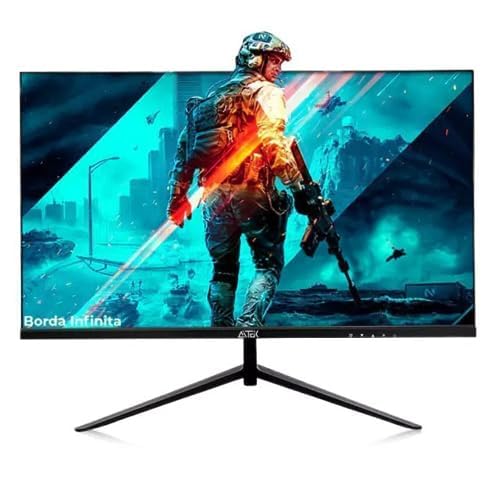
Sary 1: aoriana view of the AITEK DELTA-M2410 monitor showing power and video connections.
4. Torolàlana miasa
4.1 Power On/off
- Press the power button, usually located on the bottom right or rear of the monitor, to turn it on or off.
- Hirehitra ny jiro famantarana ny herinaratra rehefa mirehitra ny efijery.
4.2 Menu amin'ny efijery (OSD).
The OSD menu allows you to adjust various monitor settings. Use the control buttons (joystick or individual buttons) on the monitor to navigate and select options.
- Safidy fidirana: Choose between HDMI and VGA inputs.
- Fikirana sary: Ahitsio ny famirapiratana, ny fifanoherana, ny hakingan-tsaina ary ny hafanan'ny loko.
- Fikirana loko: Fine-tune RGB levels or select preset color modes.
- Audio: Adjust volume if external speakers are connected to the monitor's audio output (if available).
- Toetra lalao: Access specific gaming modes or settings (e.g., response time, crosshair overlay if supported).
4.3 Adjusting the Display
The monitor stand allows for tilt adjustment to find a comfortable viewing angle. Gently tilt the monitor panel forward or backward to your preferred position.
5. Fikojakojana
5.1 Fanadiovana ny Monitor
- Esory foana ny monitor alohan'ny hanadiovana.
- Mampiasà lamba malefaka sady tsy misy sosotra moramora dampvoahodina amin'ny rano na mpanadio ecran malefaka sady tsy mikoropaka.
- Aza manipy mpanadio mivantana eo amin'ny efijery.
- Avoid using benzene, thinner, ammonia-based cleaners, or abrasive materials.
5.2 Fitehirizana
When storing the monitor for an extended period, ensure it is powered off, unplugged, and stored in a cool, dry place away from direct sunlight and extreme temperatures. Use the original packaging if available for best protection.
6. Famahana olana
| OLANA | Vahaolana mety |
|---|---|
| Tsy misy sary eo amin'ny efijery |
|
| Manjavozavo na mivadika ny sary |
|
| Diso ny loko |
|
7. Famaritana
| endri-javatra | antsipirihany |
|---|---|
| MODELY | DELTA-M2410 |
| Marika | AITEK |
| Haben'ny efijery | 23.8 santimetatra |
| vahaolana | 1920 x 1080 (HD feno 1080p) |
| Aspect ratio | 16:9 |
| fifandraisana | 1x HDMI, 1x VGA |
| Fampidirana herinaratra | 110/220V |
| lanja | 3.69 kg |
| loko | Mainty |
| Surface Surface | malamalama |
8. Warranty sy fanohanana
AITEK provides a limited warranty for this product. Please refer to the warranty card included in your package for detailed terms and conditions, including coverage period and service procedures. Keep your purchase receipt as proof of purchase.
For technical support or service inquiries, please contact AITEK customer service through the contact information provided on the warranty card or the official AITEK website.
9. Media Integration
Vidéo vokatra
No official product videos from the seller for the AITEK DELTA-M2410 monitor were found in the provided data. If available, relevant videos would be embedded here to demonstrate features or setup processes.