
1. Fampidirana
Thank you for choosing the AgfaPhoto Powerstation PPS 600 Pro. This portable power bank is designed to provide reliable power for various devices during outdoor activities, travel, and emergency situations. This manual provides essential information for safe operation, setup, maintenance, and troubleshooting. Please read it thoroughly before using the product.
2. Torolàlana momba ny fiarovana
- Aza esorina, amboary, na ovaina ny fitaovana. Ny fametrahana azy indray amin'ny fomba tsy mety dia mety hiteraka afo na ratra.
- Do not expose the unit to fire or extreme temperatures (above 60°C / 140°F).
- Do not use or store the unit in a bathroom or in an area exposed to water or moisture.
- Do not drop, hit, or subject the unit to strong impacts.
- Arovy amin'ny ankizy.
- Ampiasao ihany ireo kojakoja sy tariby famandrihana izay atolotra.
- Ataovy izay hahazoana rivotra tsara mandritra ny fampiasana sy ny famandrihana mba hisorohana ny hafanana be loatra.
- In case of leakage from the battery, avoid contact with skin and eyes. Rinse affected areas with water and seek medical attention.
3. Ny votoatin'ny fonosana
Hamarino fa misy ny entana rehetra ao anaty boaty:
- AgfaPhoto Powerstation PPS 600 Pro
- Power Cord (for AC charging)
- Car Cigarette Lighter Adapter
- User Manual
4. Vokatra mihoatraview
Familiarize yourself with the ports, buttons, and display of your Powerstation PPS 600 Pro.

Image: Front panel of the AgfaPhoto Powerstation PPS 600 Pro, showing the LCD screen, DC output, USB-A ports, USB-C port, and AC output switch.
The unit features a clear LCD display that shows battery level, input power, and output power. Various ports are available for charging different devices simultaneously.
- LCD Display: Mampiseho ny toetry ny bateria, ny herinaratra miditra/mivoakatage, and error indicators.
- DC Output: Ho an'ny fitaovana mila herinaratra DC.
- Port USB-A: For charging smartphones, tablets, and other USB-powered devices.
- Seranan-tsambo USB-C: Ho an'ny fitaovana mifanaraka amin'ny famandrihana haingana.
- Output AC: Standard wall outlet for appliances.
- Seranana fidirana: For charging the power station itself.
5. Fametrahana
5.1 Fametrahana voalohany
Before first use, fully charge your AgfaPhoto Powerstation PPS 600 Pro. This ensures optimal battery performance and longevity.
- Connect the provided power cord to the AC input port on the power station.
- Ampidiro amin'ny faladia elektrika mahazatra amin'ny rindrina ny ilany ilany amin'ny tariby herinaratra.
- The LCD display will show the charging status. The unit is fully charged when the battery indicator shows 100%.
Charging can also be done via a solar panel (sold separately) or a car cigarette lighter adapter.

Image: Illustration of the three charging methods for the power station: via car cigarette lighter, AC wall adapter, and solar panel.
6. Torolàlana miasa
6.1 Mamelona/Mamono
- To turn on the unit, press and hold the main power button for a few seconds. The LCD display will illuminate.
- To turn off the unit, press and hold the main power button again until the display turns off.
6.2 Famandrihana fitaovana ivelany
The Powerstation PPS 600 Pro offers multiple output options:
- USB Output: Connect your USB-powered devices (smartphones, tablets, drones, cameras) to the USB-A or USB-C ports. The unit will automatically detect and begin charging.
- Output AC: For devices requiring standard wall power (laptops, mini-refrigerators, LED TVs), press the AC ON/OFF button to activate the AC outlet. Plug your device into the AC outlet. Remember to turn off the AC output when not in use to conserve battery.
- DC Output: For 12V DC devices, connect them to the DC output port.

Image: The AgfaPhoto Powerstation PPS 600 Pro connected and charging a laptop, demonstrating its use for portable electronics.

Image: The power station in use during a power outage, providing light and charging a smartphone, highlighting its emergency backup capability.
7. Fikojakojana
7.1 Fitehirizana
- Store the power station in a cool, dry place, away from direct sunlight and heat sources.
- For long-term storage, charge the unit to approximately 50-80% every 3-6 months to maintain battery health.
- Avoid storing in environments with high humidity or extreme temperatures.
7.2 Fanadiovana
- Mampiasà lamba malefaka sy maina hanadiovana ny ivelan'ilay tarika.
- Aza mampiasa mpanadio abrasive na solvents.
- Ataovy azo antoka fa tsy misy vovoka sy potipoti-javatra ny seranana rehetra.
8. Famahana olana
If you encounter issues with your Powerstation PPS 600 Pro, refer to the following common problems and solutions:
| OLANA | Antony mety hitranga | vahaolana |
|---|---|---|
| Tsy mandeha ny unit | Lany tanteraka ny bateria. | Charge the unit using the AC adapter. |
| No output from AC port | AC output not activated. Device exceeds power limit. | Press the AC ON/OFF button. Check device wattage against unit specifications. |
| Slow charging of external devices | Device requires higher current. Cable issue. | Ensure you are using the correct USB port (e.g., USB-C PD). Try a different cable. |
| Mafana be ny unit | Poor ventilation. Excessive load. | Ensure vents are clear. Reduce the number or power of connected devices. Allow unit to cool down. |
Raha mbola mitohy ny olana dia mifandraisa amin'ny fanohanana mpanjifa.
9. Famaritana
Technical details for the AgfaPhoto Powerstation PPS 600 Pro:
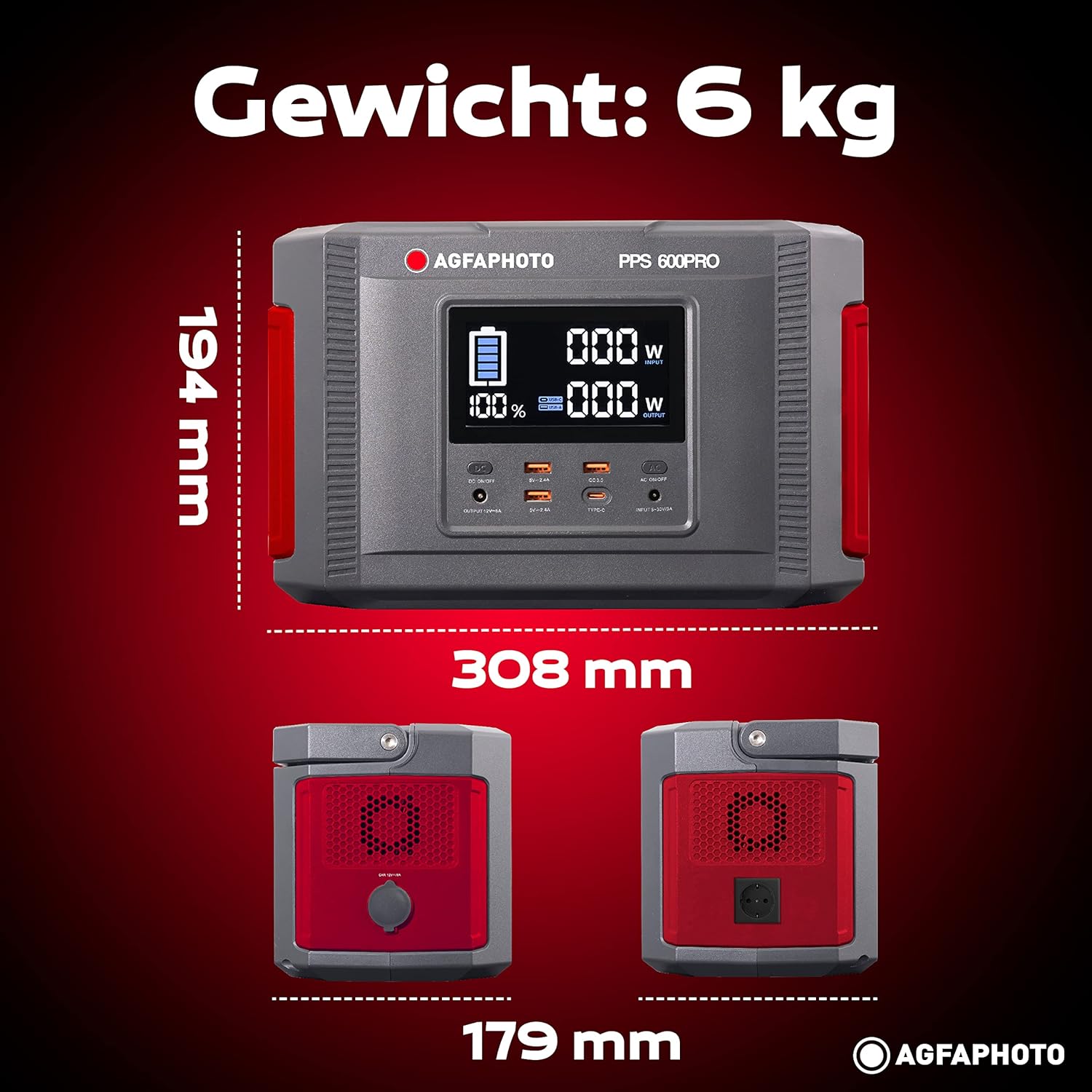
Image: Visual representation of the AgfaPhoto Powerstation PPS 600 Pro's dimensions (308 x 179 x 194 mm) and weight (6 kg).
| endri-javatra | famaritana |
|---|---|
| Marika | AgfaPhoto |
| Laharana modely | 717-854742 (PPS600) |
| Fahaizana bateria | 644 Wh |
| Hery mivoaka (Mitohy) | 600 W |
| Hery avoaka (Peak) | 1000 W |
| BOKYtage | 220 Volts |
| Lanja entana | 6.1 kg |
| refy (L x W x H) | 308 x 179 x 194 mm |
| Loharanon-kery | Battery Powered (Solaire, électricité) |
| Fampiasana soso-kevitra | Mobile phones, cameras, laptops, tablets |
| Anisan'ny singa | Power cord, USB ports, LCD screen, car cigarette lighter adapter |
| Endri-javatra manokana | Compact famolavolana |
10. Warranty sy fanohanana
AgfaPhoto products are manufactured to high-quality standards and are covered by a manufacturer's warranty. For specific warranty terms and conditions, please refer to the warranty card included with your product or visit the official AgfaPhoto website.
For technical support, troubleshooting assistance, or spare parts inquiries, please contact AgfaPhoto customer service. Contact details can typically be found on the product packaging or the official brand website.