
1. Fampidirana
Misaotra anao nividyasing the Lanix LX240 V7 23.8-inch Full HD Monitor. This manual provides essential information for the safe and efficient use of your new monitor. Please read it thoroughly before installation and keep it for future reference.
2. Information momba ny fiarovana
Araho ireto fepetra fiarovana manaraka ireto mba hisorohana ny fahasimban'ny efijery ary hahazoana antoka ny fiarovana ny mpampiasa:
- Aza atao amin'ny orana na ny hamandoana ny efijery mba hisorohana ny afo na ny fahatairana elektrika.
- Aza sokafy ny monitor casing. Tsy misy kojakoja azo ampiasaina ao anatiny. Alefaso amin'ny mpiasa mahay ny serivisy rehetra.
- Apetraho eo amin'ny toerana marin-toerana sy fisaka ny monitor mba tsy hianjera.
- Hamarino tsara ny rivotra manodidina ny monitor. Aza sakanana ny fisokafan'ny rivotra.
- Ampiasao ihany ny adaptatera herinaratra omena miaraka amin'ny monitor.
- Esory amin'ny faladia ny herinaratra raha tsy hampiasaina mandritra ny fotoana maharitra ny efijery.
3. Ny votoatin'ny fonosana
Hamarino fa misy ny entana rehetra ary ao anatin'ny toe-javatra tsara rehefa voavaha:
- Lanix LX240 V7 Monitor
- Power Adapter
- Cable HDMI
- User Manual (ity antontan-taratasy ity)

Image: Lanix LX240 V7 Monitor packaging box, showing the monitor model and key features.
4. Fametrahana
4.1 Fanangonana ny Stand
Araho ireto dingana ireto mba hametahana ny fijoroana amin'ny monitor-nao:
- Esory tsara amin'ny fonony ny efijery, ary ataovy azo antoka fa voaro.
- Attach the stand base to the stand neck. Secure with screws if provided.
- Ampifanaraho amin'ny sakan'ny fametahana eo an-damosin'ny fanaraha-maso ny fijoroana mitambatra.
- Gently push the stand into the slot until it clicks into place or secure with screws.

Sary: aoriana view of the Lanix LX240 V7 monitor, showing the stand attachment point and port area.
4.2 Mampifandray ny Monitor
Connect the monitor to your computer using the appropriate cables:
- Fampifandraisana herinaratra: Ampifandraiso amin'ny fidirana herinaratra amin'ny efijery ny adaptatera herinaratra, avy eo ampidiro amin'ny faladia herinaratra ny adaptatera.
- Fifandraisana video:
- HDMI: Connect one end of the HDMI cable to the HDMI port on your monitor and the other end to the HDMI port on your computer.
- VGA: Connect one end of the VGA cable to the VGA port on your monitor and the other end to the VGA port on your computer.
- Audio Connection (raha azo atao): The monitor has integrated speakers. If using HDMI, audio will transmit automatically. For VGA, ensure your computer's audio output is configured correctly.
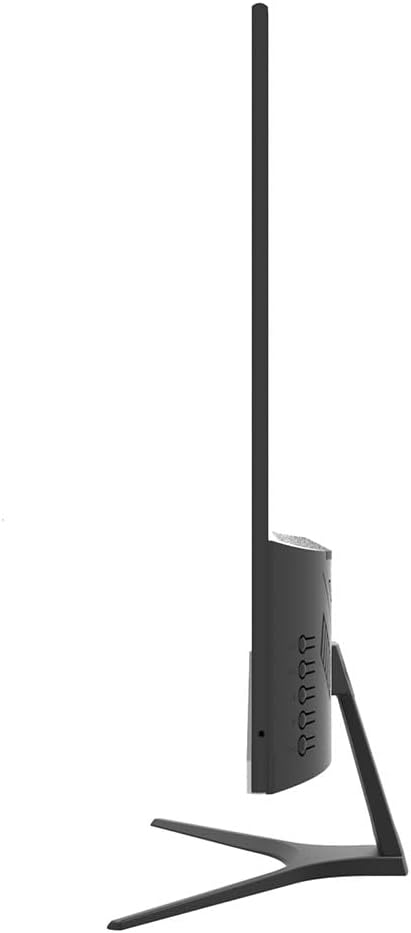
Sary: Side view of the Lanix LX240 V7 monitor, illustrating the location of input ports and control buttons.
5. Torolàlana miasa
5.1 Mamelona/Mamono
Tsindrio ny bokotra herinaratra eo amin'ny efijery mba hampandeha na hamonoana azy. Hirehitra ny jiro famantarana ny herinaratra rehefa mirehitra ny efijery.
5.2 Fantenana Loharano fampidirana
If you have multiple devices connected, you may need to manually select the input source:
- Press the "Input" or "Source" button on the monitor (refer to the side view image for button locations).
- Use the navigation buttons to select between HDMI and VGA inputs.
- Press the "Menu" or "OK" button to confirm your selection.
5.3 Menu amin'ny efijery (OSD).
The OSD menu allows you to adjust various monitor settings:
- Press the "Menu" button to open the OSD.
- Use the navigation buttons (usually up/down or left/right arrows) to browse through menu options such as Brightness, Contrast, Color Settings, Aspect Ratio, etc.
- Press "Menu" or "OK" again to enter a sub-menu or confirm a setting.
- Press the "Exit" or "Menu" button repeatedly to close the OSD.

Sary: Front view of the Lanix LX240 V7 monitor, showcasing its display area and slim bezels.
6. Fikojakojana
Ny fikojakojana tsara dia miantoka ny faharetan'ny fampiasana ny monitor-nao:
- Manadio ny efijery: Fafao moramora amin'ny lamba malefaka tsy misy loko ny efijery. Ho an'ny marika mafy loha, dampKobanina kely amin'ny rano na mpanadio efijery manokana ny lamba. Aza mamafa rano mivantana eo amin'ny efijery mihitsy.
- Fanadiovana ny Casing: Mampiasà lamba malefaka sy maina mba hamafana ny efijery.asing. Halaviro ny mpanadio na solvents.
- fitahirizana: Raha mitahiry ny monitor mandritra ny fotoana maharitra dia tapaho ny tariby rehetra ary tehirizo ao amin'ny toerana mangatsiatsiaka sy maina, indrindra ao anaty fonosana voalohany.
7. Famahana olana
Jereo ity tabilao manaraka ity ho an'ny olana mahazatra sy ny vahaolana:
| OLANA | Antony mety hitranga | vahaolana |
|---|---|---|
| Tsy misy sary eo amin'ny efijery | Monitor not powered on; Incorrect input source; Loose video cable. | Ensure power cable is connected and monitor is turned on. Select correct input source (HDMI/VGA). Check video cable connections. |
| maizina/mazava loatra ny sary | Diso ny firafitry ny famirapiratana/fanoherana. | Adjust Brightness and Contrast settings via the OSD menu. |
| Tsy misy feo avy amin'ny fanamafisam-peo | Audio settings incorrect; Volume too low. | Check monitor's volume settings in OSD. Ensure computer's audio output is set to the monitor (for HDMI) or external speakers (for VGA). |
| Sary mitsilopilopy na tsy milamina | Loose video cable; Incorrect refresh rate. | Ensure video cable is securely connected. Check your computer's display settings for the correct refresh rate (60Hz). |
8. Famaritana
| Anarana modely | LX240 V7 |
| Haben'ny efijery | 23.8 inches (23.6 inches actual) |
| Karazana tontonana | LED |
| vahaolana | 1920 x 1080 (HD feno) |
| Aspect ratio | 1.78:1 (16:9) |
| Ny tahan'ny fanavaozana | 60 Hz |
| Fotoam-pamaliana | 5 Miliseconds |
| ny famirapiratry ny mazava | 250 cd/m² |
| Contrast Ratio | 3000:1 |
| Viewamin'ny Angle | 178 degre |
| fifandraisana | 1x HDMI, 1x VGA |
| Mpandahateny anatiny | ENY |
| Fanjifana herinaratra | 22 Watts |
| refy (H x W x D) | Approx. 21cm x 25cm x 5cm (screen only, based on image) |
| lanja | 2.71 kg |
Sary: Front view of the Lanix LX240 V7 monitor with height, width, and depth measurements indicated.
9. Warranty & Fanohanana
Information momba ny fiantohana: The Lanix LX240 V7 monitor comes with a 1-year manufacturer's warranty. This warranty covers defects in materials and workmanship under normal use. It does not cover damage caused by misuse, accidents, unauthorized modifications, or external causes.
Fanohanana ny mpanjifa: For technical assistance, warranty claims, or service inquiries, please contact Lanix customer support. Refer to the official Lanix webtranokala na antontan-taratasy momba ny fividiananao ho an'ny antsipiriany momba ny fifandraisana.