
Sava lalana
This manual provides detailed instructions for the safe and efficient use of your Plimpton PlimPad P3 10.1-inch Android 12 Tablet. Please read this manual thoroughly before operating the device and keep it for future reference.
Vita ny vokatraview
The Plimpton PlimPad P3 is a 10.1-inch tablet featuring the Android 12 operating system. It is designed for general use, offering a balance of performance and portability.
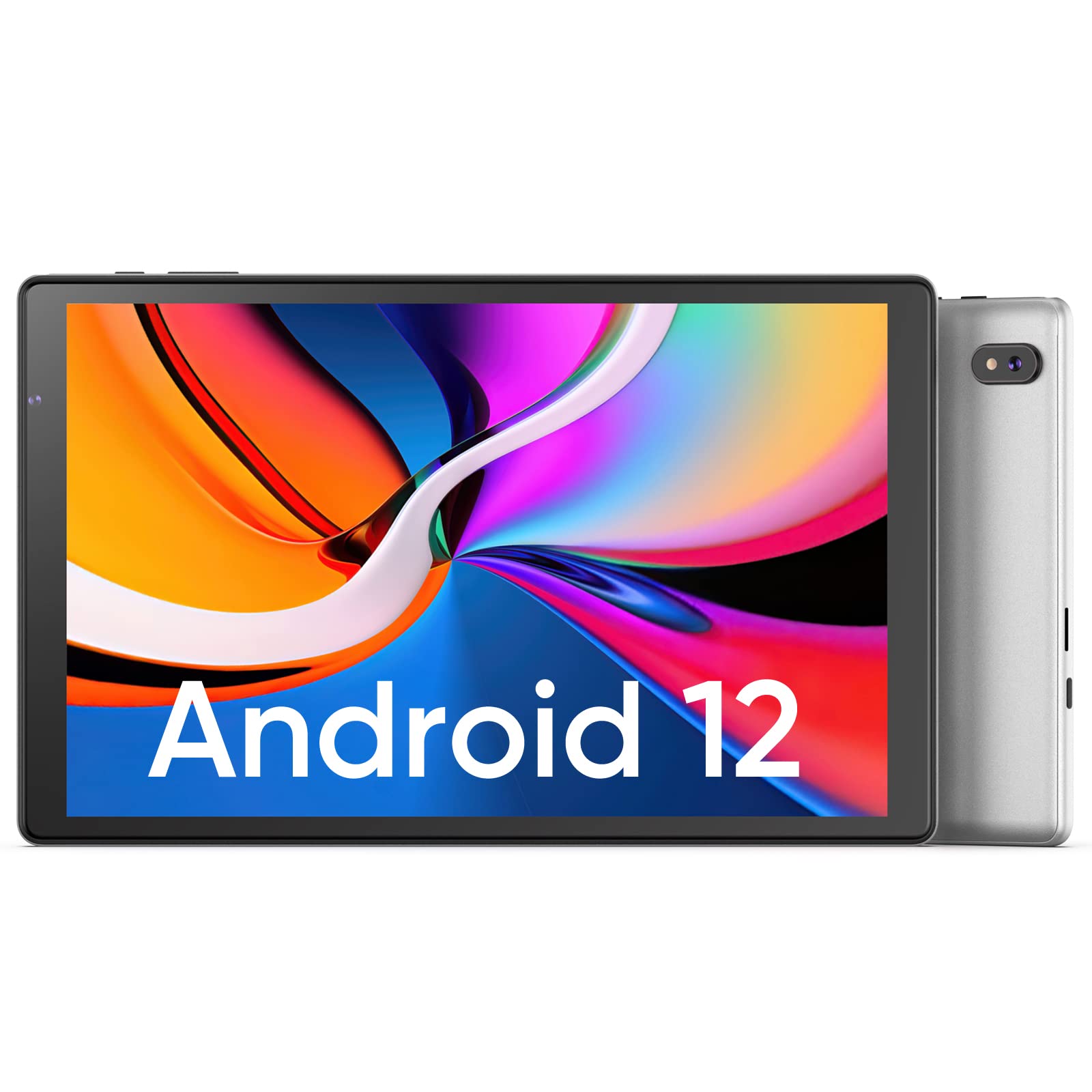
Sary: Eo anoloana sy aoriana view of the Plimpton PlimPad P3 Tablet.
Lafin-javatra fototra:
- Rafitra fikirakirana: Android 12 for a personalized and secure user experience.
- Aseho: 10.1-inch HD IPS LCD with 1280x800 resolution for clear visuals.
- Fampisehoana: Powered by an Allwinner A133 1.5GHz 4-core CPU with 4GB RAM for smooth operation.
- fitahirizana: Fitehirizana anatiny 64GB, azo mivelatra hatramin'ny 1TB amin'ny alàlan'ny karatra microSD.
- Fifandraisana: Dual-band Wi-Fi 6 (5GHz+2.4GHz) and Bluetooth 5.0.
- Audio: Dual speakers for an enhanced audio experience.
- Batterie: Batterie 6000mAh ho an'ny fampiasana maharitra.
- Design: Premium silver metal body for efficient heat dissipation and a slim profile.

Image: Visual representation of key features including metal body, 10.1-inch screen, split screen functionality, and 6000mAh battery capacity.
Setup Guide
1. Fametrahana voalohany
Before first use, fully charge the tablet using the provided USB charger and 1.8M USB Type-C cable. Ensure the tablet is powered off during initial charging. Using non-original chargers may lead to compatibility issues.

Image: Details on battery capacity, charging port, and cable length.
2. Power On/off
- Hamelona: Press and hold the power button located on the side of the tablet until the screen lights up.
- Mamono: Press and hold the power button, then select "Power off" from the options that appear on the screen.
3. Fifandraisana Wi-Fi
The tablet supports Wi-Fi 6 with dual-band (5GHz and 2.4GHz) connectivity for stable internet access. To connect to Wi-Fi:
- Mandehana any Fikirana.
- Select Tambajotra & Internet.
- paompy Wifi ary velomy.
- Safidio ny tamba-jotra tianao ao amin'ny lisitra ary ampidiro ny tenimiafina raha misy amporisihina.

Sary: Overview of Wi-Fi 6, Bluetooth 5.0, and dual-band network support.
4. Fifandraisana Bluetooth
Mba hampifandray ny fitaovana Bluetooth:
- Hamarino tsara fa ao amin'ny "pair mode" ny fitaovanao Bluetooth.
- Mandehana any Fikirana amin'ny takelakao.
- Select Fitaovana mifandray, avy eo Safidin'ny fifandraisana, ary tap Bluetooth.
- Turn Bluetooth on and select your device from the list to pair.
5. SD Card Installation and Initialization
The tablet supports microSD cards up to 1TB. Always insert or remove the SD card when the tablet is powered off to prevent data corruption.
- Vonoy ny takelaka.
- Tadiavo ny toerana fametrahana karatra microSD eo amin'ny takelaka.
- Insert the microSD card gently until it clicks into place.
- Power eo amin'ny takelaka.
- For the tablet to recognize a new SD card, it may require initialization. Refer to the on-screen prompts or the detailed instructions in the included Japanese manual for the initialization procedure.
6. Installing a Protective Case
To protect your tablet, you may wish to install a compatible protective case. The following video demonstrates how to install a tablet into a case and utilize its stand function.
Video: Demonstration of installing a tablet into a protective case and using the stand function.
Torolàlana miasa
1. Android 12 OS Features
The PlimPad P3 runs on Android 12, offering an optimized and user-friendly interface with enhanced privacy controls.
- Personalized UI: Customize your desktop display style with new UI designs.
- Privacy Management: New privacy features allow you to manage your data and permissions easily.
- Google Services & Apps: Access stable Google services and install popular third-party applications like LINE, YouTube Kids, Yahoo, and Twitter.
- Accessibility: Features include automatic text-to-speech and an eye protection mode.

Image: Highlights of Android 12 OS features such as improved UI, privacy management, and simplified data transfer.
2. Fikirana fampisehoana
- fanapahan-kevitra: The 10.1-inch IPS LCD offers a 1280x800 resolution for vivid colors and wide viewamin'ny angles.
- Fomba fiarovana maso: Activate this mode in settings to reduce eye strain during prolonged use.
3. Fanovana Audio
The tablet is equipped with dual speakers for surround sound. Adjust volume using the physical volume buttons or through the sound settings in the Android OS.

Image: Illustration of the tablet's dual stereo speakers and Bluetooth 5.0 connection for reduced interference.
4. Wireless Projection
The tablet supports wireless projection to compatible smart TVs. Refer to your smart TV's manual for instructions on enabling screen mirroring or casting, then initiate the connection from your tablet's display settings.
fikarakarana
1. Fikarakarana bateria
- To maximize battery life, close unnecessary applications running in the background.
- Aza avela ho tratran'ny mari-pana tafahoatra ny takelaka.
- For optimal performance, use the original charger and cable.
2. Fitantanana fitahirizana
- Esory tsy tapaka ny cache ary tsy ilaina files to maintain smooth operation.
- While the tablet has 4GB RAM and 64GB ROM, it is not designed for memory-intensive applications such as high-end games or professional photo editing software (e.g., Photoshop).
- Ampiasao ny toerana fitahirizana karatra microSD ho an'ny fitahirizana media fanampiny files sy antontan-taratasy.
Fanamboarana
Olana iraisana sy vahaolana:
- Fahombiazana miadana:
- Akatona ny fampiharana ambadika.
- Clear app caches.
- Ataovy azo antoka fa ampy ny toerana fitahirizana malalaka.
- Note that this tablet is not optimized for demanding games or applications like Genshin Impact.
- Olana momba ny fiampangana:
- Use only the original Plimpton charger and USB Type-C cable.
- Ataovy azo antoka fa madio sy tsy misy potipoti-javatra ny seranan-tsambo fiampangana.
- Other Type-C chargers may not be compatible.
- Karatra SD tsy fantatra:
- Ensure the tablet is powered off when inserting or removing the SD card.
- A new SD card may require initialization. Refer to the included manual for steps.
- Screen Damage:
- In case of a cracked or damaged screen, please contact customer support for the best resolution.
- Consider using a P3 Pro dedicated reinforced glass screen protector for added durability.
- No SIM Card Compatibility:
- This is a Wi-Fi model tablet and is not compatible with SIM cards for cellular data.
fepetra arahana
| endri-javatra | antsipirihany |
|---|---|
| Marika | plimpton |
| Anarana modely | PlimPad P3 |
| Rafitra fikirakirana | Android 12 |
| Unité centrale | Allwinner ARM Cortex A133, 1.8 GHz 4-core |
| ram | 4 GB |
| Fitehirizana anatiny | 64 GB |
| Fitehirizana azo itarina | MicroSD hatramin'ny 1 TB |
| Haben'ny efijery | 10.1 santimetatra |
| Karazana fampisehoana | IPS LCD |
| Asehoy ny fanapahan-kevitra | 1280x800 |
| Aspect ratio | 16:10 |
| Efijery kasihina | ENY |
| Wifi | Wi-Fi 6 (Dual-band 5GHz+2.4GHz) |
| Bluetooth | Bluetooth 5.0 |
| Camera Front | ENY |
| Fakan-tsary aoriana | 8 MP |
| Fahaizana bateria | 6000mAh (Lithium Ion) |
| lanja | 520 grama |
| loko | Silver |
Warranty sy fanohanana
Warranty Information
Your Plimpton PlimPad P3 tablet comes with a 24-month free exchange warranty from the date of purchase. If any defects occur within this period, a new product exchange will be provided.
Fanohanana ny mpanjifa
For any inquiries or support needs, please contact us through Amazon:
- On the product page, locate the store name "Plimpton Direct" below the "Add to Cart" button.
- Tsindrio eo "Plimpton Direct".
- In the upper right corner of the store page, click on "Ask a question" handefa hafatra.
Fonosana fonosana
The following items are included in your Plimpton PlimPad P3 package:
- PlimPad P3 Tablet
- USB Charger
- 1.8M USB Type-C Cable
- Japanese Instruction Manual