
1. Fampidirana
This manual provides essential information for setting up, operating, maintaining, and troubleshooting your Alienware X17 R2 Gaming Laptop. Please read this guide thoroughly to ensure optimal performance and longevity of your device.
The Alienware X17 R2 is designed for high-performance gaming and demanding tasks, featuring advanced cooling technologies, powerful processors, and dedicated graphics.
2. Vokatra mihoatraview
The Alienware X17 R2 is engineered to deliver an immersive gaming experience in a thin 17-inch form factor. Key features include:
- Powerful Intel CPUs: Experience high-performance action across all your favorite games with 12th Gen Intel Core processors.
- Next-Gen GPUs: Game unrestrained with NVIDIA GeForce RTX 3070Ti graphics, Dynamic Boost 2.0, and Deep Learning Super Sampling technology.
- Patented Quad Cooling: An industry-first design uses four intelligently controlled and programmable fans to dissipate heat.
- Fotoam-pilalaovana lavitra: Improve battery life with Advanced Optimus technology from NVIDIA—now available on all display options.
- Legend 2.0 Industrial Design: A fresh evolution in design with a high-endurance finish and customizable AlienFX lighting.

Sary 2.1: Eo anoloana view of the Alienware X17 R2 Gaming Laptop displaying a game.
3. Fametrahana
3.1 Famoahana boaty sy fisafoana voalohany
- Esory tsara ny solosaina finday sy ny kojakoja rehetra ao anaty fonosana.
- Hamarino tsara fa eo daholo ireo entana voatanisa ao amin'ny fizarana "Inona no ao anaty boaty".
- Inspect the laptop for any physical damage. If damage is found, contact your retailer immediately.
3.2 Hery mampifandray
- Connect the power adapter to the charging port located at the rear of the laptop.
- Ampidiro amin'ny fivoahan'ny rindrina ny tadin-jiro.
- The power indicator light will illuminate, indicating the laptop is receiving power.
3.3 Fametrahana voalohany ny rafitra fiasana sy ny fanombohana
- Press the Alienware head power button to turn on the laptop.
- Araho ny toromarika eo amin'ny efijery mba hamitana ny dingana fananganana trano Windows 11. Anisan'izany ny fisafidianana ny faritra misy anao, ny fampifandraisana amin'ny tambajotra Wi-Fi ary ny famoronana kaonty mpampiasa.
- Allow the system to download and install any necessary updates.
4. Fampandehanana ny solosainao
4.1 Kitendry sy Touchpad
The Alienware X17 R2 features a backlit keyboard and a responsive touchpad. The AlienFX lighting allows for customizable colors and effects across the keyboard and other zones.

Sary 4.1: antsipirihany view of the backlit keyboard and touchpad.
4.2 Fampisehoana sy sary
Enjoy stunning visuals on the 17.3-inch FHD display with a 480Hz refresh rate and 3ms response time. The NVIDIA GeForce RTX 3070Ti graphics card ensures smooth gameplay and high-fidelity rendering. The laptop supports Dolby Vision for optimized color profiles.
4.3 Audio
Experience immersive 3D sound via Dolby Atmos, designed to deliver audio as studios intended.
4.4 Seranana sy fifandraisana
The laptop offers a variety of ports for peripherals and external displays:

Sary 4.2: aoriana view mampiseho ireo seranana fifandraisana isan-karazany.
- Port USB 3.0: 3 ports for connecting various USB devices.
- Port USB-C: For versatile connectivity, including Thunderbolt 4.
- HDMI 2.1: Supports up to 4K/120Hz output for external displays.
- Ethernet: Killer E3100 RJ45 Ethernet for stable wired network connections.
- Wireless: Killer Wi-Fi 6 (802.11ax) and Bluetooth for wireless connectivity.
5. Fikojakojana
5.1 Fanadiovana
- Mampiasà lamba malefaka sady tsy misy loko mba hanadiovana ny efijery sy ny ivelany.
- Fadio ny mampiasa akora simika mahery vaika na akora abrasive.
- Regularly clean the cooling vents to prevent dust buildup, which can affect performance.
5.2 Fanavaozana rindrambaiko
Ensure your operating system and drivers are kept up-to-date. Windows Update will handle OS updates, and Alienware Command Center can assist with driver and firmware updates.
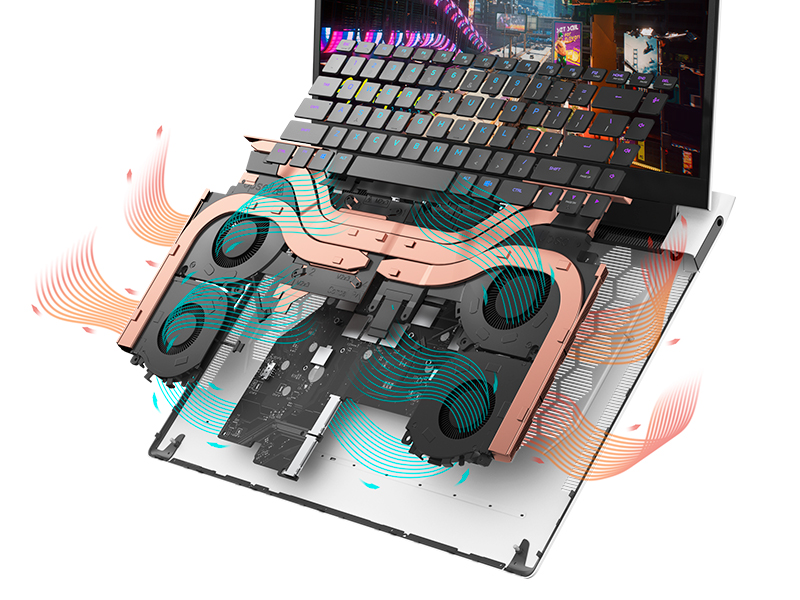
Figure 5.1: Alienware Command Center for system management.
6. Famahana olana
If you encounter issues with your Alienware X17 R2, consider the following basic troubleshooting steps:
- Tsy misy hery: Ensure the power adapter is securely connected to both the laptop and a working power outlet. Check the power indicator light.
- Olana amin'ny fampisehoana: If the screen is black, try connecting an external monitor to verify if the issue is with the laptop's display or the graphics card. Update graphics drivers.
- Mafana be loatra: Ensure cooling vents are clear of obstructions. Use Alienware Command Center to monitor temperatures and adjust fan profiles.
- Fihenan'ny Fahombiazana: Akatona ireo rindranasa tsy ilaina. Jereo raha misy dingana any ambadika mandany CPU na RAM be loatra. Ataovy izay hahazoana toerana malalaka ampy amin'ny SSD.
- Olana rindrambaiko: Restart the laptop. If issues persist, consider performing a system restore or reinstalling the problematic software.
7. Famaritana
| endri-javatra | famaritana |
|---|---|
| Haben'ny efijery | 17.3 santimetatra |
| Fanapahan-tsary | 1920 x 1080 piksela (FHD) |
| processeur | Intel Core i9-12900H (3.8 GHz, 14 Cores) |
| ram | 16 GB DDR5 (4800 MHz) |
| Hard Drive | SSD 1 TB (State Solid) |
| Graphics Coprocessor | NVIDIA GeForce RTX 3070 Ti (8 GB GDDR6) |
| Rafitra fikirakirana | Windows 11 Home |
| Karazana Wireless | 802.11ax (Killer Wi-Fi 6), Bluetooth |
| USB 3.0 Ports | 3 |
| Lanja entana | 6.82 kg |
| Ny refin'ny vokatra | 11.79 x 15.72 x 0.58 santimetatra |
8. Inona no ao anaty boaty
- Alienware X17 R2 Gaming Laptop
- Power Adapter
- Tady herinaratra
- tahirin-kevitra
9. Lahatsary vokatra ofisialy
Alienware X17 R2 Gaming Laptop Overview
Lahatsary 9.1: Nifarana ny ofisialyview of the Alienware X17 R2 Gaming Laptop, highlighting its design, cooling, and performance features.
About Alienware X17 R2 Gaming Laptop
Video 9.2: A detailed look at the Alienware X17 R2 Gaming Laptop, showcasing its features and design elements.
10. Warranty sy fanohanana
Your Alienware X17 R2 Gaming Laptop comes with a standard manufacturer's warranty. For detailed warranty information, please refer to the documentation included with your product or visit the official Alienware support website.
For technical support, driver downloads, and service requests, please visit the Alienware support portal. You can also find FAQs and community forums for additional assistance.