1. Fampidirana
Thank you for choosing the Tekstap Smart RGBIC Ambiance Light Bar. This device is designed to enhance your entertainment experience with dynamic, customizable lighting. Featuring RGBIC technology, Wi-Fi connectivity, and compatibility with voice assistants like Alexa and Google Assistant, these light bars offer a versatile solution for creating immersive atmospheres for gaming, movies, music, and more.
This manual provides essential information for the safe and efficient use of your new light bars. Please read it thoroughly before installation and operation, and retain it for future reference.
2. Ny votoatin'ny fonosana
Azafady, jereo ny fonosana ho an'ireto zavatra manaraka ireto:
- Tekstap Smart RGBIC Ambiance Light Bars (2 units)
- Power Adapter
- Base Stands (2 units)
- 3M Adhesive Pads (for alternative mounting)
- User Manual

Image: Contents of the Tekstap Smart RGBIC Ambiance Light Bar package, showing the two light bars, their stands, the power adapter, and the instruction manual.
3. Information momba ny fiarovana
- Ataovy azo antoka ny famatsiana herinaratra voltage dia mifanaraka amin'ny fitaovana.
- Aza atao amin'ny rano na hamandoana be ny fitaovana.
- Avoid direct exposure to sunlight or high temperatures.
- Aza manandrana manongotra na manamboatra ilay fitaovana. Mifandraisa amin'ny fanohanan'ny mpanjifa hahazoana fanampiana.
- Arovy amin'ny ankizy.
- Ampiasao ihany ny adaptatera herinaratra nomena.
4. Fametrahana
4.1 Fomba fametrahana
The Tekstap Smart RGBIC Ambiance Light Bars offer two primary installation methods:
- Using Base Stands: Attach the light bars to the provided base stands. These allow for vertical placement on a desk or horizontal placement behind a screen.
- Using 3M Adhesive Pads: For a more permanent setup, attach the light bars directly to the back of your TV or PC using the strong 3M adhesive pads. Ensure the surface is clean and dry before application.

Image: Demonstrates flexible placement options for the light bars, including vertical on a desk and horizontal behind a television screen.
4.2 Mifandray amin'ny herinaratra
Connect the light bars to the power adapter and then plug the adapter into a standard electrical outlet.
4.3 Smart Life App Installation and Pairing
- Download ny App: Hitady ny "Smart Life" in your smartphone's app store (iOS or Android) and download the application.
- Misoratra anarana/Miditra: Open the Smart Life app and register for a new account or log in if you already have one.
- Ampidiro ny Pairing Mode: Power on the light bars. If they do not automatically enter pairing mode (indicated by a flashing light), press and hold the power button on the control unit for several seconds until the lights begin to flash rapidly.
- Ampio fitaovana: In the Smart Life app, tap the "+" icon to add a new device. Select "Lighting" then "Light Source (Wi-Fi)" or allow the app to auto-discover the device.
- Mifandray amin'ny Wi-Fi: Follow the on-screen instructions to connect the light bars to your 2.4GHz Wi-Fi network. Note: This device does not support 5GHz Wi-Fi networks.
- Vita ny fampiarahana: Once connected, the light bars will stop flashing and appear in your Smart Life app. You can then rename the device for easier control.

Image: The Smart Life app interface on a smartphone, demonstrating options for music, brightness, scene, DIY, color, and schedule control for the light bars. Product dimensions are also shown.
5. Torolàlana miasa
5.1 Basic Control (Manual)
The light bars feature a control unit with buttons for basic functions:
- Bokotra hery: Press to turn on/off. Long press to enter pairing mode.
- Button Mode: Cycle through preset lighting modes.
- Bokotra famirapiratana: Ahitsio ny haavon'ny famirapiratana.
5.2 Fanaraha-maso ny fampiharana Smart Life
The Smart Life app provides comprehensive control over your light bars:
- Safidy loko: Choose from 16 million colors using the color wheel.
- Fanitsiana famirapiratana: Precisely control the light intensity.
- Fomba fijery: Select from over 10 preset scene modes (e.g., Movie, Date, Sunset, Romantic, Christmas Eve, Colorful, Dynamic, Dream, Rainbow, Flowing Water) to instantly change the ambiance. You can also create and save your own DIY scene modes.
- Fomba fampifanarahana mozika: Activate the music mode to synchronize the lights with audio from your TV, PC, or surrounding environment via the built-in microphone. Choose from 4 music modes: Vivid, Rhythm, Strike, and Vibrate.
- Fanomanana: Set timers to automatically turn the lights on or off at specific times.
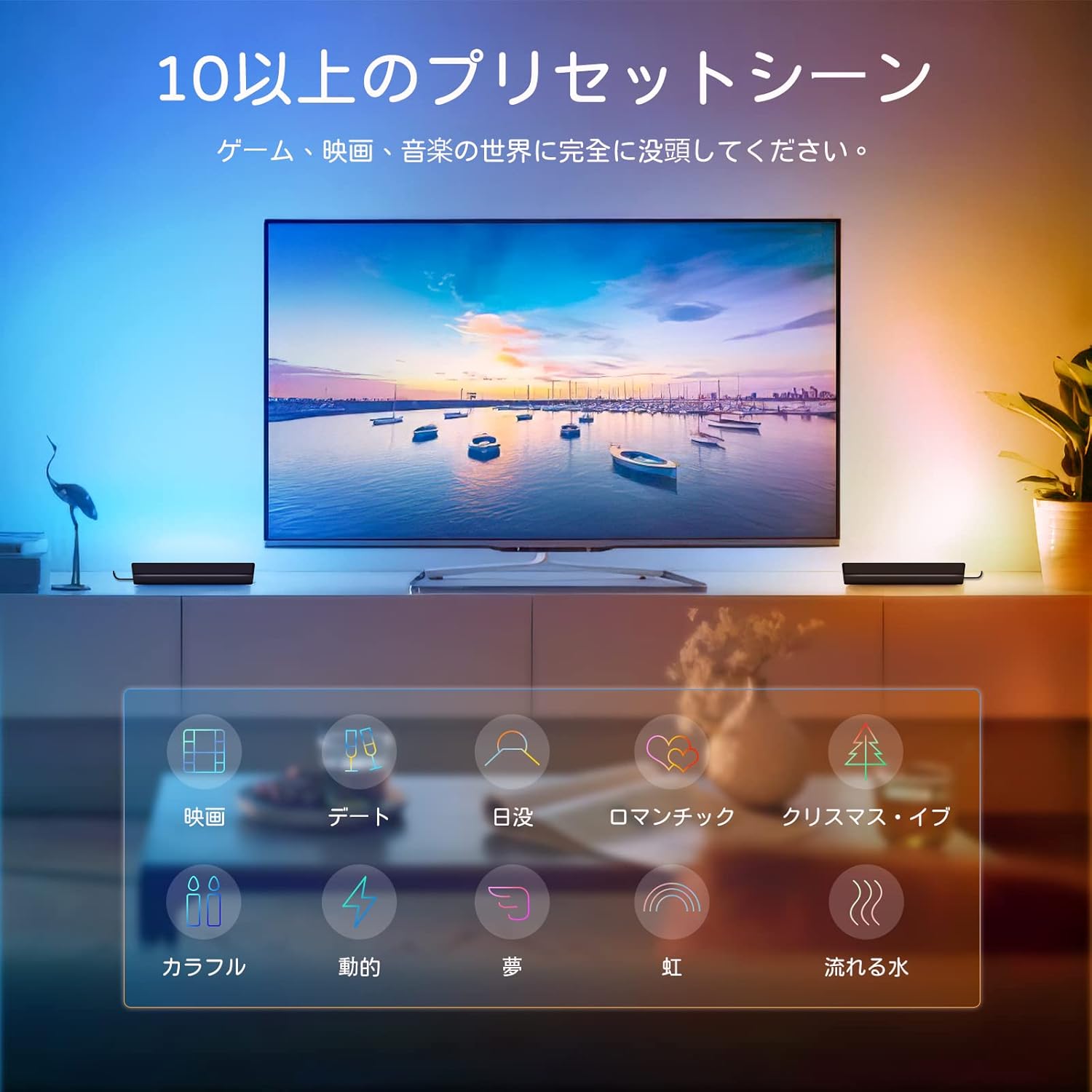
Image: A living room setup showing the light bars behind a television, illustrating various preset scene modes available for different activities like movies, dates, or music.

Image: A smartphone screen showing the scheduling feature within the app, allowing users to set specific times for the light bars to turn on or off automatically.
5.3 Fanaraha-maso amin'ny feo (Alexa/Google Assistant)
Integrate your Tekstap Smart RGBIC Ambiance Light Bars with Amazon Alexa or Google Assistant for hands-free control:
- Link Smart Life Account: In your Alexa or Google Home app, navigate to the "Skills" or "Works with Google" section. Hitady ny "Smart Life" and enable the skill/service. Log in with your Smart Life account credentials.
- Fantaro ny fitaovana: Once linked, ask your voice assistant to "Discover devices" or manually add them through the app.
- Feo baiko: You can now control your light bars using voice commands. Examples ahitana:
- "Alexa, turn on the Light Bar."
- "Hey Google, set Light Bar to blue."
- "Alexa, dim the Light Bar to 50%."
- "Hey Google, change Light Bar to romantic scene."

Image: A user relaxing on a couch, controlling the light bars behind a TV using voice commands through an Amazon Echo device, demonstrating Alexa and Google Assistant compatibility.
6. Fikojakojana
- Fanadiovana: Use a soft, dry cloth to clean the surface of the light bars. Do not use abrasive cleaners or solvents.
- fitahirizana: Raha tehirizina ela ny fitaovana dia esory amin'ny herinaratra ary tehirizo ao amin'ny toerana mangatsiaka sy maina.
- Fanavaozana ny mikirao praogramanao: Periodically check the Smart Life app for any available firmware updates to ensure optimal performance and access to new features.
7. Famahana olana
| OLANA | Antony mety hitranga | vahaolana |
|---|---|---|
| Light bars do not turn on. | Tsy misy herinaratra, tapaka ny fifandraisana. | Check power adapter connection and wall outlet. Ensure the power button is pressed. |
| Tsy afaka mifandray amin'ny Wi-Fi. | Incorrect Wi-Fi password, 5GHz network, device not in pairing mode. | Ensure correct 2.4GHz Wi-Fi network and password. Put device into pairing mode (flashing lights). Move closer to the router. |
| Tsy mandeha ny fifehezana feo. | Smart Life skill not enabled, incorrect device name, no internet connection. | Ensure Smart Life skill is enabled and linked in Alexa/Google Home app. Verify device name. Check internet connection. |
| Lights are unresponsive. | Temporary glitch, app issue. | Restart the light bars by unplugging and replugging. Close and reopen the Smart Life app. |
8. Famaritana
| endri-javatra | antsipirihany |
|---|---|
| Marika | Tekstap |
| Laharana modely | AALB-BC |
| Ny refin'ny vokatra | 8 x 4.6 x 26.6 cm (per bar) |
| lanja | 580 g (fonosana manontolo) |
| loko | Multi-colored (RGBIC) |
| Material alokaloka | Polycarbonate |
| Karazana Switch | Touch, App, Voice |
| fifandraisana | Wi-Fi (2.4GHz ihany) |
| Fifandraisan'ny Mpanampy Feo | Amazon Alexa, Mpanampy Google |
| Endri-javatra manokana | RGBIC Technology, Music Sync, 10+ Scene Modes, DIY Modes, Scheduling |
9. Warranty sy fanohanana
Tekstap products are designed for reliability and performance. For warranty information and customer support, please refer to the contact details provided on the product packaging or visit the official Tekstap website. Please have your model number (AALB-BC) and purchase information ready when contacting support.
Raha mila fanampiana fanampiny dia azonao atao ihany koa ny manondro ny Tekstap Brand Store.