1. Fampidirana
This manual provides essential information for the safe and efficient use of your Aligator A675 Senior Double SIM 2G Mobile Phone. Please read it carefully before using the device and keep it for future reference. The Aligator A675 is designed for ease of use, featuring large buttons and a clear display, making it ideal for senior users.
2. Ny votoatin'ny fonosana
Ataovy azo antoka fa misy ny entana rehetra ao anaty fonosana:
- Aligator A675 Mobile Phone
- Batterie
- dovia
- User Manual (ity antontan-taratasy ity)
Raha misy entana very na simba dia mifandraisa amin'ny mpivarotra anao.
3. Efa tapitra ny fitaovanaview
Familiarize yourself with the key components of your Aligator A675 phone.

Sary 3.1: Eo aloha sy aoriana view of the Aligator A675 mobile phone. The front shows the display, keypad, and navigation buttons. The back features the speaker and camera module.
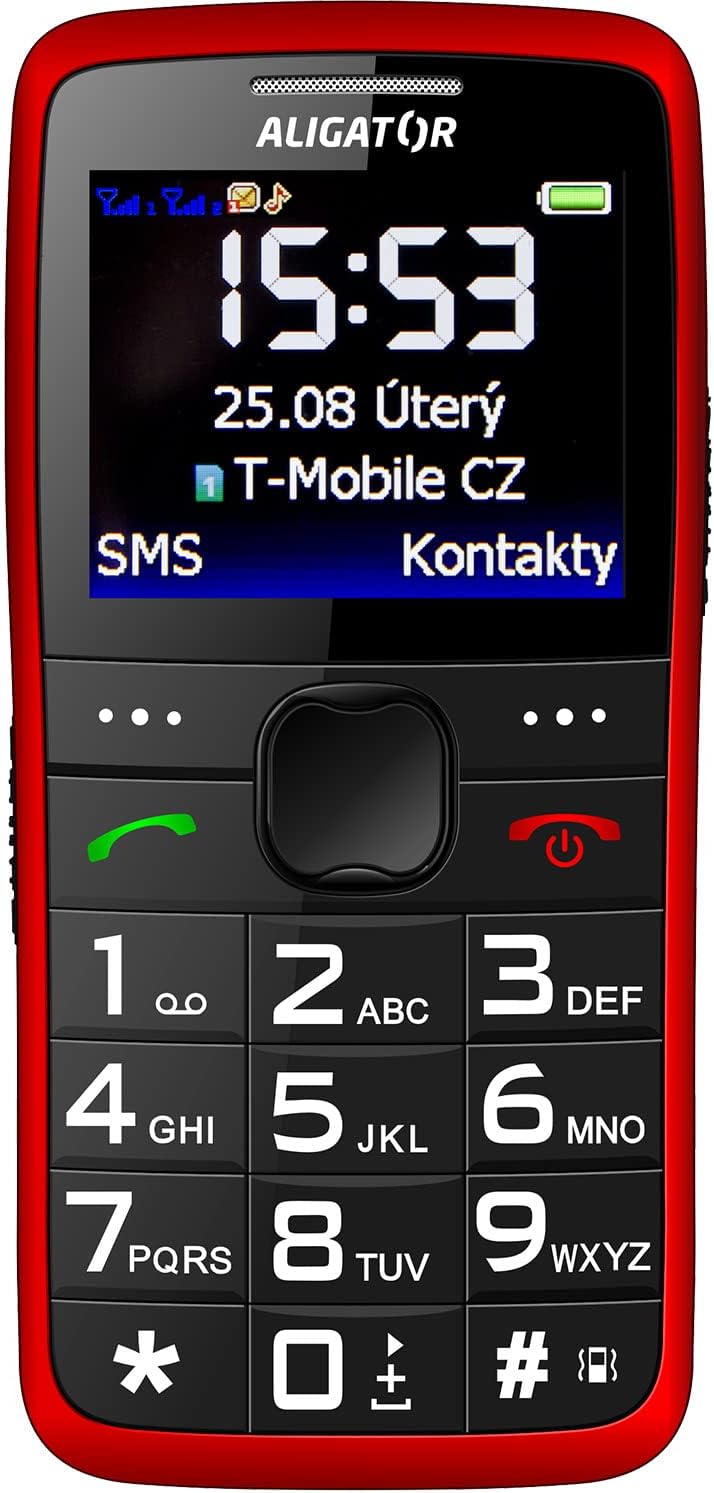
Sary 3.2: Eo anoloana amin'ny antsipiriany view of the Aligator A675 mobile phone, highlighting the large display, clear numeric keypad, and dedicated call/end buttons.
3.1 Eo aloha View
- Aseho: Shows time, date, network status, battery level, and menu options.
- Fanalahidin'ny Fikarohana: Used to scroll through menus and options.
- bokotra antso (maitso): Initiates calls and answers incoming calls.
- End/Power Button (Red): Ends calls, returns to the home screen, and powers the phone on/off.
- Keypad: Numeric keys (0-9), asterisk (*), and hash (#) for dialing and text input.
3.2 Miverina View
- Fanamafisam-peo: For ringtones and hands-free calls.
- fakan-tsary: For basic photo capture.
- Boky SOS: A dedicated button for emergency calls/SMS (refer to section 5.4 for setup).
4. Fametrahana
Follow these steps to prepare your phone for first use.
4.1 Fampidirana karatra SIM
- Remove the back cover of the phone by gently prying it open from the notch.
- If the battery is inserted, remove it.
- Locate the SIM card slots. The Aligator A675 supports two SIM cards (Dual SIM).
- Carefully insert your 2G GSM SIM card(s) into the designated slot(s) with the gold contacts facing down, ensuring they are correctly oriented.
- Ensure the SIM cards are securely in place.
4.2 Fampidirana ny bateria
- Align the battery contacts with the contacts in the phone's battery compartment.
- Gently press the battery into place until it fits snugly.
- Replace the back cover, ensuring it clicks into position.
4.3 Charging the Phone
- Connect the charger cable to the charging port on the phone (usually located at the bottom).
- Ampidiro amin'ny fivoahan'ny herinaratra ny charger.
- Ny kisary bateria eo amin'ny efijery dia hampiseho ny sata famandrihana.
- Allow the phone to charge completely before first use. This typically takes a few hours.
5. Fampiasana ny finday
Basic functions and features of your Aligator A675.
5.1 Mamelona/Mamono
- Hamelona: Tsindrio ary hazòny ny End/Power Button (red button) until the screen lights up.
- Mamono: Tsindrio ary hazòny ny End/Power Button until the power-off options appear, then confirm.
5.2 Fanaovana sy fandraisana antso
- Hanao antso: Ampidiro amin'ny alalan'ny fitendry ny laharan-telefaona ary tsindrio ny bokotra antso (green button).
- Hamaly antso: Tsindrio ny bokotra antso rehefa maneno ny telefaonina.
- Hamarana ny antso: Tsindrio ny End/Power Button.
5.3 Fandefasana sy fandraisana SMS
- Navigate to the 'Messages' menu using the navigation key.
- Safidio ny 'Manorata Hafatra' raha te-hanoratra SMS vaovao.
- Ampidiro ny laharan'ny mpandray na mifidiana amin'ireo fifandraisana.
- Type your message using the keypad. Press the appropriate key multiple times for different letters (e.g., '2' for A, B, C).
- Safidio ny 'Alefaso'.
- Incoming messages will be displayed on the screen and stored in the 'Inbox'.
5.4 SOS Function
Ny fiasa SOS dia ahafahanao mifandray haingana amin'ireo laharana vonjy taitra efa voafaritra mialoha.
- Setting Up SOS Numbers: Go to 'Settings' > 'SOS Settings'. Add up to 5 emergency contact numbers.
- Fampandehanana ny SOS: Tsindrio ary hazòny ny bokotra SOS on the back of the phone for a few seconds.
- The phone will automatically send an emergency SMS to the pre-set numbers and then start dialing them one by one until a call is answered.
5.5 Fifandraisana
- Manampy fifandraisana: Go to 'Contacts' > 'Add New'. Enter the name and phone number, then save.
- Searching for a Contact: Go to 'Contacts' and use the navigation key to scroll or type the first letters of the name.
6. Fikojakojana sy fikarakarana
Proper care ensures the longevity of your Aligator A675 phone.
- Fanadiovana: Mampiasà lamba malefaka sy maina hanadiovana ny velaran'ny finday. Fadio ny mampiasa ranoka fanadiovana na fitaovana marokoroko.
- Fikarakarana bateria: Aza apetraka amin'ny hafanana tafahoatra ny bateria. Fadio ny fanalana tanteraka ny bateria matetika.
- fitahirizana: Tehirizo ao amin'ny toerana mangatsiatsiaka sy maina ny telefaona lavitry ny tara-masoandro mivantana sy ny hamandoana.
- fanoherana ny rano: Tsy mahatohitra rano ity finday ity. Aza avela hikasika rano.
7. Famahana olana
Olana mahazatra sy ny vahaolana.
| OLANA | Antony mety hitranga | vahaolana |
|---|---|---|
| Tsy mandeha ny telefaona | Batterie ambany; Tsy tafiditra tsara ny bateria | Charge the battery; Reinsert the battery correctly |
| Tsy afaka manao/mandray antso | No network signal; SIM card not inserted; SIM card not activated | Move to an area with better signal; Reinsert SIM card; Contact your network provider |
| Tsy misy feo mandritra ny antso | Volume too low; Speaker blocked | Increase call volume; Check if speaker is obstructed |
| Tsy mandeha ny asa SOS | SOS numbers not set; No network signal | Set up SOS numbers in settings; Ensure network coverage |
Raha mbola mitohy ny olana dia mifandraisa amin'ny fanohanana mpanjifa.
8. Famaritana
Key technical details of the Aligator A675.
- marika: ALIGATOR
- Modely: A675
- Mpitatitra Wireless: nanokatra
- Wireless Network Technology: GSM (2G)
- Haben'ny efijery: 3 santimetatra
- Fampidiran'ny endrik'olona: Keypad
- Fanohanana SIM: Dual SIM
9. Warranty sy fanohanana
Your Aligator A675 phone is covered by a standard manufacturer's warranty. Please refer to the warranty card included in your package for specific terms and conditions, including the warranty period and coverage details.
For technical support, service, or warranty claims, please contact your retailer or the official Aligator customer service. Contact information can typically be found on the manufacturer's webtoerana na eo amin'ny fonosana.
Tazomy ny porofon'ny fividiananao (rosia na faktiora) satria ilaina amin'ny serivisy garantie izany.


