1. Fampidirana
The IOTWE A4300 Projector is a versatile home theater device designed to deliver a high-quality viewing experience. Featuring native 1080P resolution with 4K support, 5G WiFi, and Bluetooth connectivity, this projector is compatible with a wide range of devices including smartphones, PCs, TV boxes, and gaming consoles. Its portable design makes it suitable for various applications, from immersive home cinema to outdoor entertainment.

Figure 1.1: The IOTWE A4300 Projector, highlighting its 5G WiFi and Bluetooth capabilities, alongside a projected image and carrying case.
2. Ny votoatin'ny fonosana
Azafady mba jereo tsara ny ao anaty fonosana rehefa avy manokatra ny boaty ianao mba hahazoana antoka fa eo daholo ny entana rehetra ary ao anatin'ny toe-javatra tsara.
- IOTWE A4300 Projector
- Projector Carrying Case
- Fanaraha-maso lavitra (tsy misy bateria)
- User Manual
- Lamba fanadiovana
- AV tariby
- Cable HDMI
- Cable herinaratra
- Lensa Cap

Figure 2.1: All items included in the IOTWE A4300 Projector package.
3. Product Features and Overview
The IOTWE A4300 Projector offers several advanced features for an enhanced viewamin'ny traikefa.
3.1 High Brightness and Resolution
Experience vivid and clear images with native 1080P resolution and 9200 Lumens brightness, providing a superior visual quality compared to standard projectors.

Figure 3.1: Visual comparison of IOTWE's 1080P resolution and 9200 Lumens output against other projectors.
3.2 Large Screen Projection
The projector is capable of projecting images up to 200 inches, offering a cinematic experience. For optimal viewing, a screen size between 60-100 inches is recommended.
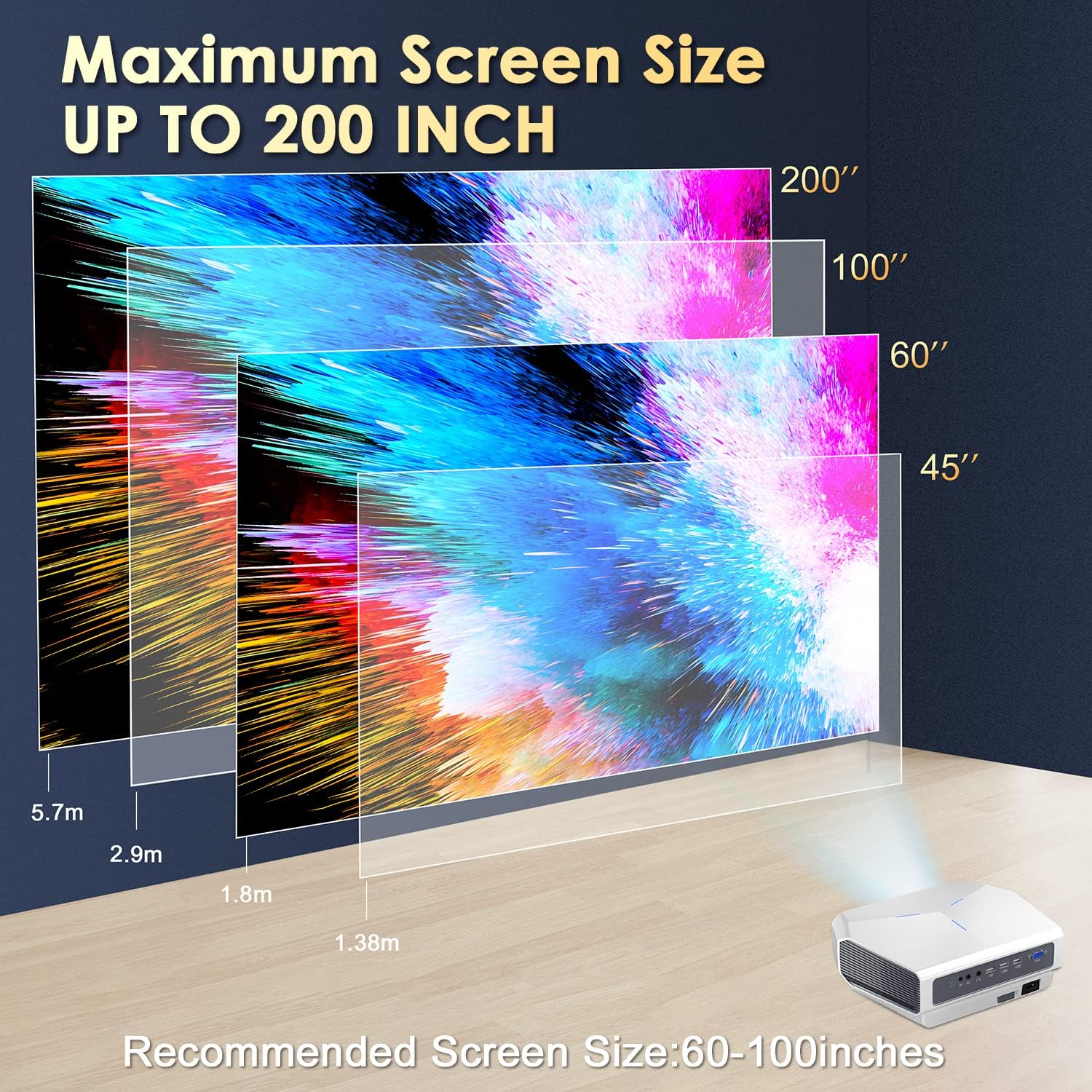
Figure 3.2: Projection distance and screen size guide for the IOTWE A4300.
3.3 Manual Focus and Keystone Correction
Adjust the image clarity using the manual focus wheel and correct trapezoidal distortion with the ±15° keystone correction feature to ensure a perfectly rectangular image.
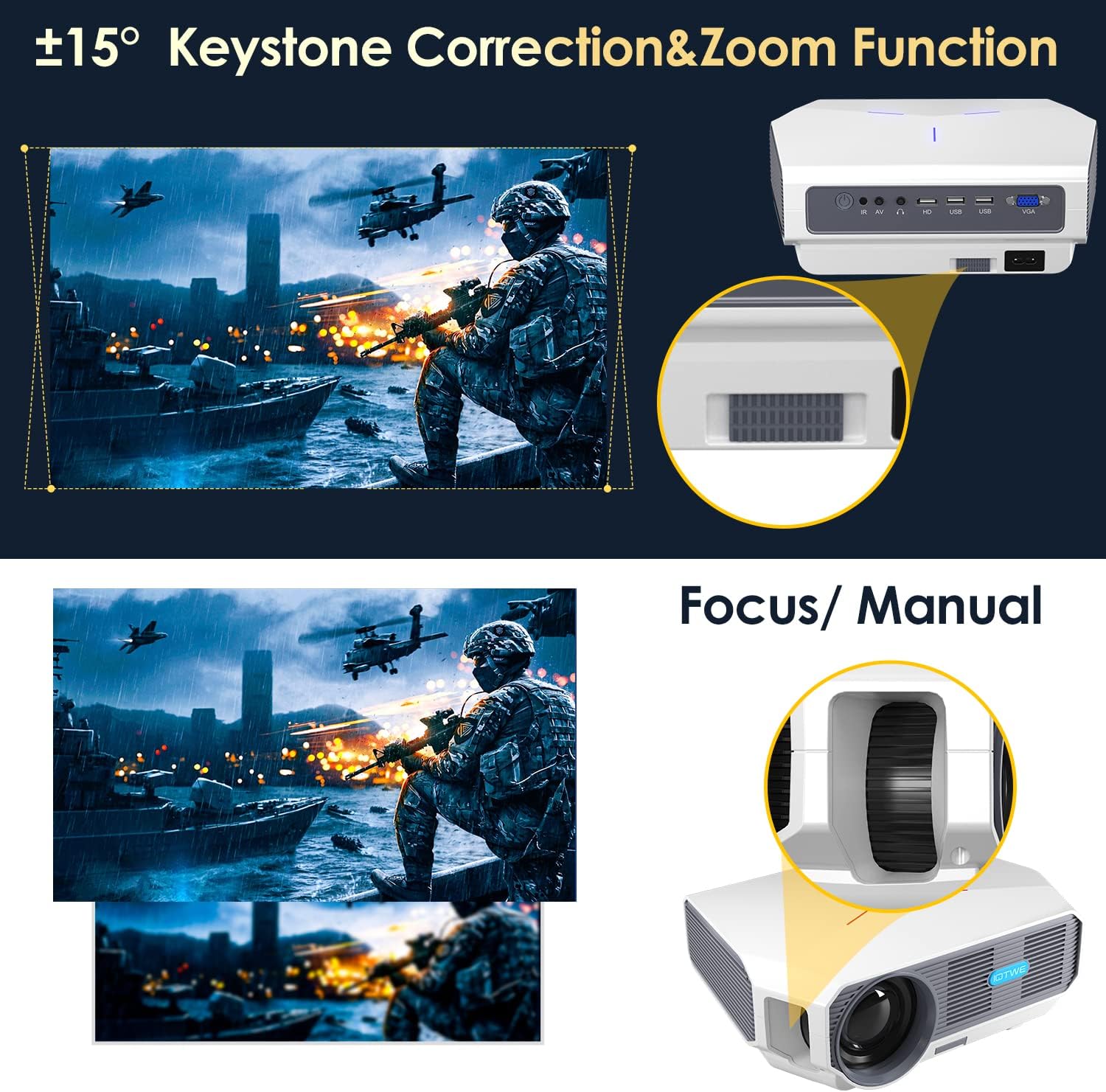
Figure 3.3: Details on adjusting focus and keystone correction.
3.4 Superior Optical Lens System
The projector incorporates a high-quality optical lens system designed for precise projection and extended lamp lifespan of up to 100,000 hours.

Sary 3.4: anatiny view of the projector's optical components.
4. Fametrahana
4.1 Placement Methods
The IOTWE A4300 Projector offers flexible placement options to suit various environments:
- Fametrahana takelaka: Apetraho eo amin'ny toerana fisaka sy azo antoka ny projector.
- Tendrombohitra tripod: Utilize the tripod screw hole at the bottom for tripod mounting.
- Ceiling Mount: Mount the projector to the ceiling using a compatible projector mount.

Figure 4.1: Different placement options for the projector.
4.2 Herin'ny voalohany
- Ampifandraiso amin'ny projecteur sy ny fantson-jiro ny tariby herinaratra.
- Tsindrio ny bokotra herinaratra eo amin'ny projector na ny fanaraha-maso lavitra mba hampandeha azy.
- Adjust the focus and keystone correction as described in Section 3.3 to achieve a clear and rectangular image.
5. Torolàlana miasa
5.1 Fampifandraisana ireo fitaovana ivelany
The IOTWE A4300 Projector supports multiple input sources:
- HDMI: Connect laptops, gaming consoles, TV sticks, etc.
- USB: Alefaso mivantana avy amin'ny kapila USB ny rakitra media.
- VGA: Connect older computers or devices.
- NY: Connect legacy devices using the included AV cable.
- Audio Jack: Ampifandraiso amin'ny fanamafisam-peo na écouteur ivelany.

Sary 5.1: Seranana azo ampiasaina hampifandraisana ireo fitaovana isan-karazany.
5.2 Wireless Screen Mirroring (WiFi)
Mirror your smartphone, iOS, Android, or iPad screen wirelessly to the projector.

Figure 5.2: Wireless screen mirroring in action.
Ho an'ny iOS Devices:
- Turn on the projector and select the screen mirroring option: MCAST.
- Select the WiFi setting and establish a WiFi connection with the projector. Ensure your phone is also connected to the same WiFi network.
- Return to the previous user interface, select the iOS/iPhone/iPad Chromecast module, and find the iOS screen mirroring option.
- Turn on the screen mirroring function on your phone, select DUAL-CAST***, and the screen mirroring connection will be successful.
Ho an'ny fitaovana Android:
- Turn on the projector and select the screen mirroring option: MCAST.
- Select the Android/Windows Miracast module and find the Android Miracast option.
- Connect your mobile phone with the Multi-Screen or Miracast function of Android devices.
- Select DUAL-CAST*** to establish the connection.

Figure 5.3: Detailed steps for WiFi connection on iOS and Android.
5.3 Fifandraisana Bluetooth
Ampifandraiso amin'ny écouteur na haut-parleurs Bluetooth mba hahazoana traikefa audio tsara kokoa.
- Navigate to the Bluetooth settings on the projector.
- Alefaso ny Bluetooth ary tadiavo ireo fitaovana misy.
- Fidio ny écouteur na haut-parleur Bluetooth-nao avy amin'ny lisitra hampiarahina.

Figure 5.4: Connecting Bluetooth audio devices.
6. Fikojakojana
6.1 Fanadiovana ny Projector
- Lens: Use the provided cleaning cloth or a professional lens cleaning solution and cloth to gently wipe the lens. Avoid abrasive materials.
- Vatana: Fafao amin'ny lamba malefaka sy maina ny ivelan'ny projecteur. Aza mampiasa mpanadio rano mivantana amin'ny fitaovana.
- rivotra: Ataovy azo antoka fa tsy misy vovoka sy sakana ny varavaran'ny rivotra mba hisorohana ny hafanana be loatra.
6.2 Lamp Fiainana
The IOTWE A4300 Projector features an LED lamp with an impressive lifespan of up to 100,000 hours, significantly reducing the need for frequent lamp fanoloana.
7. Famahana olana
This section addresses common issues you might encounter with your IOTWE A4300 Projector.
| OLANA | Antony mety hitranga | vahaolana |
|---|---|---|
| Tsy misy sary naseho | Power cable not connected; Incorrect input source selected; Lens cap on. | Ensure power cable is securely connected; Select the correct input source (HDMI, USB, etc.); Remove the lens cap. |
| Sary manjavozavo | Tsy voahitsy ny fifantohana; Akaiky/lavitra loatra ny efijery ny projecteur. | Adjust the manual focus wheel; Adjust projection distance. |
| Trapezoidal image | Projector tsy perpendicular amin'ny écran. | Adjust keystone correction (±15°); Reposition the projector. |
| Tsy misy feo | Volume too low; External audio device not connected properly; Muted. | Increase volume; Check audio cable connections or Bluetooth pairing; Unmute the projector. |
| WiFi screen mirroring issues | Incorrect network connection; Device compatibility. | Ensure both projector and device are on the same WiFi network; Refer to Section 5.2 for detailed steps; Check device's mirroring capabilities. |
8. Famaritana
Detailed technical specifications for the IOTWE A4300 Projector.
| endri-javatra | famaritana |
|---|---|
| Marika | IOTWE |
| Laharana modely | A4300 |
| Ny refin'ny vokatra | 26 x 19 x 9 cm |
| Lanja entana | 2.27 kg |
| Asehoy ny fanapahan-kevitra | 1920 x 1080 (HD feno) |
| Fanapahan-kevitra ambony indrindra | 1920 x 1080 (4K Support) |
| ny famirapiratry ny mazava | 9200 Lumens |
| Contrast Ratio | 10000:1 |
| Teknolojia fifandraisana | VGA, Bluetooth, USB, HDMI, WiFi (5G) |
| Karazana fampisehoana | LCD |
| Form Factor | portable |
| Karazana fametrahana | Tabletop, Wall Mount |
| Fampiharana naroso | Home Cinema |
| Lamp Faharetana | Hatramin'ny 100,000 ora |
9. Warranty sy fanohanana
For warranty information, technical support, or service inquiries, please refer to the official IOTWE website or the contact information provided in your product's original packaging. Keep your purchase receipt as proof of purchase for warranty claims.