
1. Fampidirana
This manual provides detailed instructions for the setup, operation, and maintenance of your WISE TIGER LED Digital Alarm Clock (Model CK-LED1302). Please read this manual thoroughly before use to ensure proper functionality and to maximize your product experience.

Image 1.1: WISE TIGER LED Digital Alarm Clock and its remote control.
2. Ny votoatin'ny fonosana
Hamarino azafady fa ao anatin'ny fonosanao ny entana rehetra:
- WISE TIGER LED Digital Alarm Clock (Model CK-LED1302)
- Fanaraha-maso lavitra
- USB Power Cable
- User Manual (ity antontan-taratasy ity)
- Fixed Bracket (for desk placement)
3. Vokatra mihoatraview
The WISE TIGER LED Digital Alarm Clock features a modern 3D design, offering clear time display and multiple functions for various environments.
3.1 Lafin-javatra fototra
- Fampisehoana fotoana: 12-hour or 24-hour format.
- Asehoy ny kalandrie: Shows date.
- Famantaranandro: With snooze function.
- Fampisehoana maripana: Mampiseho ny mari-pana manodidina.
- Famirapiratana azo ahitsy: Automatic brightness sensor and manual adjustment via remote control.
- Fahazavana alina: Provides soft illumination.
- Fahatsiarovana asa: Built-in battery retains time settings for 4-8 hours during power disconnection.
- Fametrahana zavatra maro: Suitable for desk or wall mounting.

Image 3.1: Visual representation of the clock's main functions.
3.2 singa
Jereo ny kisary etsy ambany raha te hahombyview of the clock's components and connection points.
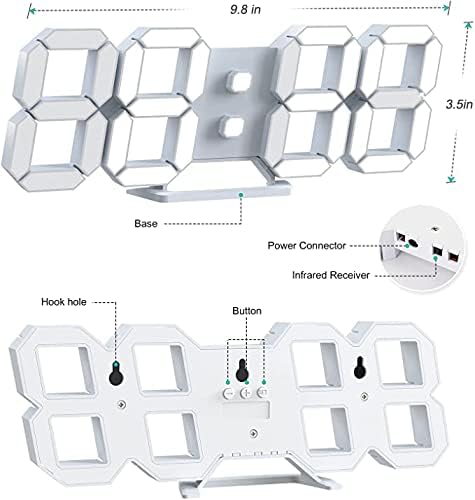
Sary 3.2: Miverina view and dimensions of the clock, highlighting the power connector, infrared receiver, and mounting options.
- Aseho: Large 3D LED digits for time, date, and temperature.
- fototra: Removable stand for desk placement.
- Fampifandraisana herinaratra: USB port for power input.
- Infrared Receiver: Ho an'ny famantarana lavitra fanaraha-maso.
- Hook Holes: Ho an'ny fametrahana rindrina.
- Bokotra fanaraha-maso: Located on the back for basic settings (Power, Up, Down, Set).
4. Fametrahana
4.1 Fampifandraisana herinaratra
- Connect the provided USB power cable to the power connector on the back of the clock.
- Ampidiro ao amin'ny adaptatera herinaratra USB mahazatra (tsy tafiditra) na amin'ny seranana USB an'ny solosaina ny ilany amin'ny tariby USB.
- The clock will power on and display the time.
The clock is powered by the USB cable only. A built-in battery serves to record time settings when power is disconnected, ensuring settings are retained for 4-8 hours.

Image 4.1: Explanation of the clock's power and memory function.
4.2 Safidy fametrahana
The clock can be used as a desk clock or a wall clock.
- Fametrahana birao: Attach the fixed bracket to the bottom of the clock. The angle of the bracket can be adjusted for optimal viewing.
- Fametrahana rindrina: Remove the fixed bracket if attached. Use the installation slots (hook holes) on the back of the clock to hang it securely on a wall using appropriate fasteners (not included).

Image 4.2: The clock configured for wall mounting and desk placement.
5. Torolàlana miasa
The clock's functions are primarily controlled using the included remote control. Basic settings can also be adjusted via the buttons on the back of the clock.
5.1 Fametrahana Ora sy Daty
- Tsindrio ny Time button on the remote control to enter time setting mode.
- Ampiasao ny UP SY MIDINY arrows to adjust the hour.
- mpanao gazety Time again to move to minute setting, then use UP SY MIDINY manitsy.
- Tohizo ny fanerena Time mba hivezivezy amin'ny taona, volana, ary andro, ary amboary tsirairay amin'ny UP SY MIDINY.
- mpanao gazety Time one last time or wait a few seconds for the settings to save automatically.
5.2 12/24 ora format
To switch between 12-hour and 24-hour time formats, press the 12/24H bokotra amin'ny fanaraha-maso lavitra.

Sary 5.1: Eksample of 12-hour and 24-hour time display.
5.3 Fametrahana ny fanairana
- Tsindrio ny fanairana button on the remote control to enter alarm setting mode.
- Ampiasao ny UP SY MIDINY arrows to set the desired alarm hour.
- mpanao gazety fanairana again to move to minute setting, then use UP SY MIDINY manitsy.
- mpanao gazety fanairana one last time or wait for the settings to save.
- Mba hampavitrika/famonoana ny fanairana, tsindrio ny fanairana button briefly outside of setting mode. An alarm icon will appear/disappear on the display.
5.4 Fampiasana snooze
Rehefa maneno ny fanairana, tsindrio ny SNOOZE button on the remote control to temporarily silence the alarm. The alarm will sound again after a set interval (typically 5-10 minutes).

Image 5.2: The snooze alarm function in use.
5.5 Fanitsiana ny famirapiratana
Ny famantaranandro dia misy fanaraha-maso ny famirapiratana mandeha ho azy sy manual.
- Famirapiratana mandeha ho azy: The built-in sensor automatically adjusts the display brightness based on ambient light conditions.
- Manual Brightness: Tsindrio ny mamirapiratra button on the remote control to cycle through different brightness levels (e.g., high, medium, low).

Image 5.3: Automatic brightness adjustment based on ambient light.

Image 5.4: Manual adjustment through three brightness levels.
5.6 Fampisehoana maripana
The clock automatically displays the ambient temperature. No manual adjustment is typically required for this function.
6. Fikojakojana
To ensure the longevity and optimal performance of your WISE TIGER LED Digital Alarm Clock, follow these maintenance guidelines:
- Fanadiovana: Use a soft, dry cloth to wipe the display and casing. Avoid abrasive cleaners, solvents, or spray cleaners directly on the clock.
- Hery: Ampiasao foana ny tariby USB omena ho an'ny herinaratra. Ataovy azo antoka fa marin-toerana tsara ny loharanon-kery.
- Tontolo iainana: Arovy amin'ny mari-pana tafahoatra, tara-masoandro mivantana ary hamandoana be ny famantaranandro.
- Fanaraha-maso lavitra: Store the remote control in a safe place to prevent loss or damage. Ensure batteries are replaced when needed (typically 2 Lithium Ion batteries, included).
7. Famahana olana
Raha sendra olana amin'ny famantaranandronao ianao dia jereo ireto olana sy vahaolana mahazatra manaraka ireto:
| OLANA | Antony mety hitranga | vahaolana |
|---|---|---|
| Tsy mandeha ny famantaranandro | Tsy misy herinaratra na fifandraisana malalaka | Ensure USB cable is securely connected and power source is active. Try a different USB port or adapter. |
| Tsy mandeha ny fanaraha-maso lavitra | Remote batteries are dead or remote is out of range/blocked | Replace remote control batteries. Ensure remote is pointed at the clock's infrared receiver (refer to Image 3.2) and within 8 meters. Remove any obstructions. |
| Tsy marina ny fotoana | Time was not set precisely | Reset the time carefully, ensuring you set it at the exact second of the desired time. |
| Manjavozavo loatra na mamiratra loatra ny efijery | Brightness setting needs adjustment | Tsindrio ny mamirapiratra button on the remote to cycle through manual brightness levels. Check if automatic brightness is functioning correctly in different light conditions. |
| Tsy maneno ny fanairana | Alarm is not activated or set incorrectly | Ensure the alarm is set and activated (alarm icon visible). Verify the alarm time is correct. |
8. Famaritana
| endri-javatra | antsipirihany |
|---|---|
| Marika | TIGER HERY |
| Laharana modely | Sary CK-LED1302 |
| Karazana fampisehoana | Hafanàm-po |
| loko | White |
| Ny refin'ny vokatra | 9.7" W x 3.5" H |
| Loharanon-kery | Corded Electric (USB) |
| Bateria fitadidiana | 2 Lithium Ion batteries (included), retains settings for 4-8 hours |
| Karazana fametrahana | Wall Mount, Desk Mount |
| Endri-javatra manokana | Adjustable Brightness, Alarm Clock, Temperature Display, Date Display, 12/24 Hour Format |
| KEVITRA | Acrylonitrile Butadiene Styrene |
| Lanja entana | 0.317 ounces (9 grama eo ho eo) |
| UPC | 728990655931 |
9. Warranty sy fanohanana
For warranty information or technical support, please refer to the product packaging or contact the retailer where the product was purchased. Keep your purchase receipt as proof of purchase.