
1. Fampidirana
Thank you for choosing the Inscabin P2 Portable DAB/DAB+FM Digital Radio and Bluetooth Speaker. This device combines multiple audio functionalities, including DAB/DAB+ digital radio, FM radio, Bluetooth connectivity, and playback from USB drives and TF cards. It also features a dual alarm clock, sleep timer, and snooze function. This manual provides detailed instructions to help you set up, operate, and maintain your device.
Azafady vakio tsara ity boky torolalana ity alohan'ny hampiasana azy ary tehirizo mba hojerena amin'ny ho avy.
2. Information momba ny fiarovana
- Loharano herinaratra: Use only the specified power adapter or USB charging cable. Ensure the voltage mifanaraka amin'ny faritra misy anao.
- Rano sy hamandoana: Do not expose the device to rain, moisture, or immerse it in water. Avoid placing liquid-filled objects on the device.
- hafanana: Arovy amin'ny loharanon-kafanana toy ny radiator, ny milina fandrefesana hafanana, ny fatana fandoroana, na fitaovana hafa mamokatra hafanana ny fitaovana.
- rivotra: Ataovy azo antoka tsara ny rivotra. Aza sakanana izay fisokafan'ny rivotra.
- Fanadiovana: Tapaho ny herinaratra alohan'ny hanadiovana. Mampiasà lamba malefaka sy maina. Aza mampiasa mpanadio ranon-javatra na mpanadio aerosol.
- Serivisy: Aza manandrana manompo an'ity vokatra ity ny tenanao. Ampidiro amin'ireo mpiasan'ny serivisy mahay ny fanompoana rehetra.
- Batterie: The device contains a built-in rechargeable battery. Do not expose it to excessive heat or direct sunlight. Dispose of batteries responsibly according to local regulations.
3. Vokatra mihoatraview
Familiarize yourself with the various parts and controls of your Inscabin P2 radio.
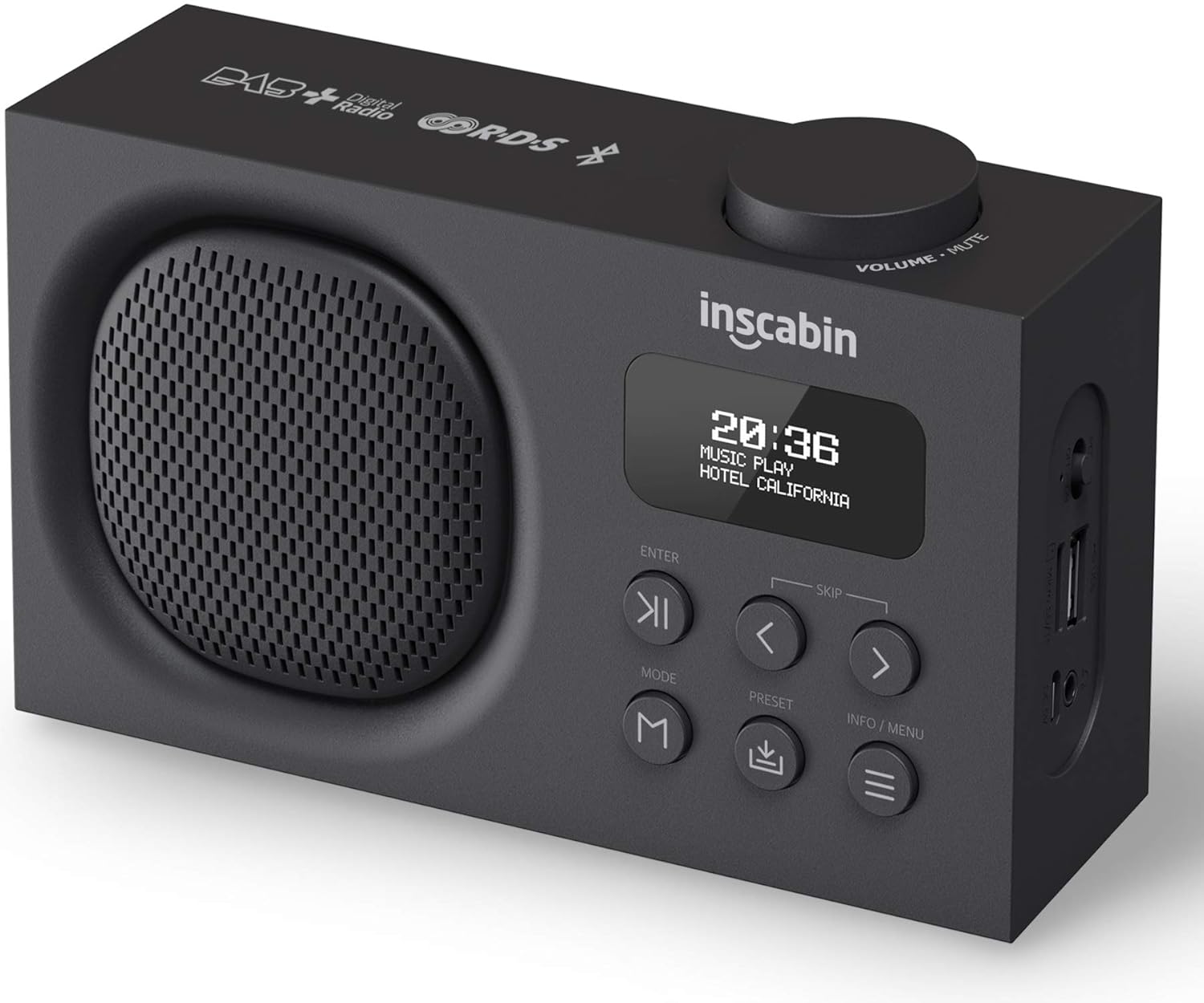
This image displays the front of the Inscabin P2 radio, highlighting its speaker grille, LCD display, control buttons, and the volume knob on top. It provides a clear view of the device's compact design.

This detailed side view of the Inscabin P2 radio clearly labels its various ports: Power Switch, Micro SD/TF card slot, USB input port, Headphone insert slot, and Micro USB charging slot. This helps users identify connection points.
Fanaraha-maso sy seranan-tsambo:
- Volume/Mute Knob: Ahodina mba hanitsy ny feo, tsindrio ny hampangina / hanalana feo.
- LCD Display: Shows time, station information, mode, and menu options.
- bokotra ENTER: Manamafy ny safidy.
- SKIP Buttons (< / >): Navigate menus, skip tracks, or tune stations.
- Bokotra MODE: Switches between DAB, FM, Bluetooth, USB, and TF card modes.
- Bokotra PRESET: Accesses or saves preset stations.
- INFO/MENU Button: Displays information or accesses the system menu.
- Hery Switch: Mamelona na mamono ny fitaovana.
- Micro SD/TF Card Slot: Mba hilalao audio files avy amin'ny karatra TF.
- Port fampidirana USB: Mba hilalao audio files avy amin'ny USB drive.
- Headphone Insert Slot: Ho fihainoana manokana.
- Micro USB Charging Slot: Ho an'ny famandrihana ny bateria anatiny.
4. Fametrahana
4.1 Famandrihana ny bateria
- Connect the provided Micro USB cable to the Micro USB charging slot on the side of the radio.
- Connect the other end of the USB cable to a USB power adapter (not included) or a powered USB port.
- The charging indicator on the display will show the charging status. A full charge typically takes several hours.
- Once fully charged, disconnect the charging cable. The built-in 1800mAh battery provides over 10 hours of playback.
4.2 Herin'ny voalohany
- Ensure the radio is charged or connected to power.
- Slide the Power Switch to the 'ON' position.
- The display will light up, and the device will typically start in DAB mode or the last used mode.
4.3 Antenna Positioning
For optimal reception in DAB and FM modes, extend the telescopic antenna fully and adjust its position. Experiment with different angles to find the best signal strength.
5. Torolàlana miasa
5.1 Power On/off
- To turn on, slide the Power Switch to 'ON'.
- To turn off, slide the Power Switch to 'OFF'.
5.2 Fomba Fifantenana
Tsindrio ny MODE button repeatedly to cycle through the available modes: DAB, FM, Bluetooth, USB, and TF Card.
5.3 DAB/DAB+ Fomba Radio
- Switch to DAB mode using the MODE bokotra.
- Upon first use or if no stations are found, the radio will automatically perform a full scan for available DAB/DAB+ stations. This may take a few minutes.
- Once the scan is complete, the first available station will begin playing.
- Ampiasao ny SKIP (< / >) buttons to navigate through the list of available stations. Press Ampidiro misafidy gara.
- Mitahiry preset: Raha te-hitahiry tobim-piantsonana iray, ampifandraiso amin'ny fiantsonana tiana, dia tsindrio ary hazòny ny PRESET bokotra. Ampiasao ny SKIP (< / >) buttons to select a preset number (1-10), then press Ampidiro hanamafy.
- Mahatsiarova preset: Tsindrio fohy ny PRESET bokotra, avy eo ampiasao ny SKIP (< / >) buttons to select your desired preset, and press Ampidiro.
- DAB Information: Tsindrio ny INFO / MENU button to cycle through various information displays such as program type, signal strength, bit rate, and date/time.
5.4 FM Radio Mode
- Mifindra amin'ny fomba FM amin'ny fampiasana ny MODE bokotra.
- Auto scan: To automatically scan and save FM stations, press and hold the INFO / MENU button. The radio will scan and store stations with strong signals.
- Bika matoanteny Tsindrio fohy ny SKIP (< / >) buttons to fine-tune the frequency in small increments. Press and hold the SKIP (< / >) bokotra mba hijerena ho azy ny onjam-peo manaraka azo ampiasaina.
- Mitahiry preset: Similar to DAB mode, tune to the desired FM station, then press and hold the PRESET bokotra. Ampiasao ny SKIP (< / >) bokotra hisafidianana isa efa voafaritra mialoha, dia tsindrio Ampidiro.
- Mahatsiarova preset: Tsindrio fohy ny PRESET bokotra, avy eo ampiasao ny SKIP (< / >) buttons to select your desired preset, and press Ampidiro.
5.5 Mode Bluetooth
- Mifindra amin'ny fomba Bluetooth amin'ny fampiasana ny MODE button. The display will show "Bluetooth Pairing" or similar, indicating it's ready to connect.
- Ao amin'ny fitaovanao misy Bluetooth (finday avo lenta, takelaka), alefaso ny Bluetooth ary tadiavo ireo fitaovana misy.
- Select "Inscabin P2" from the list of devices.
- Once paired, the radio will confirm the connection, and you can now stream audio from your device to the Inscabin P2.
- Use your connected device or the radio's SKIP (< / >) buttons to control playback (play/pause, next/previous track).
5.6 USB/TF Card Playback Mode
- Insert a USB drive into the USB input port or a TF card into the Micro SD/TF card slot.
- Switch to USB or TF Card mode using the MODE button. The radio will automatically detect and begin playing compatible audio files.
- Ampiasao ny SKIP (< / >) buttons to navigate between tracks. Press Ampidiro milalao / miato.
5.7 Alarm Clock, Sleep Timer, and Snooze
The Inscabin P2 features two independent alarms, a sleep timer, and a snooze function.
- Fametrahana fanairana: Access the alarm settings via the INFO / MENU button. You can set two separate alarms with options for alarm source (DAB, FM, or Buzzer) and volume.
- Timer matory: Set a duration after which the radio will automatically turn off. This is typically found in the system settings menu.
- Fampiasana Snooze: Rehefa misy fanairana dia tsindrio ny Ampidiro button (or another designated button) to activate snooze, which will temporarily silence the alarm for a short period before it sounds again.
5.8 Rafitra rafitra
Tsindrio ary hazòny ny INFO / MENU button to access the system settings. Here you can adjust:
- Ora/Daty: Manually set or synchronize with DAB/FM broadcast.
- Fiteny: Select from nine supported languages.
- Jiro lamosina: Adjust brightness and timeout.
- Famerenana amin'ny orinasa: Mamerina ny fika rehetra ho default.
6. Fikojakojana
6.1 Fanadiovana
- Esory foana ny tariby herinaratra alohan'ny hanadiovana azy.
- Use a soft, dry, lint-free cloth to wipe the exterior surfaces of the radio.
- Aza mampiasa mpanadio, savoka, na solvents, fa mety hanimba ny endriny.
6.2 Fikarakarana bateria
- Mba hanalava ny androm-piainan'ny batterie, aza avela hiala tanteraka ny bateria.
- If storing the device for an extended period, charge it to approximately 50% and recharge every few months.
- Aza apetraka amin'ny hafanana tafahoatra ny bateria.
6.3 Fitehirizana
When not in use, store the radio in a cool, dry place, away from direct sunlight and excessive dust.
7. Famahana olana
If you encounter issues with your Inscabin P2 radio, please refer to the following common problems and solutions:
| OLANA | Antony mety hitranga | vahaolana |
|---|---|---|
| Tsy misy herinaratra/Tsy mety mirehitra ny fitaovana | Battery is depleted; Power switch is off; Faulty charging cable/adapter. | Charge the battery; Ensure power switch is 'ON'; Try a different charging cable/adapter. |
| Fandraisana DAB/FM ratsy | Antenna not extended; Weak signal area; Interference. | Fully extend and adjust the telescopic antenna; Move the radio to a location with better signal; Avoid placing near other electronic devices. |
| Bluetooth won't connect | Radio not in Bluetooth mode; Device not discoverable; Already connected to another device. | Ensure radio is in Bluetooth mode; Make sure your device's Bluetooth is on and searching; Disconnect from other devices; Try restarting both devices. |
| No sound from USB/TF card | Fomba diso; Tsy mifanaraka file format; Corrupted media. | Ensure radio is in USB/TF mode; Check if audio files are in a supported format (e.g., MP3); Try a different USB drive/TF card. |
| Fanairana tsy maneno | Alarm not set correctly; Alarm volume too low; Device powered off. | Verify alarm settings (time, source, volume); Ensure the device is on or in standby mode. |
8. Famaritana
Detailed technical specifications for the Inscabin P2 Portable DAB/DAB+FM Digital Radio and Bluetooth Speaker.
| endri-javatra | famaritana |
|---|---|
| Marika | Inscabin |
| Laharana modely | 054114293711 |
| Ny refin'ny vokatra | 16 x 9 x 5 cm |
| Lanja entana | 540 g |
| Tuner Technology | DAB Plus, FM |
| DAB/DAB+ Frequency | Tarika III 174.928-239.20MHz |
| FM Frequency | Band II 87.5-108MHz |
| Bluetooth Version | Bluetooth 5.0 |
| Teknolojia fifandraisana | Auxiliary, Bluetooth, USB |
| Karazana fampisehoana | LCD |
| Power Output Speaker | 7 Watts RMS |
| Loharanon-kery | Battery Powered |
| Karazana bateria | 1 Lithium Polymer (misy) |
| Fahaizana bateria | 1800mAh (approx. 10+ hours playback) |
| Endri-javatra manokana | Lightweight, Portable, Rechargeable, Dual Alarm Clock, Sleep/Snooze Function, USB/TF Card Playback |
| Fiteny tohanana | Nine languages for system operation |
9. Warranty sy fanohanana
The Inscabin P2 Portable DAB/DAB+FM Digital Radio and Bluetooth Speaker comes with a standard manufacturer's warranty. Please refer to the warranty card included in your product packaging for specific terms and conditions, including warranty duration and coverage details.
For technical support, troubleshooting assistance, or warranty claims, please contact Inscabin customer service through the contact information provided on your purchase receipt or the official Inscabin website. When contacting support, please have your model number (P2) and purchase date ready.