
1. Fampidirana
This manual provides essential information for the safe and efficient operation of your Artlii Q Mini Portable Projector. Please read this manual thoroughly before using the product and retain it for future reference.
2. Information momba ny fiarovana
Araho ireto fepetra fiarovana manaraka ireto mba hisorohana ny fahasimban'ny projecteur sy hahazoana antoka ny fiarovana ny mpampiasa:
- Aza sakanana ny fidiran'ny rivotra. Ataovy izay hahazoana rivotra ampy tsara manodidina ny projecteur mba hisorohana ny hafanana be loatra.
- Avoid direct exposure to the projector lens light. The bright light can cause eye strain.
- Do not place the projector in unstable locations. Ensure it is on a flat, stable surface.
- Arovy amin'ny rano na ranon-javatra hafa ny projecteur.
- Ny adaptatera herinaratra omena miaraka amin'ny projecteur ihany no ampiasao.
- Aza manandrana manokatra na manamboatra ny projecteur samirery. Ampahafantaro ny mpiasa mahafeno fepetra ny fanamboarana rehetra.
3. Vokatra mihoatraview
The Artlii Q Mini Portable Projector is a compact and versatile device designed for various projection needs. It features a manual focus system, automatic sleep function, and supports a wide range of input sources.

Sary 3.1: Eo aloha sy ambony view of the Artlii Q Mini Portable Projector, highlighting the lens and control buttons.

Sary 3.2: aoriana view of the projector, illustrating the various input and output ports available for connectivity.
3.1 Lafin-javatra fototra
- Famolavolana portable: Compact and lightweight, ideal for transport.
- Batterie anatiny: Offers 1-1.5 hours of operation on battery power.
- Mifantoha amin'ny tanana: Allows for precise image clarity adjustments.
- Wide Compatibility: Connects to various devices including USB sticks, PCs, Macs, and TV sticks.
- Fampiasana feo ambany: Engineered for quiet performance.

Sary 3.3: The projector's internal battery, providing portable power for extended use.

Sary 3.4: Demonstrating the projector's portability, easily fitting into a backpack.
4. Fametrahana
4.1 Mamelona/Mamono
- Ampifandraiso amin'ny projecteur sy amin'ny fantson-jiro ny adaptatera herinaratra.
- Press the power button located on the top panel of the projector to turn it on.
- To turn off, press the power button again. The projector also features an automatic sleep function.
4.2 Fanitsiana fifantohana
The projector features a manual focus adjustment to ensure a clear image.
- Alefaso ny projector ary asehoy sary.
- Locate the focus knob near the lens.
- Rotate the focus knob clockwise or counter-clockwise until the projected image appears sharp and clear.

Sary 4.1: Diagram showing the focus knob and various projection sizes from 14 to 72 inches at different distances.
4.3 Projection Distance and Size
The projector can display images from 14 to 72 inches, depending on the distance from the projection surface. Refer to Figure 4.1 for approximate distances.
5. Torolàlana miasa
5.1 Fikarohana ny Menu
Use the directional buttons (up, down, left, right) and the 'OK' button on the projector's top panel or remote control to navigate through the on-screen menu. The 'Return' button allows you to go back to the previous menu.
5.2 Fifantenana loharano
After powering on, select your desired input source (e.g., HDMI, USB, AV) from the main menu. Ensure your external device is connected before selecting the source.
6. fifandraisana
The Artlii Q Mini Portable Projector offers a variety of connection options for different devices.
6.1 Fitaovana mifanentana
Mifanaraka amin'ny fitaovana isan-karazany ity projecteur ity, anisan'izany:
- Laptops/PCs
- Gaming Consoles (e.g., Nintendo Switch, PS5)
- USB Flash Drives
- TV Sticks (e.g., Fire TV Stick)
- Mpilalao Blu-ray
- Cameras
- TF Cards (MicroSD)
- U Disks
- Chromecast
- Home Cinema Systems
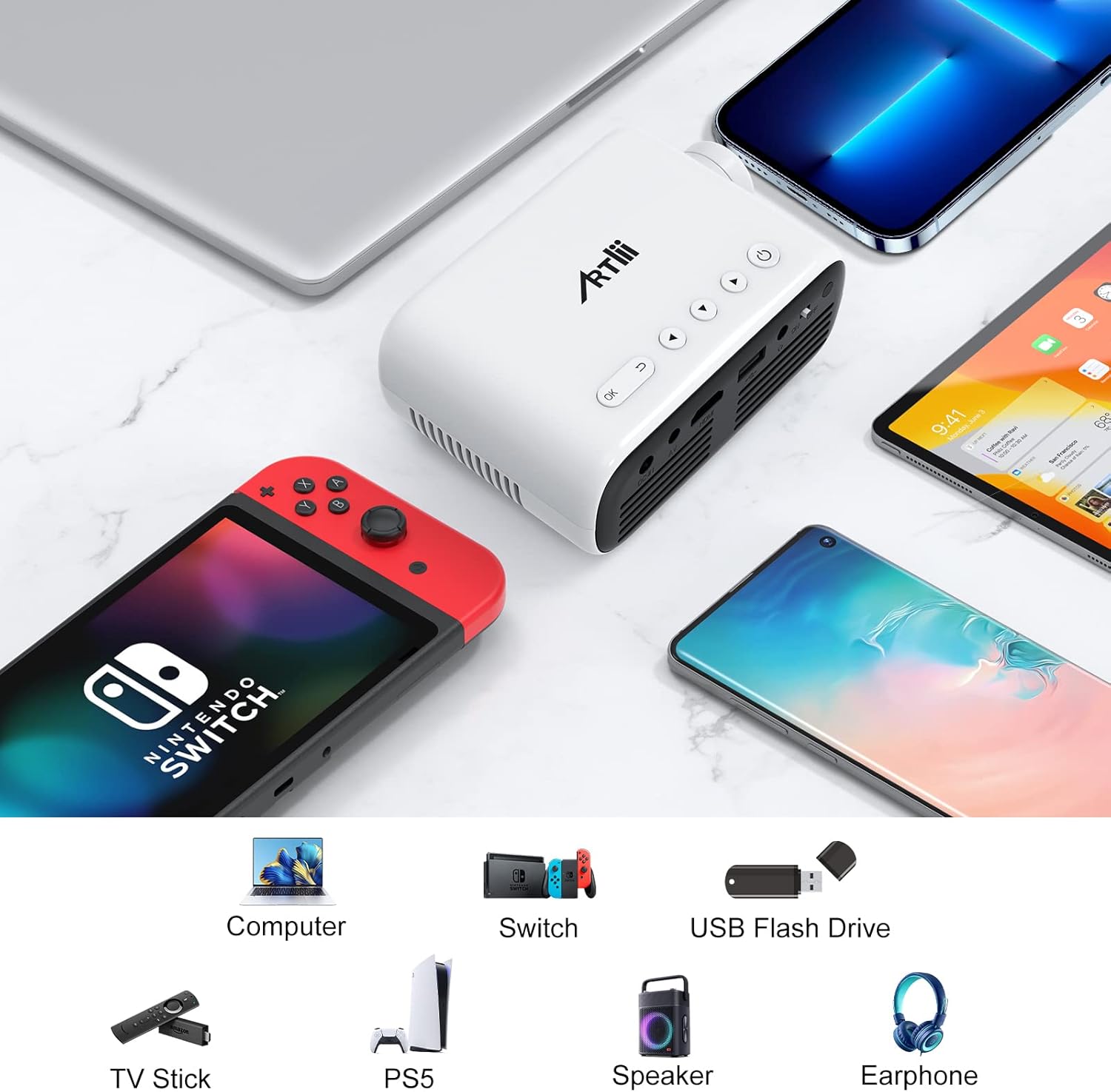
Sary 6.1: Examples of devices that can be connected to the Artlii Q Mini Portable Projector.

Sary 6.2: Further compatible devices and an illustration of connecting phones/tablets via a separate WiFi display dongle (not included).
6.2 Connecting to Phones/Tablets
To connect your phone or tablet, a separate WiFi display dongle (not included) is required. Connect the dongle to the projector's HDMI port and follow the dongle's instructions for screen mirroring.
7. Fikojakojana
7.1 Fanadiovana ny Lens
Mampiasà lamba malefaka sy tsy misy volo natao manokana ho an'ny lantihy optika mba hamafa moramora ny lantihy projecteur. Fadio ny mampiasa mpanadio mikikitra na mampiasa hery be loatra.
7.2 Fanadiovana ny vatan'ny projecteur
Wipe the exterior of the projector with a soft, dry cloth. Do not use liquid or aerosol cleaners.
7.3 Fitehirizana
When not in use for extended periods, store the projector in a cool, dry place, away from direct sunlight and extreme temperatures. Use the original packaging or a protective case to prevent dust accumulation and damage.
8. Famahana olana
Raha sendra olana amin'ny projecteur-nao ianao dia jereo ireto vahaolana mahazatra ireto:
| OLANA | Antony mety hitranga | vahaolana |
|---|---|---|
| Tsy misy sary naseho | Power not connected, incorrect input source, loose cable connection | Check power cable, select correct input source, ensure all cables are securely connected. |
| Manjavozavo ny sary | Focus not adjusted, projector too close/far | Adjust the manual focus knob. Adjust projection distance. |
| Tsy misy feo | Volume too low, external device volume low, audio cable not connected | Increase projector volume. Increase external device volume. Ensure audio cables are connected correctly. |
| Mihoatra ny hafanana ny projector | Blocked ventilation, prolonged use | Ensure ventilation openings are clear. Allow the projector to cool down. |
9. Famaritana
| endri-javatra | famaritana |
|---|---|
| Marika | Artlii |
| MODELY | HD Videoprojecteur |
| Ny refin'ny vokatra | 31 x 24 x 11 cm |
| Lanja entana | 3.34 kg |
| Hardware Interface | AV, HDMI, Infrared, MicroSD, USB, VGA |
| Fitaovana mifanentana | Laptop, Gaming Consoles, USB Sticks, TV Sticks, Blu-ray Players, Cameras, Phones/Tablets (with dongle) |
| Endri-javatra fanampiny | Large projection size, High compatibility, Lightweight and portable, Powerful and clear sound, Clear and fresh image |
| Teknolojian'ny efijery | LCD |
| Haben'ny efijery | Up to 200 Inches (Optimal 14-72 inches) |
| Fifanarahana mifanohitra amin'ny sary | 3000:1 |
| Aspect ratio | 16:9, 4:3 |
| Native Resolution | 1280x800 |
| Max Display Resolution | 1920 x 1080 (1080p supported) |
| Ambaratonga tabataba | 40 dB |
| Karazana fifandraisana | HDMI, USB, VGA |
| Form Factor | portable |
| Karazana fametrahana | valindrihana |
| ny famirapiratry ny mazava | 3400 lm |
| loko | Mainty |
10. Warranty sy fanohanana
Artlii provides a one-year warranty for this product. Additionally, a 3-month worry-free refund policy is offered. For any defective products or support inquiries, please contact Artlii customer service for a free replacement or a full refund.
Raha mila fanampiana fanampiny dia tsidiho azafady ny Artlii Store on Amazon.