
Artlii Stone
Boky Torolalana ho an'ny Mpampiasa Projecteur Artlii Stone Full HD 1080P
Model: Stone
Sava lalana
Misaotra anao nividyasing the Artlii Stone Full HD 1080P Projector. This manual provides essential information for setting up, operating, and maintaining your projector to ensure optimal performance and longevity. Please read this manual thoroughly before using the product and keep it for future reference.
The Artlii Stone projector delivers a native 1080P resolution, supporting 4K content, with 7200L brightness and an 8000:1 contrast ratio. It features a 75%-100% zooming function, a 300-inch projection screen capability, and a HIFI level built-in speaker. Connectivity options include dual HDMI, VGA, and USB inputs, making it versatile for various home theater and presentation needs.
Information momba ny fiarovana
To prevent fire or electric shock, do not expose this appliance to rain or moisture. To avoid electric shock, do not open the cabinet. Refer servicing to qualified personnel only.
- Aza mijery mivantana amin'ny family projector rehefa mandeha ny lamp mandeha.
- Ataovy izay hahazoana rivotra tsara manodidina ny projecteur. Aza sakanana ny fisokafan'ny rivotra.
- Ny adaptatera herinaratra omena miaraka amin'ny projecteur ihany no ampiasao.
- Arovy amin'ny rano na ranon-javatra hafa ny projecteur.
- Esory amin'ny faladiany ny projecteur rehefa misy tselatra na rehefa tsy ampiasaina mandritra ny fotoana maharitra.
- Do not attempt to repair this product yourself. Contact qualified service personnel for assistance.
Fonosana fonosana
Hamarino fa tafiditra ao anatin'ny fonosanao ny entana rehetra:

The image displays the Artlii Stone projector along with its standard accessories. These include the projector unit, a remote control (batteries not included), a power cable, an AV cable, an HDMI cable, and the instruction manual.
- Artlii Stone Projector
- Cable herinaratra
- Fanaraha-maso lavitra (tsy misy bateria)
- AV tariby
- Cable HDMI
- Boky torolalana
Vita ny vokatraview
Familiarize yourself with the main components and ports of your Artlii Stone projector.

This image shows the front and top view of the Artlii Stone projector, highlighting its sleek design, the main projection lens, and the focus/keystone adjustment dials located on the top surface.

The rear panel of the Artlii Stone projector is displayed, detailing the various connectivity ports. These include an SD Card slot, two HDMI ports, a USB port, and a VGA port, along with an audio output jack.
singa fototra:
- Lens projection: Mamoaka ny sary eo amin'ny efijery.
- Focus Ring: Manitsy ny hazavan'ny sary naseho.
- Fanitsiana Keystone: Manitsy ny fiovaovan'ny endrika trapezoidal amin'ny sary.
- Takelaka fikirakirana: Bokotra ho an'ny fitetezana sy fikirana fototra.
- Fandraisana seranana: HDMI (x2), USB, VGA, Audio Output, Micro SD.
- Fisokafan'ny rivotra: Ho an'ny fanariana hafanana.
- Mpandahateny anatiny: Manome vokatra audio.
Hametraka
1. Placement and Projection Size
Position the projector on a stable, flat surface. The distance from the projector to the screen will determine the size of the projected image. Refer to the diagram below for recommended projection distances and corresponding screen sizes.

This diagram illustrates the relationship between projection distance and screen size. For example, a distance of 1.7m yields a 50-inch screen, 2.6m for an 80-inch screen, and up to 9.2m for a 300-inch screen.
- Minimum Projection Distance: 2 meters (approx. 50 inches)
- Maximum Projection Distance: 9 meters (approx. 300 inches)
2. Fampifandraisana herinaratra
Connect the supplied power cable to the projector's power input port and then plug the other end into a wall outlet (AC 90-240V, 50-60Hz).
3. Fampifandraisana ireo fitaovana fampidirana
The Artlii Stone projector supports various input sources. Choose the appropriate cable and port for your device.

This image illustrates the wide range of devices compatible with the Artlii Stone projector. It shows connections for game consoles, Blu-ray/DVD players, home cinema systems, TV boxes, iPads/Tablets, streaming devices (like Roku, Chromecast), USB drives, and SD cards.
- HDMI: Connect Blu-ray players, game consoles, laptops, TV sticks, etc., using an HDMI cable. The projector has two HDMI ports.
- USB: Ampidiro USB flash drive mba hilalao haino aman-jery files mivantana.
- VGA: Ampifandraiso amin'ny tariby VGA ny solosaina na solosaina efa tranainy.
- Micro SD: Insert a Micro SD card to play media files.
- NY: Use the supplied AV cable to connect devices with RCA outputs.
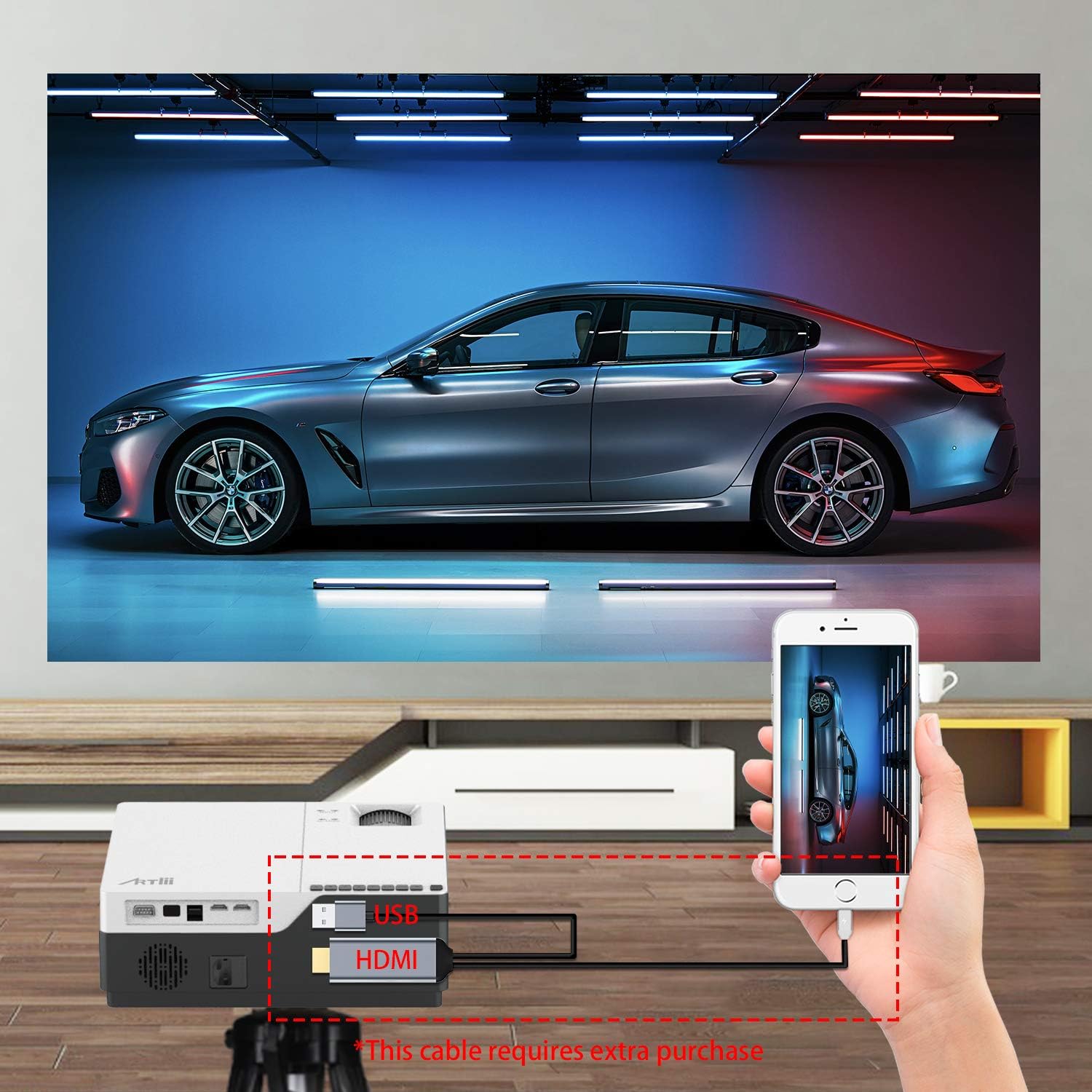
This image demonstrates connecting a smartphone to the projector. Note that an additional cable (not included) may be required for smartphone connectivity, typically an MHL to HDMI adapter or a USB-C to HDMI adapter, depending on the phone model.
4. Fanitsiana ny fifantohana sy ny vato fototra
After powering on and selecting an input source, adjust the image for clarity and shape.
- mifantoka: Ahodino ny peratra fifantohana eo amin'ny family projecteur mandra-pisehoan'ny sary ho maranitra sy mazava.
- Fanitsiana Keystone: If the projected image appears trapezoidal (wider at the top or bottom), use the keystone correction dial to adjust it into a perfect rectangle. The projector supports ±15 degrees keystone correction.
fandidiana
1. Power On/off
- Herim-batana: Tsindrio ny bokotra herinaratra eo amin'ny projector na ny fanaraha-maso lavitra.
- Mamono hery: Press the power button again. The projector will go into standby mode.
2. Menu Navigation
Use the buttons on the projector's control panel or the remote control to navigate the on-screen menu. Select input sources, adjust picture settings (brightness, contrast, color), and sound settings.
3. Fampiasa Zoom
The Artlii Stone projector features a digital zoom function, allowing you to adjust the screen size without moving the projector.

This image illustrates the projector's zoom capability, allowing the user to reduce the screen size from 100% down to 75% using the remote control, providing flexibility in screen fitting without physical repositioning.
- Access the zoom setting through the projector's menu.
- Adjust the zoom factor between 75% and 100% to fit your screen or wall.
4. Audio Output
The projector has a built-in HIFI level speaker. For external audio, connect speakers or a sound system to the Audio Output port.
fikarakarana
- Fanadiovana Lens: Use a soft, lint-free cloth specifically designed for optical lenses to gently wipe the projector lens. Do not use abrasive cleaners or cloths.
- Fanalana vovoka: Regularly clean the projector's exterior with a soft, dry cloth. Use a small brush or compressed air to clear dust from ventilation openings.
- fitahirizana: Rehefa tsy ampiasaina mandritra ny fotoana maharitra dia tehirizo ao amin'ny toerana mangatsiaka sy maina ary voaaro amin'ny vovoka sy ny mari-pana tafahoatra ny projecteur.
Fanamboarana
| OLANA | Antony mety hitranga | vahaolana |
|---|---|---|
| Tsy misy sary eo amin'ny efijery | Power cable loose; Incorrect input source; Device not connected properly. | Check power connection; Select correct input source (HDMI, USB, VGA); Ensure device is connected securely. |
| Manjavozavo ny sary | Tsy voahitsy ny fifantohana; Akaiky/lavitra loatra ny efijery ny projecteur. | Amboary ny peratra fifantohana; Amboary ny halaviran'ny fandefasana. |
| Trapezoidal ny sary | Tsy namboarina ny Keystone. | Adjust the keystone correction dial. |
| Tsy misy feo | Ambany loatra ny feo; Mangina; Tsy mifandray/tsy mandeha ny fanamafisam-peo ivelany. | Ampitomboy ny feo; Atsaharo ny fampanginana; Jereo ny fifandraisana ivelany sy ny herinaratra. |
| Tsy mandeha ny fanaraha-maso lavitra | Batteries dead/incorrectly inserted; Obstruction between remote and projector. | Soloy ny bateria; Ataovy azo antoka fa mazava tsara ny fahitana ny mpandray IR. |
fepetra arahana
| endri-javatra | antsipirihany |
|---|---|
| Rafitra fandidiana | Linux |
| Teknolojia Projection | TFT LCD |
| Distance projection | 2-9m |
| Haben'ny projection | 50-300 santimetatra |
| Native Resolution | 1920x1080 pixels (Full HD) |
| Lamp Type | LED |
| LED Lamp Fiainana | 55,000 ora |
| Tora-bato | 1.35 |
| Contrast Ratio | 8000:1 |
| Zoom Factor | 75%-100% |
| Fanitsiana vato ifaharana | ±15 degre |
| Fomba fijery | Front projection, Rear projection, Lifting |
| KEVITRA | Metal + ABS |
| Mpampiteny anatiny | ENY |
| Fampidirana Voltage | AC 90-240V, 50-60Hz |
| Connectors | HDMI x2, USB, Audio Output, Micro SD |
| lanja | 5.7 lb (2.59 kg) |
| refy (L x W x H) | 9.1 x 12.1 x 4.1 santimetatra (23.1 x 30.7 x 10.4 cm) |
Fanamarihana: ny mari-pahaizana dia miova tsy misy fampandrenesana.
Warranty sy fanohanana
The Artlii Stone Projector comes with a comprehensive warranty and support:
- Money Back Policy: 1-month 100% Money Back Policy.
- Factory Policy: 1-year factory policy.
- Certifications: FCC, RoHS, and CE certified.
- Local Maintenance: Artlii provides a local maintenance center with professional engineers to assist you.
For any inquiries or technical assistance, please refer to the contact information provided on the Artlii official webtranokala na antontan-taratasy momba ny fividiananao.
Ask a question about this manual
Ask about setup, troubleshooting, compatibility, parts, safety, or missing instructions. Manuals+ will review the question and use this page’s manual context to help answer it.